A learner on a laptop mid-class — the online-learning teams Askhaven AI is built for

Resolve every learner question before it becomes a ticket.

Askhaven AI reads every learner message an online-learning team handles — chat, email, LMS help, course Q&A — grounds the answer in your own course materials, and routes anything that still needs a human to the right desk with a confidence score attached.

24,680 conversationsHandled by the platform in the last 30 days.
78% self-service containmentResolved without ever reaching a human.
18-second first responseAcross LMS access, deadlines and course Q&A.

Reads the LMS docs, syllabi, lesson materials and FAQs you already keep — grounds every answer in a real source, cites it back to the learner, and escalates only what the model isn’t confident about.

Book a demoSee the support desk
The support desk

Every learner conversation, on one screen.

Askhaven AI watches every message an online-learning team receives — chat, email, LMS help, course Q&A — grounds an answer in the syllabus the learner is actually enrolled in, and shows the confidence, the routing decision and the escalation reason side by side. Support agents work a ranked queue, not an inbox.

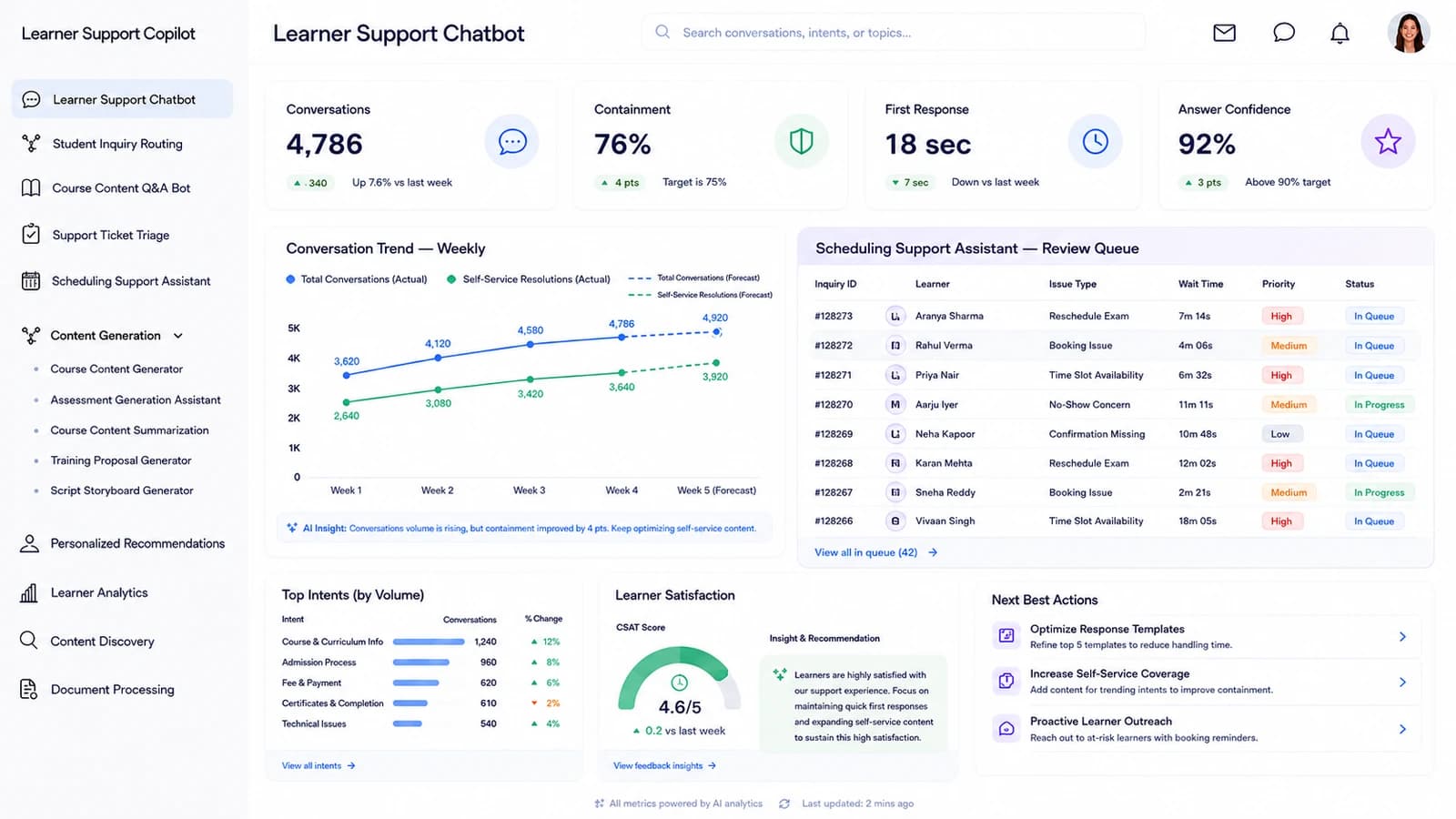
Askhaven AI learner support desk — KPI cards for conversations, containment, first response and answer confidence above the resolution forecast, the intent routing table, the escalation queue and the AI Next Best Action panel.
  • Containment 78%
  • Forecast +6.2%
  • Intent routing
  • Next best action
24,680ConversationsUp 6.2% vs forecast
78%Self-service containmentTarget is 75%
18sFirst responseDown 9 seconds this month
92%Answer confidenceAbove the 90% target
Content gap: LMS access1,240 escalations (22.8% of the queue) — the largest single reason.
Coverage: syllabi 97%/95%Syllabus questions get an answer 97% of the time, cited to source 95% of the time.
Biggest opportunityGuided answers for LMS-access and deadline questions would recover ~620 self-service resolutions next month.
The platform

Ten modules, one learner conversation.

Routing, Q&A, ticketing, scheduling, content generation, learner analytics and document processing all read from the same learner record — so a support agent sees the same evidence the routing engine used, and no answer has to be re-keyed between teams.

Student Inquiry Routing

Every inquiry lands on the desk that can answer it.

The queue reads each incoming learner question, tags its intent — Course Help, Account Help, Policy, Technical, Other — assigns a priority, and routes it to the right support queue or automated assistant, with the routing confidence shown beside the destination.

Intent + priority togetherRouting decisions carry a confidence score you can filter on.
Segment tabs on topAll, Needs Routing, Low Confidence, Escalated.
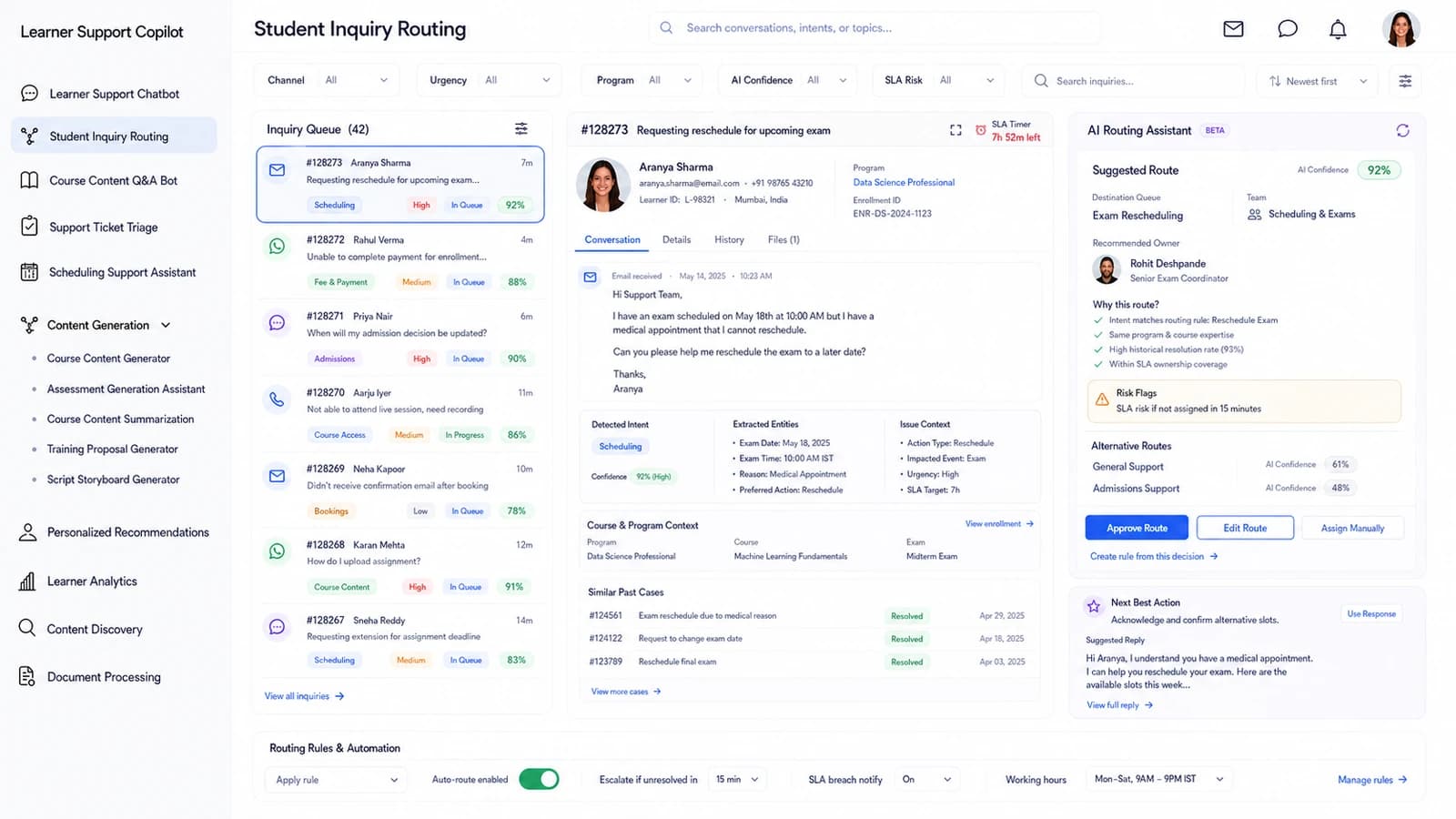
Student Inquiry Routing dashboard — Every inquiry lands on the desk that can answer it.
Course Content Q&A Bot

Every answer is grounded in the course the learner is on.

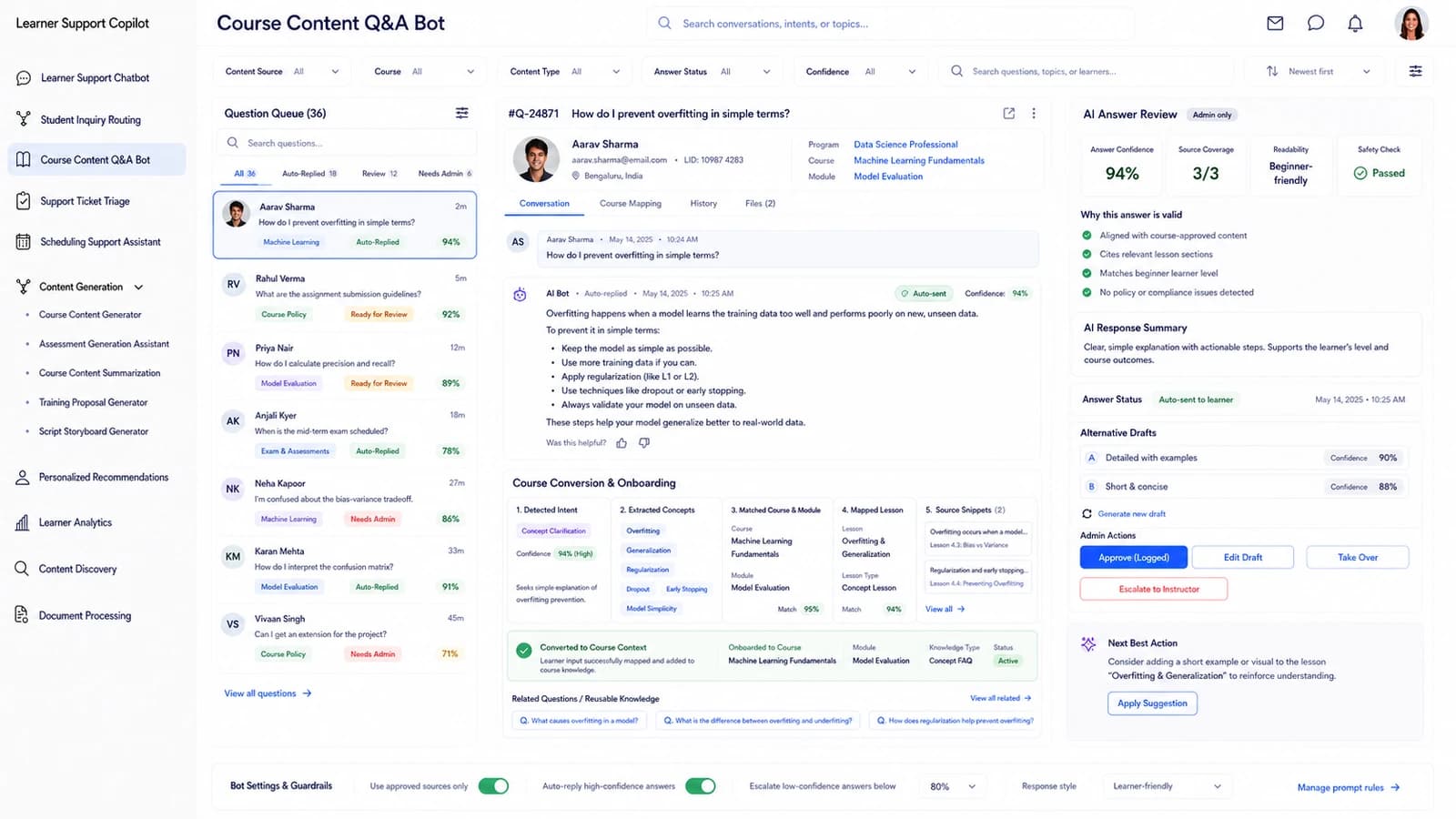
The reviewer opens the learner's question beside the AI answer, the source it was drawn from — Lesson, PDF, Video, FAQ — the topic and course, and the confidence score, then approves, edits or escalates before it ships back.

Cited to sourceEvery answer carries the lesson or PDF it came from.
Draft → Reviewed → ApprovedThe queue tracks the status of each answer.
Course Content Q&A Bot dashboard — Every answer is grounded in the course the learner is on.
Support Ticket Triage

One queue for every ticket the platform receives.

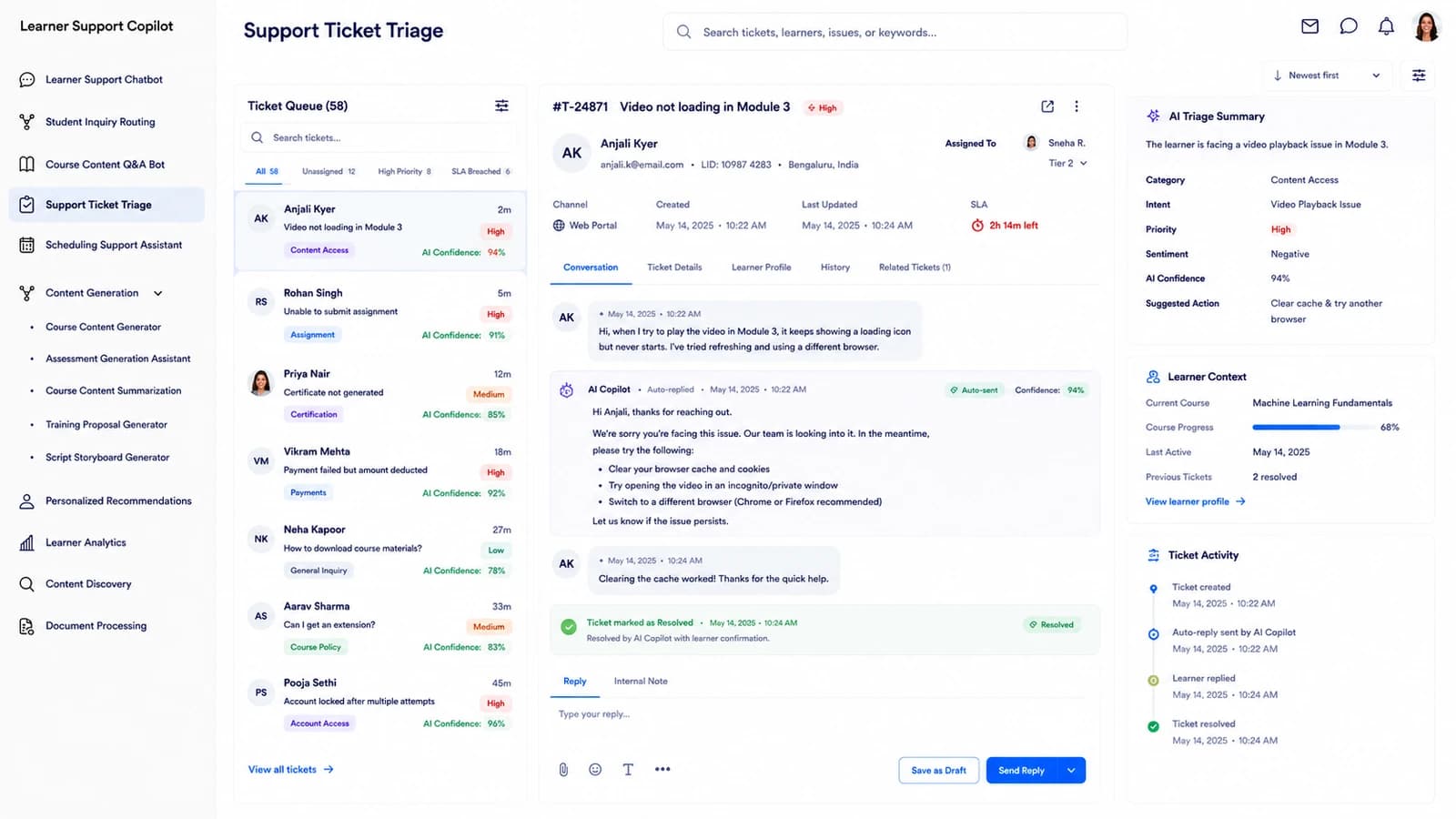
Tickets are classified — Course, Account, Billing, Technical, Access — prioritised against the applicable SLA, and offered to the right agent or team, with the urgency rationale shown alongside the ticket history.

SLA at a glanceTime remaining on every ticket, red when at risk.
Bulk assign / prioritise / closeThe queue is workable, not read-only.
Support Ticket Triage dashboard — One queue for every ticket the platform receives.
Scheduling Support Assistant

Learner scheduling requests, resolved in one place.

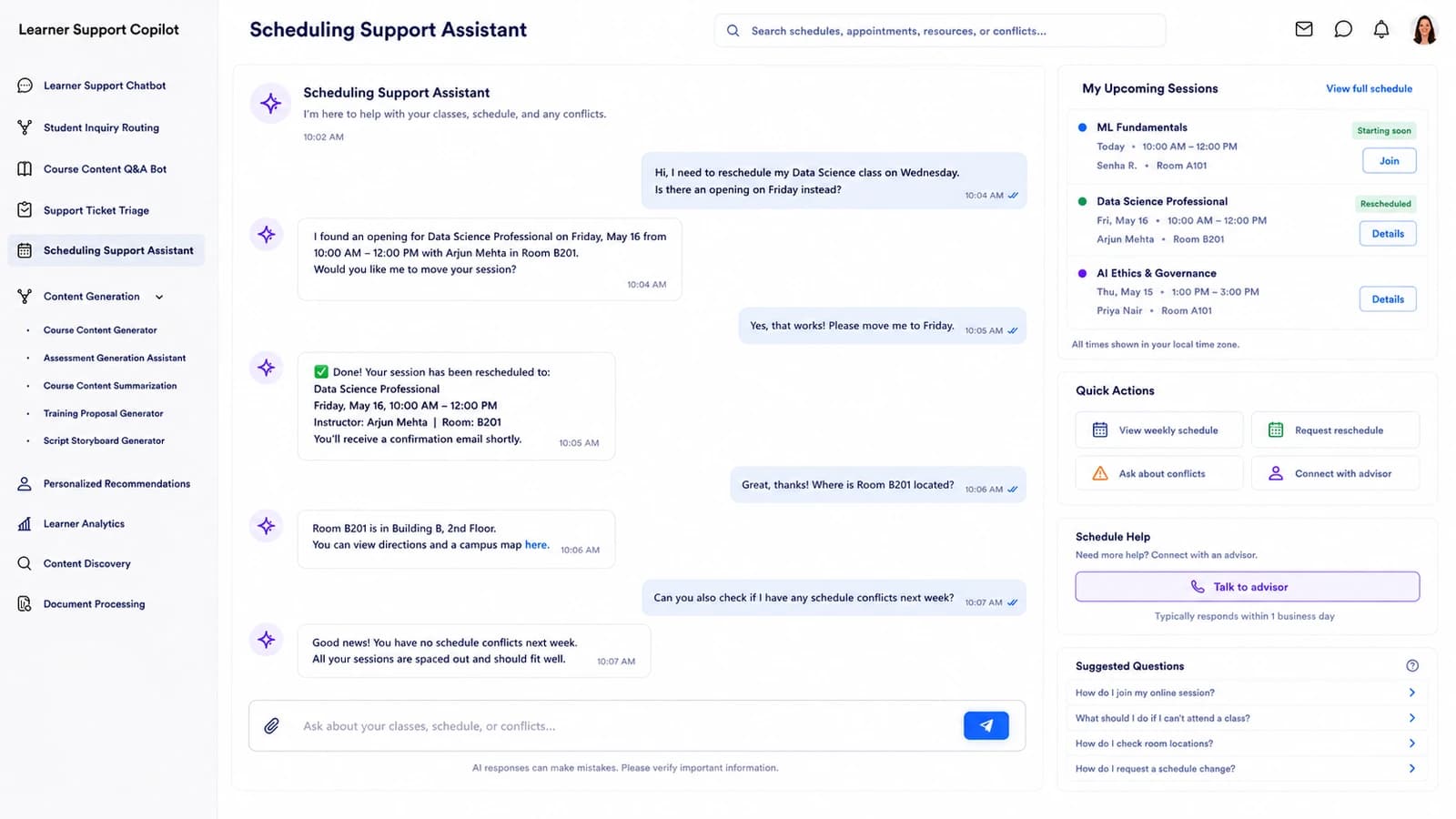
The calendar shows session type, learner, course, requested time and availability state — Available, Limited, Full, Conflict — and proposes an alternative when a slot doesn't work, so agents confirm or reschedule without email ping-pong.

Availability, not just timesFull, limited and conflict states are surfaced up front.
Requested / Proposed / ConfirmedEvery status change is captured on the record.
Scheduling Support Assistant dashboard — Learner scheduling requests, resolved in one place.
Content Generation

Learner-facing content, grounded in the course you already run.

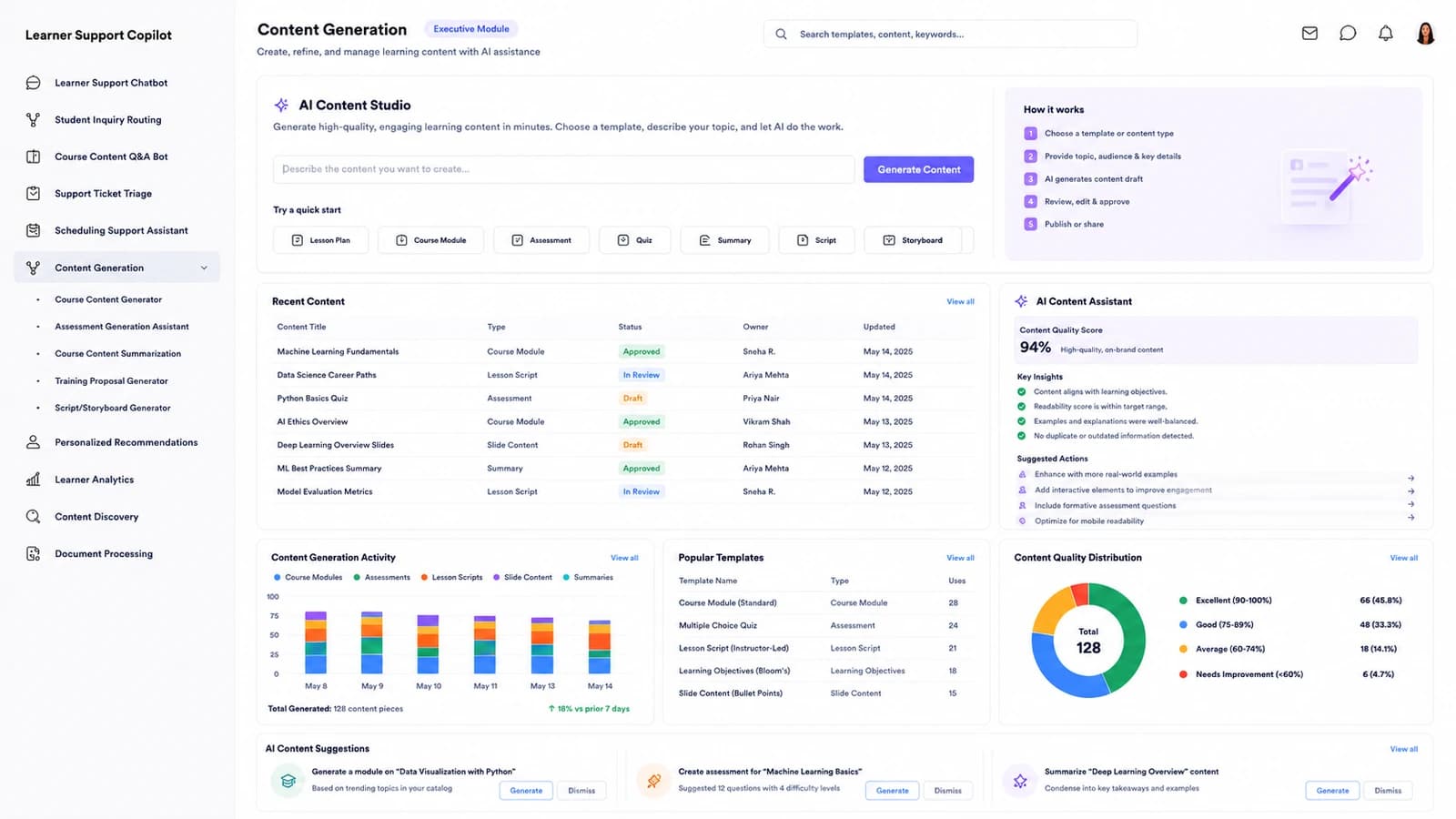
FAQ, explanation, quiz, summary or announcement drafts are generated from approved course knowledge, targeted at a specific audience or proficiency level, and shepherded through Draft → Review → Approved → Published in one form view.

Content by audienceEvery draft is tagged to the learner audience it serves.
Grounding shown alongsideThe panel exposes the source material behind each draft.
Content Generation dashboard — Learner-facing content, grounded in the course you already run.
A learner's home study desk with a laptop and books
A quiet study space in a university library
A hybrid classroom mid-session
A campus quad on a study afternoon
Where learners live

Built for the platforms learning actually happens on.

Students crossing an open campus lawn
Deeper in

The rest of the platform, at full size.

Recommendations, per-learner analytics, content discovery, document processing and the coverage map that tells you where your knowledge has gaps.

Personalized Recommendations

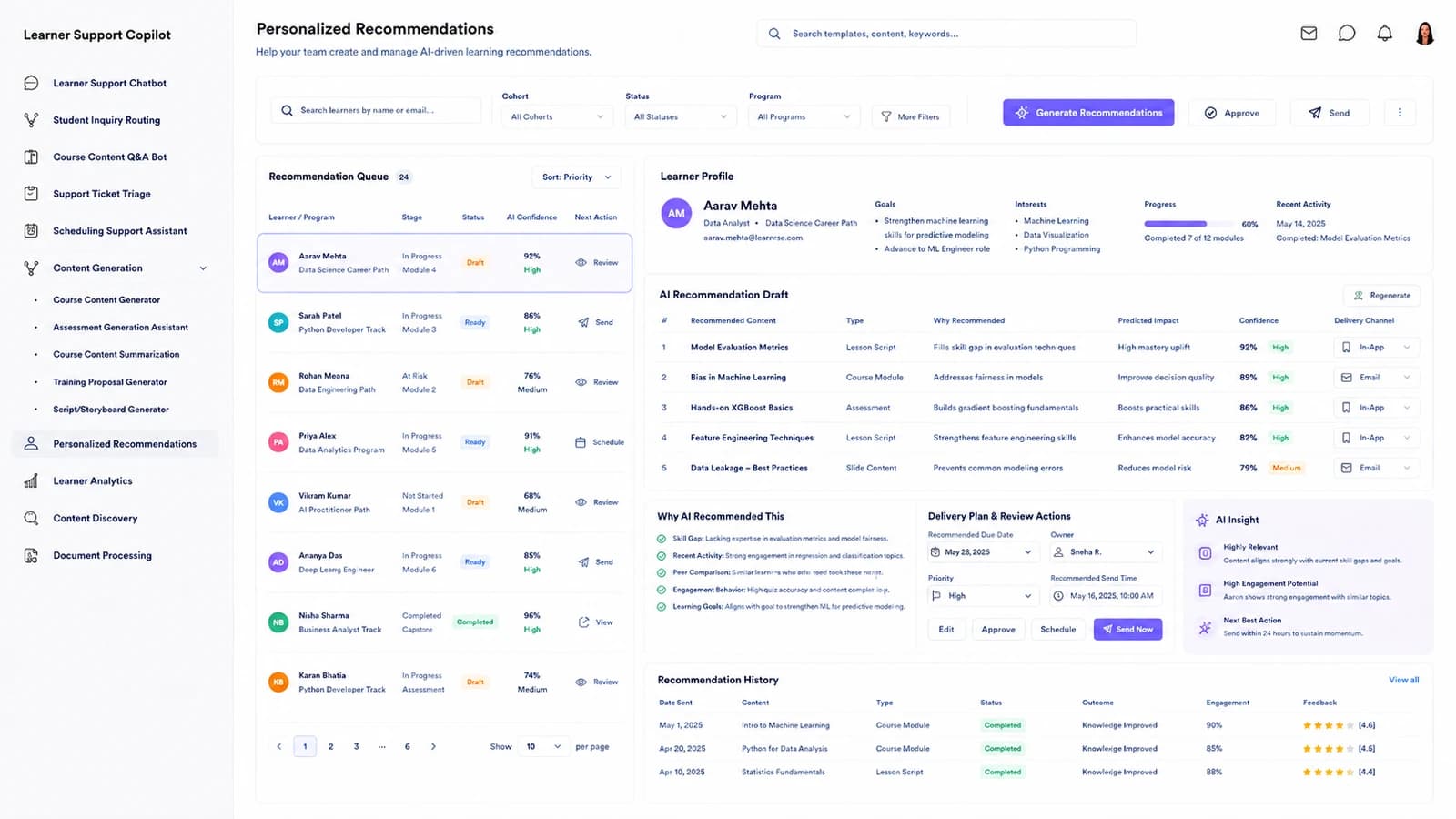
The next lesson, resource or activity — with the reason attached.

Each recommendation carries a learner, the recommended course or resource, the reason — Skill Gap, Progress, Interest, Prerequisite, Goal — a 0-1 relevance score and an expiry, so advisors approve, edit or dismiss the suggestion instead of guessing at it.

Ranked by relevanceThe score is shown on every row.
Bulk approve / dismissThe queue clears on a batch instead of one-by-one.
Personalized Recommendations dashboard — The next lesson, resource or activity — with the reason attached.
Learner Analytics

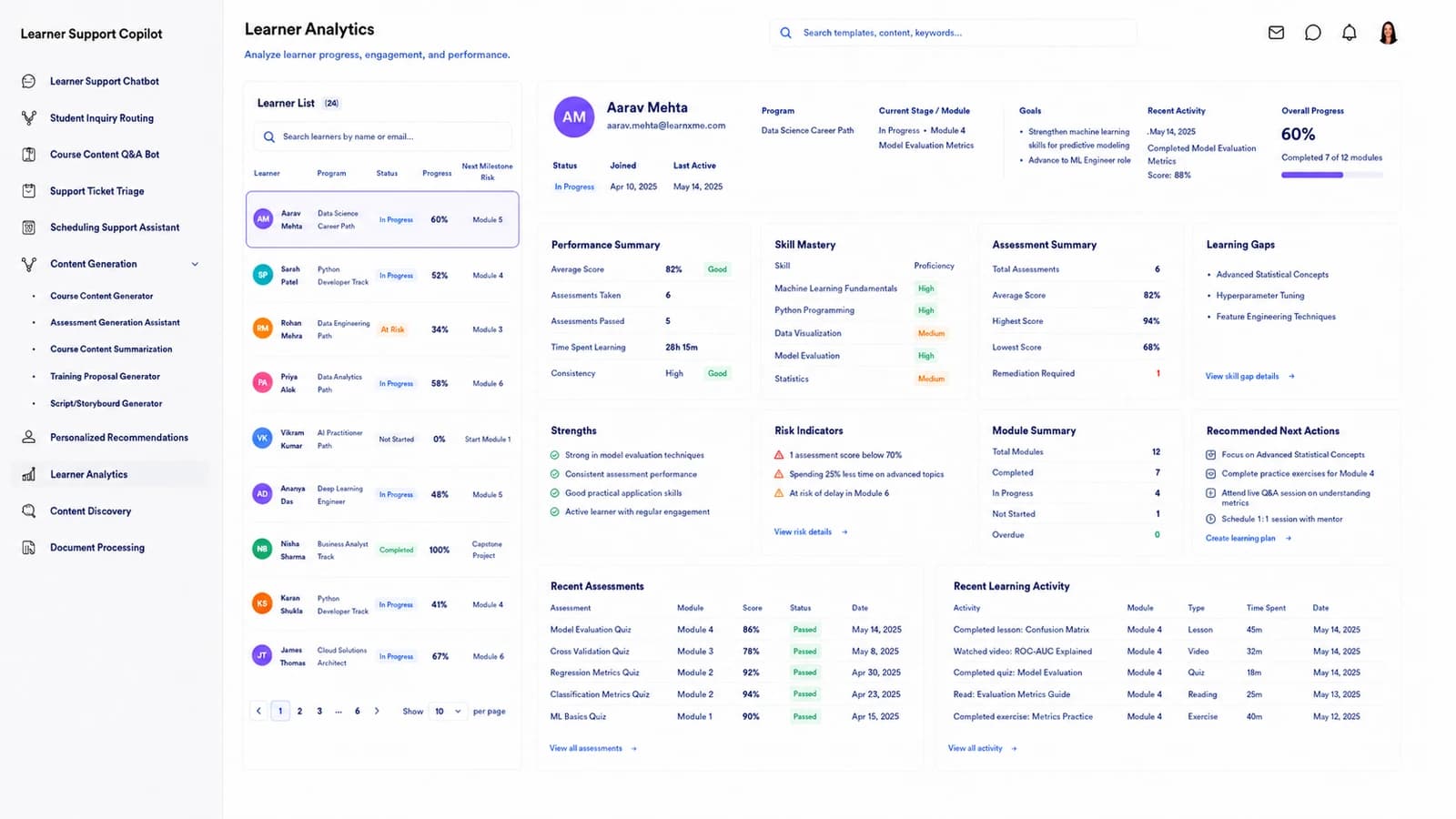
One learner, one profile, every signal in one place.

Progress, engagement, recent activity, support-need level — None, Guidance, Intervention, Escalation — and intervention history sit on one record view, so an advisor sees why a learner has stalled without stitching four reports together.

Support need, classifiedLearners land on the right lane automatically.
Notes and interventions on-recordNothing is re-keyed between advisor and system.
Learner Analytics dashboard — One learner, one profile, every signal in one place.
Content Discovery

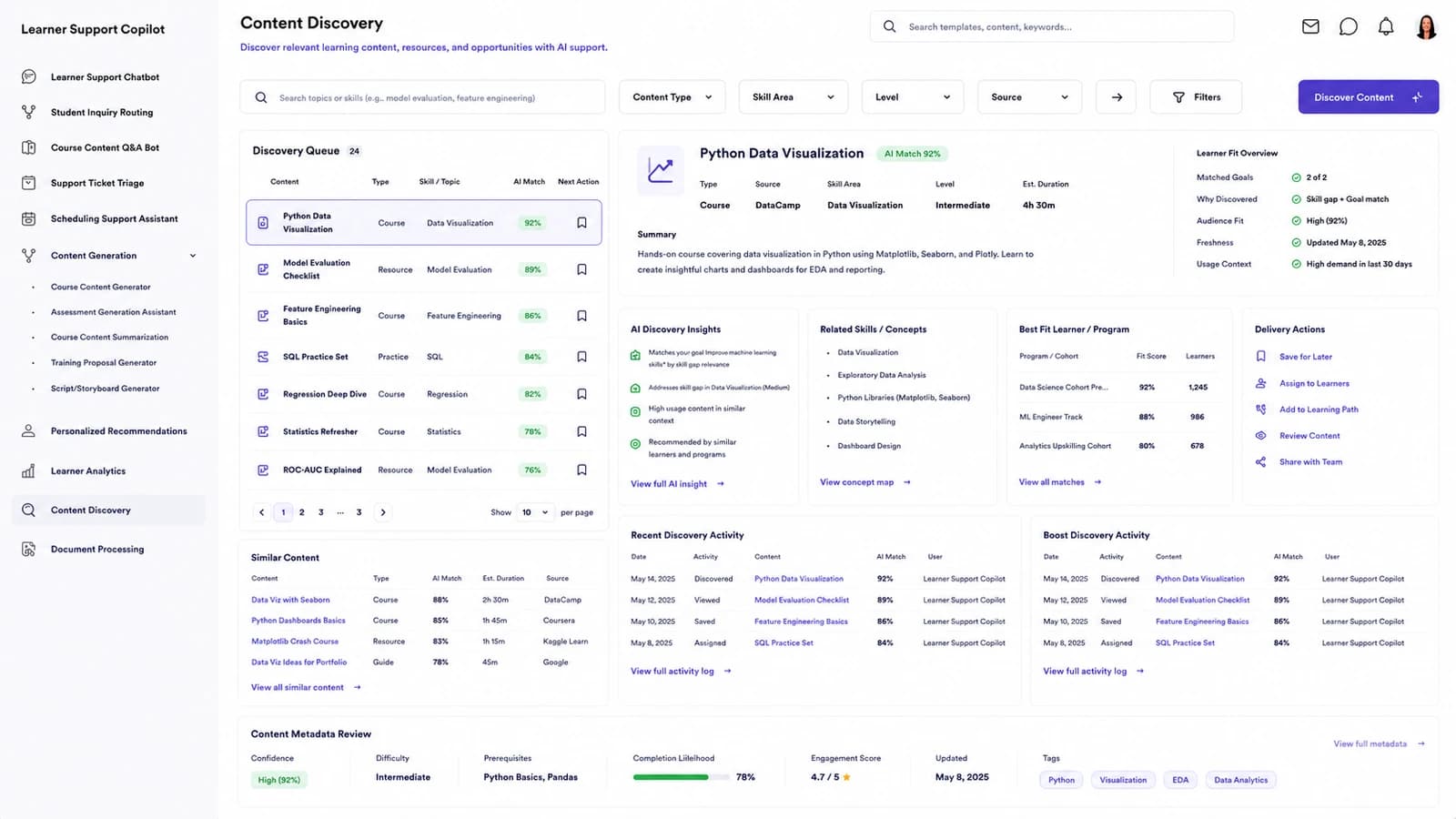
Find the lesson, video or FAQ that already answers the question.

A semantic index across every lesson, video, PDF, quiz, FAQ and assignment returns the best-match resource for a learner or support ticket — with topic, type, access level and a 0-1 relevance score — so agents recommend the existing answer before anyone writes a new one.

Semantic, not keywordMatch score reflects meaning, not string overlap.
Access-awareOpen, Enrolled and Restricted are surfaced before you recommend.
Content Discovery dashboard — Find the lesson, video or FAQ that already answers the question.
Document Processing

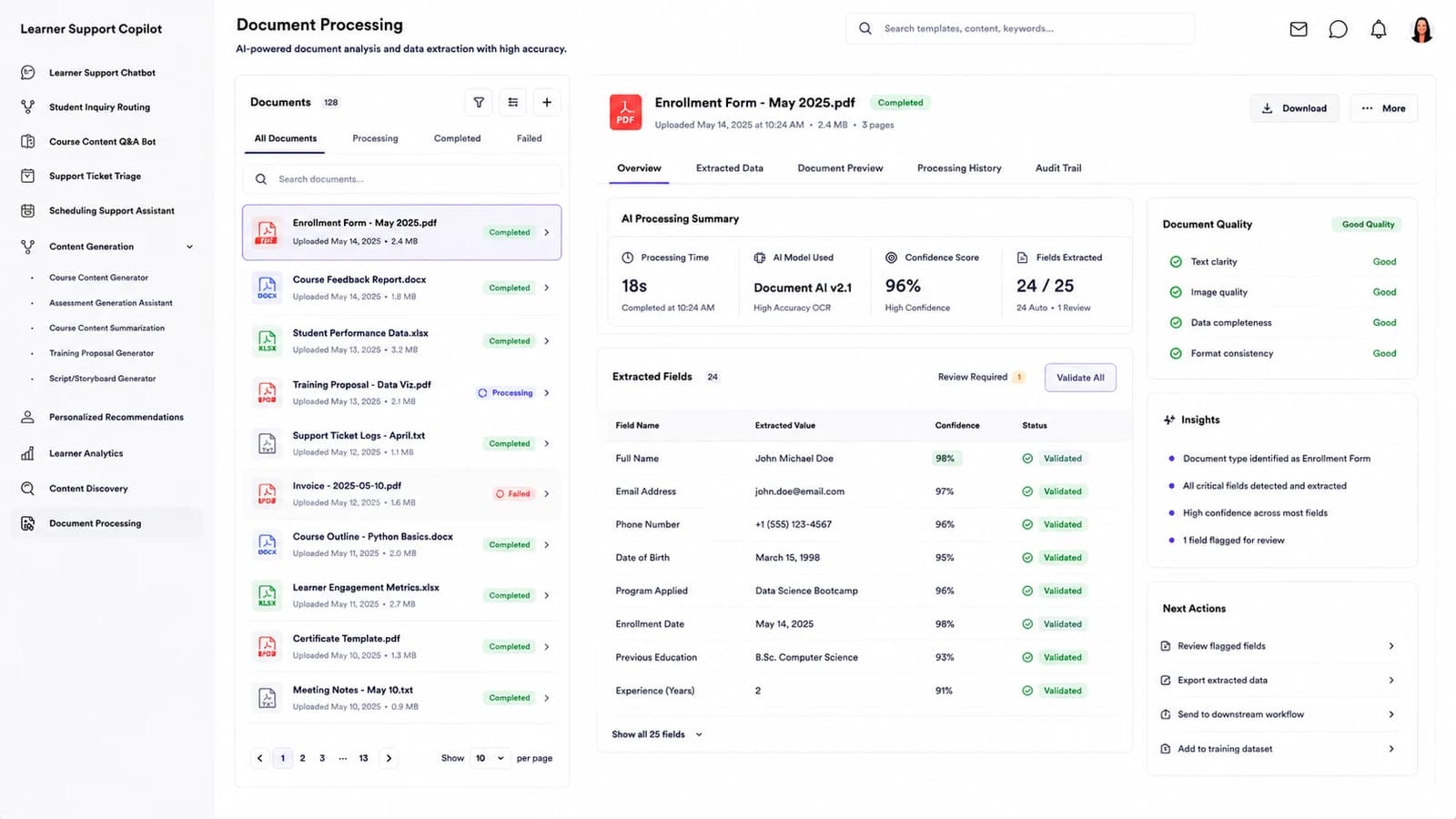
Uploaded enrollment and course documents, read and structured.

PDFs, DOCXs, PPTXs and images are parsed side by side with the original — extracted fields carry a confidence score and a Good / Review / Poor quality state, and the workflow moves each document through Uploaded → Processing → Review → Approved.

Side-by-side reviewSource document beside every extracted field.
Quality tags, not just confidenceYou know which extractions need a human.
Document Processing dashboard — Uploaded enrollment and course documents, read and structured.
Course Knowledge Coverage Map

See where your course knowledge has gaps — and where it doesn't.

A coverage heatmap over FAQs, LMS documentation, syllabi, lesson materials and assignment guides — with answer rate, citation rate and indexed passage counts on every row — so you know which source is thin before the escalation queue tells you.

Answer rate + citation rateTwo separate signals — coverage vs grounding.
Indexed passages countedYou see how much source there is behind each row.
Course Knowledge Coverage Map dashboard — See where your course knowledge has gaps — and where it doesn't.

And the rest of Askhaven AI.

Automated Escalation Router

Low-confidence conversations are routed to the right desk automatically — with the escalation reason and handoff confidence carried onto the ticket.

Learner Support Chatbot

A conversational front door for LMS help, deadlines, billing and course questions — grounded in your own materials and cited back to the learner.

Assessment Generation Assistant

Practice questions, quizzes and formative checks are drafted from a lesson's own knowledge and targeted at a specific proficiency band.

Assignment Feedback Assistant

Written feedback on submitted work is drafted, tagged Positive / Constructive / Negative, and returned to the instructor for review.

Enrollment Document Processing

Enrollment forms, IDs and credentials are read field by field beside the source, with confidence scores and a Valid / Needs Review / Missing Data state.

Student Success Prediction

Learners at risk of falling behind are surfaced with the evidence — activity drop, missed assessments, engagement level — and a prioritised list of interventions.

How it works

Three steps from a learner message to a resolved conversation.

01

Point it at your course materials

Connect the LMS, the syllabi, the lesson PDFs, the FAQs and the ticketing tool you already run — nothing is re-keyed, no new data entry lands on your team.

02

Askhaven AI grounds every reply

Each learner question is answered from a real source in your course library — with the citation shown to the learner and the confidence shown to the reviewer.

03

Agents work the escalation queue

Only the low-confidence and off-course conversations reach a human — ranked, classified, and prioritised — so the queue is short and the tickets already carry context.

78%

Of conversations resolved without a human

18s

Median first response, across every intent

92%

Answer confidence on every routed message

94%

Routing accuracy on LMS-access questions

Compliance

Held to the standards online learning runs on.

Askhaven AI is built around the regulations that govern learner conversations, accessibility, minor consent and cross-border data — here is what it supports out of the box.

FERPA

Family Educational Rights & Privacy Act (20 U.S.C. § 1232g)

Student records are handled as protected education records with role-scoped access and audit trails on every enrolment, credential and progress transaction.

COPPA

Children's Online Privacy Protection Act (16 CFR Part 312)

For learners under 13, the support chatbot honours verifiable school or parental consent, plus the 2026 rule updates on third-party sharing and biometric data.

WCAG 2.2 AA

W3C Web Content Accessibility Guidelines 2.2, Level AA

The learner chatbot, Q&A widgets and content surfaces meet all 25 Level AA success criteria — including the nine new 2.2 criteria for cognitive and low-vision users.

SOC 2 Type II

AICPA SOC 2 Type II — Security, Availability, Confidentiality

An independent audit of the controls protecting learner conversations, transcripts and enrolment documents in transit and at rest across the platform.

GDPR

EU General Data Protection Regulation (Regulation (EU) 2016/679)

Lawful-basis, data-subject-rights and cross-border-transfer obligations for EU learners are enforced across analytics, chatbot transcripts and document processing — with DPA and SCCs available.

Starting at

$200/mo

Flat for the whole platform, billed monthly. Cancel or change any time — every conversation transcript exports with you.
Pricing

One plan. Every module.

No seat counting as your learner base grows and no feature held back for a higher tier. Talk to us and we’ll shape it around your course catalogue and support volume.

Every module, unlimited learnersNo per-seat maths and no tier to decode.
Grounded answers with citationsEvery reply cites the lesson or PDF it came from.
Live routing + escalation queueIntent, priority and confidence on every conversation.
Onboarding includedContent mapping and support from the first week.
Know more
Onboarding

What your onboarding fee covers

A one-time setup that gets your platform live before the first recurring cycle — we ingest your course materials, connect your LMS and ticketing tool, and tune the routing, grounding and escalation rules to the way your support team already runs. Each fee below is a starting point: the final onboarding is scoped once we understand your environment, security needs, integrations, data volume, compliance requirements and deployment model.

Essential

$1,000+one-time
  • Kickoff call and onboarding plan scoped to your course catalogue and support volume
  • Workspace provisioning and admin, agent and reviewer account setup
  • Ingestion of your syllabi, lesson PDFs, FAQs and knowledge-base articles
  • Learner support chatbot deployed on one channel — web widget or LMS embed
  • Core modules configured — Student Inquiry Routing, Course Content Q&A Bot
  • Baseline intent taxonomy and confidence thresholds set for your queue
  • Roles and permissions set for agents, reviewers and administrators
  • Live-readiness check before your first recurring billing cycle

Plus

Most teams
$2,500+one-time

Everything in Essential, plus:

  • Ingestion of historical tickets and transcripts to seed routing and coverage
  • Two integrations with your LMS, ticketing or CRM (Canvas, Moodle, Zendesk, Salesforce and the like)
  • Support Ticket Triage tuned to your SLA tiers and escalation destinations
  • Scheduling Support Assistant connected to your session and appointment calendar
  • Live training for support agents and content reviewers, with a recording
  • Dedicated onboarding specialist through go-live

Enterprise

$5,000+one-time

Everything in Plus, plus:

  • Tailored rollout across multiple learner cohorts, brands or intake seasons
  • Bespoke integrations with SSO and your learner-data APIs
  • Bulk records migration and reconciliation with cleansing across systems
  • Content Generation and Document Processing modules configured to your templates and approvals
  • Role-based training tracks for agents, reviewers, content owners and admins
  • Named onboarding manager with a go-live date and a containment-rate baseline
Where it runs

Two ways to deploy the platform

Same recurring subscription either way — only the onboarding may differ by your requirements.

Cloud (SaaS)

Fastest to start

Runs in Nestack's managed cloud — nothing to provision, updates and scaling handled for you. The quickest path from onboarding to your first live conversation.

Private / self-hosted

Data stays with you

The same platform deployed inside your own infrastructure — your cloud, VPC or on-prem — for teams handling sensitive learner data. Chatbot transcripts, enrolment documents and analytics run where your FERPA / COPPA / GDPR-governed data already lives, and the recurring subscription stays the same.

FAQ

Questions online-learning teams ask first.

What does Askhaven AI do?

It handles the learner-side support your platform receives — LMS access, deadlines, billing, course Q&A, scheduling — grounded in your own syllabi, lesson PDFs and FAQs. Every message is classified, given an intent and priority, and either answered by the bot with a citation or routed to the right desk with the confidence score attached.

Where do the answers come from?

The course library and knowledge base you already keep — syllabi, lesson PDFs, FAQ articles, LMS documentation and video transcripts. The Q&A bot only answers from a real source and cites the passage back to the learner; anything it isn't confident about is escalated rather than made up.

How is containment measured?

Containment is the share of learner conversations resolved without a human ever touching them. The dashboard reports it live against your target (default 75%) and breaks it down by intent, so you see whether LMS-access questions or deadline queries drive the escalations.

What happens when confidence is low?

Low-confidence conversations don't get shipped to the learner. They land in the reviewer's queue with the draft answer, the source it was grounded in, and the escalation reason — the reviewer approves, edits or hands them off to the right agent.

Do agents stay in control of the escalations?

Yes. Nothing is auto-resolved above the confidence threshold you set. The router ranks and prioritises; agents accept, reroute or resolve. The dashboard tracks that split so you can see how much of the queue your team is actually acting on.

Which platforms does it fit?

Online learning platforms, MOOC providers, ed-tech companies and any team running courses at scale — anywhere there is a learner base, a course catalogue and a support inbox worth deflecting.

How do we try it on our own learners?

Book a demo and pick the modules you want to see. We’ll walk Askhaven AI through a slice of your real support volume — routing, grounded answers, the escalation queue and the coverage map, end to end.

Book a demo

See Askhaven AI on your own support volume.

Tell us who you are, pick what you want to see, then grab a time — we’ll run Askhaven AI on a slice of your real learner conversations.

Step 1 of 3

First, who should we prep for?

Takes a few seconds — so we come ready for your platform.