Intake forms, application packets, grant files, donation batches and the questions that arrive at 4:55pm — Beaconfold.AI reads all of it, scores what it is unsure about, and puts the next action in front of the person who can take it.
Eleven working dashboards. One queue. Built for teams whose caseload never waits for a spreadsheet to catch up.
The line at the door is the real deadline.
Front desk to funded, in one system
11Dashboard modules, all included
4Intake channels read in one queue
1Flat monthly price, no per-seat maths
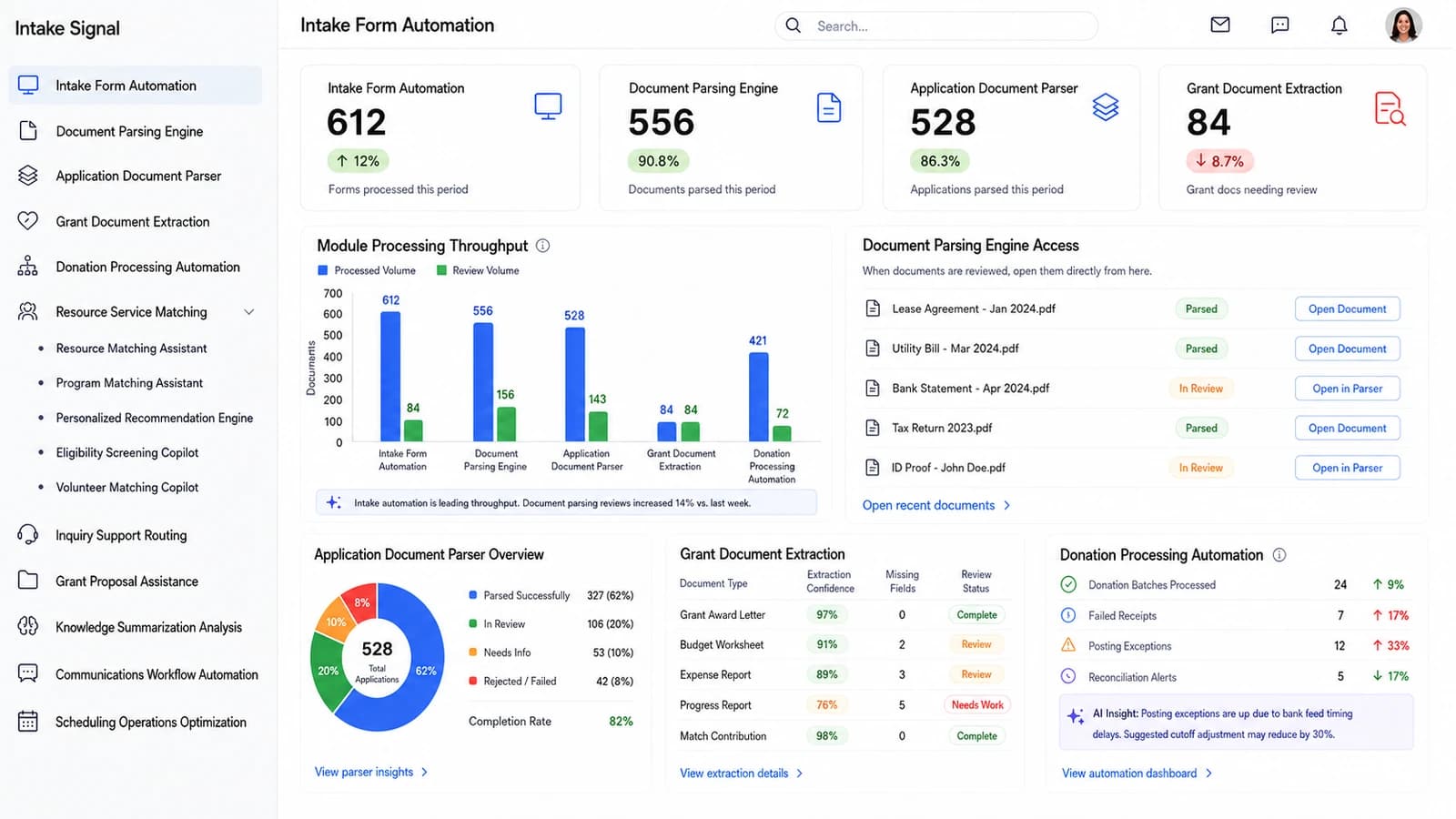
The main dashboard
One board for the whole caseload, not eleven tabs.
This is the screen a program director opens first: volume by module, what parsed and what did not, which applications are stuck, and where the donation batch stopped. Click any pin on the plate to read what that panel does.
app.beaconfold.ai/intake-form-automationLIVE · MAIN DASHBOARD
Intake Form Automation
Page 1 of 11 · click a pin to read the panel, or the plate itself to open it full screen.
Modules on this dashboard
Intake Form AutomationDocument Parsing EngineApplication Document ParserGrant Document ExtractionDonation Processing AutomationResource Service MatchingInquiry Support RoutingGrant Proposal AssistanceKnowledge Summarization AnalysisCommunications Workflow AutomationScheduling Operations Optimization
Every module, every screen
Ten more working boards — shown in full, not summarised.
These are real screens from Beaconfold.AI, not illustrations. Each one below is the module a different part of your team lives in all day. Click any plate to open it full screen.
02
Read the packet, flag only what is genuinely unclear
Document Parsing Engine
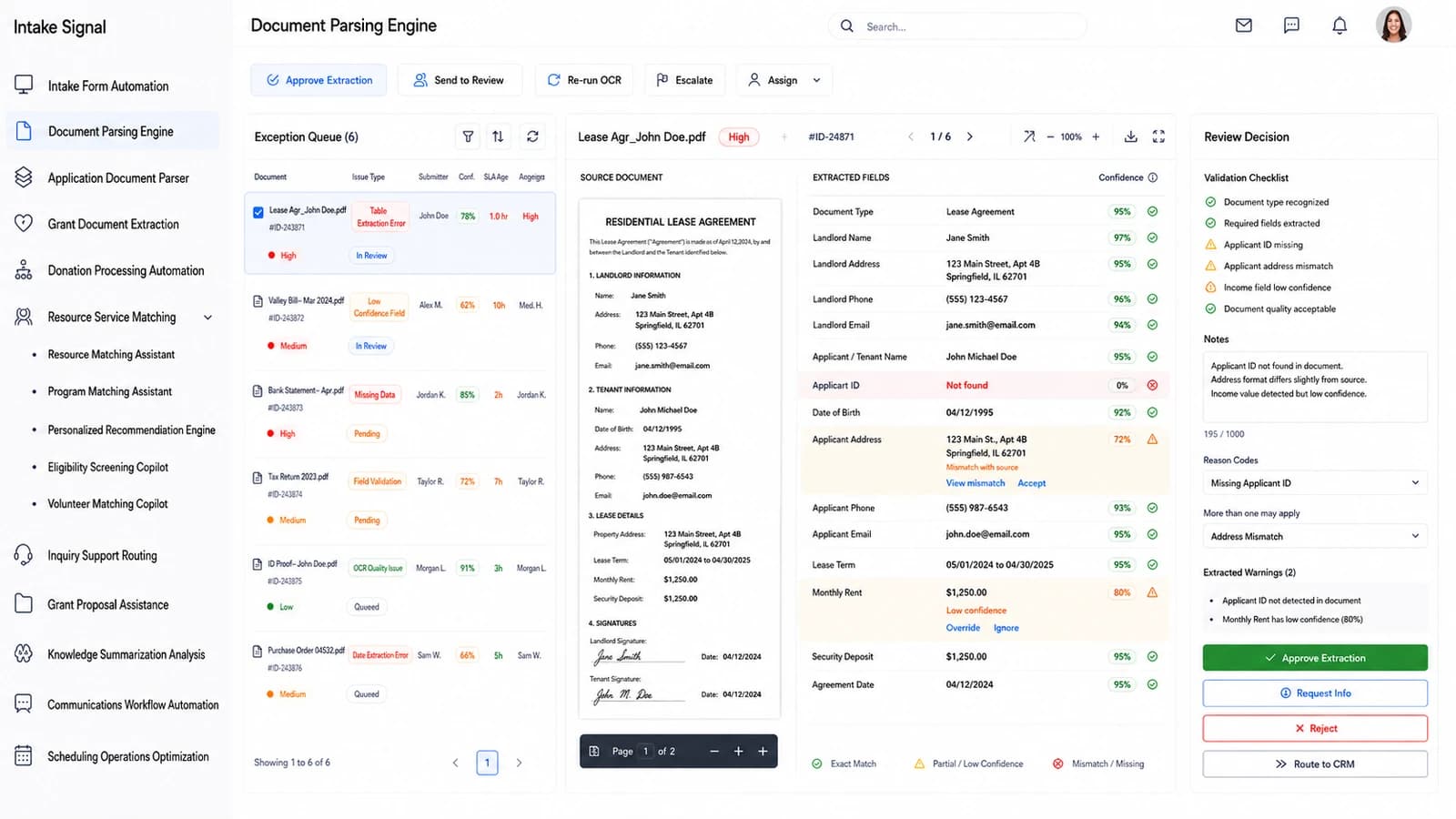
The exception queue holds the documents that did not parse clean. Each one opens side by side — source page on the left, extracted fields on the right, with a confidence score against every value so a reviewer corrects six fields instead of retyping sixty.
Field-level confidence with mismatch, low-confidence and not-found states called out
A validation checklist, reason codes and a note box that travel with the decision
app.beaconfold.ai/document-parsing-engineLIVE · PAGE 2 OF 11
Document Parsing Engine
03
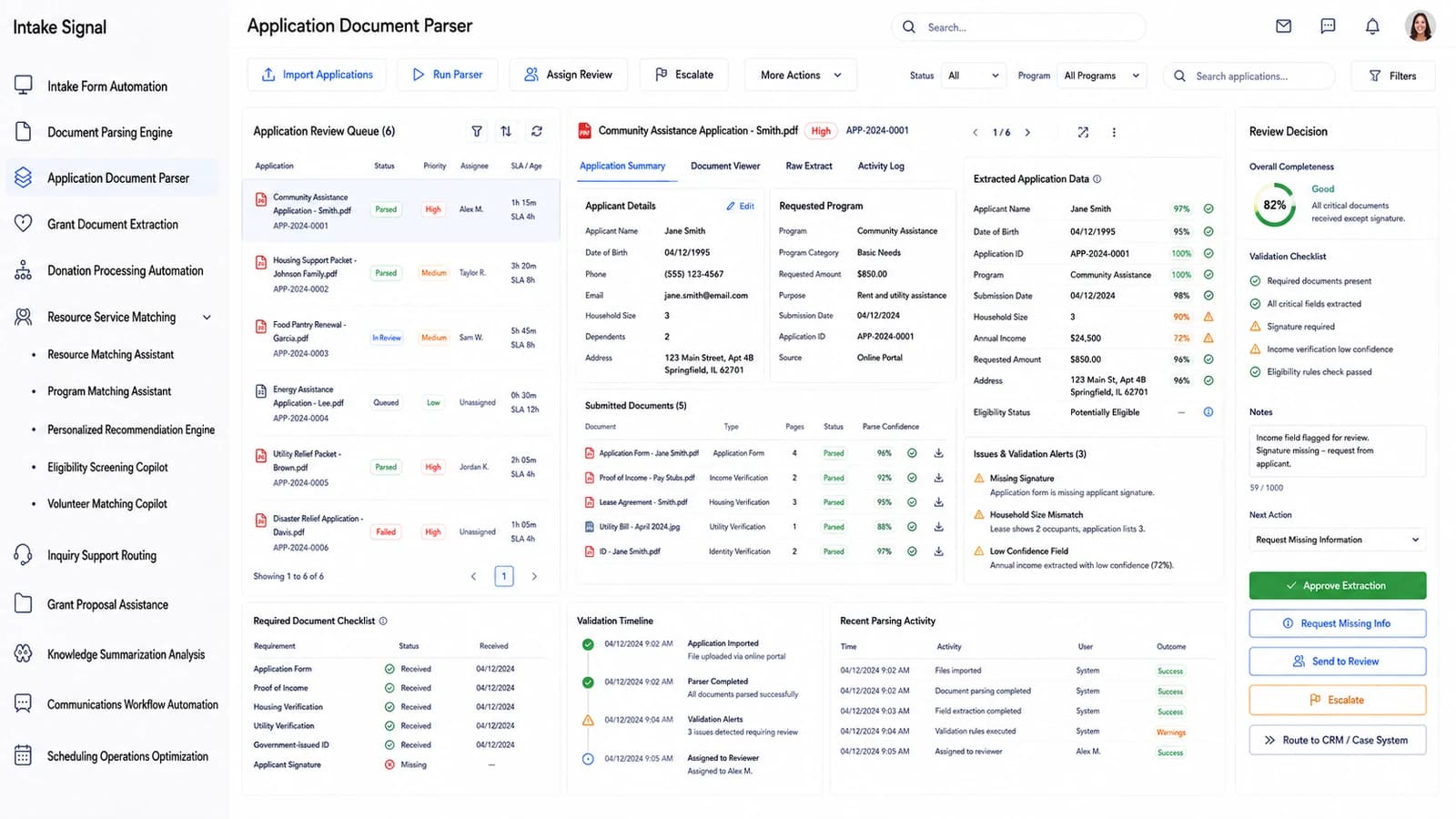
A whole assistance application, checked before anyone opens it
Application Document Parser
Every submitted application arrives as a bundle — form, proof of income, lease, utility bill, ID. The parser reads all of them, scores overall completeness, and lists exactly which document is missing a signature or contradicts another.
Required-document checklist with received dates, and a validation timeline per application
Issues and alerts written in plain English: missing signature, household-size mismatch, low-confidence income
app.beaconfold.ai/application-document-parserLIVE · PAGE 3 OF 11
Application Document Parser
04
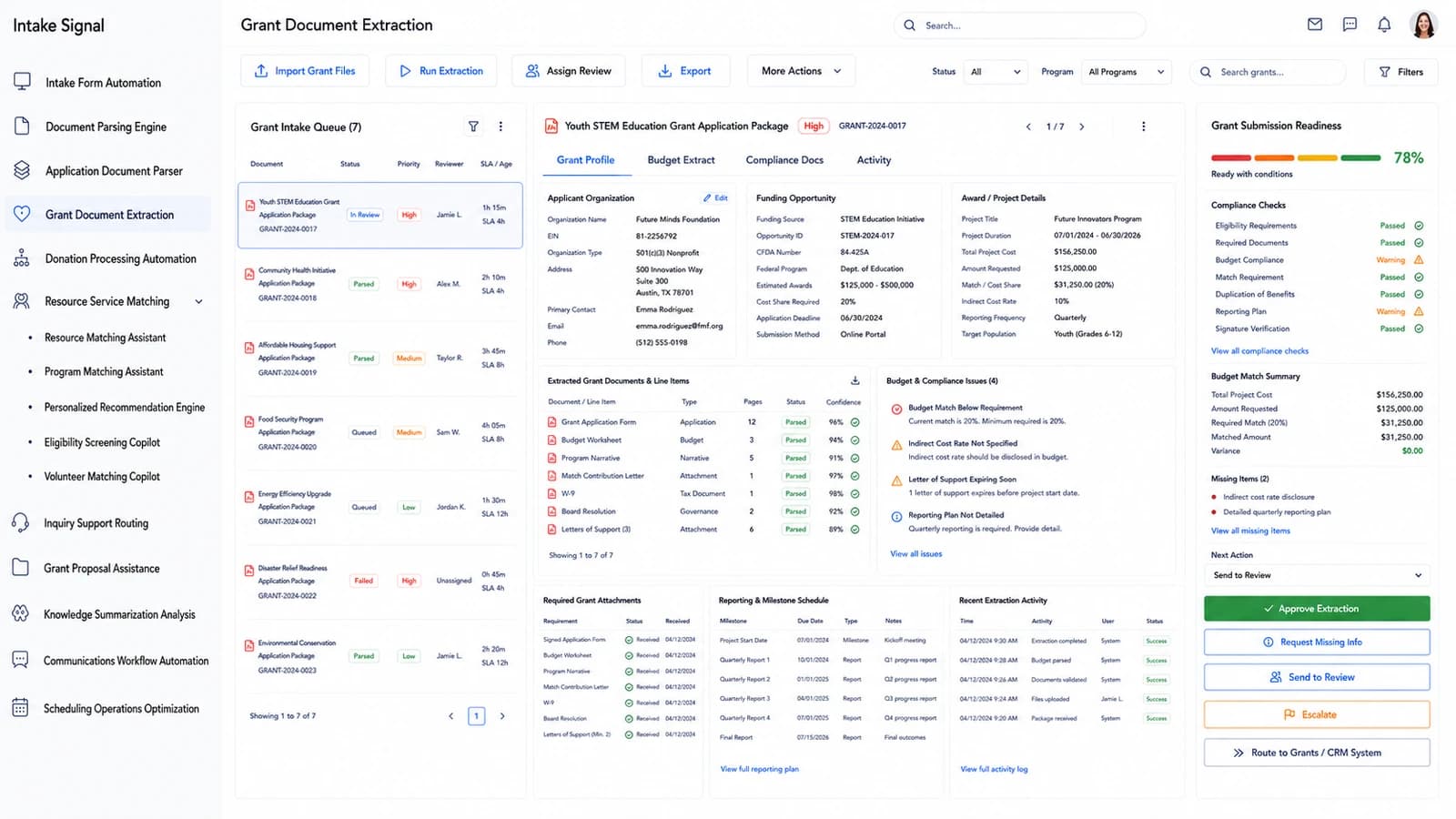
Submission readiness, before the deadline decides for you
Grant Document Extraction
Grant packets are read end to end — application form, budget worksheet, program narrative, board resolution, letters of support. The readiness score is backed by named compliance checks, not a vibe, and the budget match is reconciled to the dollar.
Compliance checks for eligibility, required documents, budget match, duplication of benefits and reporting plan
A missing-items list and a full reporting and milestone schedule extracted from the award terms
app.beaconfold.ai/grant-document-extractionLIVE · PAGE 4 OF 11
Grant Document Extraction
05
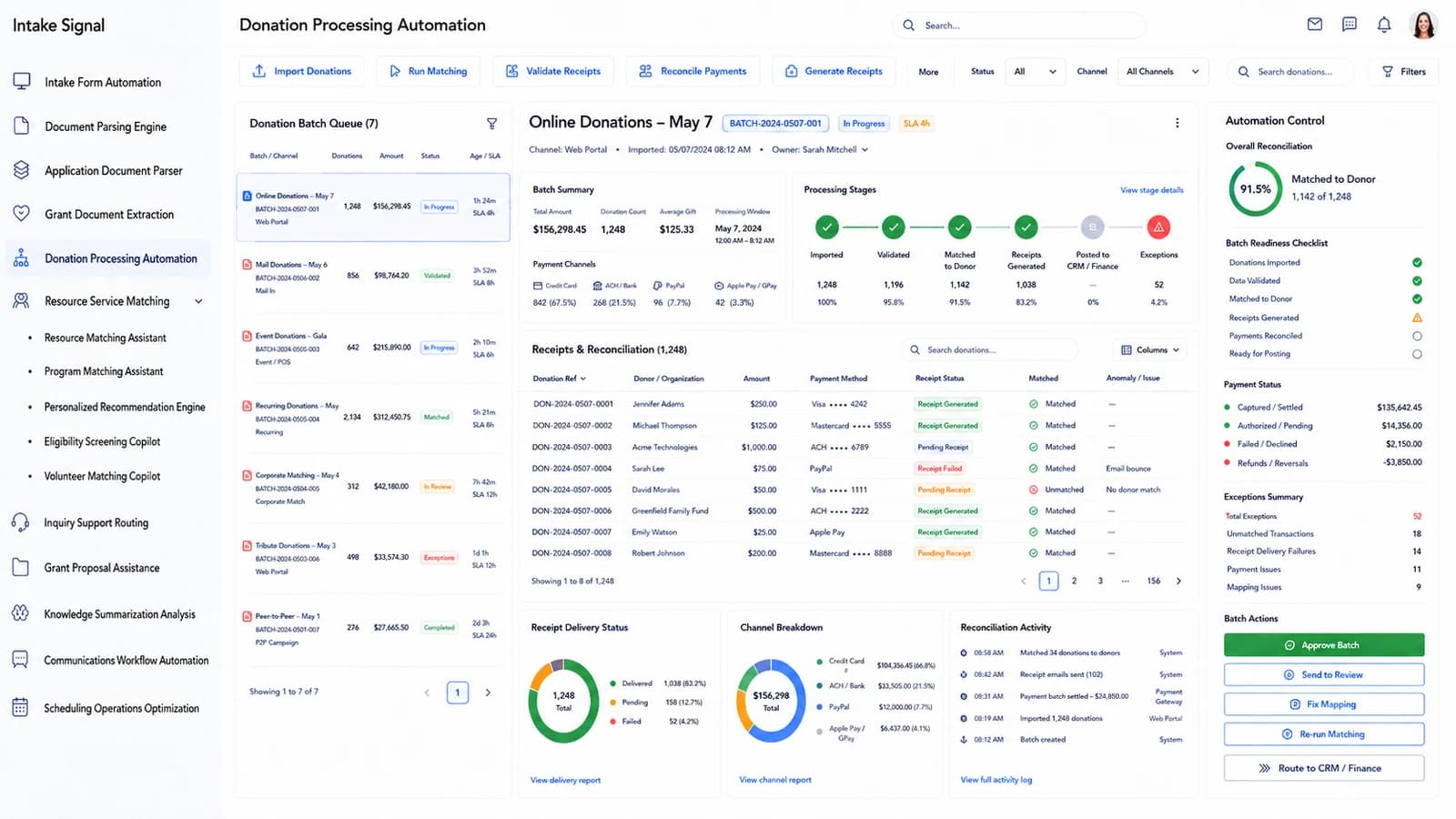
Every gift matched, receipted and reconciled in one pass
Donation Processing Automation
Batches from the web portal, mail, events, recurring gifts, corporate matching and peer-to-peer all land in one queue. The platform walks each batch through imported, validated, matched to donor, receipts generated and posted to finance — and shows you where it stopped.
Channel breakdown across card, ACH and wallet, with receipt delivery status per gift
An exceptions summary separating unmatched transactions, delivery failures, payment and mapping issues
app.beaconfold.ai/donation-processing-automationLIVE · PAGE 5 OF 11
Donation Processing Automation
06
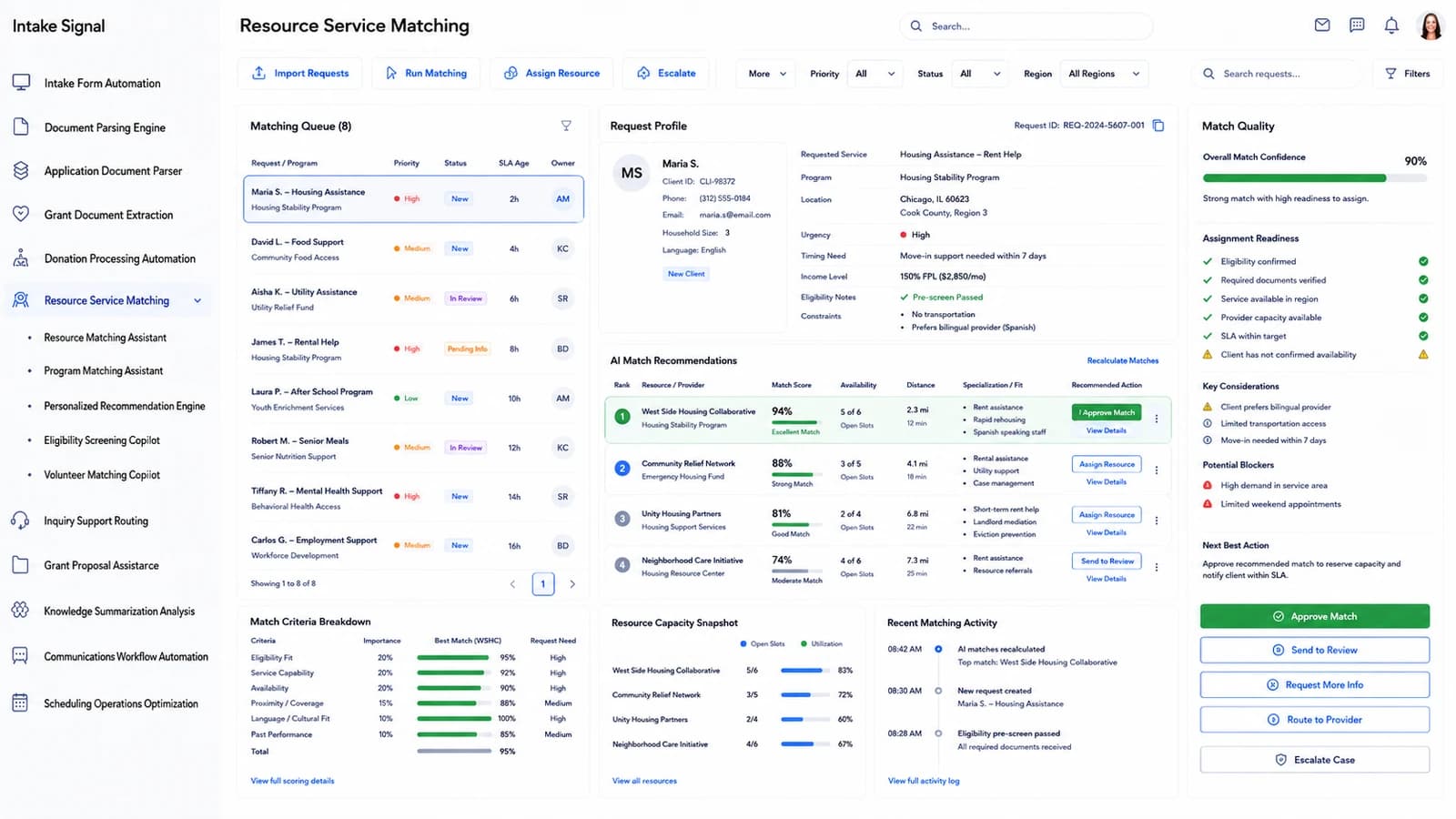
The right provider, ranked against the constraints that matter
Resource Service Matching
A request profile carries urgency, household size, language, income level and real-world constraints such as no transport or a bilingual preference. Matches come back ranked with a score, open slots, travel distance and the specialisation behind the fit.
Potential blockers surfaced up front — high demand in the service area, limited weekend appointments
app.beaconfold.ai/resource-service-matchingLIVE · PAGE 6 OF 11
Resource Service Matching
07
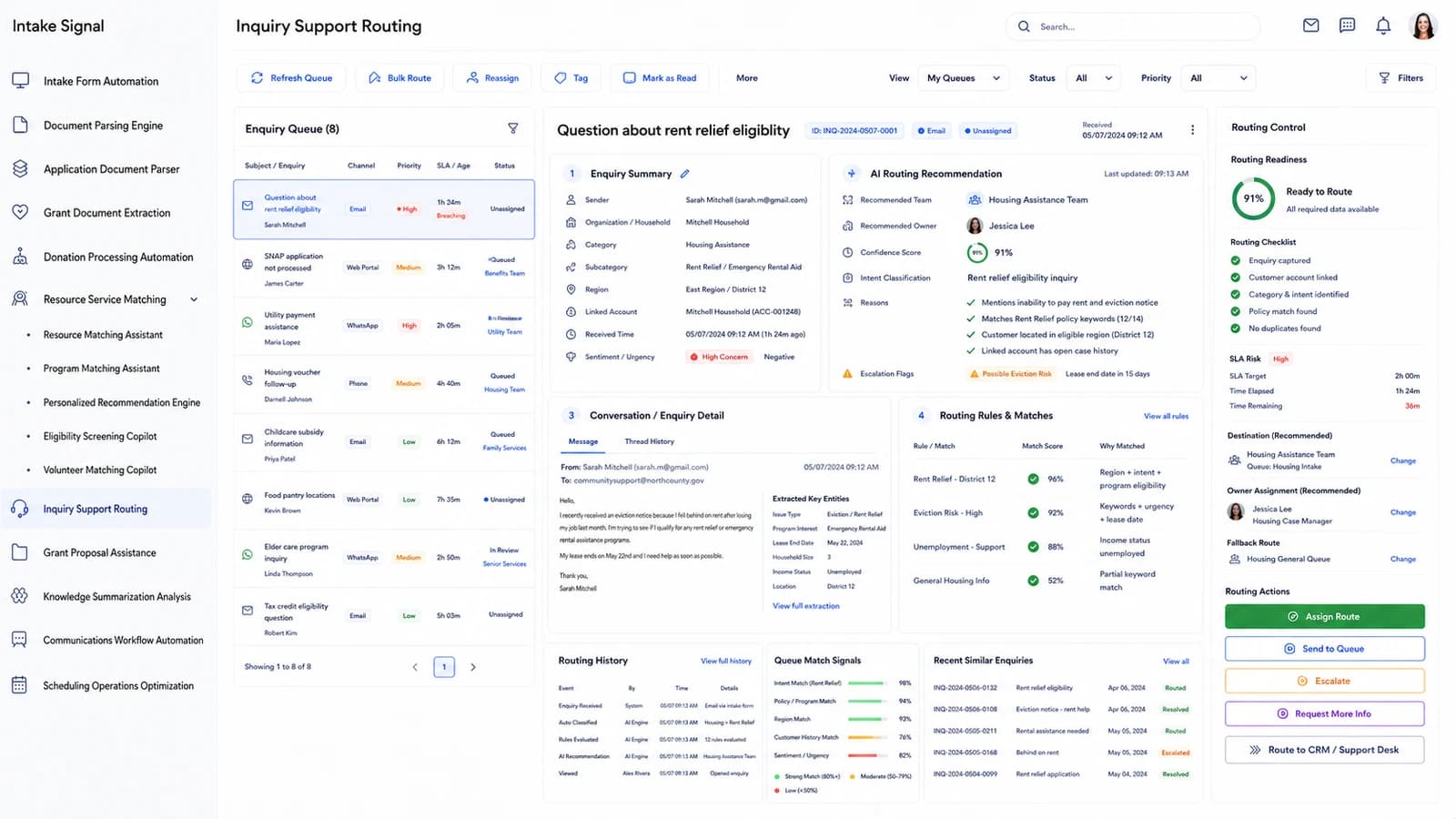
Read the question, route it before the SLA burns
Inquiry Support Routing
Enquiries arrive by email, web portal, WhatsApp and phone into one queue. Each is summarised, classified by intent, linked to an existing household account, and routed to the team that can actually answer — with the reasons for that recommendation written out.
Key entities pulled from the message: issue type, program interest, lease end date, income status, district
Live SLA risk with time elapsed and remaining, plus a recommended owner and a fallback queue
app.beaconfold.ai/inquiry-support-routingLIVE · PAGE 7 OF 11
Inquiry Support Routing
08
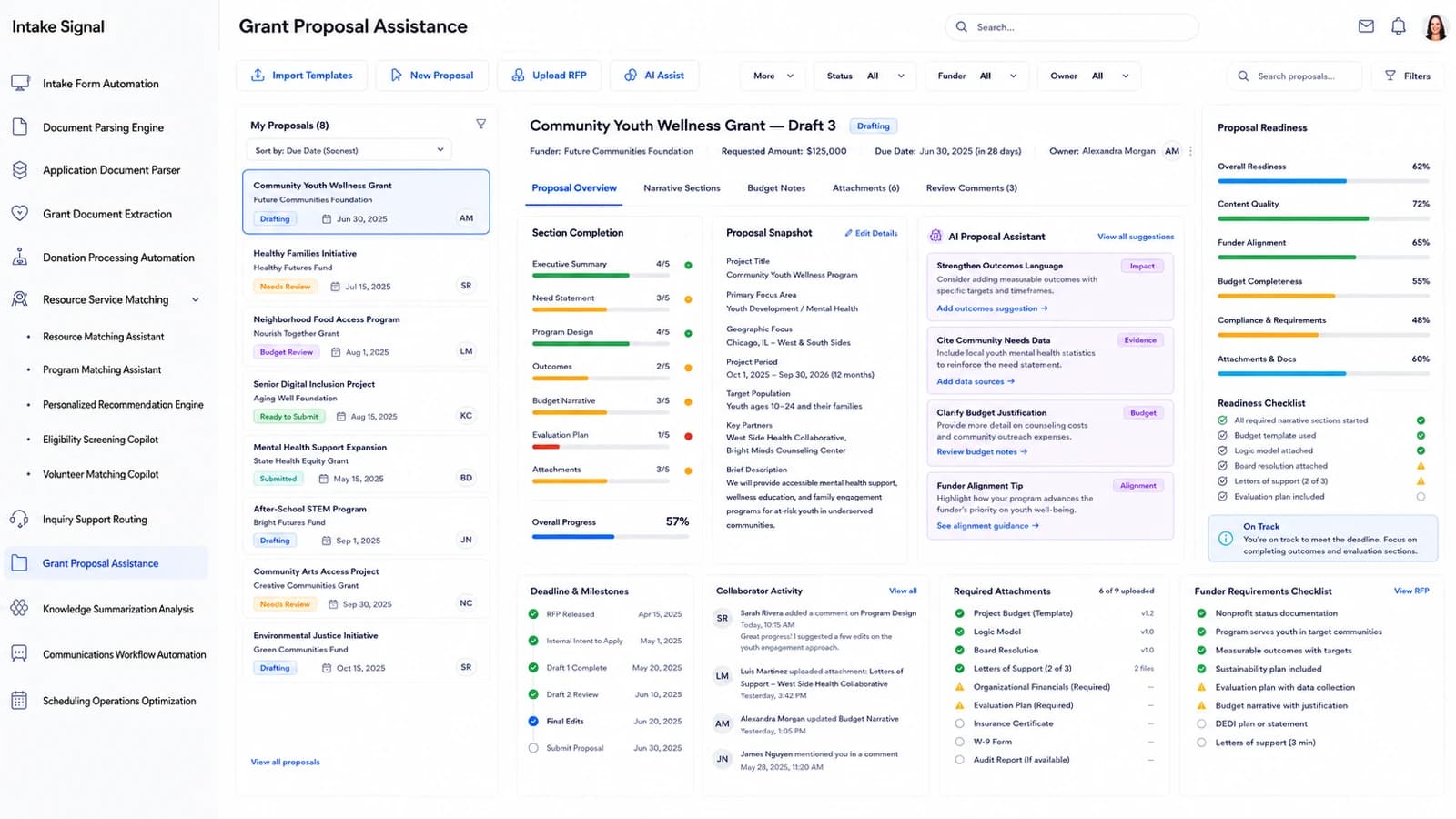
Draft with the funder's checklist already open
Grant Proposal Assistance
Each proposal tracks section completion against the funder's own requirements — executive summary, need statement, program design, outcomes, budget narrative, evaluation plan. The assistant suggests where to strengthen outcomes language and where the budget justification is thin.
Section-by-section progress with attachments tracked against the required list
A funder-requirements checklist and collaborator activity, so nothing waits on an unread comment
app.beaconfold.ai/grant-proposal-assistanceLIVE · PAGE 8 OF 11
Grant Proposal Assistance
09
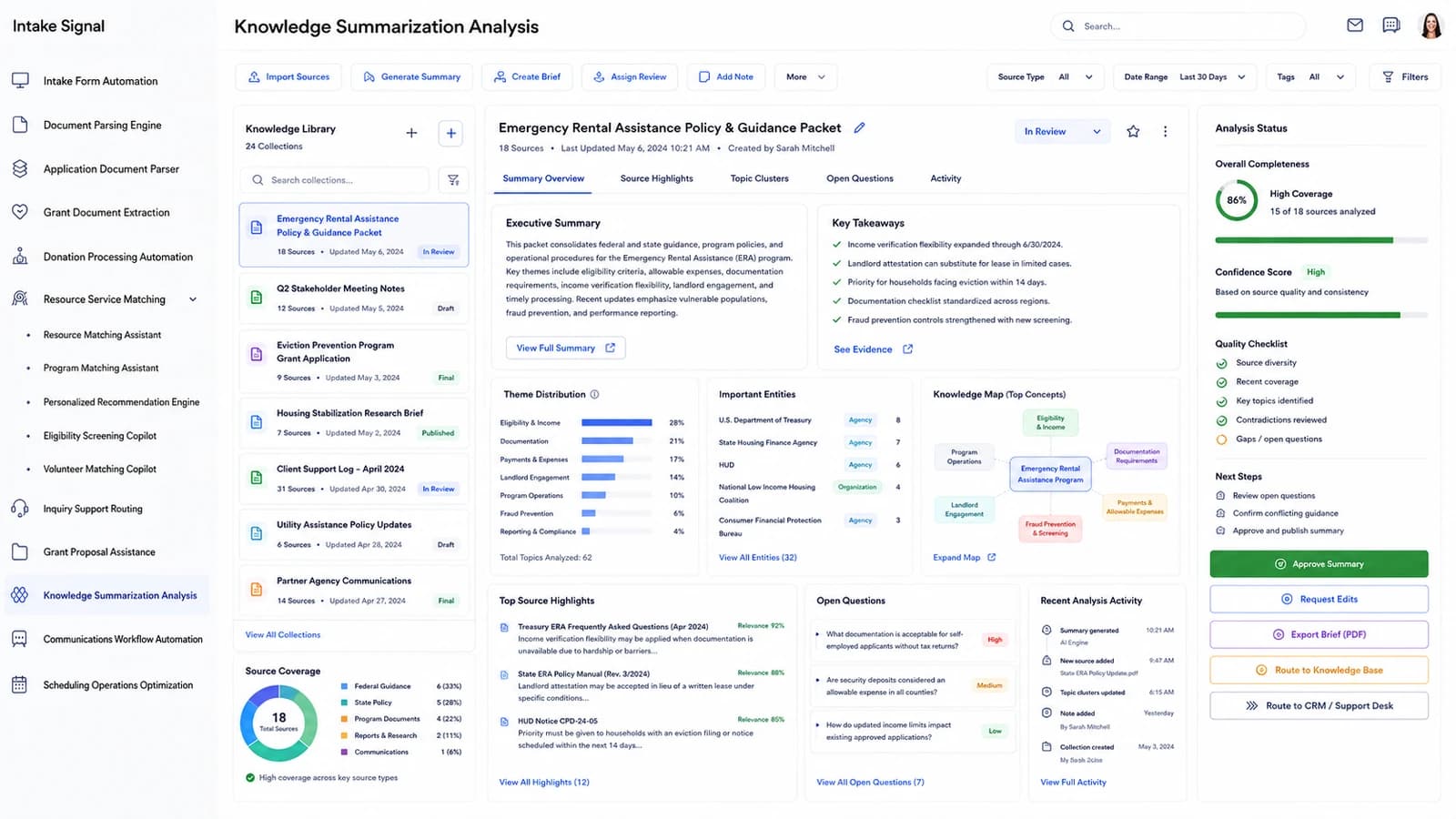
Every policy notice your team is supposed to have read
Knowledge Summarization Analysis
Federal guidance, state policy, program documents and internal logs are collected into a library and summarised into one packet — with key takeaways, theme distribution, named agencies and a knowledge map of how the concepts connect.
Source coverage by type, with a confidence score based on source quality and consistency
Open questions kept visible rather than buried, each ranked by how much it matters
app.beaconfold.ai/knowledge-summarization-analysisLIVE · PAGE 9 OF 11
Knowledge Summarization Analysis
10
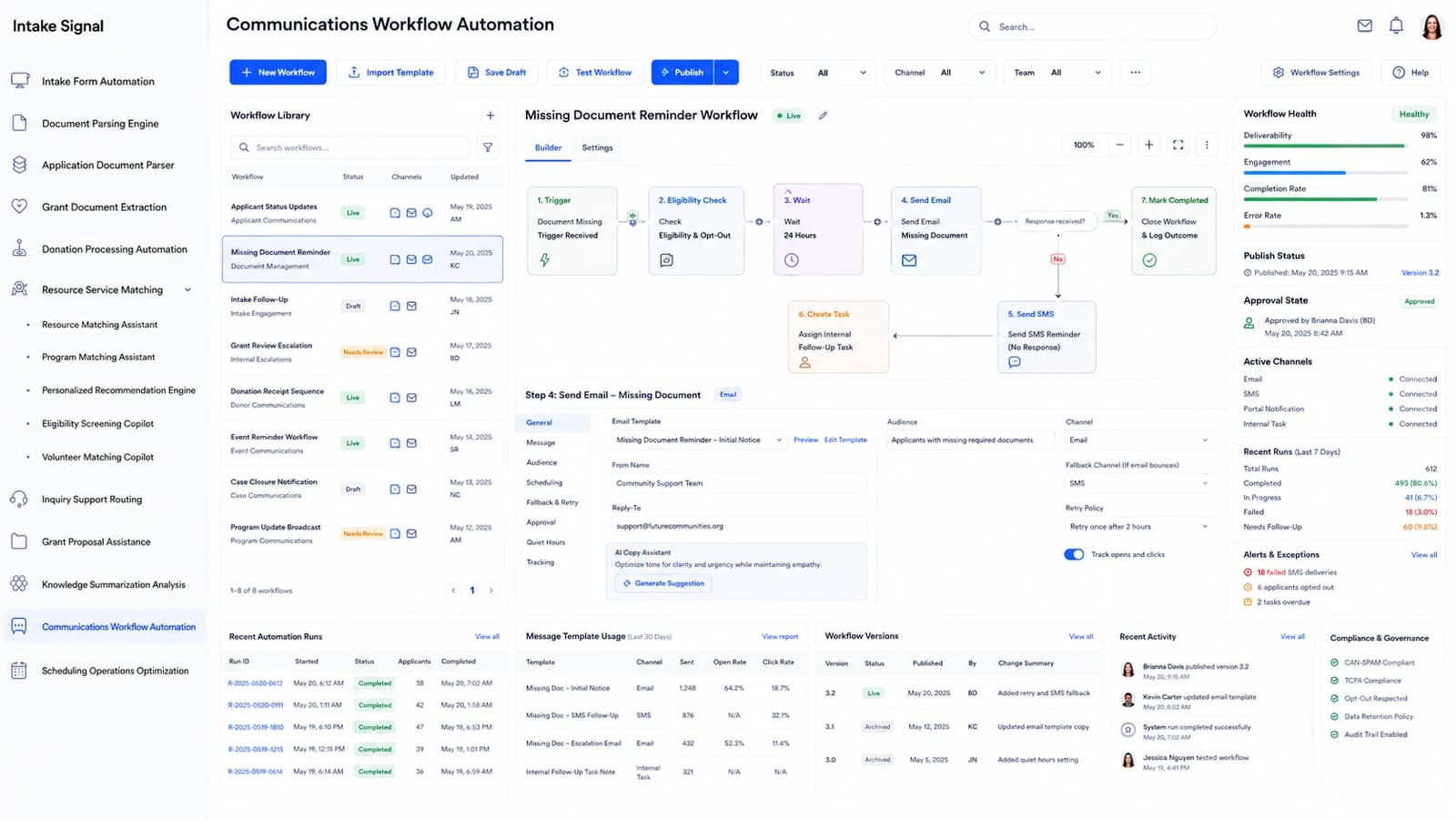
Follow-up that keeps going after office hours
Communications Workflow Automation
Build the sequence visually — trigger, eligibility and opt-out check, wait, email, SMS fallback, internal task, close. Publish it, and the workflow chases the missing document for you across email, SMS and portal notification.
Quiet hours, retry policy and fallback channel configured per step, with approval state on the version
Deliverability, engagement and completion tracked live, alongside CAN-SPAM, TCPA and opt-out governance
app.beaconfold.ai/communications-workflow-automationLIVE · PAGE 10 OF 11
Communications Workflow Automation
11
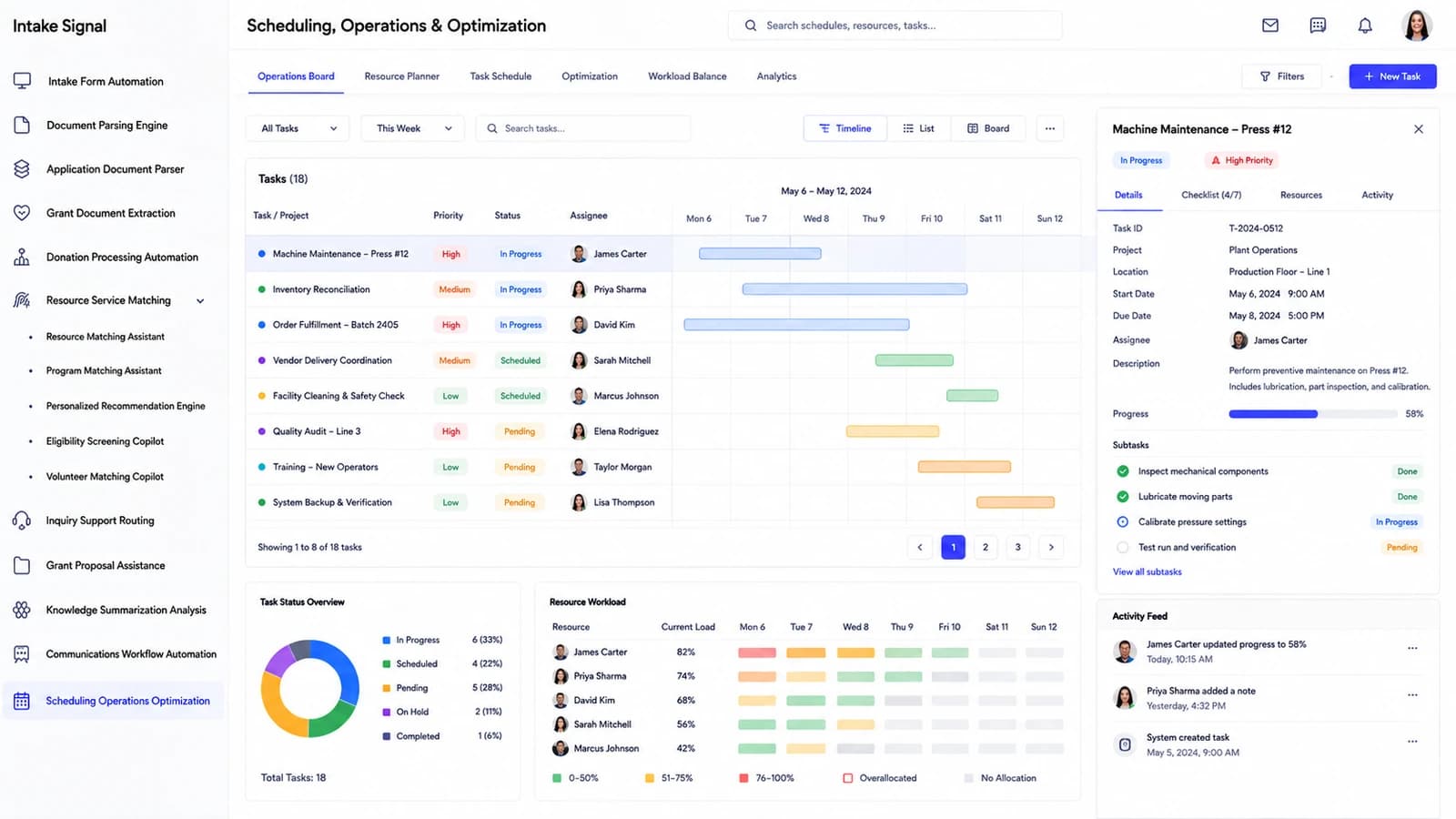
Who is doing what this week, and who is already at capacity
Scheduling Operations Optimization
The operations board lays every task across the week on one timeline — priority, status, assignee and progress. Resource workload shows current load per person so the next assignment goes to someone who can actually take it.
Timeline, list and board views over the same tasks, with subtasks and a checklist on each
A workload heat strip flagging over-allocation before it becomes a missed appointment
app.beaconfold.ai/scheduling-operations-optimizationLIVE · PAGE 11 OF 11
Scheduling Operations Optimization
How it works
From the doorway to the decision, without the retyping.
Most social-services backlogs are not a staffing problem. They are a reading problem — and reading is the part software can take.
01
It arrives however the person could send it
An application through the web portal, a photographed lease over WhatsApp, a voicemail, a walk-in at the front desk, a mailed donation batch. Everything lands in one queue with its channel, its timestamp and its household already attached.
02
It gets read, field by field, with the doubt shown
The parser pulls names, addresses, income, lease terms, award amounts and match contributions — and scores every value. Anything it is unsure about is flagged with a reason, so your reviewer corrects a handful of fields instead of retyping the packet.
03
It is checked against the rules that actually bind you
Eligibility, required documents, budget match, duplication of benefits, consent scope, reporting plan. The checks are named and the evidence is kept, so the readiness score holds up in a monitoring visit.
04
It is routed, scheduled and followed up without a nudge
The right team, the right provider, the right appointment slot — then the follow-up sequence chases the missing signature across email, SMS and portal notice, inside quiet hours and inside consent.
Built around the caseload
Your team stays the expert. Beaconfold.AI just stops the paperwork winning.
No module makes a determination for you. Every extraction carries a confidence score, every routing decision shows its reasons, and every record keeps the audit trail your funders and monitors will ask for.
Public money comes with a rulebook. These are the named standards this platform is designed around — what each one covers, and where it shows up in the product.
2 CFR Part 200
Uniform Administrative Requirements, Cost Principles and Audit Requirements for Federal Awards
The federal grant rulebook — allowable costs, match, sub-recipient monitoring and the single-audit trail. Grant Document Extraction checks every packet against it and keeps the evidence.
HMIS Data Standards
HUD Homeless Management Information System Data Standards
HUD's required data elements and universal identifiers for homeless and housing services. Intake Form Automation captures the mandated fields at first contact, in HUD's own shape.
HIPAA
Health Insurance Portability and Accountability Act
Protects individually identifiable health information. Health-adjacent client records are encrypted at rest and in transit, with role-based access and a full audit log.
42 CFR Part 2
Confidentiality of Substance Use Disorder Patient Records
Stricter-than-HIPAA rules on disclosing SUD treatment records. Consent scope is stored on the record, and routing honours it before any referral leaves the platform.
FERPA
Family Educational Rights and Privacy Act
Governs education records for youth and after-school programs. School-sourced documents stay segregated with their own consent and disclosure rules.
Section 508
Section 508 of the Rehabilitation Act of 1973
Requires federal and federally funded electronic content to be accessible. Every applicant-facing form and generated PDF is produced to the Section 508 baseline.
WCAG 2.1 AA
Web Content Accessibility Guidelines 2.1, Level AA
The W3C standard behind most public-sector accessibility mandates. Contrast, keyboard navigation, focus order and labelling are held to Level AA across the intake portal.
PCI DSS
Payment Card Industry Data Security Standard
The card-data security standard for anyone taking donations by card. Donation Processing Automation reconciles on tokens only — no card number ever reaches our storage.
TCPA
Telephone Consumer Protection Act
Sets consent rules for automated calls and SMS to applicants and donors. Communications Workflow Automation records consent per channel and blocks sends without it.
CAN-SPAM
Controlling the Assault of Non-Solicited Pornography and Marketing Act
Governs commercial email: honest headers, real postal address, working opt-out. Every campaign the platform sends carries a one-click unsubscribe that suppresses instantly.
SOC 2 Type II
AICPA System and Organization Controls 2, Type II
An audited report on security, availability and confidentiality controls over time. The controls our funders and boards ask about are documented and evidenced.
NIST SP 800-53
NIST Special Publication 800-53, Security and Privacy Controls for Information Systems and Organizations
The federal control catalogue behind FedRAMP and most agency security reviews. Access control, audit and incident-response controls map to the moderate baseline.
Listed as the standards the platform is built to support. Your own certification scope, funder terms and state requirements are confirmed during onboarding.
Companion hardware
Devices that put the front desk on the dashboard.
Three connected companion devices, pre-paired with your Beaconfold.AI workspace. Each one captures something at the counter and streams it into a module you have already seen on this page.
Intake Check-In Stand
A desk-mount check-in station for your front counter — a walk-in taps in, answers the short screening set, and the record opens itself. Every arrival streams straight into your Intake Form Automation dashboard, timestamped and queued.
Casefile Scan Reader
A sheet-fed scanner with an integrated tap-card reader, pre-paired with your workspace over Wi-Fi. Feed in a proof-of-income packet or a lease and the pages land in the Document Parsing Engine queue for extraction — no upload step, no email.
Giving Tap Terminal
A pocket contactless reader for events, drives and front-desk gifts, paired to your workspace over Bluetooth. Each tap posts a tokenised donation into Donation Processing Automation, already matched to the donor and the batch.
Shown for context only — these are the first-party devices that pair with the platform, not a store. Availability by region is confirmed during onboarding.
Pricing
One price for the whole platform.
No seat counting, no module tiers, no surprise line for the grants team. One flat monthly subscription covers every dashboard you have just scrolled through — and it stays the same whether we host it or you do.
Starting at
$200/mo
All eleven dashboard modules, no tier gating
Every intake channel — portal, email, phone, messaging, mail
Unlimited documents parsed, scored and reviewed
Grant readiness checks and funder reporting schedules
Donation matching, receipting and reconciliation
Consent-aware outreach across email, SMS and portal
Billed monthly. A one-time onboarding fee applies — see below.
Onboarding
What your onboarding fee covers
A one-time setup that gets your caseworkers, grants team and development staff fully live before the first monthly cycle — we import your existing client and donor records, wire up the intake channels you already publish, and tune every dashboard module to your programs and eligibility rules. Each fee below is a STARTING point: we scope the final onboarding once we understand your environment, security needs, integrations, data volume, compliance requirements and deployment model — so the exact figure lands after that conversation, never before.
Essential
from$1,000+
one-time setup
Kickoff workshop mapping your programs, eligibility rules and referral partners
Workspace provisioning with admin accounts for your program and finance leads
Import of your existing client, household and donor records
Intake Form Automation configured for your published application forms
Document Parsing Engine tuned to the proof documents you actually collect
Shared inbox, web portal and phone intake connected as live channels
Roles and permissions set per program, with consent scope on each record
Live-readiness review and an onboarding handbook before your first cycle
Plus
from$2,500+
one-time setup
Everything in Essential, plus:
Guided migration of historical case files and closed grants, with validation
Two integrations with your CRM, case-management or accounting system
Resource Service Matching loaded with your provider network and capacity
Grant Document Extraction mapped to your funders' packet and reporting formats
Communications Workflow Automation built out with your consent and quiet-hours rules
Live training for caseworkers, grants staff and development, with a recording
Enterprise
from$5,000+
one-time setup
Everything in Plus, plus:
Multi-agency or multi-county rollout plan across sites and program teams
Bespoke integrations, SSO and API access for partner referral exchange
Bulk migration with de-duplication and household reconciliation across sources
Custom eligibility, routing and escalation logic per funding stream
Role-based training tracks plus admin enablement for your own system owners
Named onboarding manager working to a defined go-live date and audit checklist
Deployment
Two ways to run it. Same platform either way.
Cloud (SaaS)
Runs in Nestack's managed cloud — we handle hosting, scaling, updates and backups. Fastest to start: your intake queue is live and parsing documents without any infrastructure to stand up.
Private / self-hosted
The same platform deployed inside your own infrastructure — your cloud, VPC or on-prem — for agencies whose client records, health-adjacent notes and grant files cannot leave their environment. Your data stays where it is, and the monthly subscription stays exactly the same.
Questions
The things teams ask us first.
Straight answers on how Beaconfold.AI reads, checks and routes the work — and where your staff stay firmly in charge.
It reads everything a social-services or grant-making team receives — intake forms, application packets, proof documents, grant files, donation batches, enquiries — extracts the fields, scores its own confidence, and routes the next action to the right person. Eleven dashboards cover intake, parsing, applications, grants, giving, matching, routing, proposals, knowledge, communications and scheduling.
Does it decide who is eligible?
No. It pre-screens against the rules you configure and shows the evidence — eligibility confirmed, documents verified, income flagged as low confidence — but the determination stays with your staff. Every recommendation carries its reasons so a reviewer can disagree with it in one click.
What happens when a document is unclear?
It is flagged, not guessed. The parser marks the field with a confidence score and a reason — mismatch with source, not found, low confidence — and drops it into an exception queue with the source page open beside the extracted values.
Which intake channels can it read?
The web portal, email, phone and messaging all land in the same queue, alongside mailed and event-collected donation batches. Each item keeps its channel, its timestamp and its linked household record.
How does it handle client confidentiality?
Consent scope is stored on the record itself and honoured before anything leaves the platform — which matters most for health-adjacent notes under HIPAA and substance-use records under 42 CFR Part 2. Access is role-based per program, and every read and change is logged.
Will it hold up in a funder monitoring visit?
That is what the compliance checks are for. Grant packets are scored against named requirements — eligibility, required documents, budget match, duplication of benefits, reporting plan — and the evidence behind each check is kept with the record.
Can we run it on our own infrastructure?
Yes. The same platform deploys into your own cloud, VPC or on-prem environment for teams whose records cannot leave it, and the subscription is unchanged either way. Only the one-time onboarding differs by requirements.
Can we see it on our own forms first?
Yes. Book a demo and tell us which modules matter, and we will run Beaconfold.AI against the kind of packets your team actually receives before the call.
Book a demo
See Beaconfold.AI on your own caseload.
Tell us who you are, pick the modules that matter to your programs, then grab a time — we’ll come ready with the packets and workflows your team actually handles.
Step 1 of 3
First, who should we prep for?
Takes a few seconds — so we come ready for your team.


 Document Parsing Engine