75%
From days to hoursFaster Turnaround
Turn days of manual proposal and tender review into hours so your team submits complete, audit-ready bids faster.
Civoraq AI brings the complete construction journey into one place—from reviewing opportunities and preparing bids to managing drawings, estimates, schedules, materials, site activities, costs and compliance. It helps project teams stay organized, monitor progress and complete every requirement until the project is ready for handover.
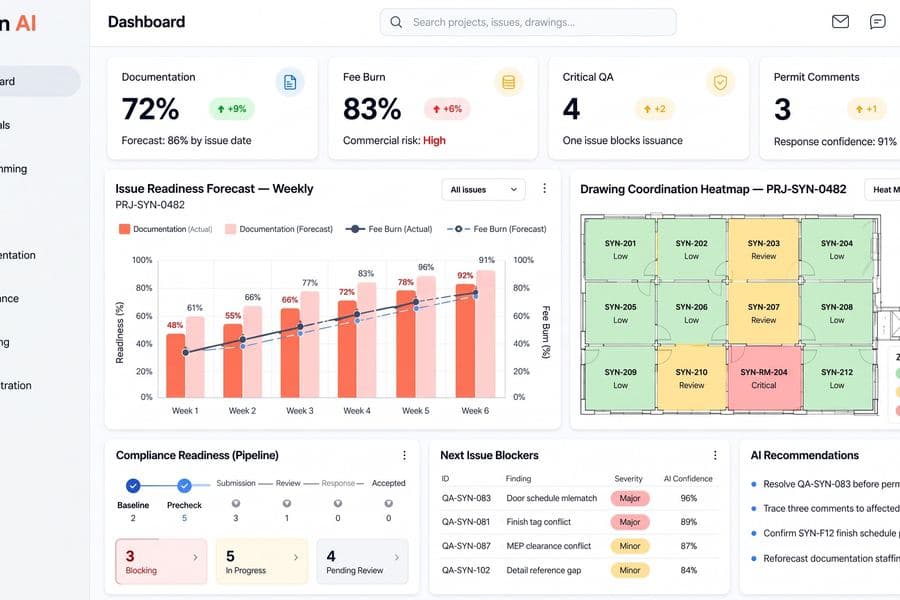
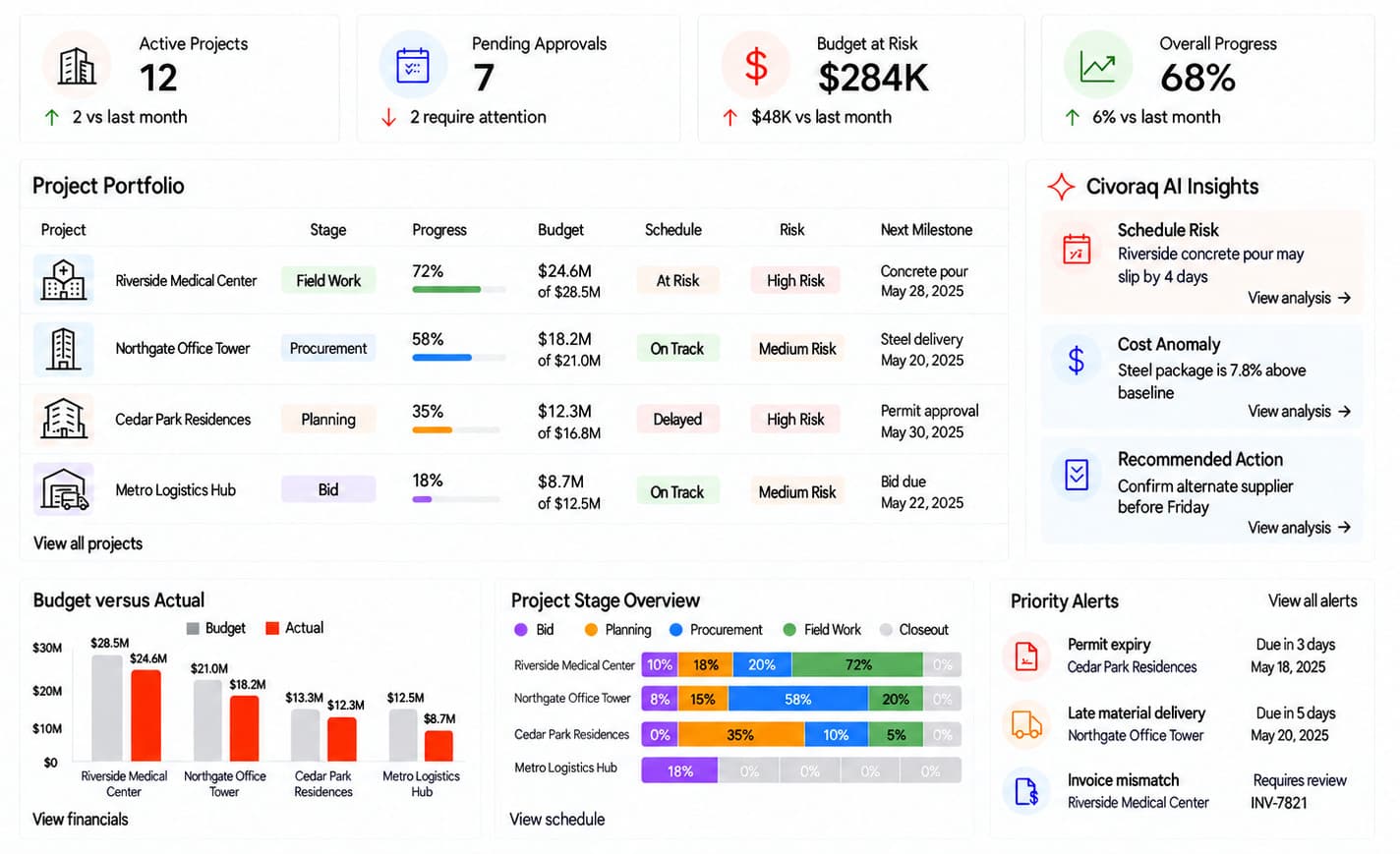
View all your construction projects from one central dashboard. Track progress, budgets, schedules, approvals, risks and important site updates in one place. Quickly identify delayed work, pending decisions and projects that need attention, helping your team stay informed and keep every project moving forward.
Turn days of manual proposal and tender review into hours so your team submits complete, audit-ready bids faster.
Catch every key specification, deadline, and compliance requirement across multi-page drawing sets with automated AI checks.
Eliminate manual paperwork data entry and invoice chasing so PMs and superintendents focus on field execution and site safety.
Handle a larger portfolio of active jobsite workflows and project proposals without increasing your office coordination bench.
Civoraq AI guides your project from the initial bid to the final handover. Project data flows seamlessly across all eight connected stages. Because every module shares a single source of truth, your team eliminates manual double-entry, prevents costly mistakes, and always stays aligned as the project moves forward.
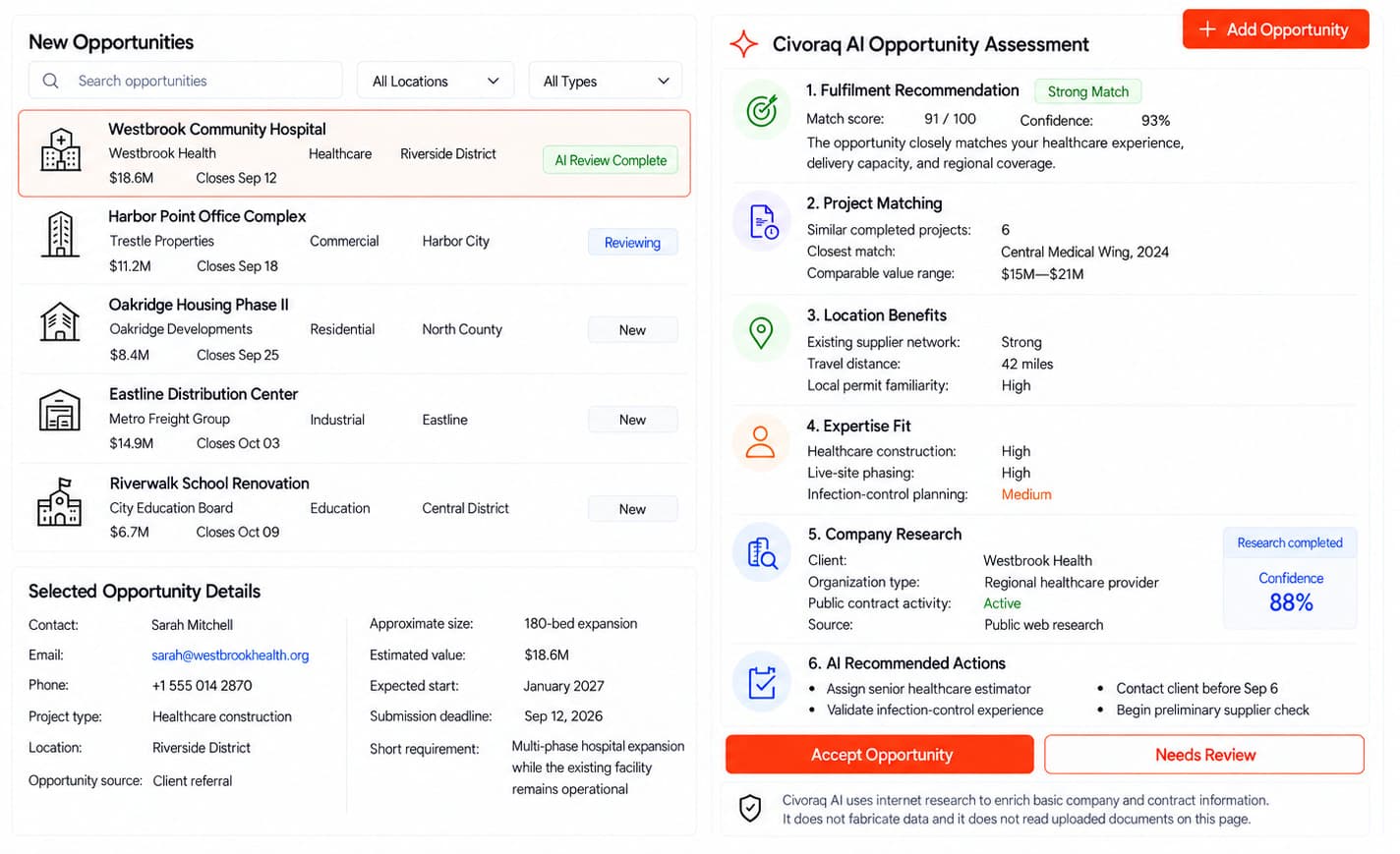
New opportunities are collected and reviewed in one place. The system compares each project’s location, requirements, value and timeline with your company’s experience and available resources. It highlights promising opportunities and shows the main risks. Your team makes the final decision about whether to bid.
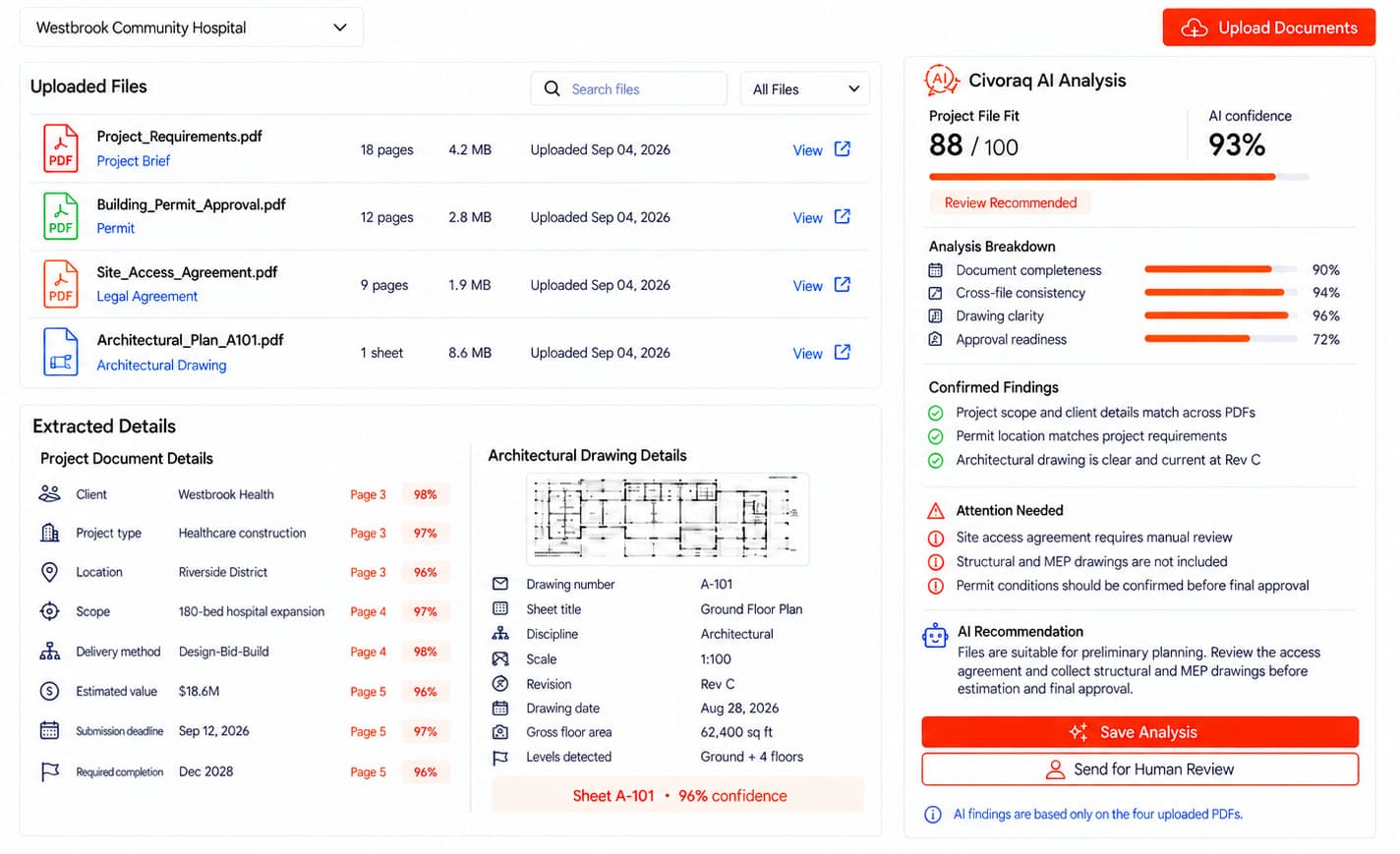
Drawings, contracts, specifications and tender documents can be uploaded and organized by project. Important information is identified, while missing details and differences between documents are brought to the team’s attention. Updated versions remain easy to find and compare. Every important item can be reviewed before it is approved for use.
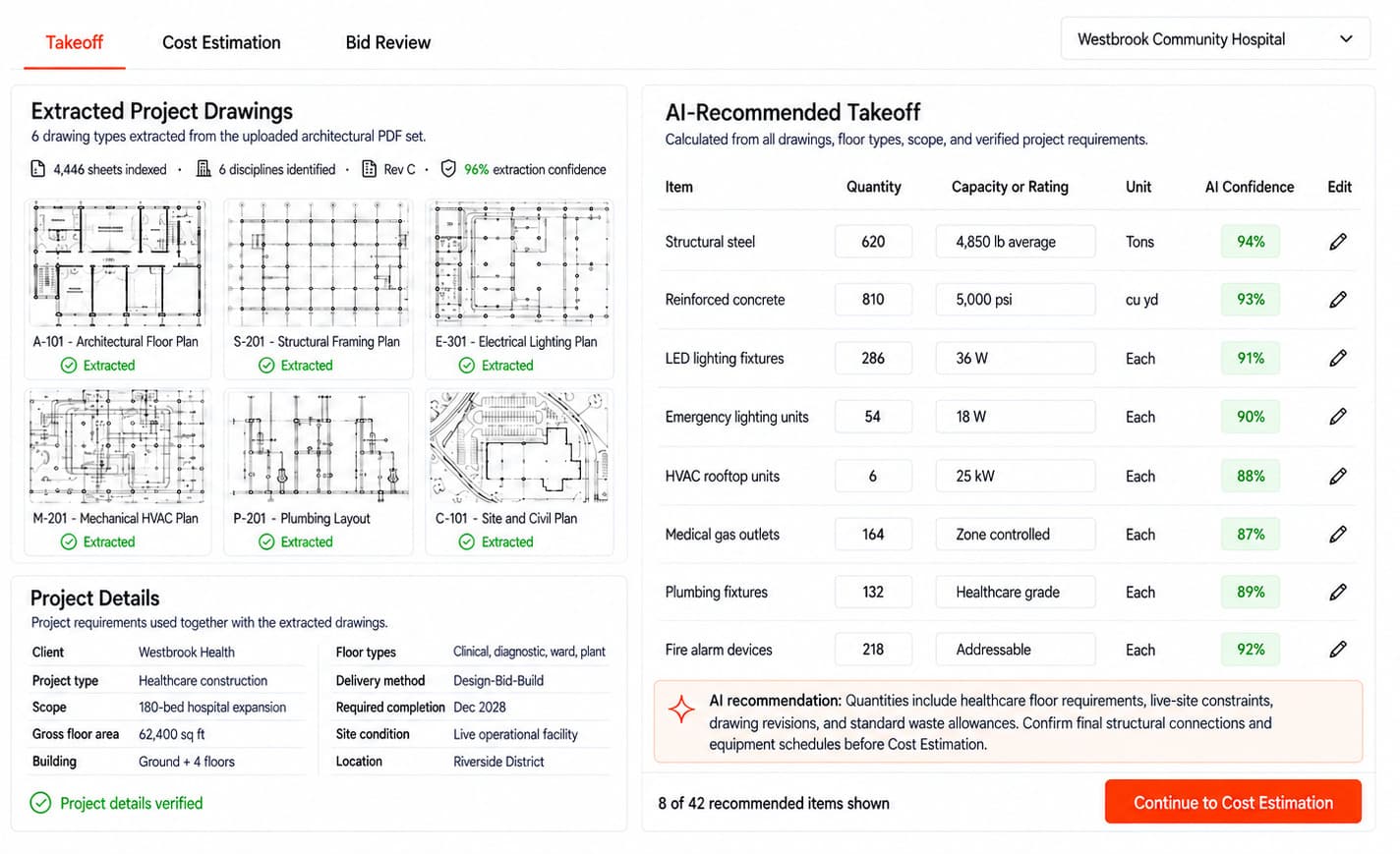
The system reads approved drawings and calculates the quantities needed for the proposed work. These quantities help estimate material, labor, equipment and subcontractor costs. The estimating team can review and adjust every figure before preparing the final bid. This reduces manual measuring and helps create more consistent estimates.
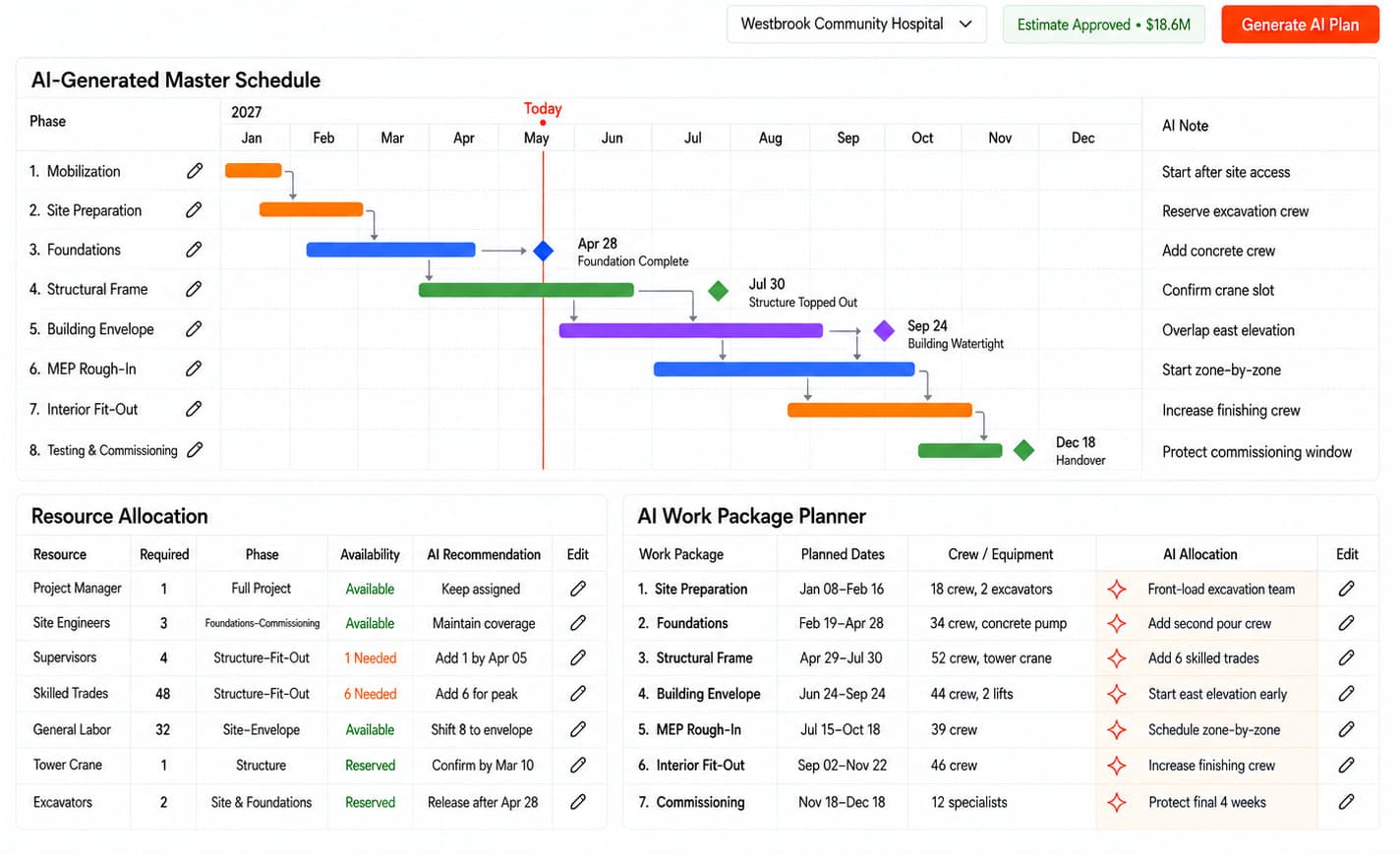
Project work is divided into activities, milestones and target dates. Workers, equipment and materials can then be assigned based on availability. The system highlights overlapping work, missing resources and possible delays before they affect the schedule. Project managers can update and approve the plan as conditions change.
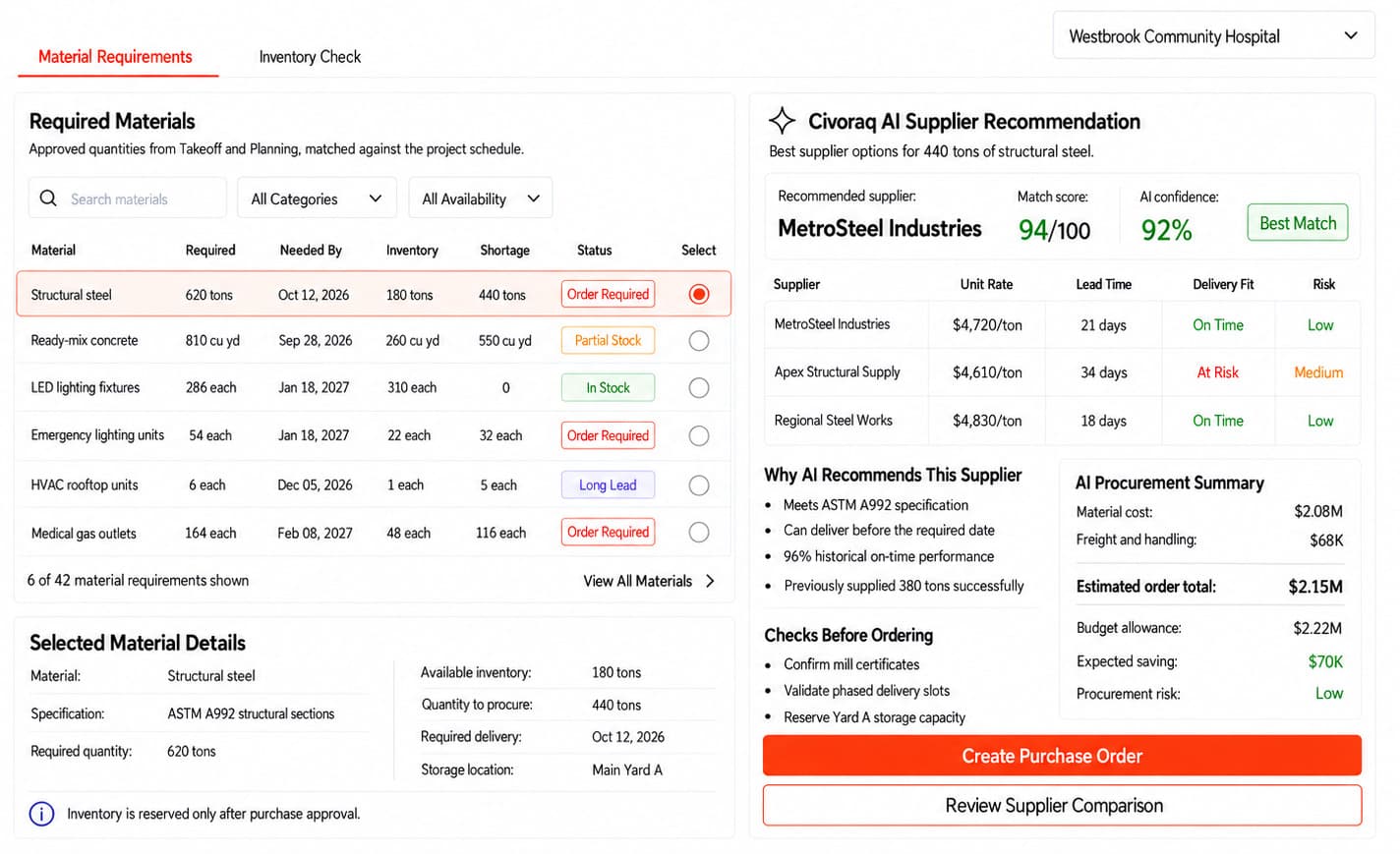
Material requirements from the estimate and project plan are turned into purchase requests. Teams can compare supplier quotations, issue purchase orders and follow expected delivery dates. Delayed deliveries, missing quantities and urgent material needs are clearly shown. This helps prevent unnecessary purchases and site delays.
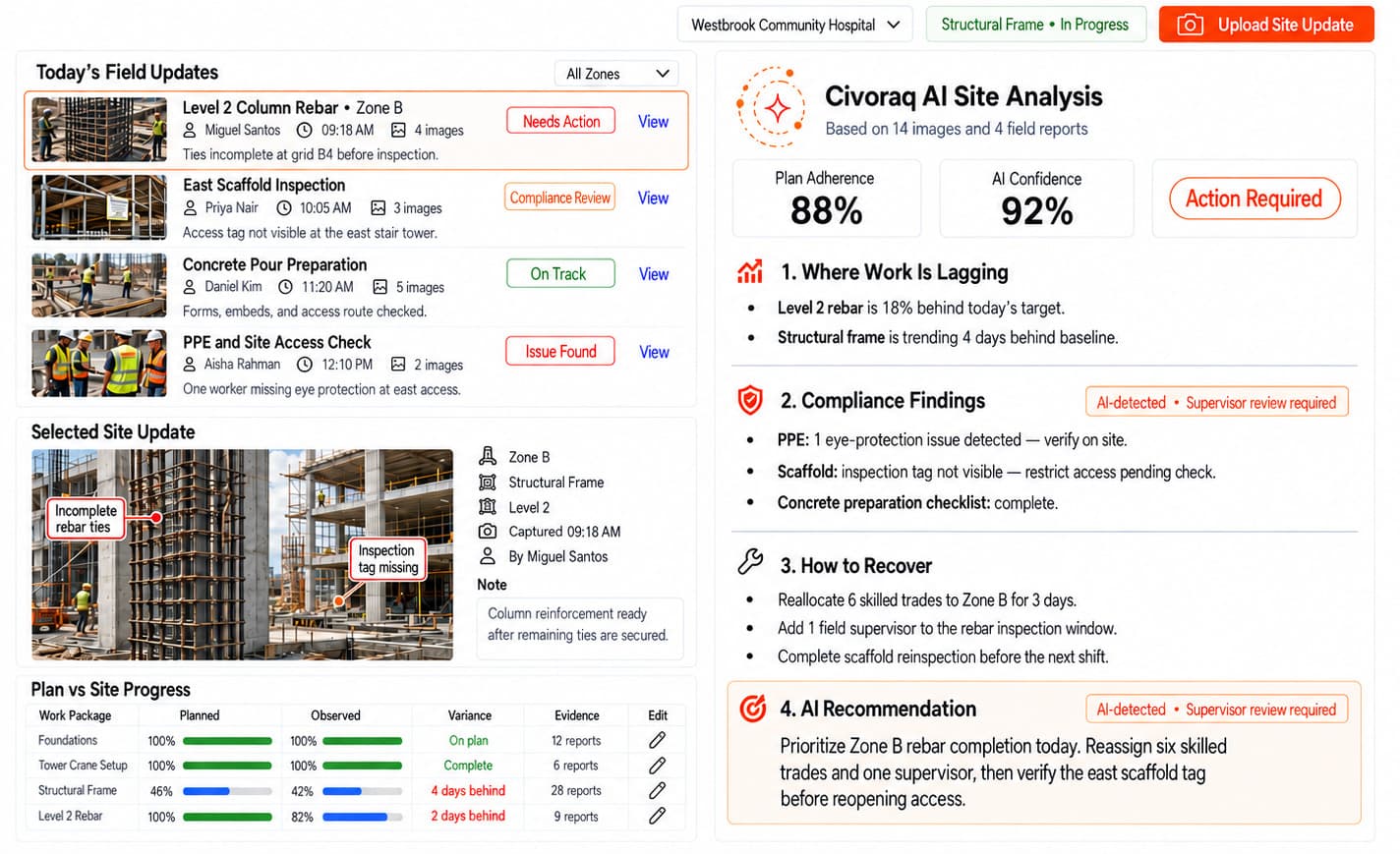
Site teams can record daily progress, completed work, inspections, worker details, safety events and site photographs. The information is compared with the approved plan to show delays or incomplete activities. Missing permits, records and corrective actions are brought to the team’s attention. Responsible staff review and close each item.
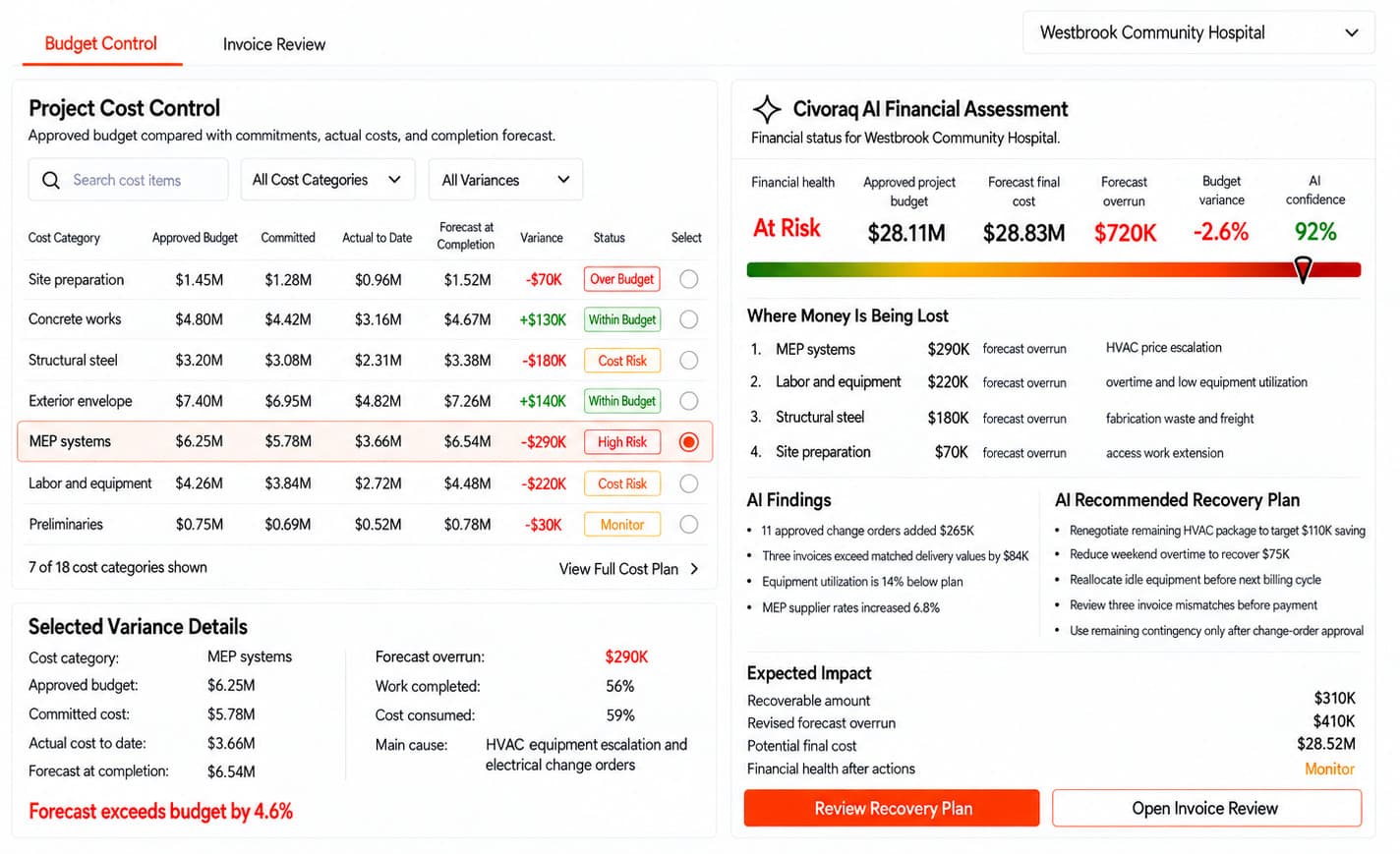
The approved budget is compared with purchase orders, invoices, payments, change orders and actual project costs. Any unexpected increase or possible budget overrun is highlighted early. Managers can see where money has been committed, spent or is still expected. This supports better cost decisions throughout the project.
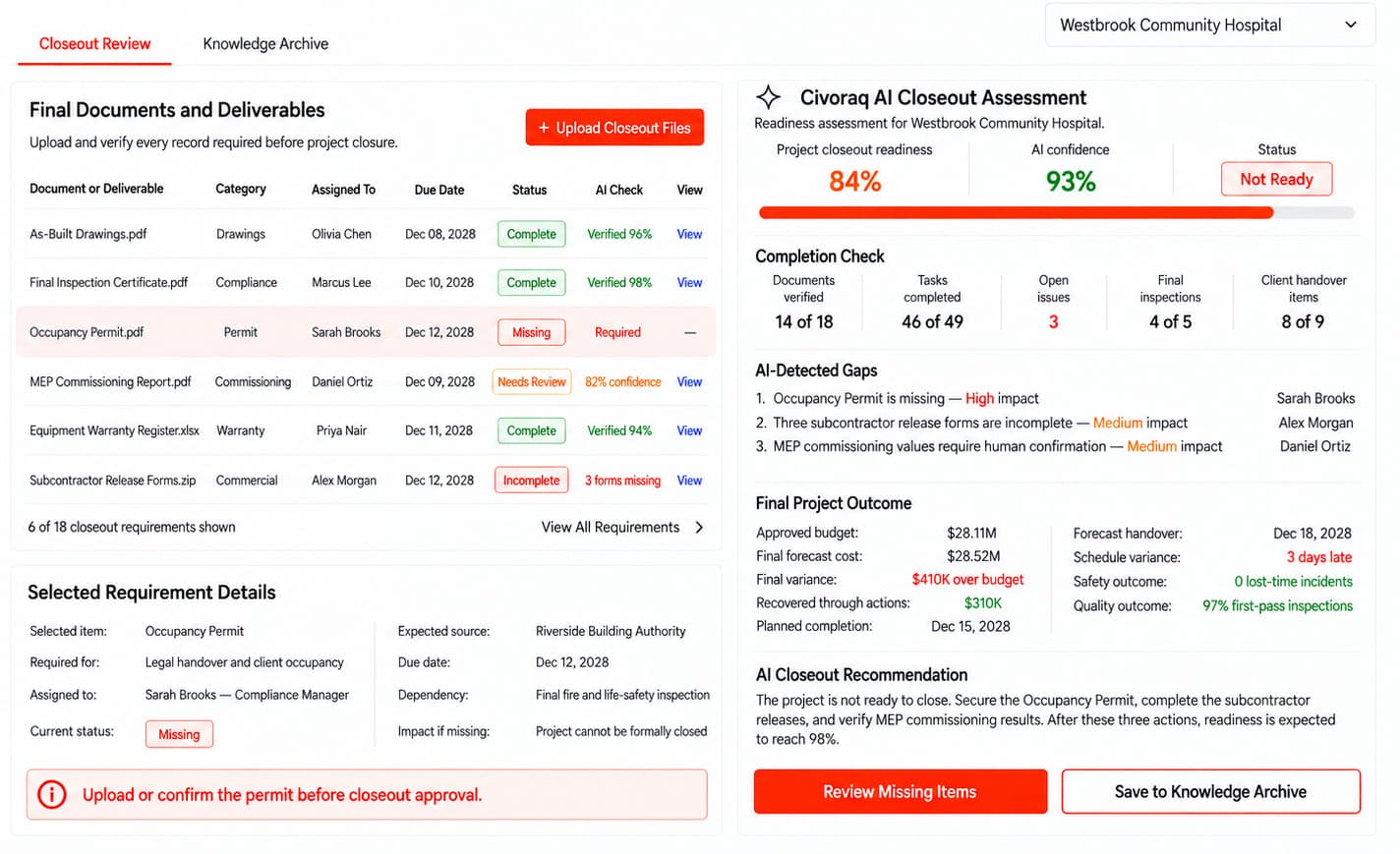
Important project decisions, contracts, approved changes and site records are kept together throughout the work. During closeout, the system tracks unfinished work, defects, final inspections and required approvals. It also organizes as-built drawings, warranties, certificates and equipment manuals. The complete handover package is reviewed before being delivered to the client.
Capture delivery tickets, subcontractor pay apps, tender packages, permits, drawings, RFIs, and compliance certificates from inboxes, gate scans, or cloud drives with zero template setup.
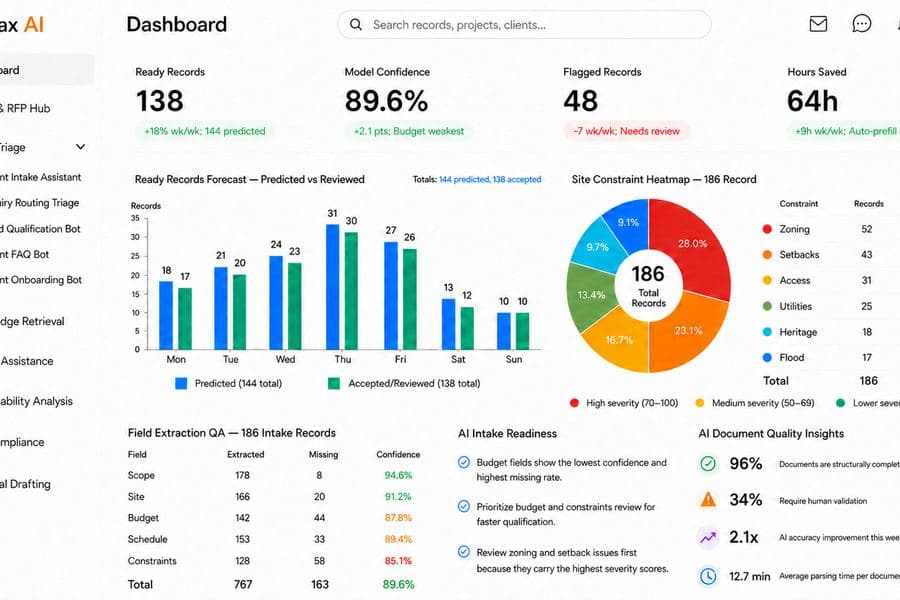
Intelligent AI agents extract line items, bid specifications, drawing metadata, and compliance requirements — scoring confidence and linking every value back to its exact source line.
Resolve flagged exceptions in a centralized review queue, then automatically sync verified, audit-ready data straight into Procore, Autodesk ACC, Sage 300, or your enterprise ERP.
Use a platform designed to harness the best intelligence available for the work in front of you. Civoraq AI puts an AI orchestration layer between your construction workflows and the frontier AI stack, routing every step to the model best built to solve it.
One model, fixed limits, and no step you can point somewhere else. You work strictly within whatever AI the software vendor bundled.
You work within its limits.
Layout-aware OCR holds multi-column tickets, title blocks, and stamp fields that a general model flattens
A fine-tuned classifier separates invoices, RFIs, tenders, certificates, and drawings — at high speed and low cost
Long context holds the full bid package, so a clause on p.9 still binds a field on p.318
Strict schema enforcement ensures structured, audit-ready data straight into your ERP or accounting stack
Holds structure across thousands of words and cites the source line for each compliance flag
Deep confidence scoring makes every review flag trustworthy before syncing into your ERP stack
Note: Model names and marks are the property of their owners and appear here to say which APIs a paperwork step can be routed to. No endorsement or partnership is implied. Families are named without version numbers because the frontier re-ranks faster than a page can be edited.
Procore, Autodesk, Sage, QuickBooks — and the rest of what your jobsite already runs on. 24 integrations across bid-to-handover, every one of them reading the tool’s own public API.
Note: Tool names and marks belong to their respective owners. No endorsement or partnership implied.
Civoraq AI is built around the safety, contract, drawing, and documentation standards that govern how a construction project is audited and paid. Here is what it supports out of the box.
Supports Safety Compliance Monitor and Visual Site Compliance Auditor with citation-tagged findings mapped to the correct Part 1926 subpart.
Bid and Tender Extraction and Document Parsing classify specifications, submittals and bid packages into MasterFormat divisions and section numbers automatically.
Regulatory Code Compliance Checker and Permit and Plan Parsing cross-reference drawings and permit sets against current IBC chapters and adopted local amendments.
Note: These are standards the platform is built to support inside your workflows — obligations that fall on you as the licensee. They are not certifications held by us, and support in the product is not a substitute for your own counsel or compliance officer.
A construction agent, in production, managing real project workflows.
Which is the easy half. It runs every day against invoices nobody reconciled, drawings nobody versioned, and schedules nobody updated — on a model that shifts under it, for a contractor that finds out something drifted when a pay app comes back wrong.
Both catalogued in playbook 3.12
Telemetry, evaluations, guardrails, human review, and a crew on call when one of them starts drifting at 3am.
Construction Services agents are catalogued under Construction — playbook 3.12.

A site-mounted camera that captures regular panoramic images of construction progress. These images can help teams compare completed work with the project schedule, confirm site conditions and maintain visual progress records. Integration and camera placement depend on the project requirements.

RFID tags can be attached to valuable materials, tools and equipment entering or moving around the site. A handheld reader or fixed gateway records their movement and helps update their latest known location. This supports procurement, inventory control and reduced material loss.
Note: Hardware, installation, and integration are not included in the standard subscription. Additional charges apply based on the hardware selected, integration modules required, and implementation scope.
Simple, flat pricing for the whole platform — no per-seat maths, no tiers to decode. Talk to us and we’ll tailor it to how your firm runs a project.
Full access to every module — document parsing, invoice reconciliation, tender extraction, permit and plan parsing, compliance auditing, scheduling and knowledge search.
Know moreA one-time setup that gets your firm live before the first monthly cycle — we import your active projects, past invoices, permit sets, tender packages, and compliance certificates, wire Civoraq AI to the inboxes and drives your jobsite paperwork already arrives through, and tune every parsing, reconciliation, and audit module to how your projects actually run. Each fee below is a starting point: we scope the final onboarding once we understand your environment, security, integrations, data volume, compliance, and deployment model.
Everything in Essential, plus:
Everything in Plus, plus:
Civoraq AI handles the sensitive material your project is paid on — subcontractor contracts, insurance certificates, tender packages, sealed drawings, and the extraction and match predictions built on them. Run it whichever way your firm’s data policy requires.
Runs in Nestack's managed cloud — nothing to provision, fastest way to get your firm live. We handle hosting, updates, and scaling so your team just logs in and works.
The same platform deployed inside your own infrastructure — your cloud, VPC, or on-prem — for firms that keep contracts, drawings, and predictions off shared infrastructure. Your project data never leaves your environment, and the monthly subscription stays exactly the same.
Everything you need to know about pricing, implementation, and how Civoraq AI integrates with your current construction workflows.
See the platformCivoraq AI uses a simple, flat monthly fee for the entire platform. We don't charge per-seat or per-module. Whether you have 5 project managers or 50 superintendents, your team gets full access to all features—from invoice reconciliation to compliance auditing—without unpredictable costs eating into your project margins.
Most firms are fully onboarded and processing live jobsite data in under two weeks. We integrate directly with the systems your field and accounting teams already use, like Procore, Autodesk ACC, Sage, and QuickBooks. Your crews don't have to learn a complex new app—they just keep capturing delivery tickets and forwarding emails, while Civoraq AI structures it in the background.
We built Civoraq AI specifically for construction's strict audit standards. Every extracted field comes with an AI confidence score, and our intelligent exception manager flags anything that needs human verification—like a blurry signature, a missing PO number, or a cost code mismatch. You maintain complete control in a centralized review queue before any data syncs to your ERP.
On average, construction teams eliminate over 80% of manual data entry. Instead of spending hours keying in subcontractor pay apps or hunting down missing lien waivers, your accounting and project management teams can focus on resolving flagged exceptions, managing job costs, and keeping projects moving forward.
Your one-time onboarding fee covers complete system setup, ERP integration, and team training. After launch, you get dedicated support from construction technology experts who understand how project data flows. If an API connection shifts or you need help tuning a workflow, our team is on call to keep your pipeline running smoothly.
Construction moves differently in every field, with unique teams, workflows, documents, and decisions. Your tools should be built to work the way your industry does.