A modern preschool room with children's tables, a reading nook and colourful decor — the childcare centres Cradlegrove.AI is built for

Every parent question reaches the person who can answer it.

Cradlegrove.AI reads every inquiry a parent sends your childcare centre — admissions, billing, classroom, administration — tags the topic and the urgency, and routes it to the desk that owns it, with the classification confidence and the reasoning shown on every message.

1,086 inquiries auto-routed87% of last week's 1,248 parent messages classified without a human.
6-minute handoffMedian time from a parent question landing to the right staff member picking it up.
82% model confidenceAverage classification confidence across every routed inquiry.

Built on the parent inbox, enrolment forms and daily records your centre already keeps — read together, so nothing has to be re-keyed and no parent question sits in the wrong queue.

Book a demoSee the platform
The parent-inquiry cockpit

Every parent inquiry, every classroom, on one screen.

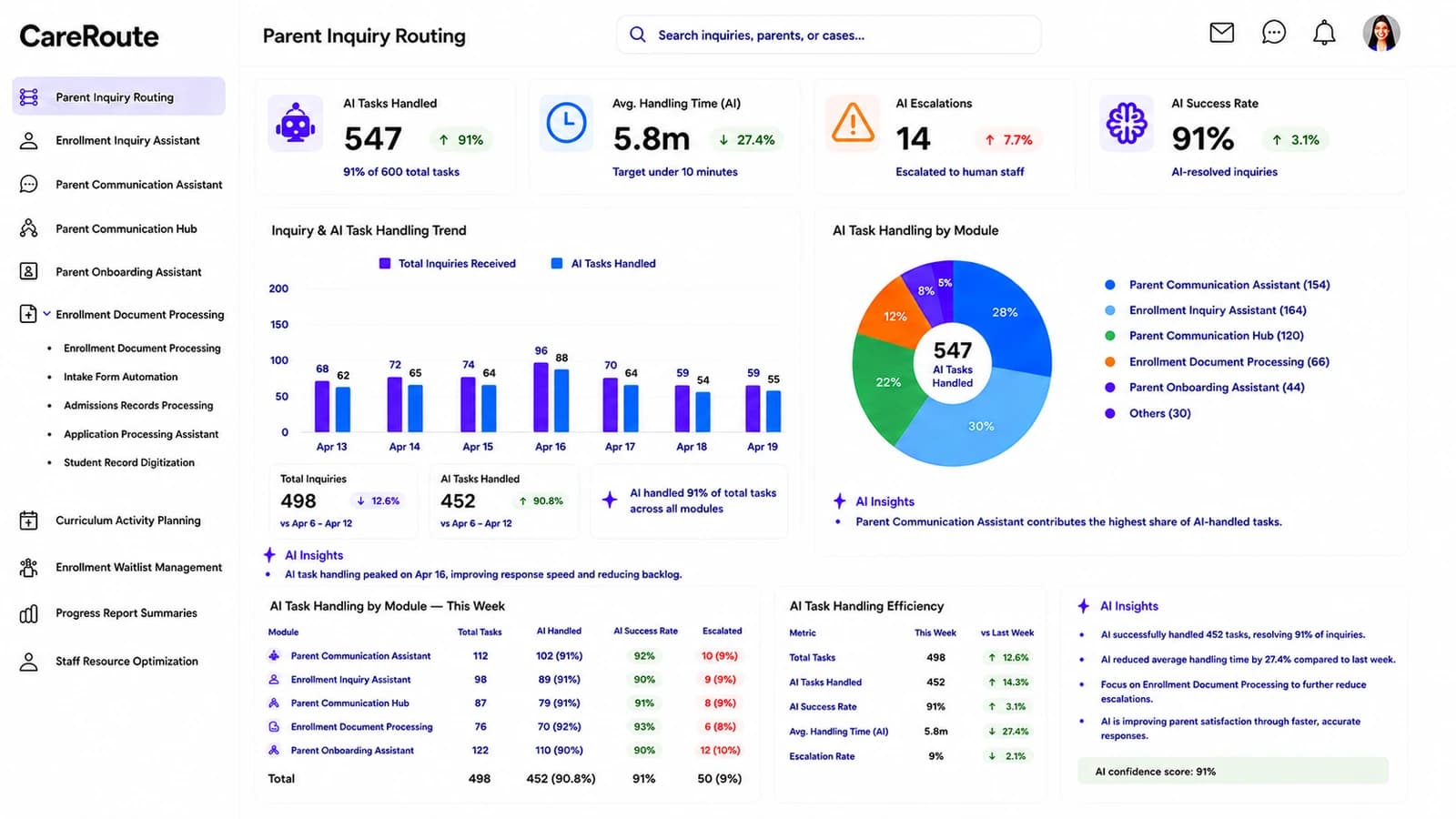
Cradlegrove.AI classifies every message a parent sends — a fees question, a schedule change, an allergy note, a tour request — tags it Admissions, Billing, Classroom or Administration, ranks urgency, and routes it to the desk that owns it. Confidence, reasoning and handling time sit in the same view so directors act on evidence, not on a Friday-afternoon guess.

Cradlegrove.AI Parent Inquiry Routing dashboard: KPI cards for AI tasks handled, handling time, escalations and success rate above a weekly volume chart, an AI-task-by-module donut, a per-module handling table and a live AI Insights panel.
  • 547 handled
  • 5.8m handling time
  • 91% success
  • By module
  • AI insights
1,086Inquiries auto-routedThis week · 87% of 1,248 total
6mMedian handoff timeUnder the 10-minute target
82%Model confidenceAverage across every routed inquiry
14Urgent openAwaiting staff — down 5 since yesterday
Friday inquiry spikeFriday parent messages ran 20% above the daily average, driven by schedule and tour questions.
Where to add coverAdding a Friday afternoon admissions agent would protect the 6-minute handoff target on the busiest day of the week.
Highest routing volumeAdmissions takes 42.5% of routed inquiries; classroom teams take 26.3% — the two desks the model leans on most.
The platform

Nine modules, one record of the family.

Inquiry routing, parent communication, enrolment intake, waitlist, curriculum planning, progress reports and staff scheduling all read from the same family record — so an admissions coordinator sees the same evidence the routing model used, and nothing has to be re-keyed between teams.

Enrollment Inquiry Assistant

Answer the enrolment question before the parent has to chase you.

Every parent enquiry — tuition payment plans, preschool intake, allergy submissions, sibling discounts, tour availability — arrives with an AI-drafted response the admissions team can Accept, Edit or Flag. Each draft carries its own classification confidence, current status, parent satisfaction reading and timestamp so nothing goes missing between shifts.

Draft, then reviewThe AI proposes the reply; a coordinator sends the version that goes out.
Confidence on every line94% on preschool enrolment, 89% on tour availability — you can see where to look first.
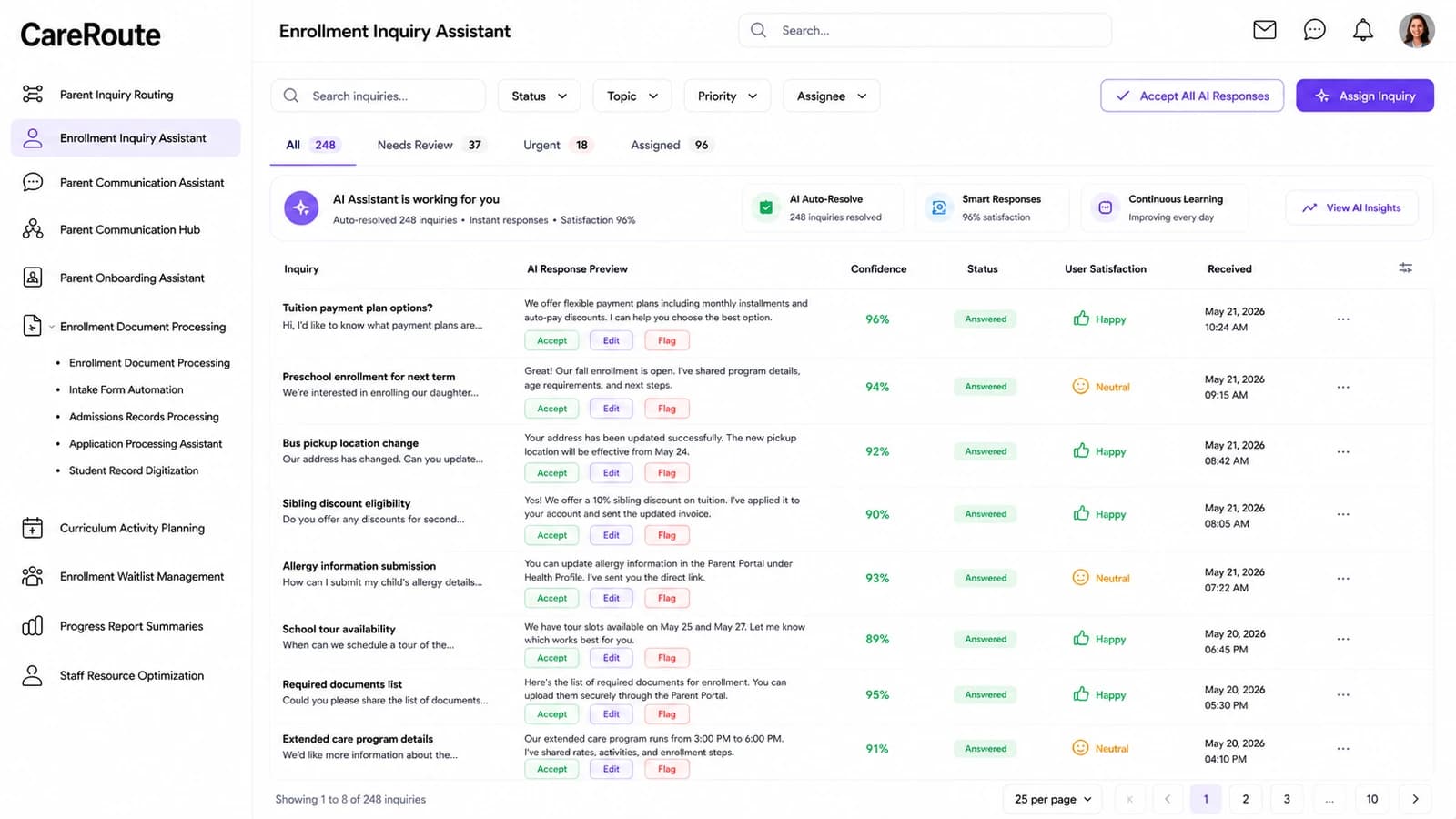
Enrollment Inquiry Assistant dashboard — Answer the enrolment question before the parent has to chase you.
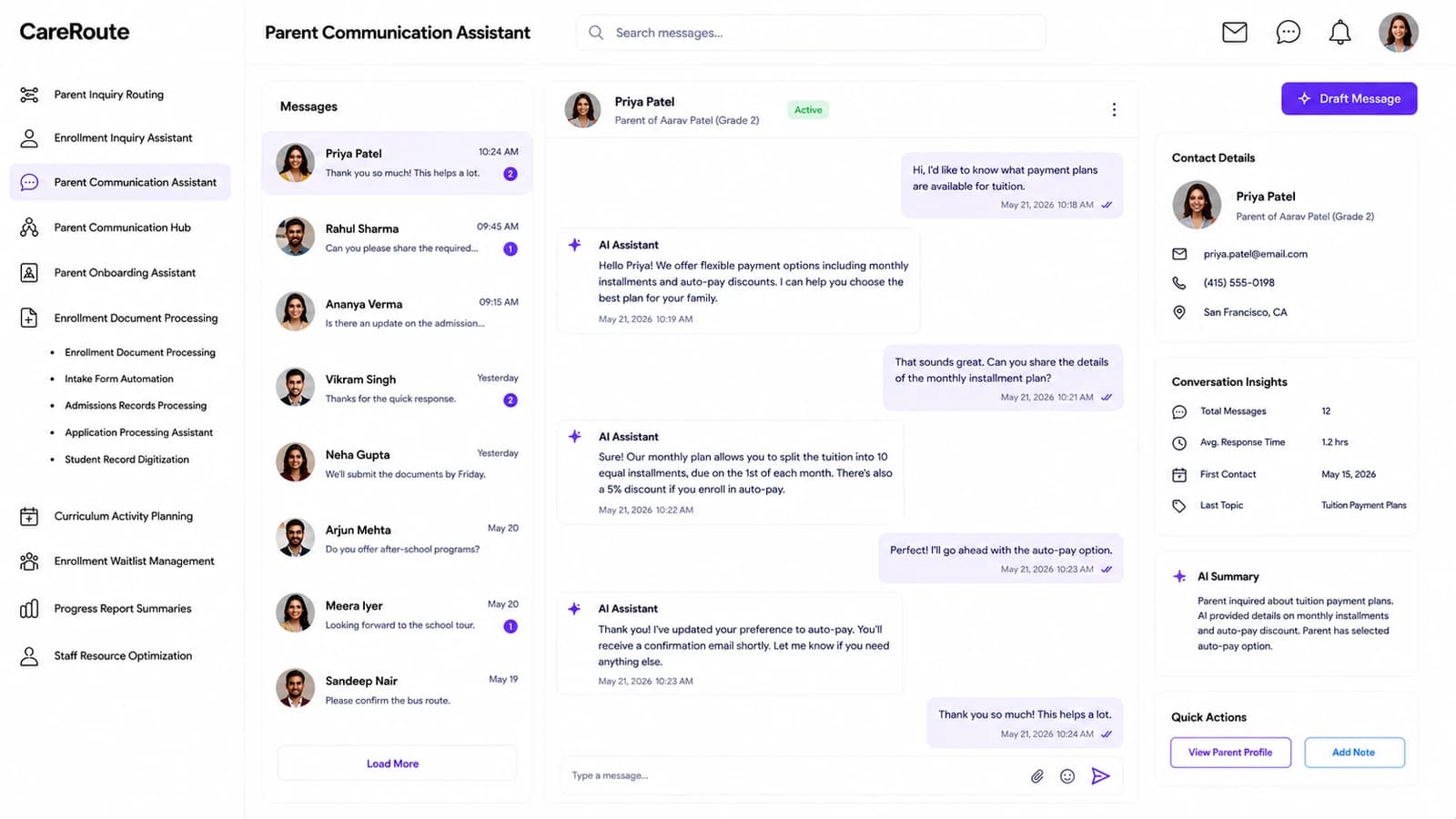
Parent Communication Assistant

Compose the message that fits this family, not a template.

Draft, review and personalise a parent message with the AI Assistant beside you. Pick the channel — email, SMS, portal or phone — set the audience from an individual family to the whole centre, and the assistant suggests wording that matches your voice, the child's programme and the previous conversation.

Channels togetherEmail, SMS, portal and phone all leave from one workspace, with one audit trail.
Approval on the recordDrafts move Draft → Review → Approved → Sent with the owner named on every step.
Parent Communication Assistant dashboard — Compose the message that fits this family, not a template.
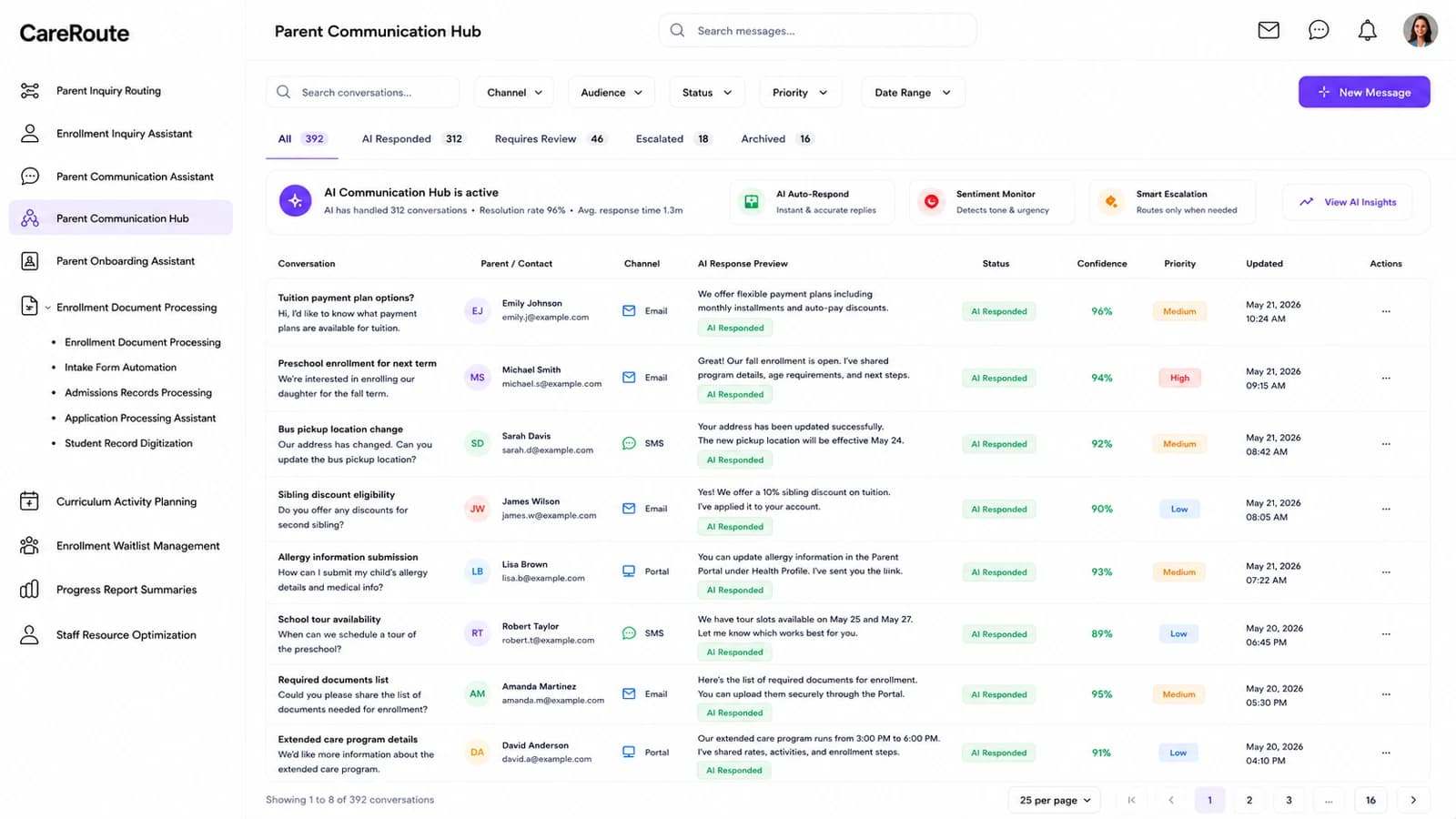
Parent Communication Hub

Manage every open parent conversation from one queue.

Live threads across email, SMS, portal and phone land in a single hub, tagged Open, Waiting, Escalated or Closed with urgency, owner and last-activity time in view. Open a chat and the whole timeline is there — participant context, AI-suggested replies, internal notes and the handoff controls.

One inbox, every channelNo jumping between Gmail, the portal and phone slips to piece together a family's week.
Handoff without lossReassign a conversation and the next owner sees every prior message and note.
Parent Communication Hub dashboard — Manage every open parent conversation from one queue.
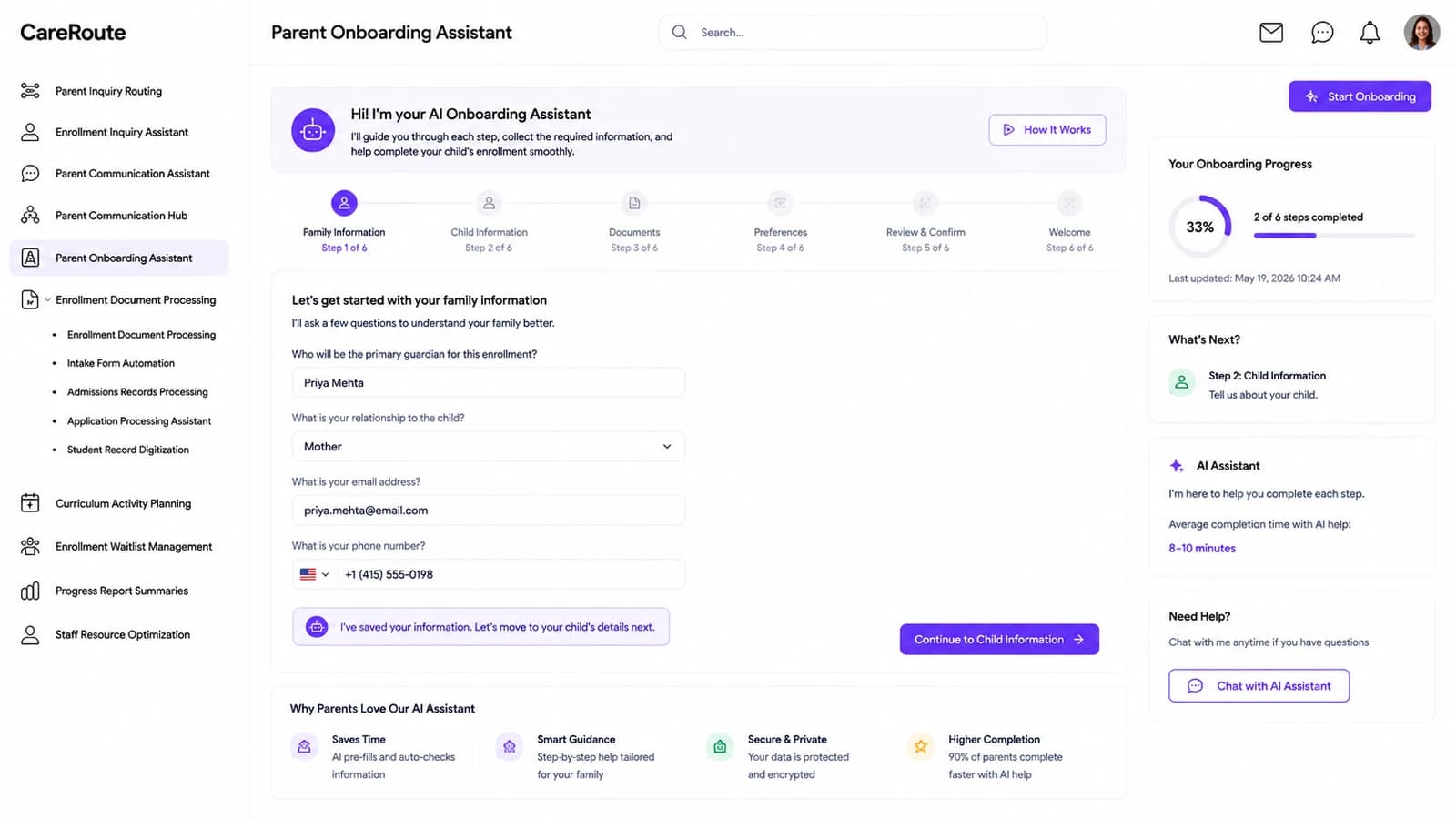
Parent Onboarding Assistant

Walk a new family through intake step by step.

A structured intake board that moves each household through Profile → Documents → Orientation → Ready, with the missing information, required documents and AI guidance for the step surfaced beside the form. Owners, due dates and stage progression are captured so admissions never lose a family in the shuffle.

Stage by stageEvery family sits in exactly one stage — no half-started, half-forgotten profiles.
Documents in contextRequirements for THIS programme show against THIS household — no generic checklist.
Parent Onboarding Assistant dashboard — Walk a new family through intake step by step.
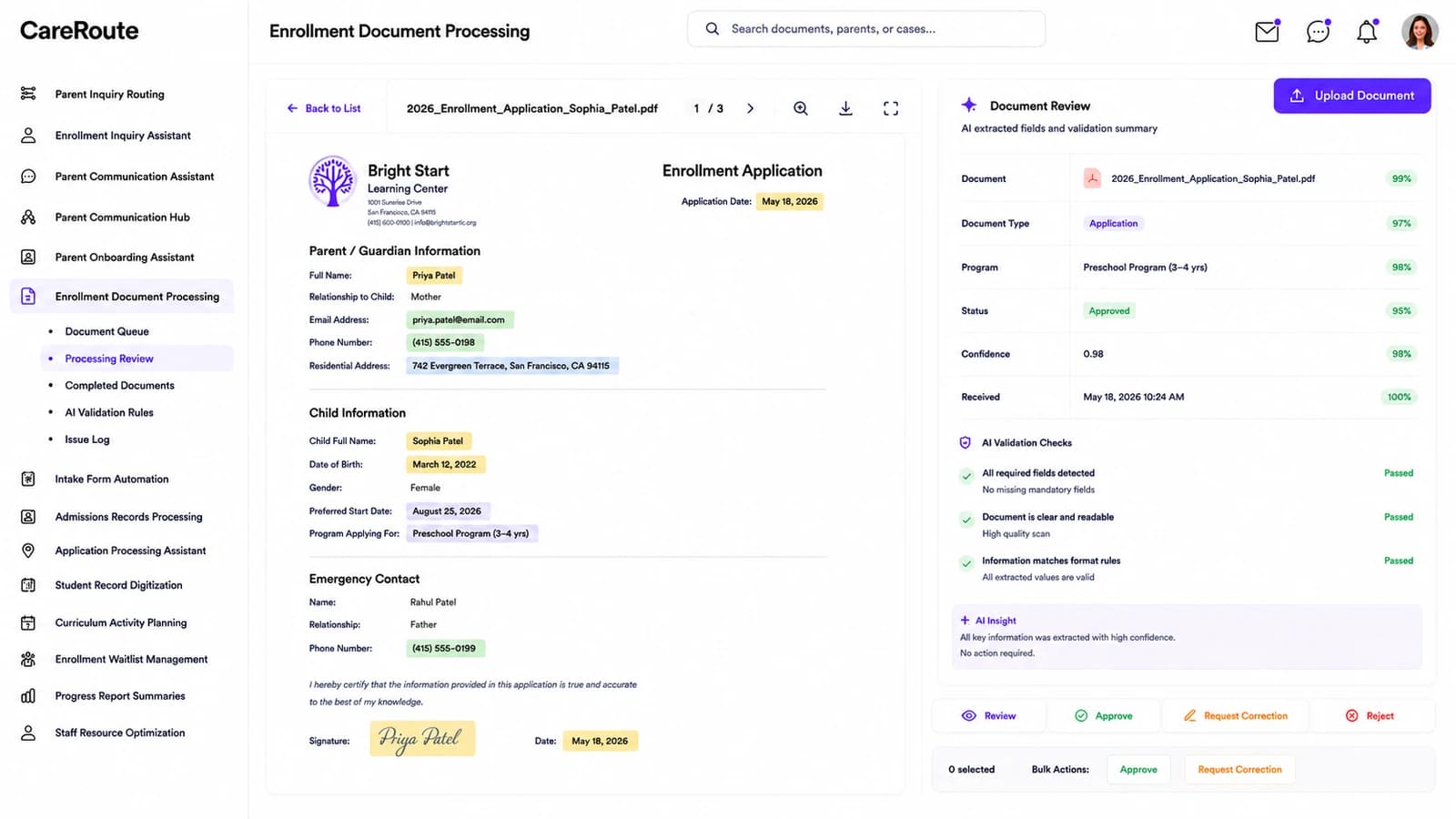
Enrollment Document Processing

Verify enrolment documents against the fields they should carry.

The source PDF sits beside the extracted values — Application, ID, Medical, Consent or Other — each field carrying its extraction confidence and a Valid, Needs Review or Missing Data state. Approve, Request Correction or Reject in a click; low-confidence extractions are surfaced before they land as an approved record.

Original beside extractionEvery extracted value can be checked against the source without leaving the panel.
Low-confidence firstA dedicated segment tab surfaces the extractions the model wasn't sure about.
Enrollment Document Processing dashboard — Verify enrolment documents against the fields they should carry.
A preschool learning table with wooden letters, Play-Doh and small chairs
A wide preschool playroom with a green-and-pink semicircle bench
A preschool wall with an alphabet chart, a Tricky Words board and cut-outs
In the classroom

Built for the rooms early childhood actually happens in.

A preschool art corner with a flower-shaped yellow table and easels
The rest of the platform

And the four rooms admissions, teachers and directors all touch.

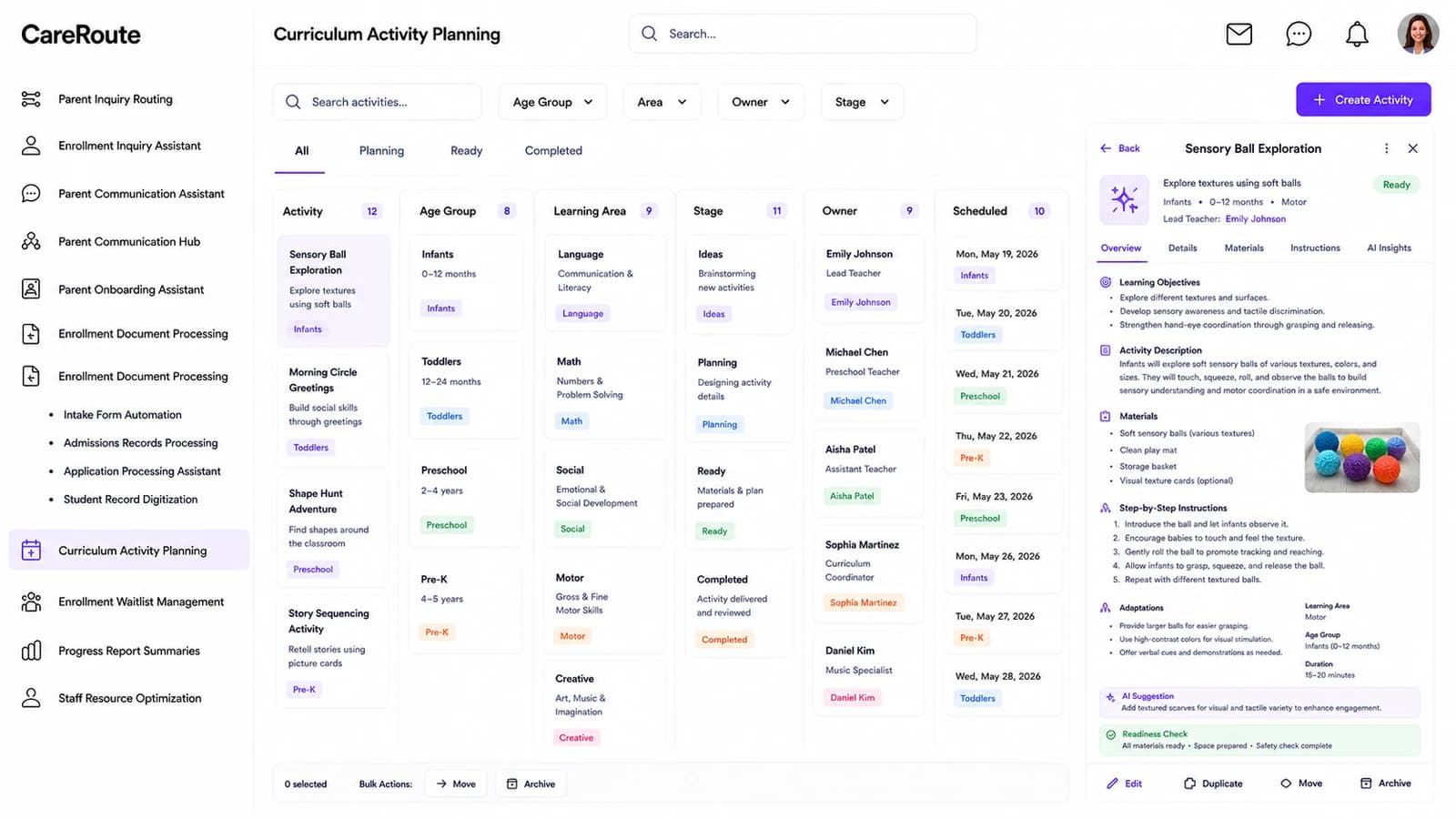
Curriculum Activity Planning dashboard — Plan and move classroom activities from idea to ready.
Curriculum Activity Planning

Plan and move classroom activities from idea to ready.

A board for the teaching week — activities tagged by age group (Infants, Toddlers, Preschool, Pre-K) and learning area (Language, Math, Social, Motor, Creative), moved through Ideas → Planning → Ready → Completed with objectives, materials and adaptations attached.

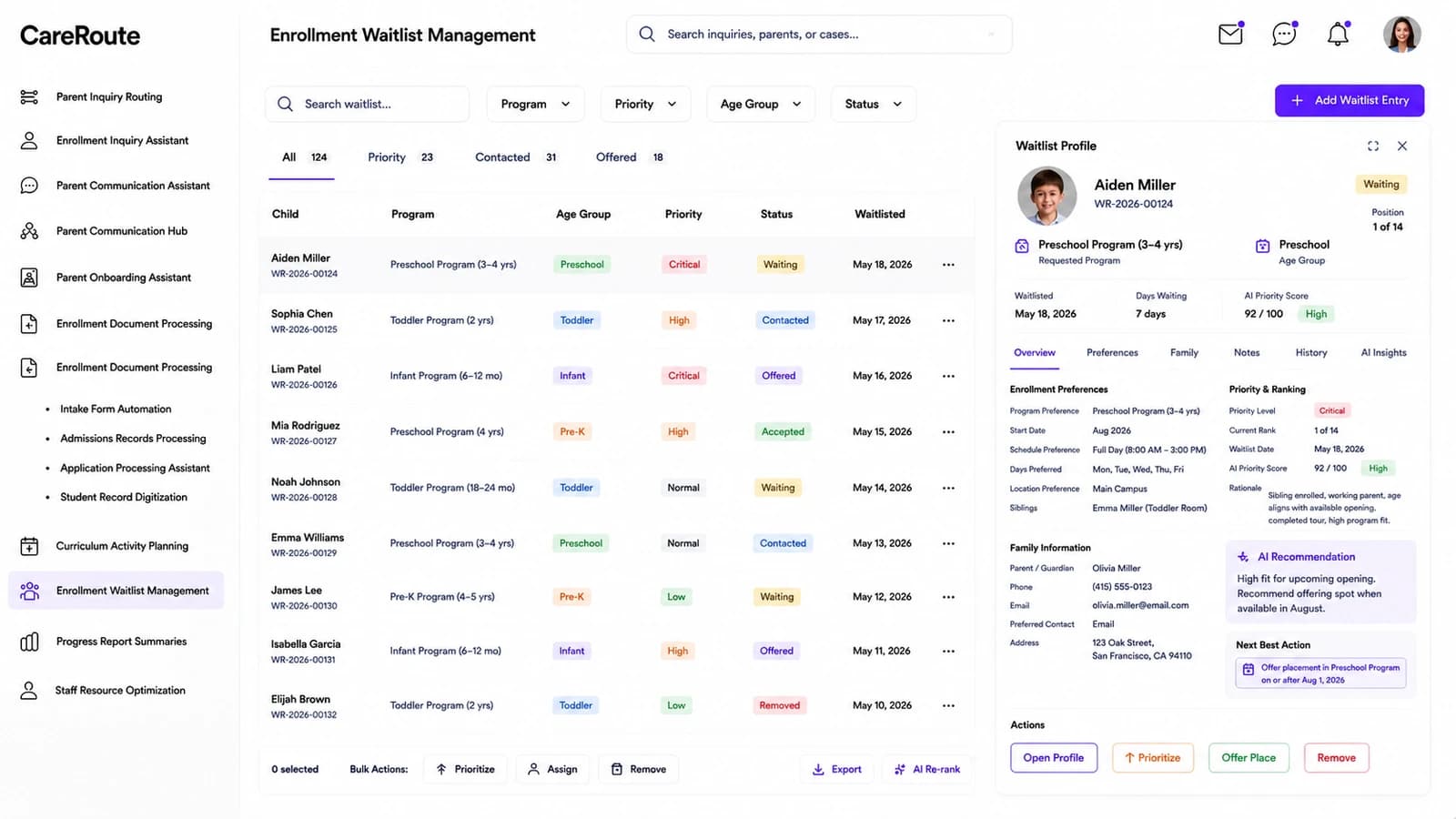
Enrollment Waitlist Management dashboard — Prioritise and place children from the waitlist.
Enrollment Waitlist Management

Prioritise and place children from the waitlist.

Every waitlisted child by programme and age group, with priority, status and eligibility context ranked so admissions can see who to contact and offer next. Open a profile for placement rationale, family notes and the offer controls.

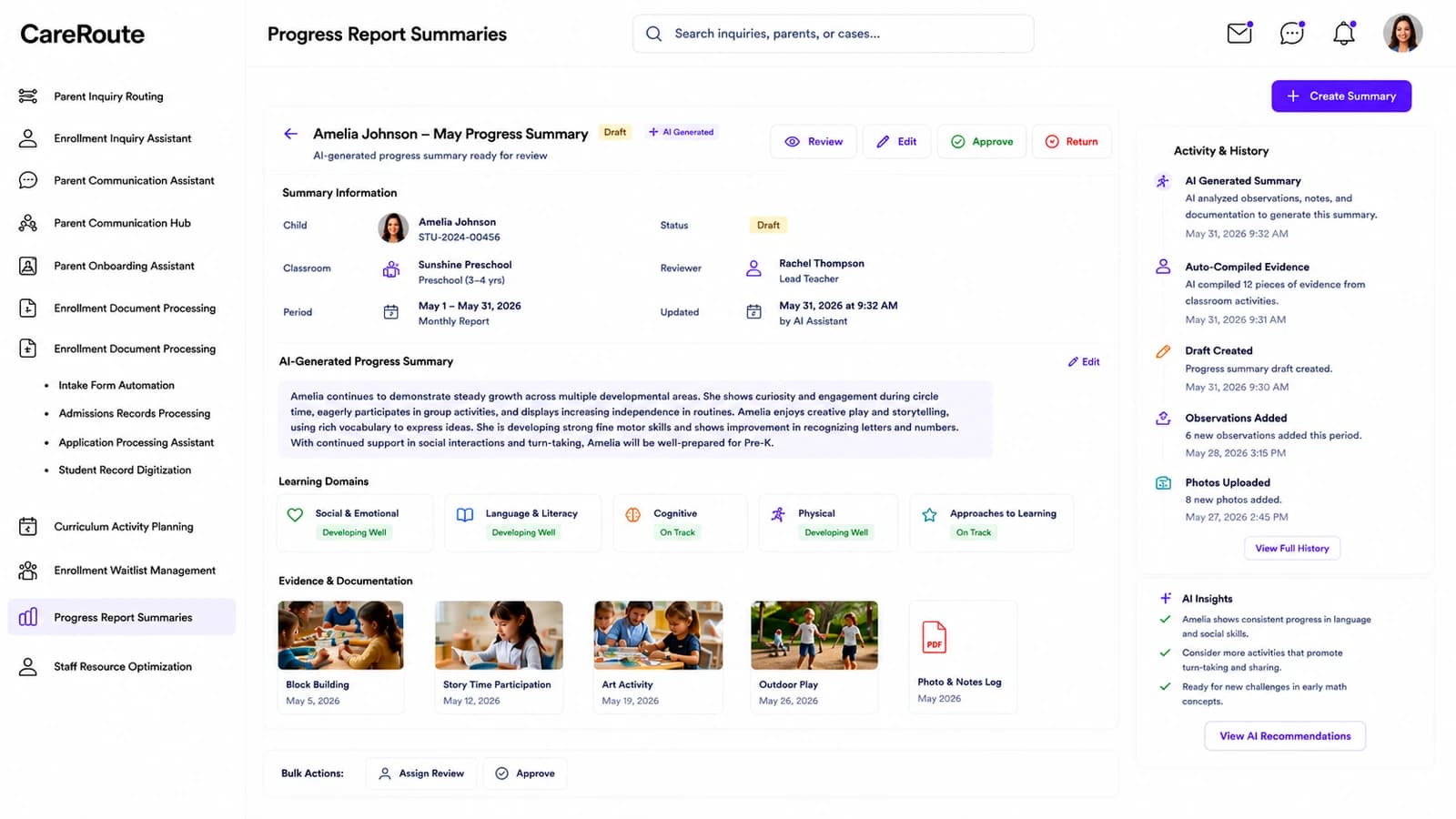
Progress Report Summaries dashboard — Review AI-drafted child progress summaries.
Progress Report Summaries

Review AI-drafted child progress summaries.

Observation notes and learning-domain evidence collated into a draft progress summary the reviewer can edit, approve or return. Reporting period, classroom and reviewer are tracked so nothing sits unsigned.

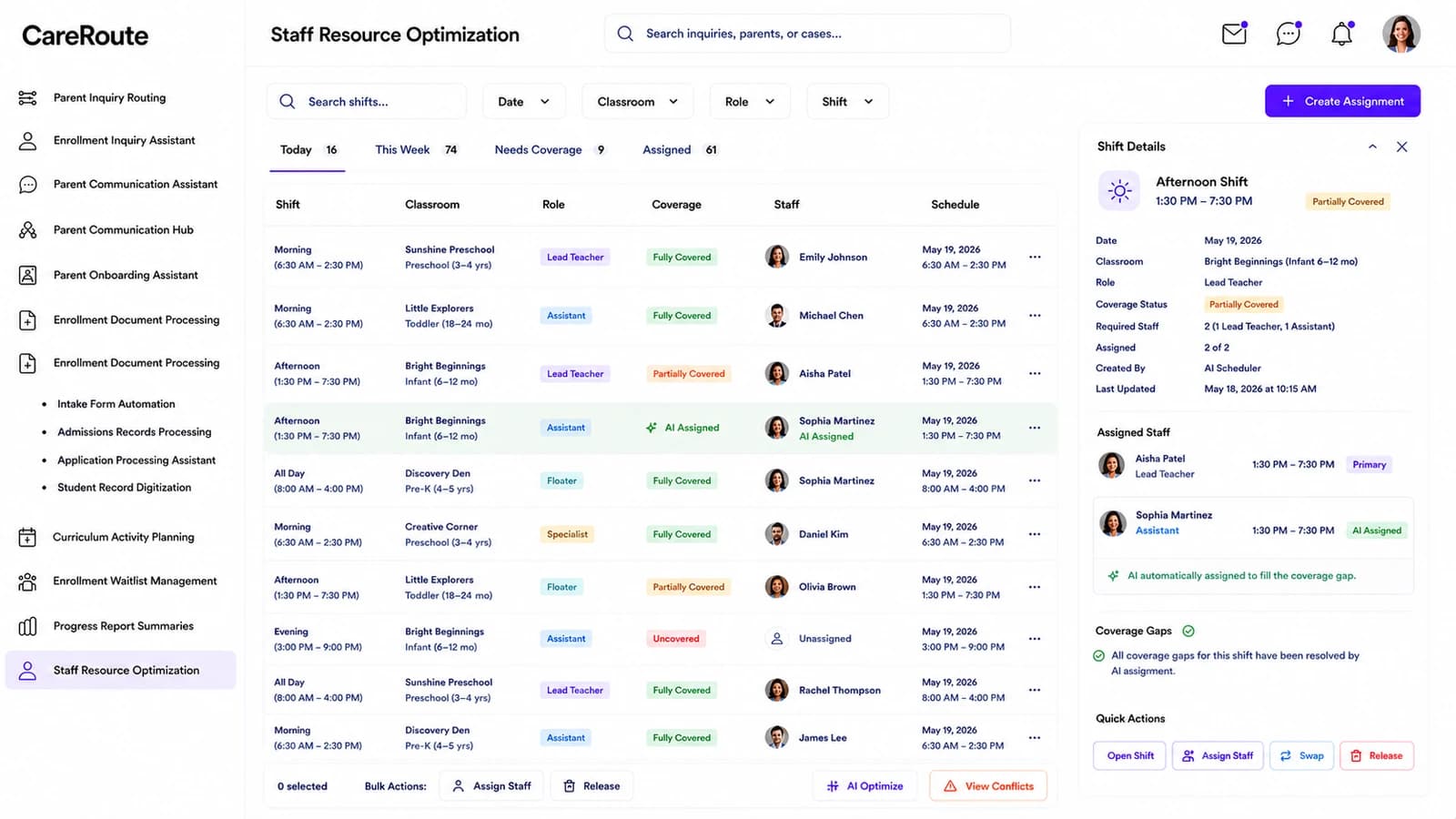
Staff Resource Optimization dashboard — Coordinate staff coverage against classroom needs.
Staff Resource Optimization

Coordinate staff coverage against classroom needs.

The staffing week against classrooms — Lead Teacher, Assistant, Floater and Specialist slots tagged Fully Covered, Partially Covered or Uncovered — with an AI-suggested reassignment shown when a shift is short. Ratios and group-size limits stay inside CFOC guidance.

How it works

Three steps from your parent inbox to a routed, answered queue.

01

Connect your parent inbox and records

Pull enrolment forms, daily records and the messages parents already send you across email, SMS, portal and phone. Nothing is re-keyed and no new data entry lands on your team.

02

The model classifies every message

Cradlegrove.AI tags each parent inquiry Admissions, Billing, Classroom or Administration, scores its urgency, and routes it to the desk that owns it — with the classification confidence and reasoning shown on every message.

03

Coordinators act on the queue

The routed queue lands in front of admissions, billing, teachers and administration with the AI-drafted response beside the original message. They Accept, Edit or Flag; the handling-time and success-rate readouts update as they work.

1,086

Parent inquiries auto-routed this week

82%

Average classification confidence

6m

Median handoff, well under the 10-minute target

91%

AI success rate on first-pass classification

Compliance

Held to the standards early childhood care runs on.

Cradlegrove.AI is built around the regulations and accreditation standards that govern children’s records, health and safety, family data and accessibility — here is what it supports out of the box.

FERPA

Family Educational Rights and Privacy Act

Enrollment documents, waitlist files and progress reports are stored under FERPA-aligned access controls, audit logs and parental-consent rules so student records stay protected.

COPPA

Children's Online Privacy Protection Act

Data captured from or about children under 13 in parent-facing flows follows COPPA's verifiable-parental-consent, notice and data-minimization requirements (including the April 2026 opt-in update).

NAEYC ELP

NAEYC Early Learning Program Accreditation Standards

Curriculum activity planning, family-engagement records and staff workflows map to NAEYC's ten Early Learning Program standards so accreditation evidence is one export away.

CFOC 4th Ed.

Caring for Our Children — National Health and Safety Performance Standards

Staff scheduling and classroom rosters enforce the CFOC child-to-staff ratios, group-size limits and health-and-safety recordkeeping expectations for early care and education.

ADA / WCAG 2.1 AA

Americans with Disabilities Act — Title III · WCAG 2.1 AA

Parent messaging, portals and translated notices meet WCAG 2.1 AA so families with disabilities can reach the right staff member without barriers.

Products

The drop-off hardware that feeds the platform.

Room-ready companion devices that pair with Cradlegrove.AI — each one wired to a module, so classroom rosters and wellness readings land on your dashboard without a teacher re-keying anything.

Classroom Attendance BLE Beacon

Classroom Attendance BLE Beacon

A pocket-sized Bluetooth Low Energy tag clipped to each child's bag that silently checks kids in and out at the classroom door, streaming live rosters into your Staff Resource Optimization dashboard so ratios and headcounts update the moment a child arrives.

Bluetooth Wellness Thermometer

Bluetooth Wellness Thermometer

A no-touch Bluetooth forehead thermometer used at drop-off; readings sync straight to the platform, log against the child's daily record and — if a threshold is crossed — auto-route a parent notification through the Parent Inquiry Routing queue.

Starting at

$200/mo

Flat for the whole centre, billed monthly. Cancel or change any time — every family record exports with you.
Pricing

One plan. Every module.

No per-child counting as classrooms fill and no feature held back for a higher tier. Talk to us and we’ll shape onboarding around your intake calendar, programmes and staff shifts.

Every module, every classroomNo per-child maths and no tier to decode.
Live parent-inquiry routingThe routed queue with AI drafts, confidence and handoff time.
Family + child recordkeepingEnrolment, waitlist, onboarding and progress reports in one place.
Rosters + ratiosStaff scheduling that respects CFOC ratios and classroom group sizes.
Know more
Onboarding

What your onboarding fee covers

A one-time setup that gets your childcare centre live before your first billing cycle — we import your rosters and programmes, connect your parent inbox and communication channels, and tune the routing, drafting and intake modules to your teams and calendar. Each fee below is a starting point: the final onboarding is scoped once we understand your environment, security needs, integrations, family volume, compliance requirements and deployment model.

Essential

$1,000+one-time
  • Kickoff call and onboarding plan scoped to your centre, programmes and intake calendar
  • Workspace provisioning and admin, admissions, teacher and administrator account setup
  • Import of your classroom roster, programmes and household directory
  • Family record fields mapped from your existing enrolment forms
  • Core modules configured — Parent Inquiry Routing, Enrollment Inquiry Assistant, Parent Communication Assistant
  • Parent email and messaging channels connected (email, SMS, portal)
  • Roles and permissions set for admissions, billing, classroom teachers and administration
  • Live-readiness check before your first billing cycle

Plus

Most centres
$2,500+one-time

Everything in Essential, plus:

  • Guided migration of historical enrolment and family records, validated for FERPA and COPPA
  • Two integrations with your childcare-management, billing or SIS tools (Brightwheel, Procare, Sage and the like)
  • Enrollment Waitlist Management prioritised to your programme cutoffs and sibling policies
  • Inquiry routing rules mapped to your admissions, billing, classroom and administration desks
  • Live training session for admissions, teachers and directors, with a recording
  • Dedicated onboarding specialist through go-live

Enterprise

$5,000+one-time

Everything in Plus, plus:

  • Tailored rollout across multiple centres, sites or intake seasons
  • Bespoke integrations with SSO and your parent-portal and finance APIs
  • Bulk family and child records migration with cleansing and reconciliation across systems
  • Curriculum Activity Planning and Progress Report Summaries configured to your programme framework and approval workflow
  • Role-based training tracks for classroom leads, floaters, administrators and directors
  • Named onboarding manager with a go-live date and an NAEYC / CFOC readiness baseline
Where it runs

Two ways to deploy the platform

Same subscription either way — only the onboarding may differ by your requirements.

Cloud (SaaS)

Fastest to start

Runs in Nestack's managed cloud — nothing to provision, updates and scaling handled for you. The quickest path from onboarding to your first live intake day.

Private / self-hosted

Data stays with you

The same platform deployed inside your own infrastructure — your cloud, VPC or on-prem — for centres that must keep children's records under strict control. Parent inbox, enrolment and progress data stay where your FERPA and COPPA-governed information already lives, and the subscription stays the same.

FAQ

Questions early childhood teams ask first.

What does Cradlegrove.AI do?

It reads every parent inquiry your childcare centre receives — across email, SMS, portal and phone — classifies it Admissions, Billing, Classroom or Administration, scores its urgency, drafts a reply and routes the message to the desk that owns it. Coordinators work a routed queue with AI drafts and confidence scores, instead of a shared inbox.

Where does the data come from?

The records your centre already keeps: the enrolment forms in your admissions folder, the daily records in your classroom software, and the messages parents already send you. It reads them together rather than one system at a time, so nothing has to be re-keyed and no new data entry lands on your team.

How are urgency and classification confidence calculated?

Every parent inquiry carries a confidence score for how well the model classified it, and an urgency level (Urgent / High / Normal / Low). Both are shown beside the message itself, alongside the reasoning and the routing decision, so a coordinator can override rather than take it on trust.

What happens to urgent messages?

They land at the top of the routed queue with the evidence attached — an allergy note, a pickup emergency, a health concern — and a prioritised list of actions: assign the right staff member, escalate to the director, notify the classroom. The Urgent Open KPI on the main dashboard shows how many are still awaiting staff.

Do coordinators stay in control of every reply?

Yes. Nothing goes out automatically. The model classifies, drafts and routes; the coordinator Accepts, Edits or Flags. The AI Success Rate on the dashboard tracks that split so you can see how much of the draft queue is landing without edits.

Which childcare centres does it fit?

Nurseries, preschools, day-care centres and after-school programmes — anywhere there is a parent inbox, an enrolment book and a small team juggling admissions, teaching and administration at the same time.

How do we try it on our own centre?

Book a demo and pick the modules you want to see. We will walk Cradlegrove.AI through a week you care about — routed inquiries, drafted replies, the waitlist, the onboarding board and the staffing week — end to end.

Book a demo

See Cradlegrove.AI on your own centre.

Tell us who you are, pick what you want to see, then grab a time — we’ll run Cradlegrove.AI on a week of your parent inbox and rosters.

Step 1 of 3

First, who should we prep for?

Takes a few seconds — so we come ready for your centre.