A teacher leading a class of students — the institutions Eduqentra.AI is built for

One intelligent workspace for the learner journey.

Eduqentra.AI brings AI into everyday education work — drafting admissions replies, checking enrollment documents, matching learners to programs, recommending the next learning step, and flagging who needs support — so your team decides faster with clear reasons beside every suggestion.

The learner journeyFrom first inquiry to enrollment, program matching, learning path, schedule, and completion — one continuous path.
Help for every learnerThe right program, a clear next step, and the resources they need to stay on track.
Support when it mattersSpot learners who need help early, then advisor interventions before they fall behind.

Built on the learner record you already keep — enrollment, progress, assessment and support history, read together rather than one report at a time.

Book a demoSee the platform
The learner cockpit

See the learner’s journey. Know where to act.

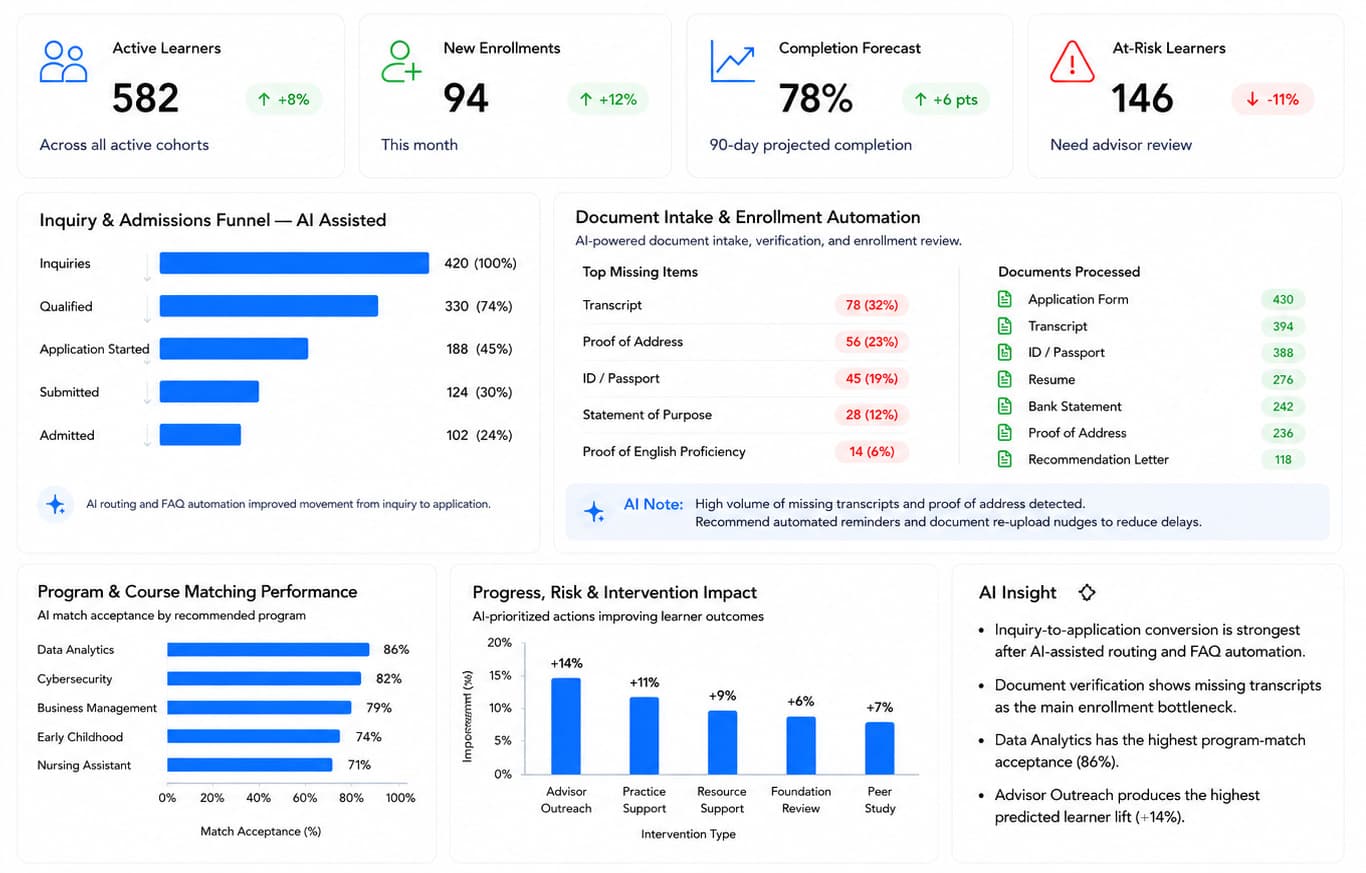
Eduqentra.AI gives teams one clear view of learner operations — from enrollment and admissions progress to document readiness, program matching, learner risk, intervention impact, and projected completion. AI highlights the most important issues and helps teams understand where attention is needed and what action can improve learner outcomes.

Eduqentra.AI dashboard: KPI cards for active learners, new enrollments, completion forecast and at-risk learners, with inquiry funnel, document intake, program matching, intervention impact and AI insight panels.
  • At-risk learners
  • Missing documents
  • AI insight
One live viewWhole journey on one screenInquiry through completion in a single dashboard
AI that guidesSuggestions with reasonsWhat to do next, explained in plain language
Faster decisionsLess chasing, more actingTeams see bottlenecks before they grow
Shared recordSame truth for every teamAdmissions, advising and faculty stay aligned
See the full pipelineFrom inquiry and documents to matching and progress — know where learners are and what is blocking them.
Act on AI insightClear calls on bottlenecks, best program fits, and which support actions help learners most.
Support at-risk learnersSee who needs help, pick the next support action, and stay with them until they finish the program.
The platform

Modules that keep the learner’s journey moving.

Each one helps your team work faster and support learners better — from first inquiry through to completion.

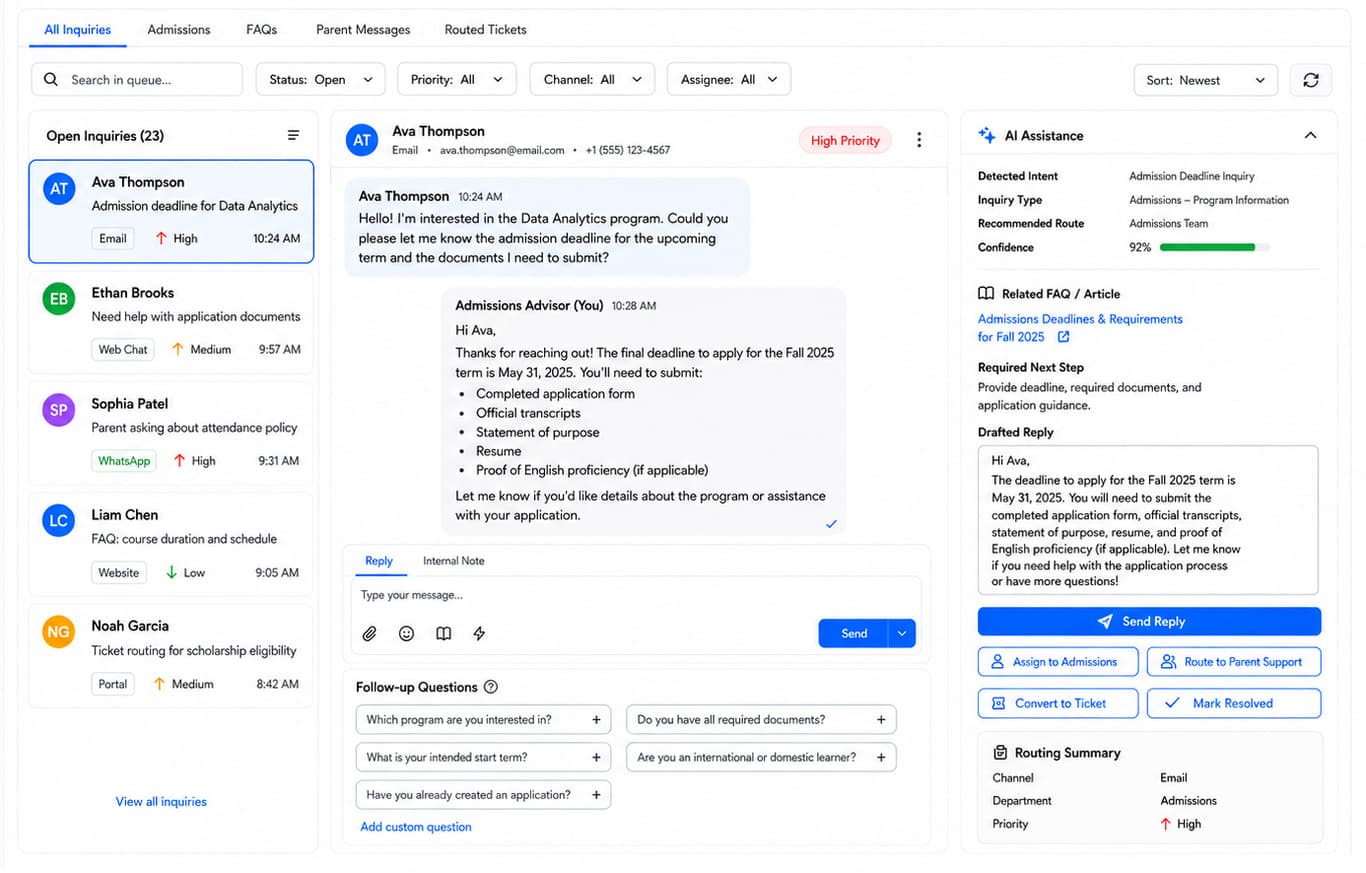
  • Inquiry & Admissions Support dashboard — Turn every inquiry into a clear next step.

    Inquiry & Admissions Support

    Turn every inquiry into a clear next step.

    When every inquiry lands in one place and AI helps draft the reply, admissions spends less time chasing messages — and more learners move from first contact to application.

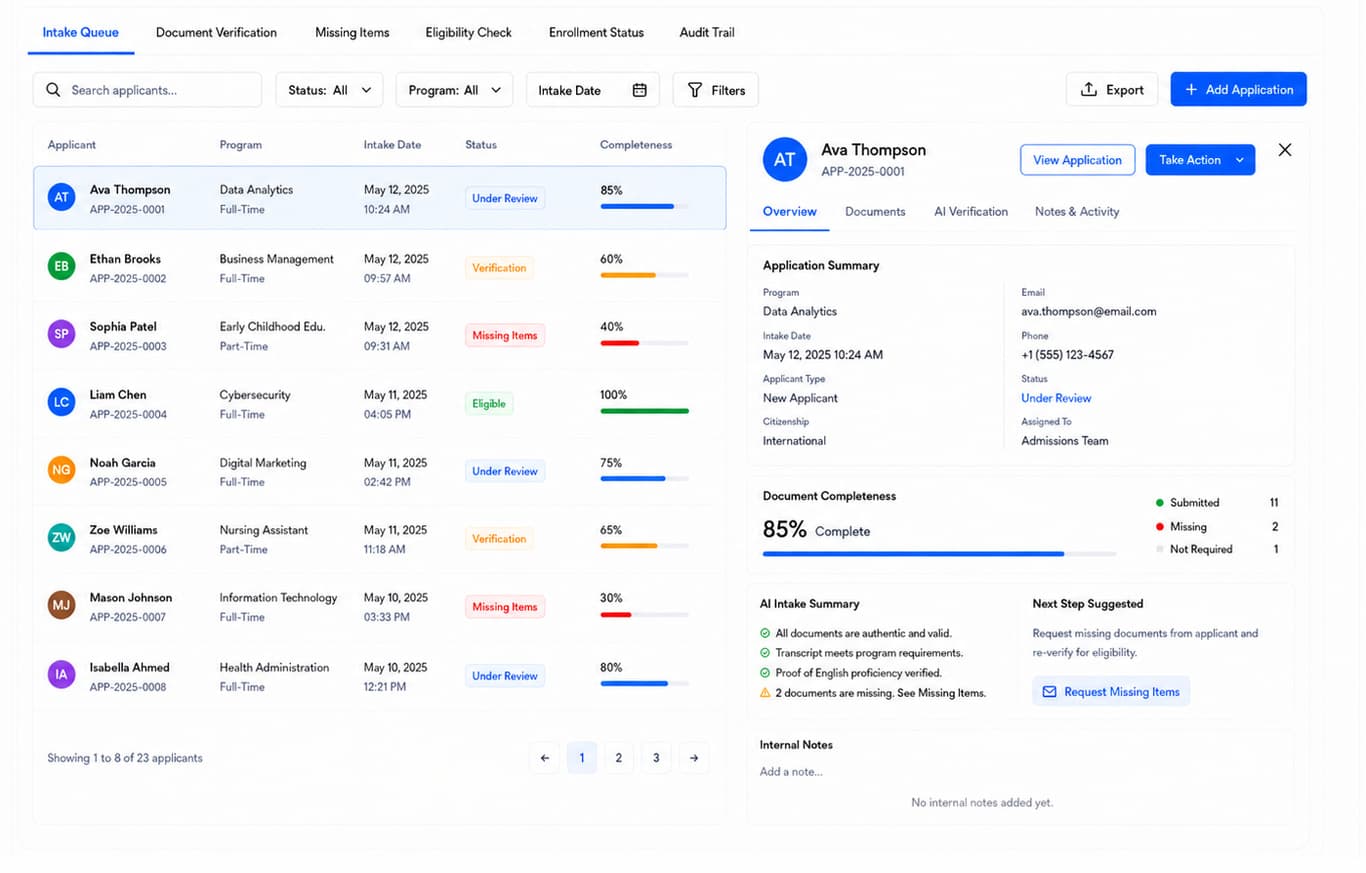
  • Document Intake & Enrollment dashboard — Keep every application moving forward.
    Document Intake & Enrollment

    Keep every application moving forward.

    AI checks each application, flags missing or weak documents, and suggests the next request — so enrollment keeps moving and your team only steps in when a case needs attention.

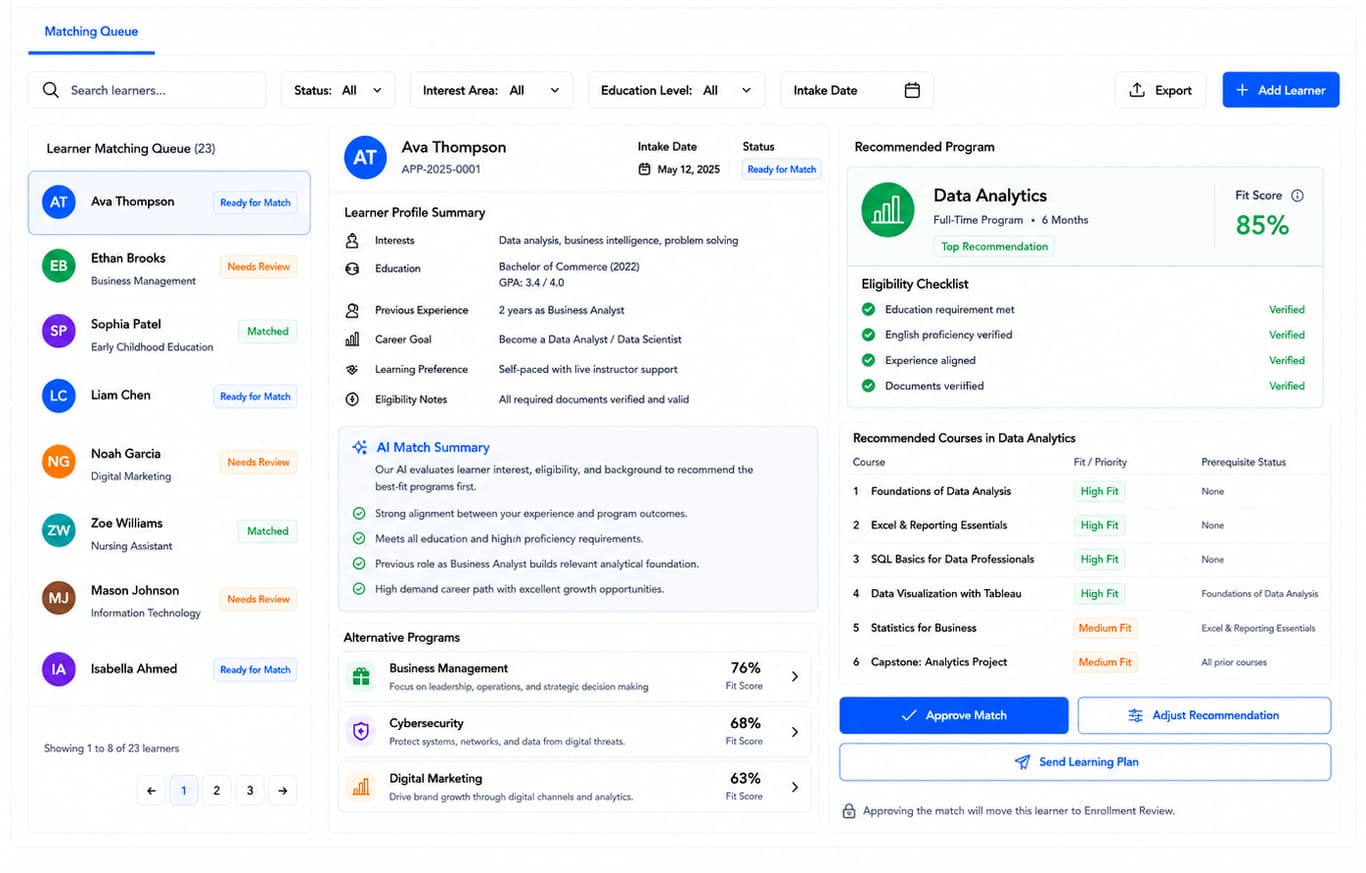
  • Program & Course Matching dashboard — Find the best program fit automatically.
    Program & Course Matching

    Find the best program fit automatically.

    AI reads each learner’s goals, background, and eligibility, then ranks the programs and courses that fit best — with a clear reason for every recommendation, so matches happen without manual guesswork.

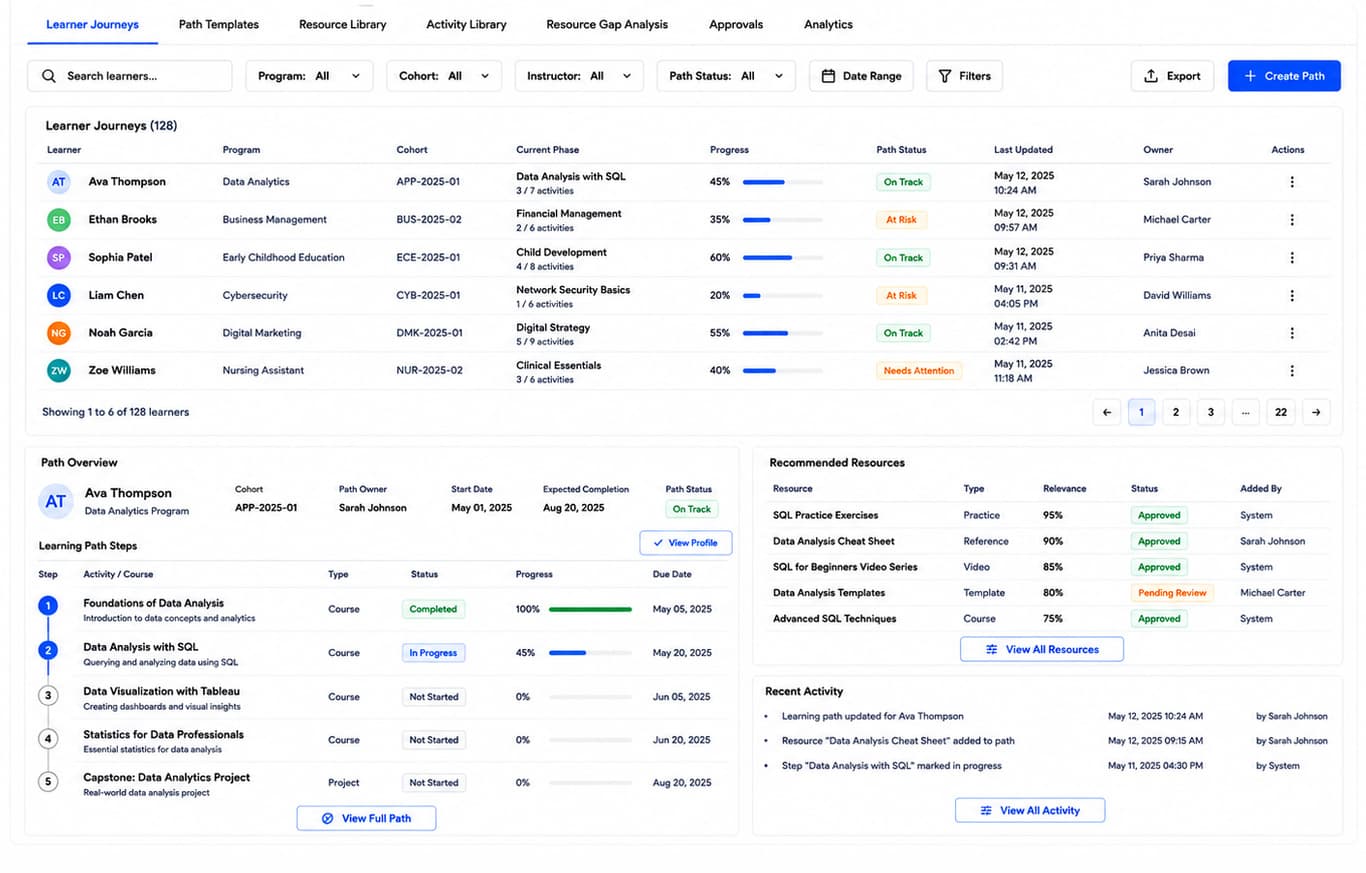
  • Learning Path & Resources dashboard — AI keeps each learner’s path moving forward.
    Learning Path & Resources

    AI keeps each learner’s path moving forward.

    AI builds each learner’s path, picks the next activity, and attaches the right resources as they progress — so your team only reviews and confirms, without rebuilding a plan by hand every time.

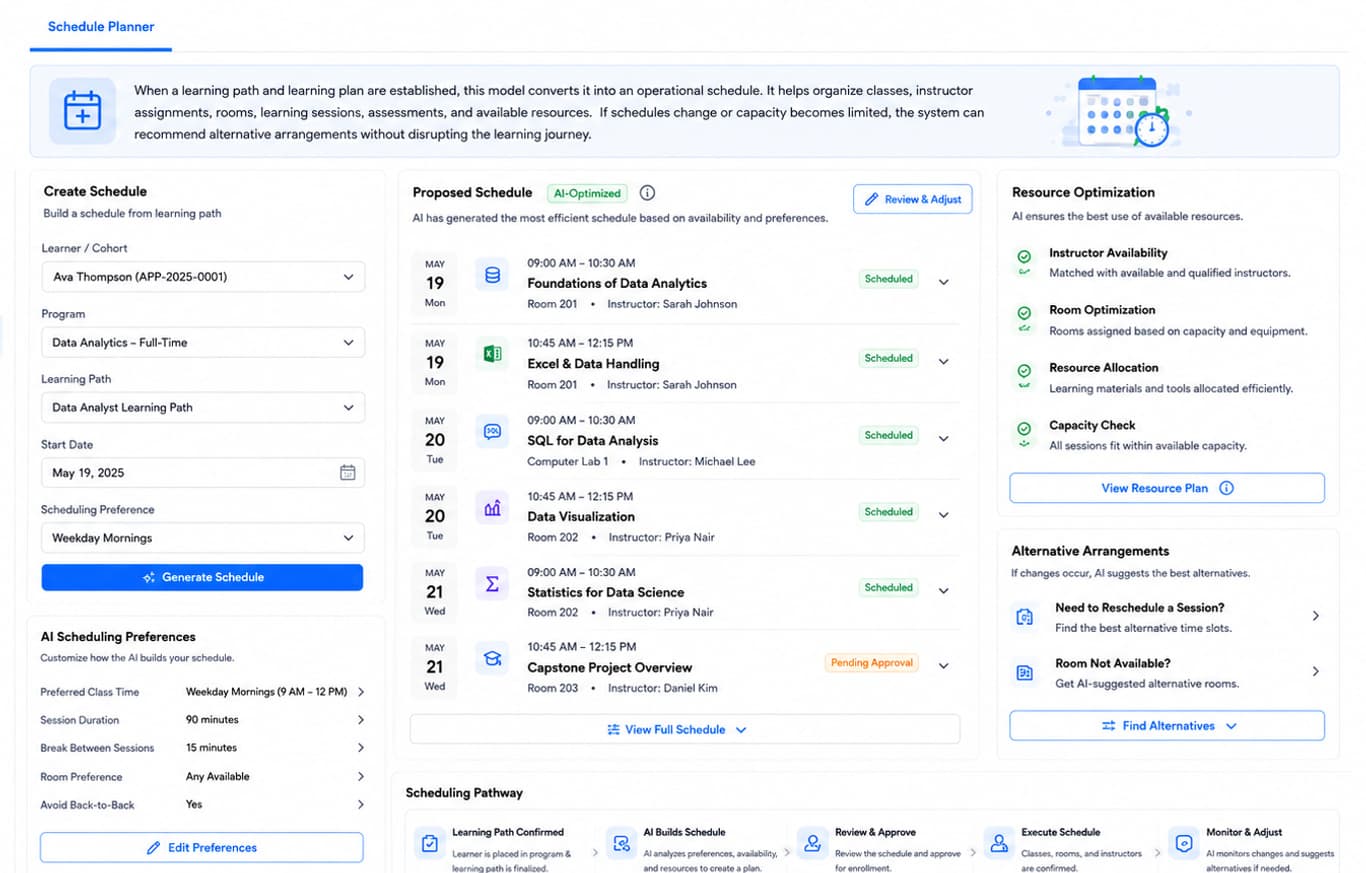
  • Scheduling & Resource Optimization dashboard — AI builds a timetable that actually works.
    Scheduling & Resource Optimization

    AI builds a timetable that actually works.

    AI builds and adjusts the timetable for every cohort — catching clashes early and keeping the week running smoothly with far less manual work.

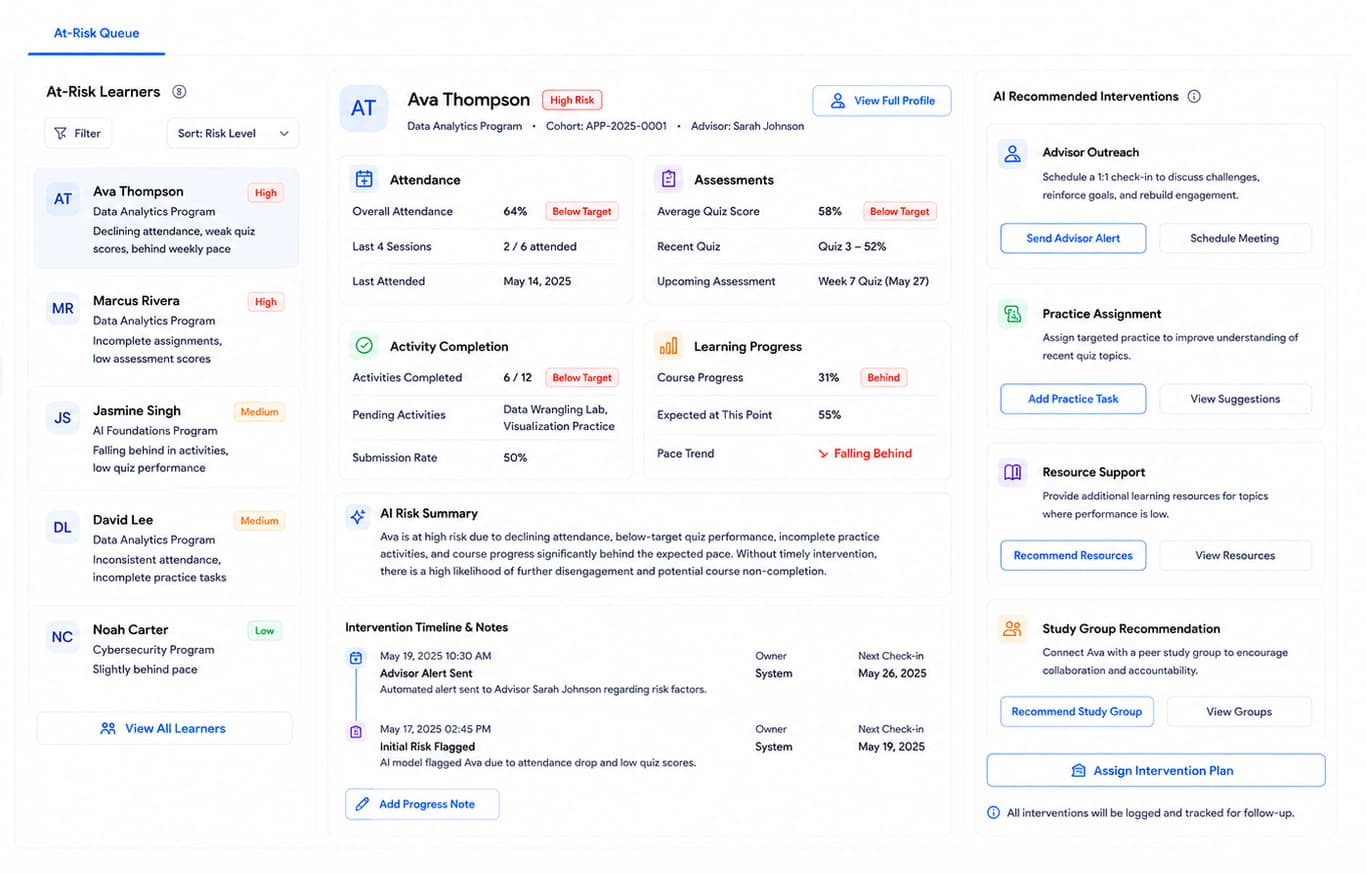
  • Progress, Risk & Intervention dashboard — Help learner's before they fall behind.
    Progress, Risk & Intervention

    Help learner's before they fall behind.

    AI flags who is at risk, explains why, and suggests the support to offer next — so your team acts early and more learners stay on track, instead of waiting for late rescue.

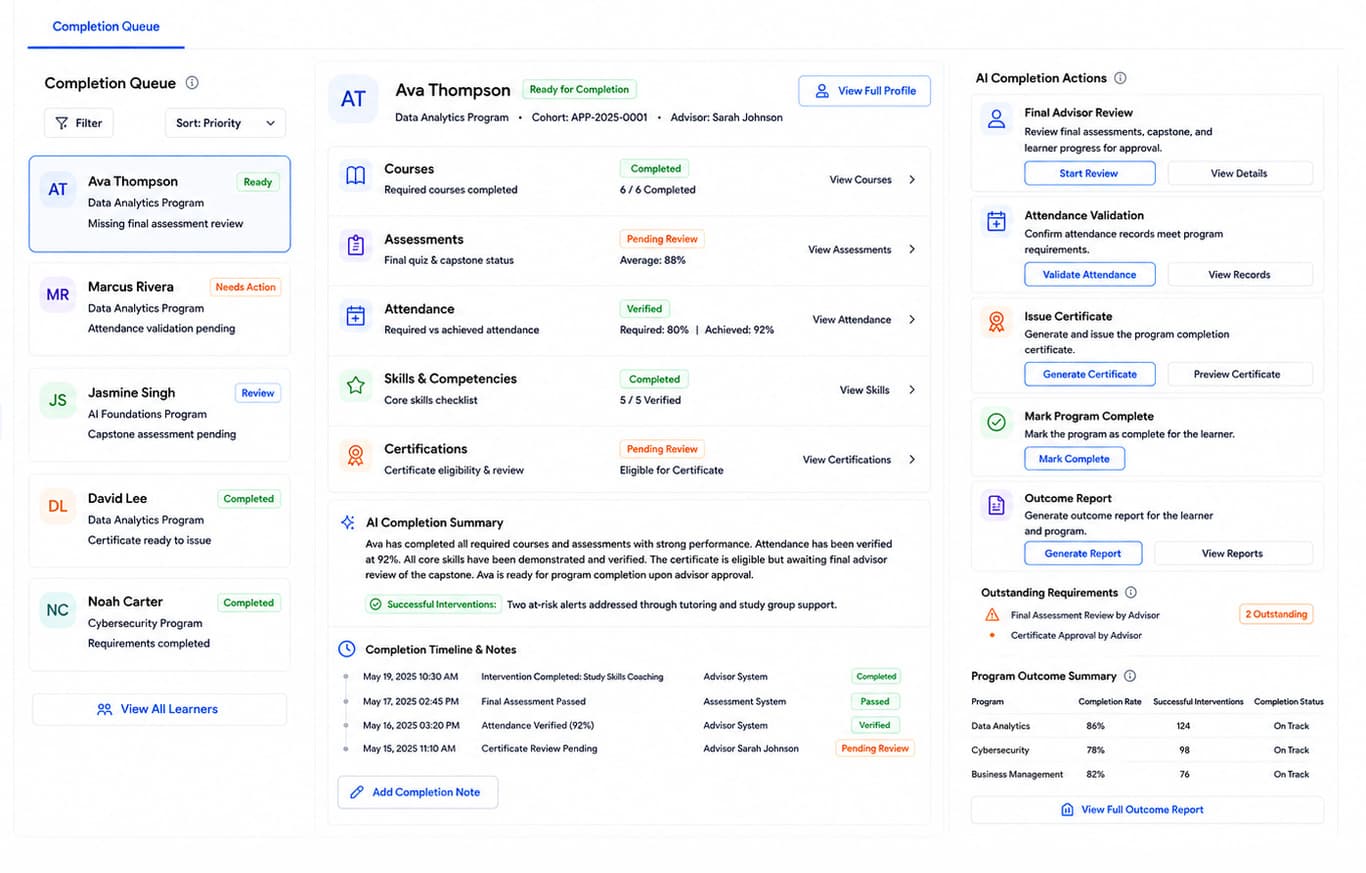
  • Completion & Outcome Analytics dashboard — AI confirms when a learner is ready to finish.
    Completion & Outcome Analytics

    AI confirms when a learner is ready to finish.

    AI checks remaining requirements, closes gaps, and prepares outcome reports — so completion is proven, not guessed, and your team finishes each learner with confidence.

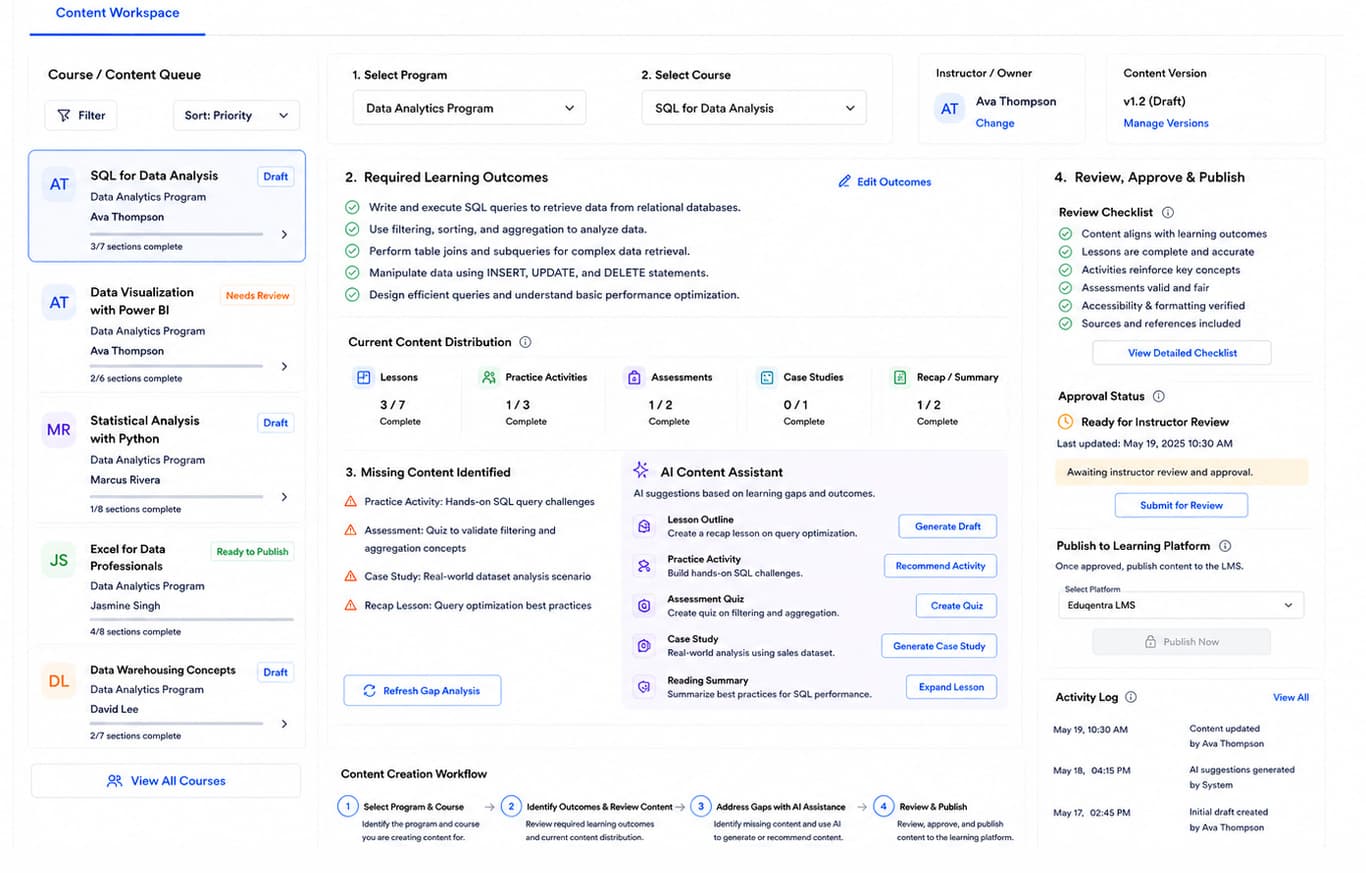
  • Curriculum Content Creation dashboard — AI drafts what your courses are missing.
    Curriculum Content Creation

    AI drafts what your courses are missing.

    AI finds gaps in lessons, practice, and assessments, then drafts the missing pieces for review — so your team publishes stronger courses without building everything from a blank page.

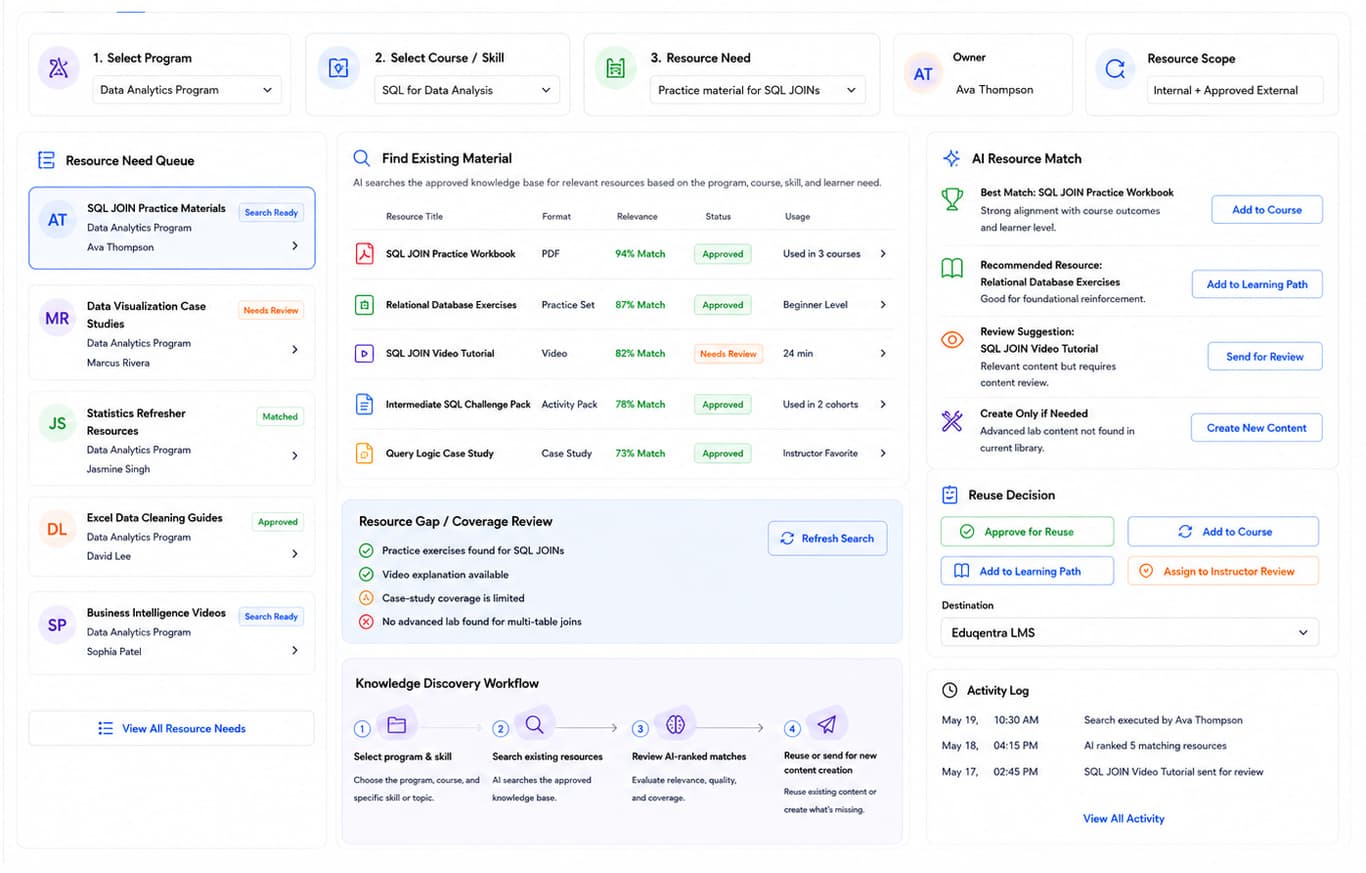
  • Knowledge Resource Discovery dashboard — AI finds the best material you already have.
    Knowledge Resource Discovery

    AI finds the best material you already have.

    Most institutions already own useful content — they just cannot find it. This module surfaces the best existing resources for a need, so teams reuse what works and only create what is truly missing.

A school building on a summer afternoon
Library stacks
A university campus lawn
A modern faculty building
In the institution

Built for the places learning actually happens.

Books and learning materials on a classroom desk
How it works

Three steps from first inquiry to a completed learner.

01

Bring every learner in

Eduqentra.AI takes incoming inquiries, then AI checks uploaded applications and documents, flags what is missing, and matches each learner to the right program and course map.

02

Build the path and the week

Turn that program match into an adaptive learning path with the right resources, then generate a conflict-aware schedule — rooms, instructors and session preferences set once, adjusted when something shifts.

03

Guide learners all the way to finish

AI spots learners who need help, recommends the right support, and confirms when they are ready to finish — so your team can review, certify, and report from one place.

Inquiry to intake

Unified inbox, document queue and enrollment status

Match & path

Program fit, course map and adaptive resources

Schedule & deliver

AI-optimised timetable with room and instructor fit

Risk to complete

At-risk queue, interventions and outcome close-out

Traditional SaaS vs Eduqentra.AI

Don’t settle for the AI your software chose.

Most platforms ship one model and you work inside its limits. Eduqentra puts an orchestration layer between the learner record and the model, so every step of an intake runs on the intelligence that suits it.

Traditional SaaSBuilt-in AI · one pass
Eduqentra · Routed intake
  • 01

    Read the scanned transcript

    Mistral

    Layout-aware OCR holds multi-column credit tables and grade legends that a general model flattens

  • 02

    Tag all 1,400 assessment items

    Hugging Face

    A fine-tuned classifier beats a frontier model per item, at a fraction of the cost

  • 03

    Read the whole handbook in one pass

    Gemini

    Long context holds the full programme, so a prerequisite on p.9 still binds a module on p.318

  • 04

    Extract goals, credits and eligibility

    OpenAI

    Strict schema, so the learner record never comes back malformed into your SIS

  • 05

    Draft the advisor note and rationale

    Claude

    Holds structure across thousands of words and cites the source line for each claim

  • 06

    Score every path, flag what is weak

    DeepSeek

    Cheap enough to score all 96 signals twice, which is what makes the flags trustworthy

One ranked learner path96 SIGNALS · 87% MEAN CONFIDENCE · 146 HELD FOR REVIEW
Also routableLlamaQwenor any specialist you bring

Note: Model names and marks are the property of their owners and appear here to say which APIs an intake step can be routed to. No endorsement or partnership is implied. Families are named without version numbers because the frontier re-ranks faster than a page can be edited.

Sister platform — Nestack Agent Care

Your Education AI agents, run like production systems.

Telemetry, evaluations, guardrails, human review, and a crew on call when one of them starts drifting at 3am.

30

Failure modes catalogued

12

Rated SEV-1

1,950+

Baseline eval cases

24/7

Agent monitoring

Open the Education playbook2.08 · 23 playbooks(opens nestackagents.com in a new tab)

Learning-path and advising agents are catalogued under Education — playbook 2.08.

Compliance

Held to the standards education runs on.

Eduqentra.AI is built around the regulations and learning standards that govern student data, accessibility and accredited training — here is what it supports out of the box.

Section 508 / WCAG

ADA · Section 508 · WCAG 2.1 AA

Platform UI and learning content are perceivable and operable for disabled learners.

Accreditation

ACCET / ACCSC & state licensure

Records retention and audit trails required of accredited training providers.

Note: These are standards the platform is built to support inside your workflows — obligations that fall on you as the licensee. They are not certifications held by us, and support in the product is not a substitute for your own counsel or compliance officer.

Connectivity

Your whole stack, connected.

Canvas, PowerSchool, Ellucian, Salesforce, Snowflake — and the rest of what your institution already runs on. 24 integrations across 4 stages of a learner intake, every one of them reading the tool’s own public API.

Note: Tool names and marks belong to their respective owners. No endorsement or partnership implied.

Products

The classroom hardware that feeds the platform.

Field-ready devices that pair with Eduqentra.AI — each one wired to a module, so the readings land on your dashboard without re-keying.

Attendance Reader

Attendance Reader

A wall-mounted RFID + biometric check-in reader with on-device NFC and Wi-Fi. It streams every tap-in and roll-call in real time to your Scheduling Resource Optimization dashboard.

Enrollment Scanner

Enrollment Scanner

A cordless Wi-Fi document scanner for enrollment forms, IDs and certificates. Each capture auto-syncs — OCR text and image — straight into your Document Intake Automation dashboard.

Note: Hardware, installation, and integration are not included in the standard subscription. Additional charges apply based on the hardware selected, integration modules required, and implementation scope.

Starting at

$200/mo

Flat for the whole institution, billed monthly. Cancel or change any time — your student records export with you.
Pricing

One plan. Every module.

No seat counting as cohorts grow and no feature held back for a higher tier. Talk to us and we’ll shape it around your intake calendar and student numbers.

Every module, every campusNo per-seat maths and no tier to decode.
Live risk scoringThe at-risk queue and its intervention actions.
Outcome reportingPlacement, progression and completion, tracked.
Onboarding includedData mapping and support from the first week.

Note: AI API usage is charged separately. Clients must recharge their AI credit balance based on their usage.

Know more
Onboarding

What your onboarding fee covers

A one-time setup that gets your institution live before the first monthly cycle — we map your student records, connect your SIS and communication tools, and tune the matching, risk-scoring and intake modules to your programs and intake calendar. Each fee below is a starting point: the final onboarding is scoped once we understand your environment, security needs, integrations, data volume, compliance requirements and deployment model.

Essential

$1,000+one-time
  • Kickoff call and onboarding plan scoped to your institution and intake calendar
  • Workspace provisioning and admin, advisor and faculty account setup
  • Import of your student roster, programs and course catalogue
  • Learner profile fields mapped from your existing records
  • Core modules configured — Program Matching, Course and Resource Recommendation
  • Advisor email and calendar integration connected
  • Roles and permissions set for admissions, advising and faculty staff
  • Live-readiness check before your first monthly billing cycle

Plus

Most institutions
$2,500+one-time

Everything in Essential, plus:

  • Guided migration of historical enrollment and outcome data, validated
  • Two integrations with your SIS, LMS or CRM (Banner, Canvas, Salesforce and the like)
  • Student Support Predictor tuned to your at-risk thresholds and intervention actions
  • Inquiry routing rules mapped to your teams, queues and support desks
  • Live training session for advisors and admissions, with a recording
  • Dedicated onboarding specialist through go-live

Enterprise

$5,000+one-time

Everything in Plus, plus:

  • Tailored rollout across multiple campuses, faculties or intake seasons
  • Bespoke integrations with SSO and your student-data APIs
  • Bulk records migration with cleansing and reconciliation across systems
  • Curriculum and document-drafting modules configured to your templates and approvals
  • Role-based training tracks for faculty, advisors and administrators
  • Named onboarding manager with a go-live date and an outcome-reporting baseline
Where it runs

Two ways to deploy the platform

Same monthly subscription either way — only the onboarding may differ by your requirements.

Cloud (SaaS)

Fastest to start

Runs in Nestack's managed cloud — nothing to provision, updates and scaling handled for you. The quickest path from onboarding to your first live intake cycle.

Private / self-hosted

Data stays with you

The same platform deployed inside your own infrastructure — your cloud, VPC or on-prem — for teams handling sensitive student records. Predictions and outcome analytics run where your FERPA-governed data already lives, and the monthly subscription stays the same.

FAQ

Common questions about Eduqentra.AI.

What is Eduqentra.AI?

Eduqentra.AI is an AI workspace for schools, colleges, and training providers. It helps your team manage learners from first inquiry to program completion — admissions, documents, matching, learning paths, schedules, risk support, and outcomes — in one place.

Who is it for?

It is for education teams that handle admissions, enrollment, advising, and learner support. If your staff works across inquiries, documents, placement, timetables, and completion, this product is built for that day-to-day work.

What problems does it help us solve?

Slow inquiry replies, stalled enrollment files, uncertain program placement, unclear learning next steps, schedule clashes, and late notice when a learner is struggling. AI helps surface the issue and suggest the next action so your team can move faster.

Do we need to replace our current systems?

No. It connects to the channels and records you already use — such as email, chat, WhatsApp, your website, and student systems. Setup maps your data once so teams do not re-type the same learner details across screens.

How do we get started?

Book a demo and tell us which parts matter most to you — for example inquiry support, document intake, matching, or at-risk help. We walk through Eduqentra.AI with your process in mind, then plan onboarding around your data and how you want to run it.

Is our learner data kept secure?

Yes. Learner information is handled with education privacy needs in mind, and you can run in our managed cloud or in your own private environment when data must stay inside your infrastructure. We confirm the right setup with you during onboarding.