
A financial-district skyline at blue hour, the desks below still lit through tax season

Filingloom.AI — intake, extract, prepare, review, research, report for accounting and tax firms

Filingloom.AI is the AI intake and filing layer for accounting and tax firms — client documents classified, tax forms prepopulated, payroll extracted, review checks resolved, and client-ready summaries drafted on one system of record.

Impact

Every client document, sorted before staff open the queue.

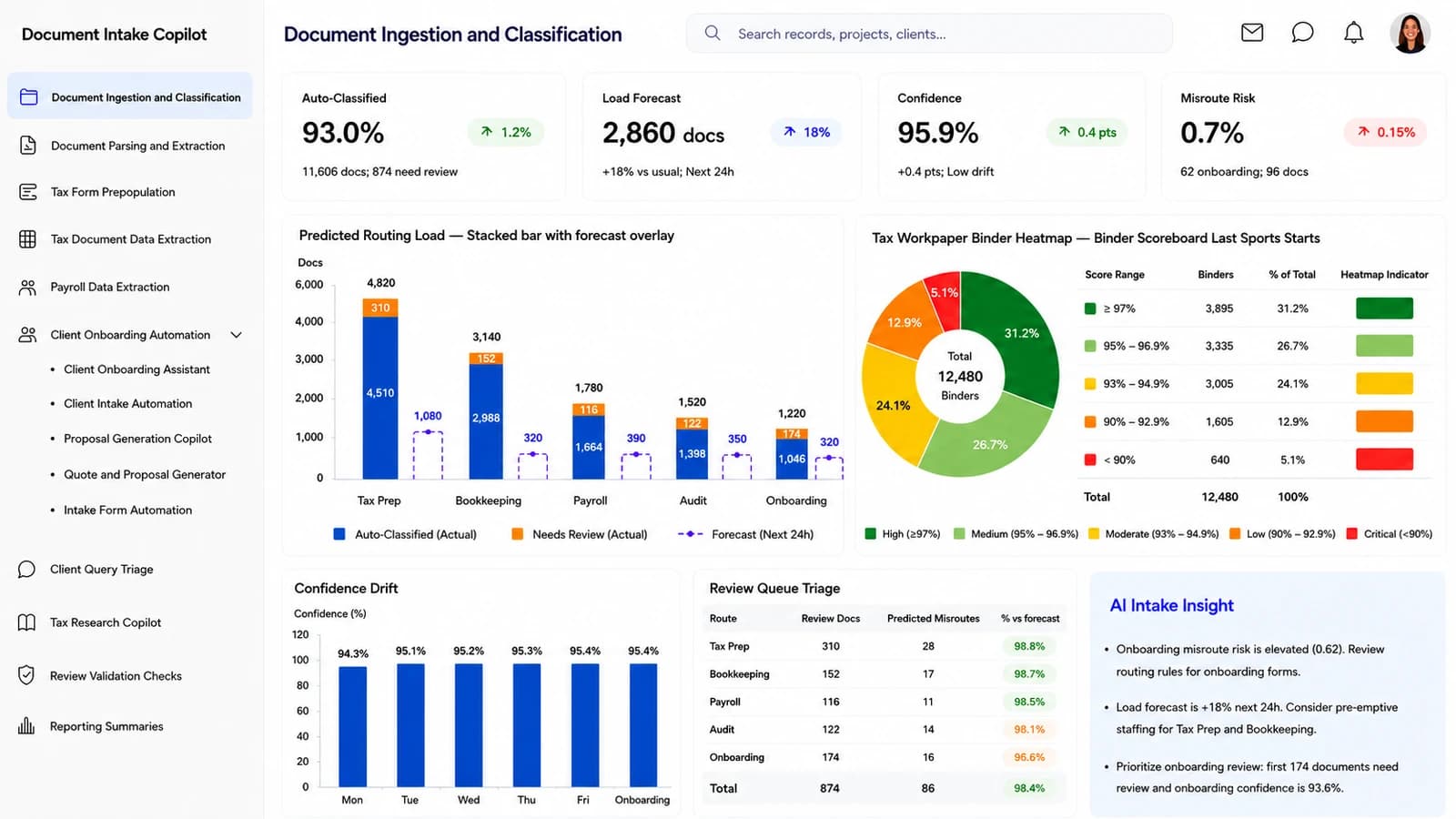
Tax, bookkeeping, payroll, audit and onboarding paperwork arrive from portals, email and scanners in a hundred shapes. Filingloom.AI classifies each one, scores the confidence of every extracted field, and hands preparers a queue that’s already triaged.

Filingloom.AI — Document Intake Copilot dashboard
Of 11,606 client documents auto-classified this cycle; 874 held back for staff review
93.0%
Documents predicted for the next 24 hours, +18% versus the usual daily load
2,860
Extraction confidence across connected sources, up 0.4 points with low model drift
95.9%
Misroute risk on 86 documents — flagged early, before they land in the wrong staff queue
0.7%

Filing season should not start with a week of sorting the intake. It should start with the paperwork already on the right desk.

Why intake comes firstEvery other module reads from it
Tax-season partners reviewing a workpaper binder around a boardroom table
Modules

The whole return, on one system of record.

Intake, parsing, tax prep, payroll and downstream review are not five tools stitched together in Filingloom.AI — they are one continuous record of a client engagement, from the first upload to the filed return.

Start a conversation
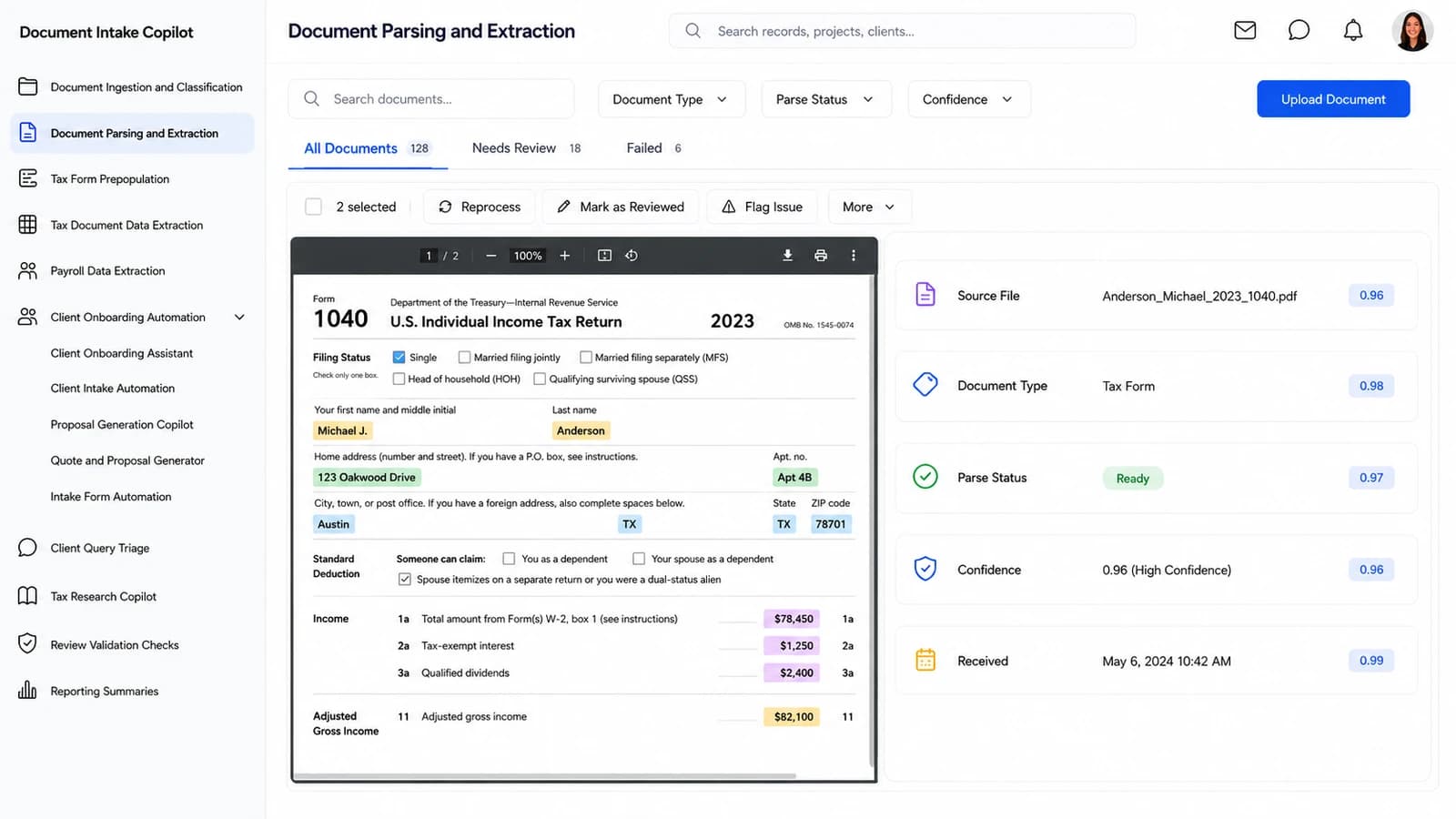
Document Parsing and Extraction — Filingloom.AI
01 — Document Parsing and Extraction

Source documents parsed, then held next to what was extracted

Uploaded source files render beside their AI-parsed fields — document type, parse status, confidence, timestamp — so preparers can accept, correct or reprocess in one motion instead of jumping between the file and a data grid.

  • Document Type
  • Parse Status
  • Confidence
  • Received
  • Assignee
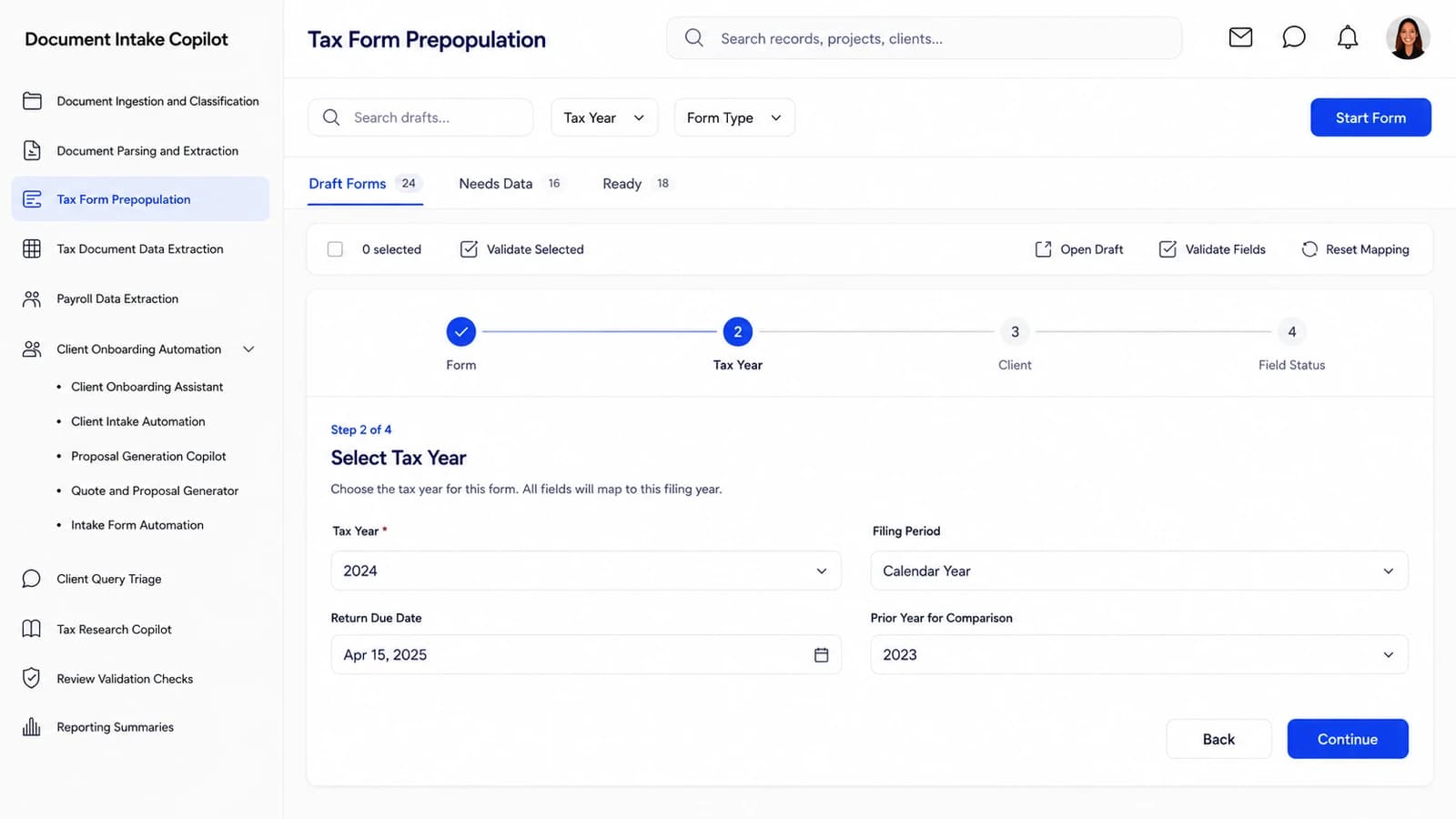
Tax Form Prepopulation — Filingloom.AI
02 — Tax Form Prepopulation

Approved client data mapped straight onto the filing

Individual, business and information-return drafts populate from approved intake — every field showing whether it is complete, missing data, or waiting for reviewer sign-off before it flows into the return.

  • Form
  • Tax Year
  • Client
  • Field Status
  • Ready to File
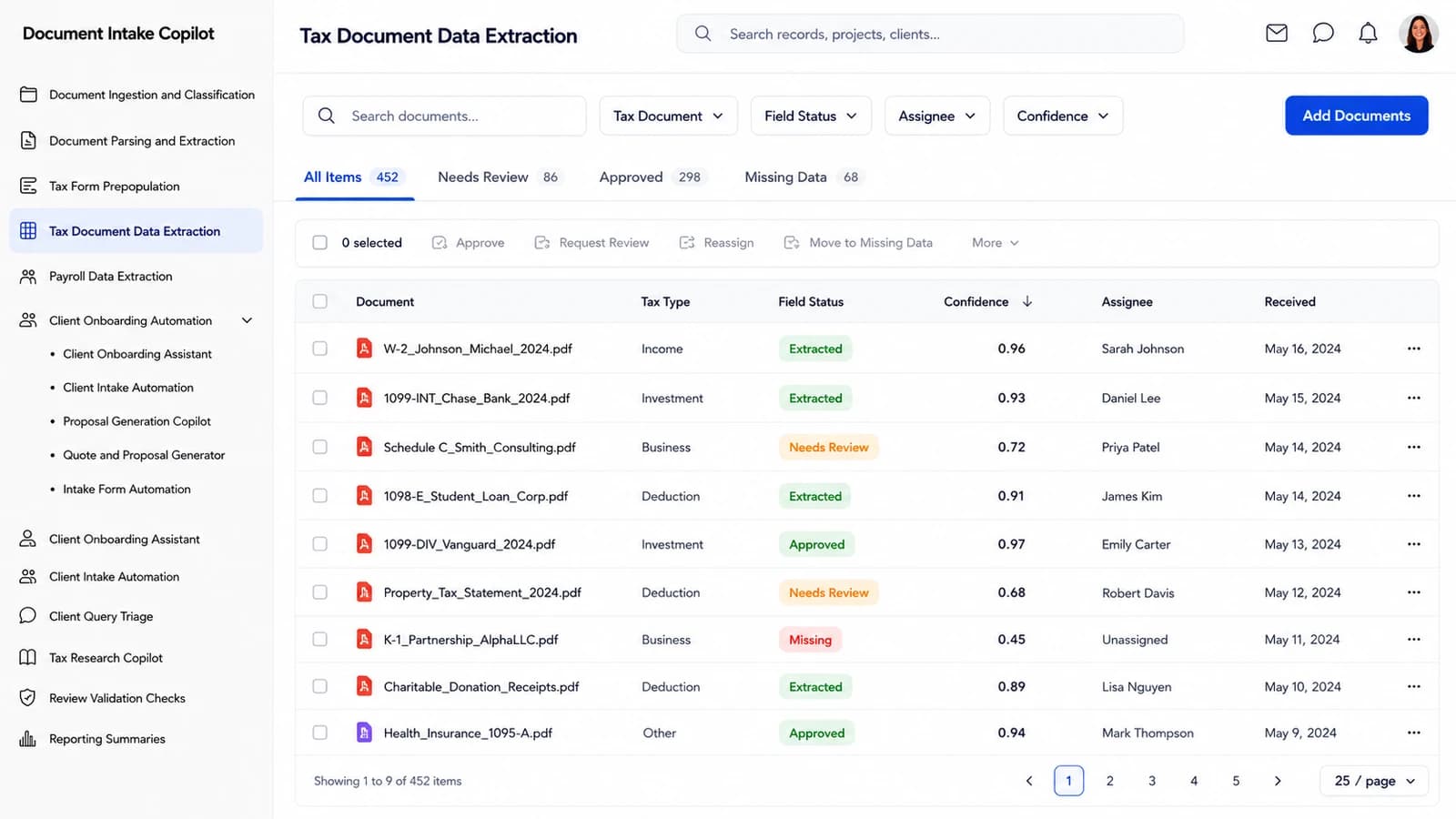
Tax Document Data Extraction — Filingloom.AI
03 — Tax Document Data Extraction

W-2, 1099, K-1 fields read into the return, with the source alongside

Tax documents are extracted into structured fields with a confidence per value, a source reference for every entry, and a reviewer queue for anything that needs a person — no more retyping from a scanned PDF into the return package.

  • Tax Type
  • Field Status
  • Confidence
  • Assignee
  • Received
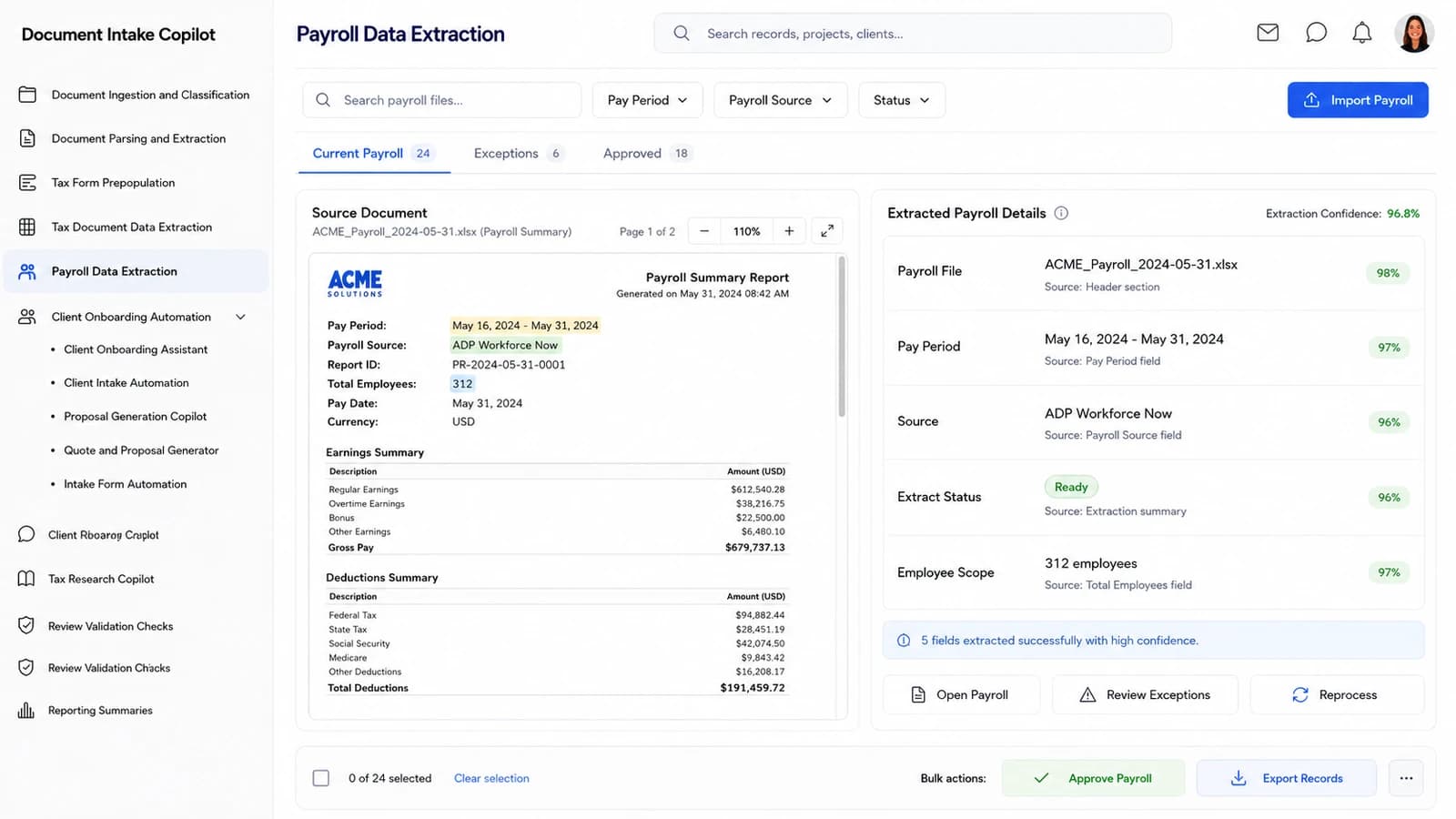
Payroll Data Extraction — Filingloom.AI
04 — Payroll Data Extraction

Payroll runs parsed into per-employee, per-period records

Payroll files from any provider land as structured earnings, withholding and exception rows — grouped by pay period, ready for reconciliation and downstream accounting workflows without a spreadsheet in the middle.

  • Pay Period
  • Source
  • Extract Status
  • Employees
  • Exceptions

And the modules the firm runs around the return.

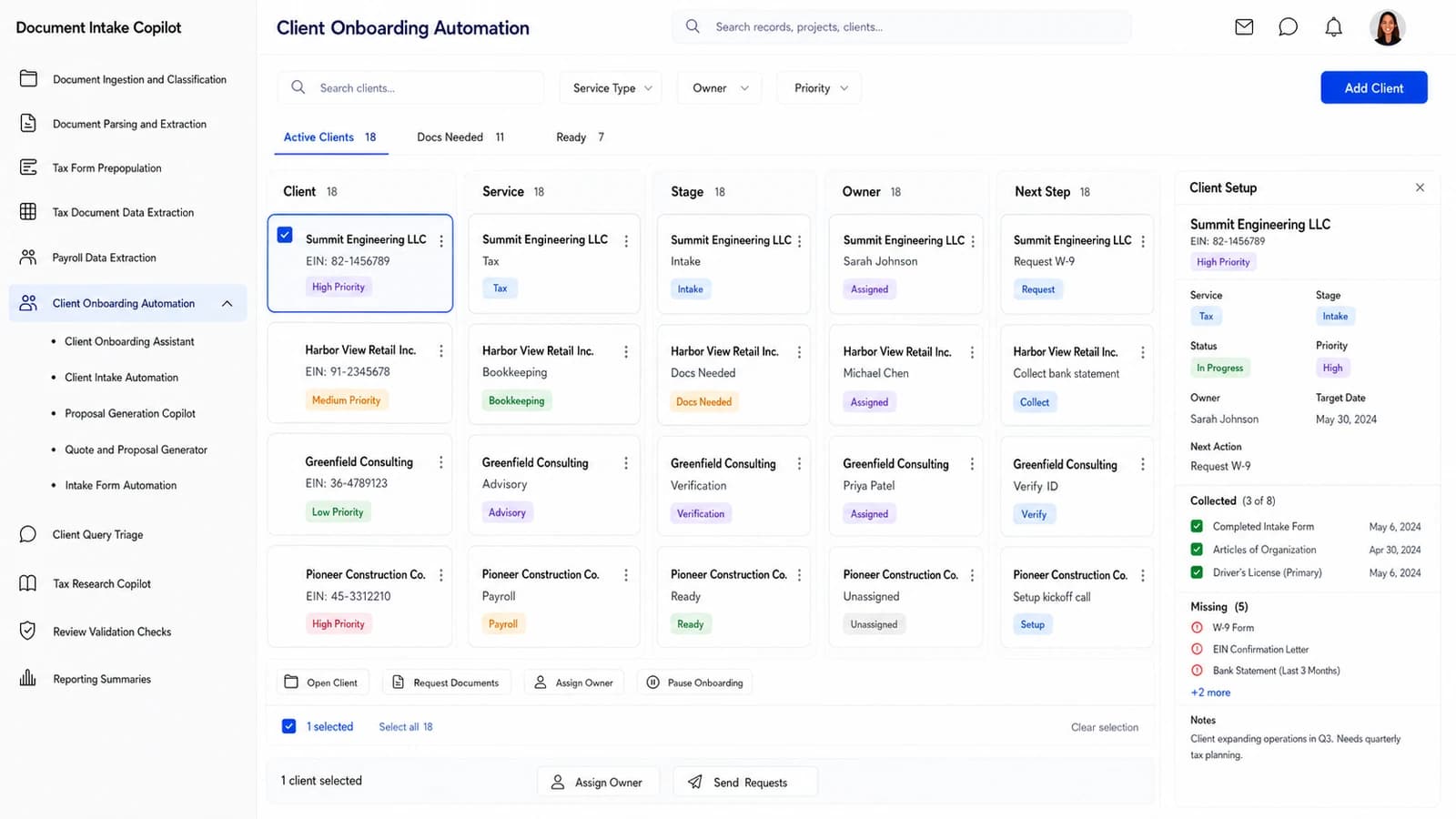
Client Onboarding Automation — Filingloom.AI

Client Onboarding Automation

New tax, bookkeeping, payroll and advisory clients move through document collection, verification and readiness — each with the next action already written next to the file that unblocks it.

Client Query Triage — Filingloom.AI

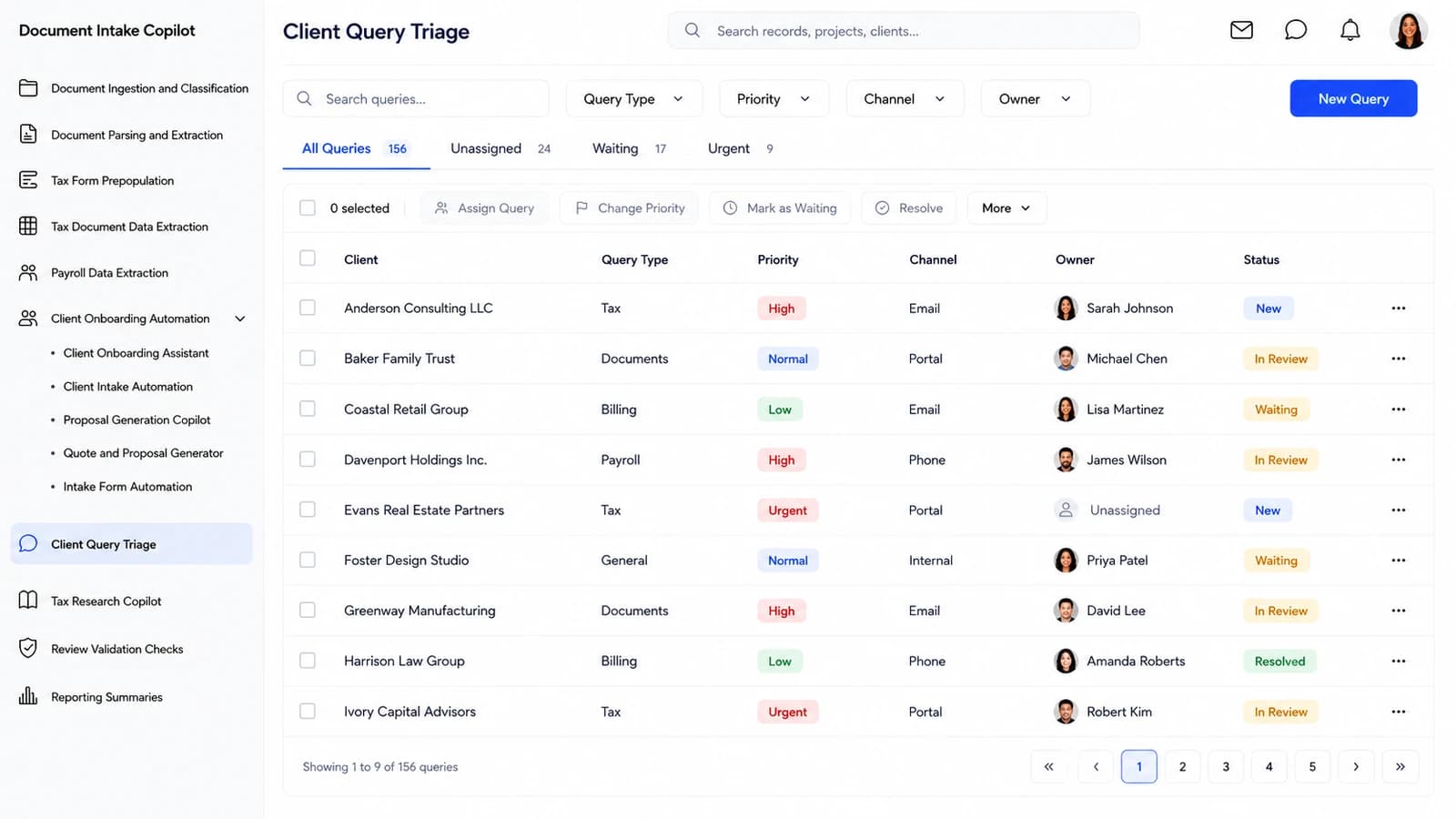
Client Query Triage

Every inbound message — tax, payroll, billing, documents, general — is classified by topic, priority and channel, then routed to the right staff member with the context already gathered next to the reply.

Compliance Alerts Assistant — Filingloom.AI

Compliance Alerts Assistant

Rule and code changes across the jurisdictions your firm files in surface as alerts against affected clients and engagements — with the source citation, effective date and suggested next step attached.

Approach

Built for the whole engagement.

The work does not stop when the intake queue empties. Filingloom.AI carries the engagement through the three rhythms that decide whether the return goes out clean — researching the question, closing the exceptions, and shipping the client-ready package.

Discuss your firm’s workflow
Tax Research Copilot — Filingloom.AI

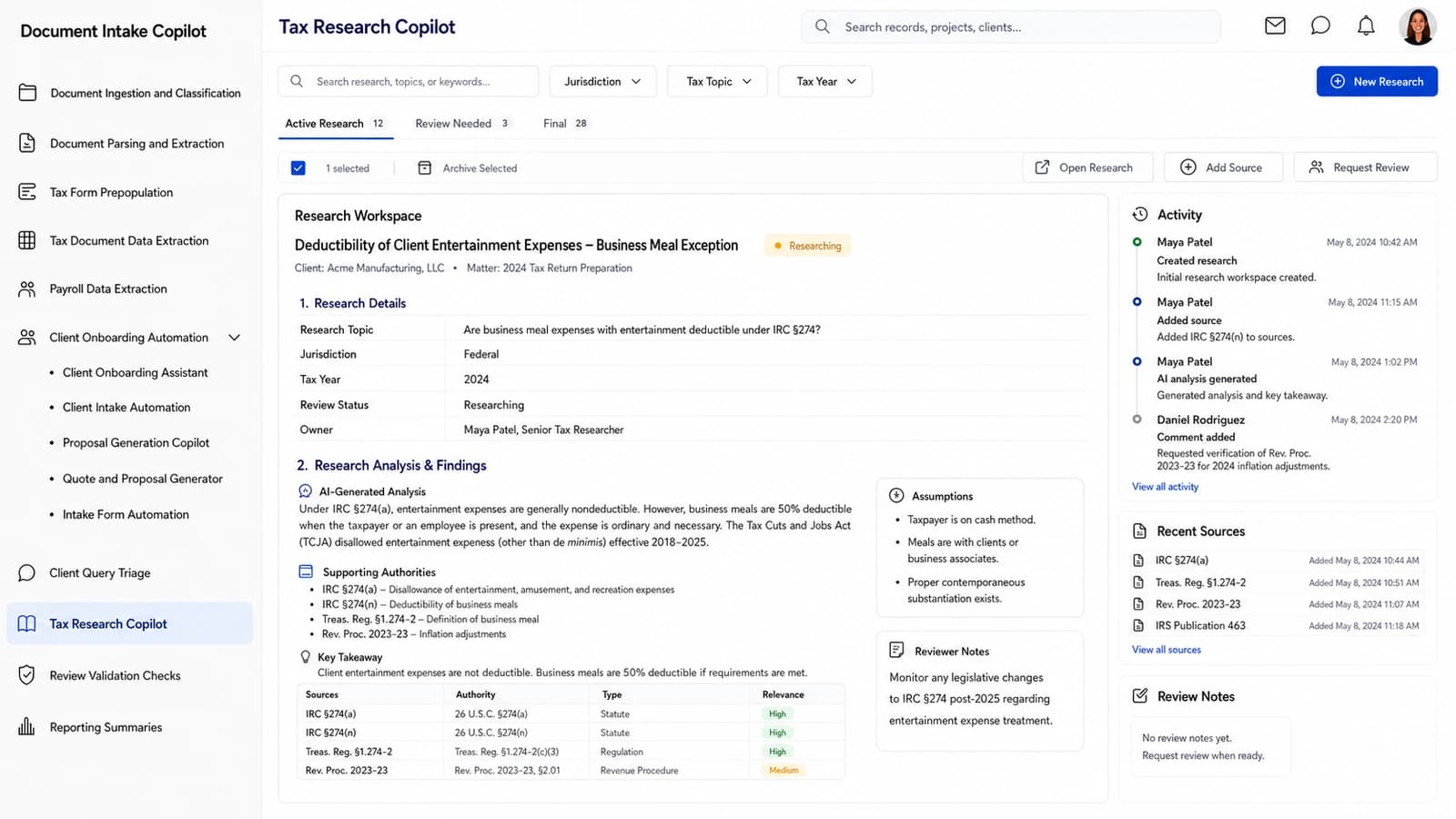
Answer a tax question with cited authority the same afternoon

Open a research question, and the copilot assembles a draft answer from primary authority — code sections, regulations, revenue rulings, state guidance — with every citation shown. A reviewer signs off before the answer leaves the firm, on the same record.

Review Validation Checks — Filingloom.AI

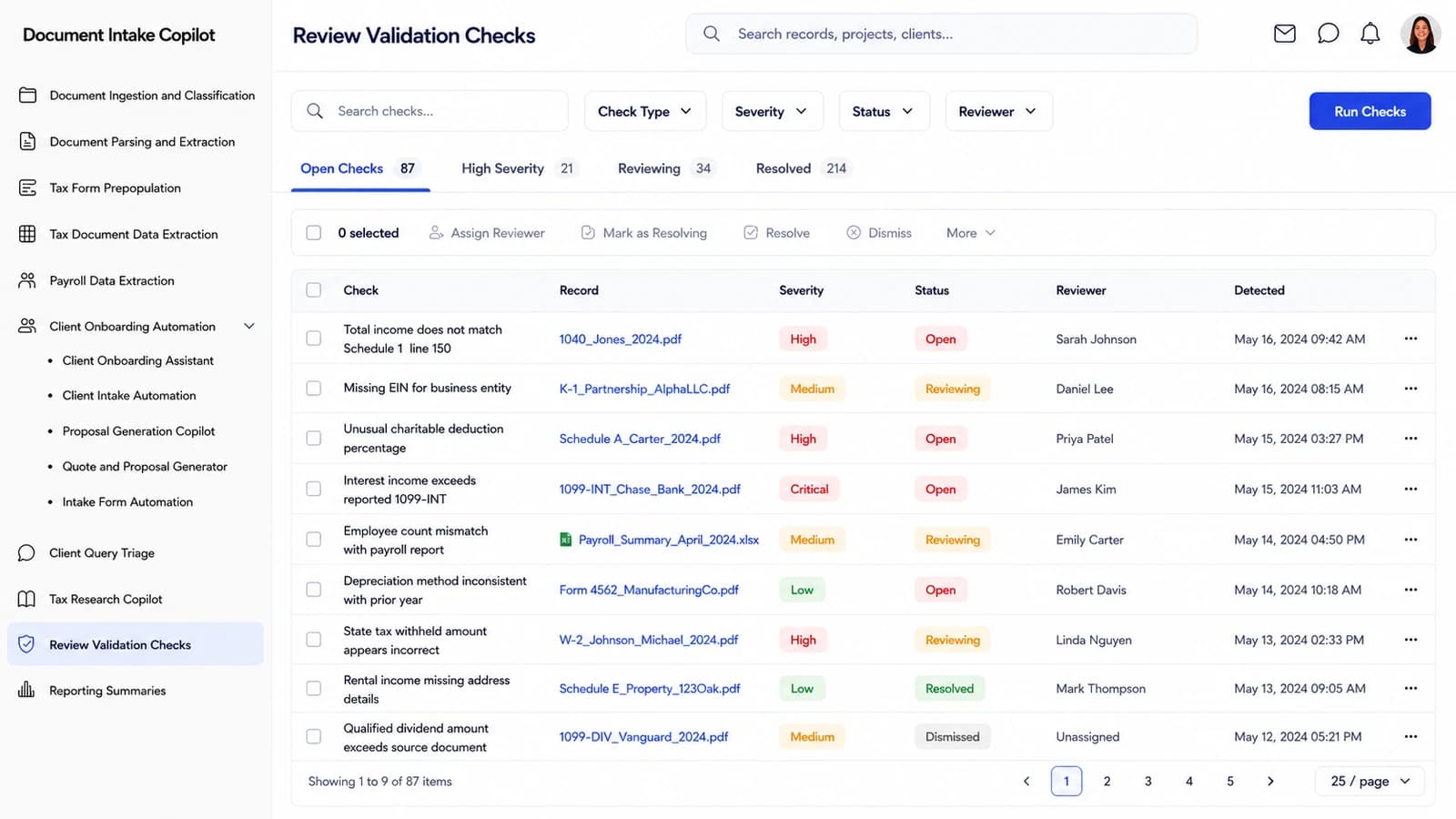
Fix the exceptions before they leave the review queue

Every validation check that fails — mismatched totals, missing prior-year values, out-of-range confidence, unresolved payer IDs — is queued with its severity, the source evidence, the AI explanation and a suggested correction, so review closes the loop instead of just flagging it.

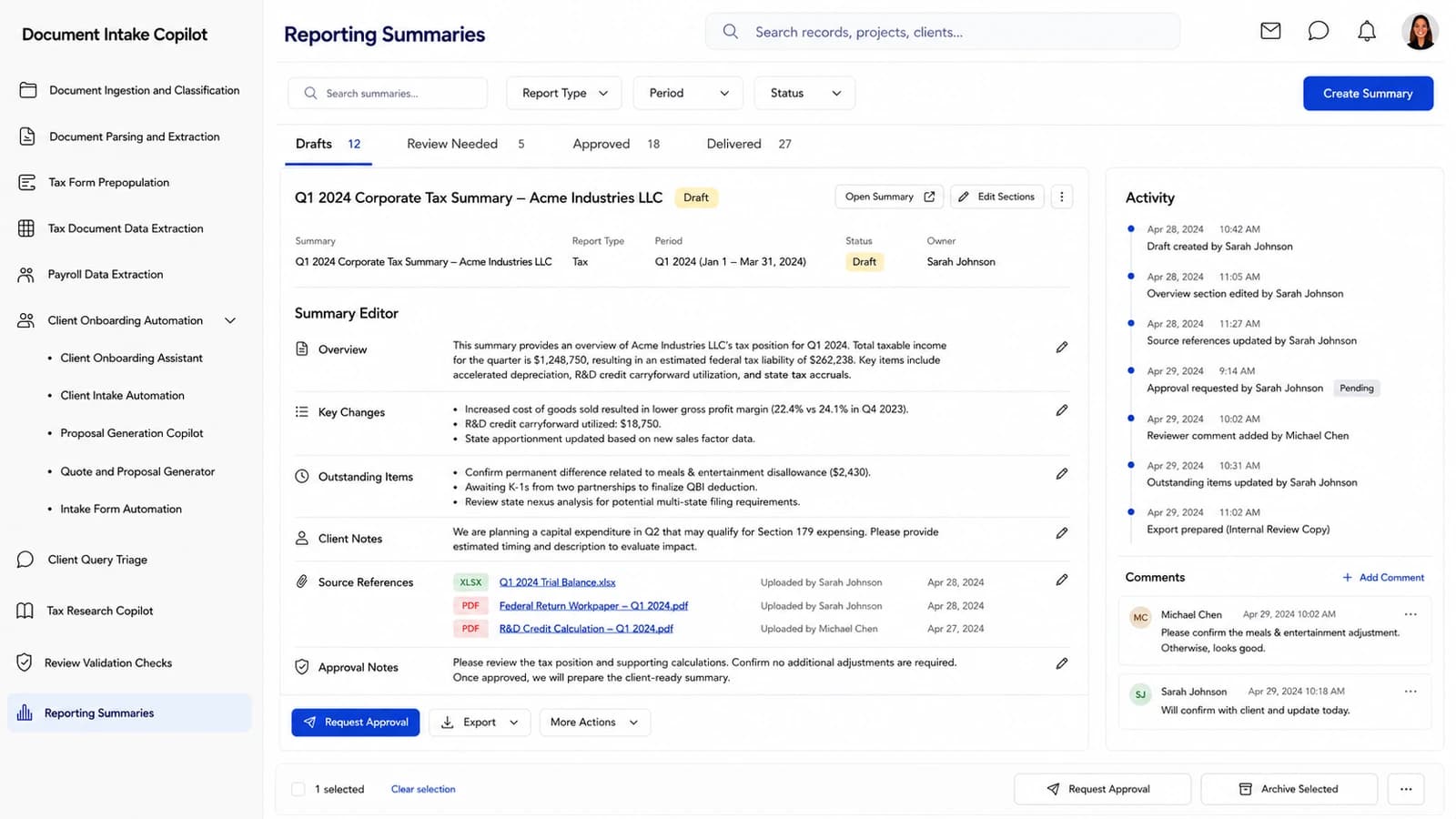
Reporting Summaries — Filingloom.AI

Assemble the client-ready package from work already approved

Tax, payroll, financial and client-update summaries generate from the completed work on their own recurrence — narrative sections cite their source data, editable commentary sits alongside, and the delivery log stays with the package the client actually receives.

A tax preparer walking a client through their organizer at a firm workstation

The queue keeps moving. The record should keep up.

Compliance

Built for the taxpayer-data rules you already work to.

A firm’s operating system sits inside a regulatory perimeter, not beside it. Filingloom.AI is built around the publications, safeguards and practice rules that already govern how accounting and tax firms handle client information.

  • IRS Pub 4557

    IRS Publication 4557 — Safeguarding Taxpayer Data

    Filingloom ingests, classifies and stores client tax documents inside the WISP, MFA, encryption and access-log controls every tax preparer that handles taxpayer information is required to keep.

  • FTC Safeguards Rule

    FTC Safeguards Rule under the Gramm-Leach-Bliley Act (16 CFR 314)

    The classification, review-queue and audit-log pipeline enforces the administrative, technical and physical safeguards the FTC requires of tax and accounting firms treated as financial institutions.

  • IRS Pub 1345

    IRS Publication 1345 — Handbook for Authorized IRS e-file Providers

    Tax Form Prepopulation follows Pub 1345 originator-of-record and record-retention rules so extracted W-2, 1099 and K-1 data can flow into an e-filed return without breaking e-file authorization.

  • AICPA SOC 2

    AICPA SOC 2 Trust Services Criteria (Security, Availability, Confidentiality)

    Every intake, review and export action is logged against SOC 2 security and confidentiality criteria so firms can inherit those controls in their own client engagements.

  • IRS Circular 230

    Treasury Department Circular No. 230 — Regulations Governing Practice before the IRS

    The Tax Research and Tax Compliance Check copilots keep a reviewer-in-the-loop and cite primary authority so practitioners meet the diligence and competence standards Circular 230 requires.

Listed for orientation only — supporting a standard in the product is not a substitute for your own counsel or compliance officer.

Kit

Our desk hardware, wired to your intake queue.

Most of what Filingloom.AI reads starts on paper — the organizer, the courier packet, the signed 8879. The Loom kit is our own desk hardware: it enrols against your workspace and streams straight into the module it belongs to, with nothing to configure.

Loom Intake Scanner

A palm-size sheet-fed desk scanner that pulls W-2s, 1099s, organizer pages and receipts straight into your Document Ingestion and Classification dashboard. Every scan lands in the intake queue with page-level confidence scores, so staff only touch the docs the copilot flags for review.

Loom Batch Reader

A cordless 2D barcode and QR reader for physical client folders and courier packets that checks each document set into your Client Onboarding Automation module the moment it hits the desk. It opens the right client's onboarding record, tags the source, and routes the batch to the correct engagement queue.

Loom Signature Pad

A low-profile LCD signature pad that captures engagement letters, e-file consent forms and 8879 authorizations directly into your Intake Form Automation module. Signed forms flow into the same review queue as the rest of the client's documents, so nothing stalls waiting on paper.

Pricing

One firm. One number.

No per-seat arithmetic, no module gates, no charge for the reviewer who only opens the validation queue. The whole platform, one flat monthly figure, set from the Nestack admin.

Starting at
$200/mo

One flat monthly figure for the whole platform. Talk to us about seats, connector setup, and onboarding for your firm.

Know more
  • Every module on the platform, with no tiers
  • Document Ingestion, Parsing and Extraction
  • Tax Form Prepopulation and Tax Document Data Extraction
  • Payroll Data Extraction and reconciliation
  • Client Onboarding, Query Triage and Tax Research
  • Review Validation Checks and Reporting Summaries
Onboarding

What your onboarding fee covers

A one-time setup that gets your firm fully live on Filingloom before your next intake cycle opens — we import your live client roster and last cycle's intake, connect the portal, email and document sources your clients already send through, and configure the intake, extraction, prepopulation, payroll, review and reporting modules to your firm's playbook. Each fee below is a starting point: the final onboarding is scoped once we understand your environment, security needs, integrations, data volume, compliance requirements and deployment model.

Essential

$1,000+one-time
  • Kickoff call and onboarding plan scoped to your services and client mix
  • Workspace provisioning with partner, preparer and reviewer seats, roles and permissions
  • Import of your live client roster and current engagements
  • Intake queues configured to your document types, engagements and staff pods
  • Client portal and inbound email connected for document capture
  • Tax-form and review templates set to your firm's house format
  • Live-readiness check before your next intake cycle opens
  • Onboarding handbook and self-serve help for your team

Plus

Most firms
$2,500+one-time

Everything in Essential, plus:

  • Guided migration of last cycle's client documents and extracted fields, with validation
  • Two integrations — tax software, payroll provider or practice management — connected and field-mapped
  • Custom validation rules, severity thresholds and reviewer routing
  • Client query classification tuned to your firm's response templates
  • Live training session for preparers and reviewers, with a recording
  • Dedicated onboarding specialist for the rollout

Enterprise

$5,000+one-time

Everything in Plus, plus:

  • Tailored implementation across multiple offices, service lines and partner books
  • Bespoke integrations and SSO across your tax, payroll, practice management and DMS
  • Bulk migration of historical client documents and prior-year returns, with cleansing and reconciliation
  • Role-based training tracks for preparers, reviewers, partners and admin staff
  • Reporting workflows aligned to your firm's engagement letters and delivery calendar
  • Named onboarding manager with a defined go-live date
Where it runs

Two ways to deploy — same platform, same subscription

Run Filingloom wherever your client documents, workpapers and filings are allowed to live. The subscription is identical either way.

Cloud (SaaS)

Runs in Nestack’s managed cloud — nothing to provision. The fastest way to get your firm live before the next cycle.

Private / self-hosted

The same platform deployed inside your own infrastructure — your cloud, VPC or on-prem — for firms whose WISP or engagement letters require it. Client documents, tax workpapers and filings never leave your environment, and the subscription stays the same.

FAQs

Frequently asked questions

Clear answers on where the extracted values come from, how much you have to take on trust, and what the platform does between the intake queue and the client delivery.

Connect with our team
What does Filingloom.AI actually do?

It is the intake and filing record for an accounting or tax firm. Client documents are classified as they land, tax forms are prepopulated from approved data, payroll runs are extracted into structured records, review checks are worked to resolution, client questions are triaged, tax research is drafted with cited authority, and client-ready reporting summaries are generated — all on one record per engagement.

Where do the extracted values come from?

From your clients' own uploads and your firm's existing sources — portal uploads, email attachments, courier packets scanned at the desk, and payroll exports from any provider. The extractor reads W-2s, 1099s, K-1s, receipts and statements into structured fields, scores confidence per value, and holds anything low-confidence in a visible review queue.

Do preparers have to accept the AI's answer on trust?

No. Every extracted field carries a confidence score, every tax-research answer names its primary authority, and every validation exception shows the source evidence beside the AI explanation. Nothing flows into a return until a reviewer clears it.

Is this only for large firms?

No. Pricing is one flat monthly figure for the whole platform, so a two-partner practice and a multi-office firm get the same modules — no cut-down tier and no per-preparer arithmetic.

How does it handle client-ready reporting?

Reporting Summaries assemble tax, payroll, financial and client-update narratives from the completed work on their own recurrence. Every section cites its source data, editable commentary sits alongside, and the delivery log stays attached to the package the client actually receives.

What about tax-year data we already have on file?

Prior-year returns, historical documents and past extracted fields migrate in during onboarding (see the Plus and Enterprise tiers). Your existing organizer, workpaper and delivery templates carry over so the firm keeps working the way it already does.

Can we see it against our own client documents first?

Yes. Book a walk-through and we will run Filingloom.AI against a slice of your real intake — a client folder or a batch of source documents — before the first call, so you are looking at your paperwork rather than a sandbox.

Book a demo

See it against your own intake.

Tell us who you are, pick the screens you want to see, then take a time — we’ll run Filingloom.AI against a slice of your real client documents before we meet.

Step 1 of 3

First, who should we prep for?

A few seconds — so we arrive prepared for your firm.