A teacher leading a class of students — the institutions Kindesk AI is built for

Every education support ticket, routed to the desk that can answer it.

Kindesk AI reads every learner, parent, instructor and admin ticket a school, college or training provider takes in — intent, urgency, cohort context and history — and turns it into a routed case, a drafted reply and an SLA save, with the reasoning shown for each one.

1,842 tickets routedAuto-routed today across every desk.
90% intent confidenceOn every ticket the model handles.
312 hours savedSLA time returned to your support team.

Built on the tickets, chats and learner records you already keep — read together rather than one inbox at a time, so the model knows who is asking and why before it routes.

Book a demoSee the platform
The support cockpit

Every ticket, every desk, on one screen.

Kindesk AI reads every learner, parent, instructor and admin ticket — intent, urgency, cohort context and history — and routes it to the desk that can answer it, with a drafted reply attached. The routing forecast, the confidence behind each intent and today’s SLA save sit side by side, so support teams work a ranked queue instead of an inbox.

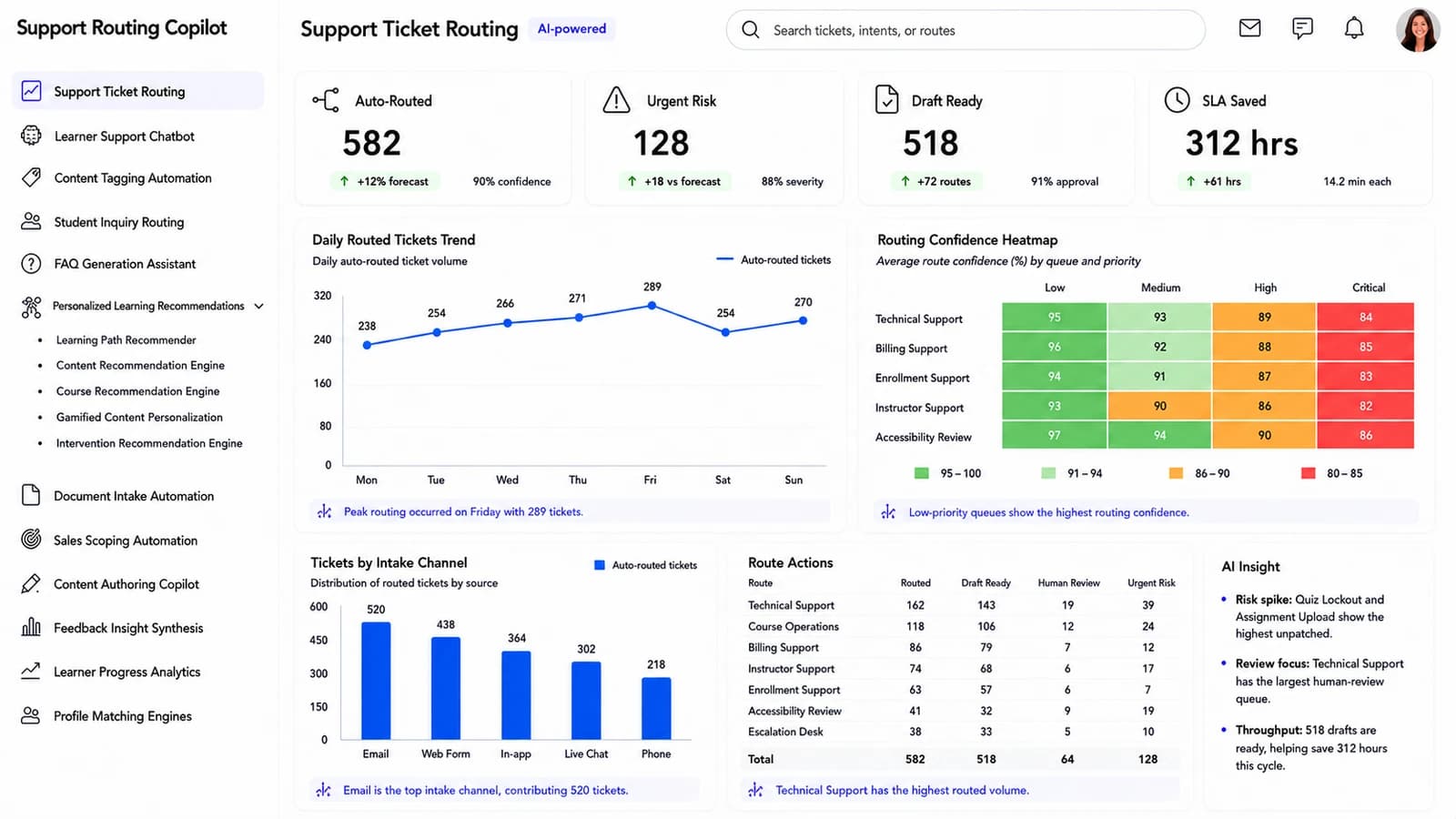
Kindesk AI Support Ticket Routing dashboard: KPI cards for auto-routed, urgent, draft-ready and SLA saved above the AI Routing Forecast bar chart, an intent confidence chart, a route-actions table and the Course Touchpoint Heatmap.
  • Auto-routed 1,842
  • Routing forecast
  • Next best action
  • Touchpoint heatmap
1,842Auto-routed today90% model confidence
128Urgent tickets89% severity, flagged for review
1,318Drafts ready72% of routes, 91% approval
312 hrsSLA time savedAbout 14.2 min per ticket
Urgent risk in focus128 urgent tickets today; accessibility and platform issues need the fastest review.
Drafts save the day1,318 ready drafts, at 91% approval — worth about 312 hours if agents approve them.
Where misroutes hideQuiz Lockout and Assignment Upload carry the highest predicted misroute risk — worth watching this week.
The platform

Ten dashboards, one record of every learner interaction.

Routing, matching, intake, authoring, feedback and progress analytics all read from the same learner record — so an agent sees the same evidence the routing engine used, and nothing has to be re-keyed between teams.

Learner Support Chatbot

Every conversation, triaged by intent and urgency.

Active learner conversations grouped by All Chats, Needs Review, Escalated and Resolved. Each row shows the requester type, the detected intent (Access / Billing / Course / Technical), the urgency and the AI state — so an agent takes over the right chat first.

Full transcript on tapOpen Chat opens the thread, AI draft and detected intent side by side.
Escalate in one clickTake Over, Assign, Resolve — the row actions that keep the queue moving.
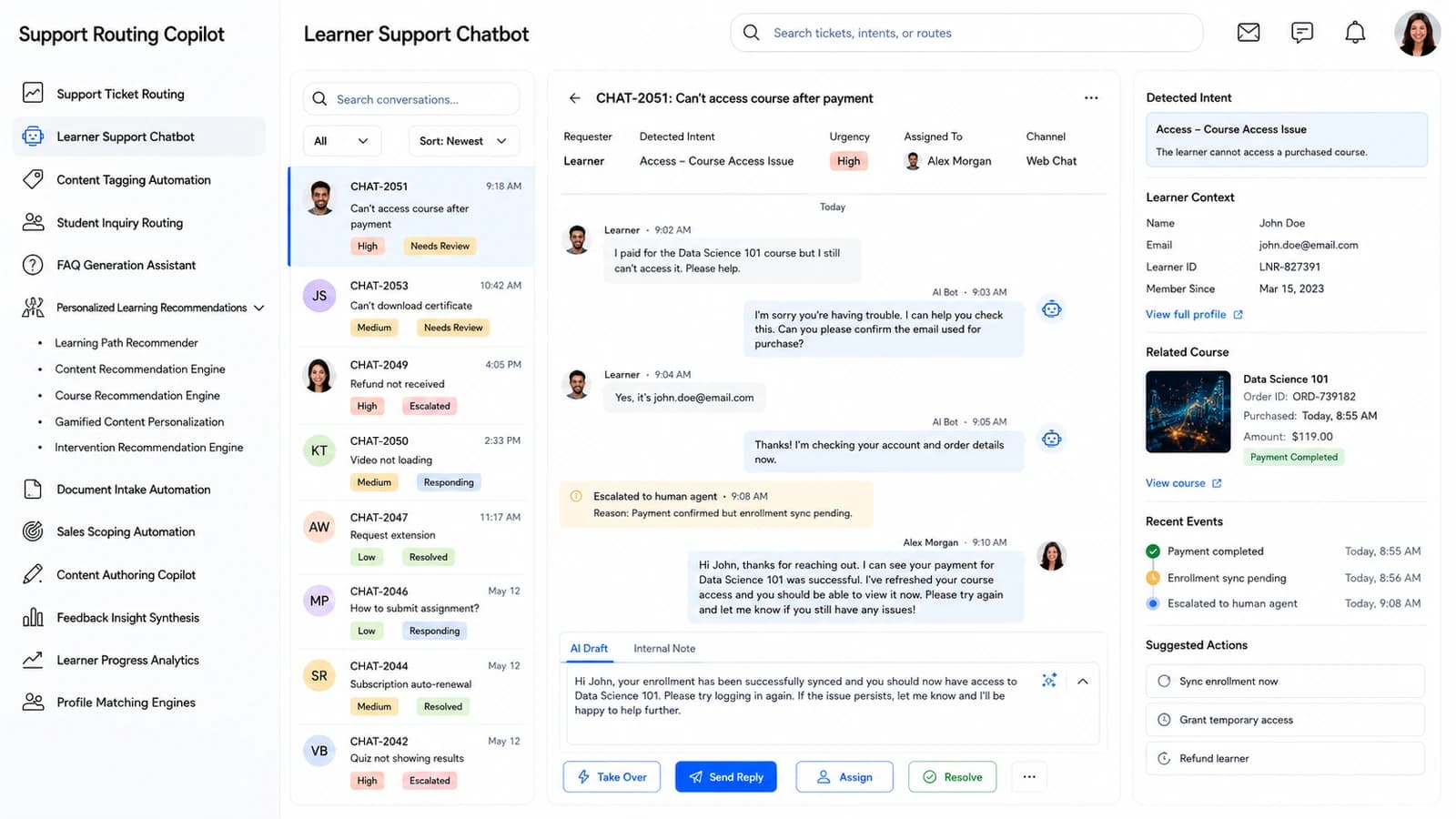
Learner Support Chatbot dashboard — Every conversation, triaged by intent and urgency.
Content Tagging Automation

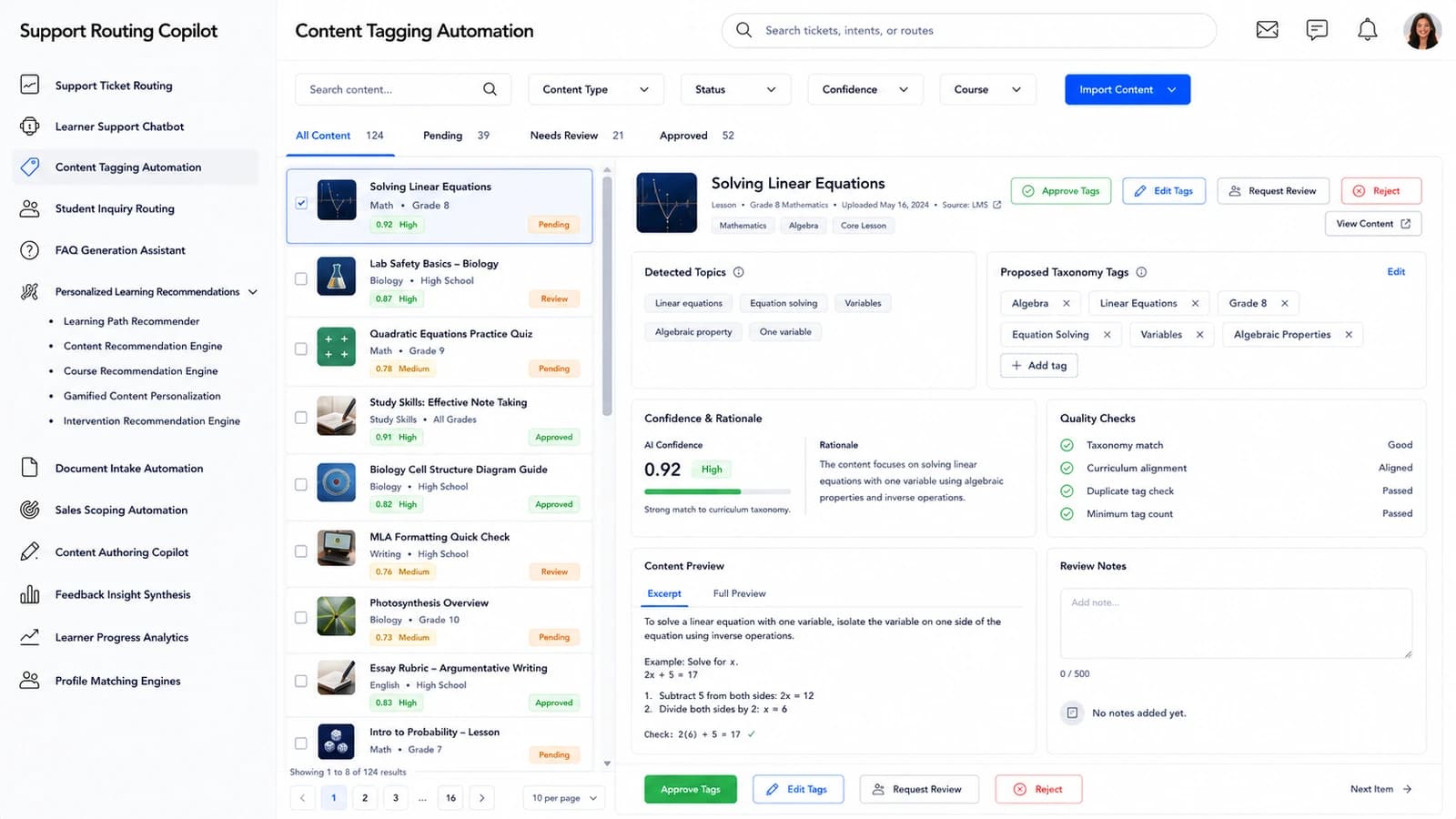
Course metadata, proposed and approved as a queue.

Lessons, videos, quizzes, articles and resources arrive with suggested taxonomy tags and a 0–1 confidence score. Filter by content type, tag status and confidence; approve, edit or reject tags in bulk before they land on the learning catalogue.

Confidence-first reviewLow-Confidence and Pending tabs surface the tags that actually need a human.
Bulk approve safelyApprove Tags, Apply Tags and Reject Tags act on a selection, not one at a time.
Content Tagging Automation dashboard — Course metadata, proposed and approved as a queue.
Student Inquiry Routing

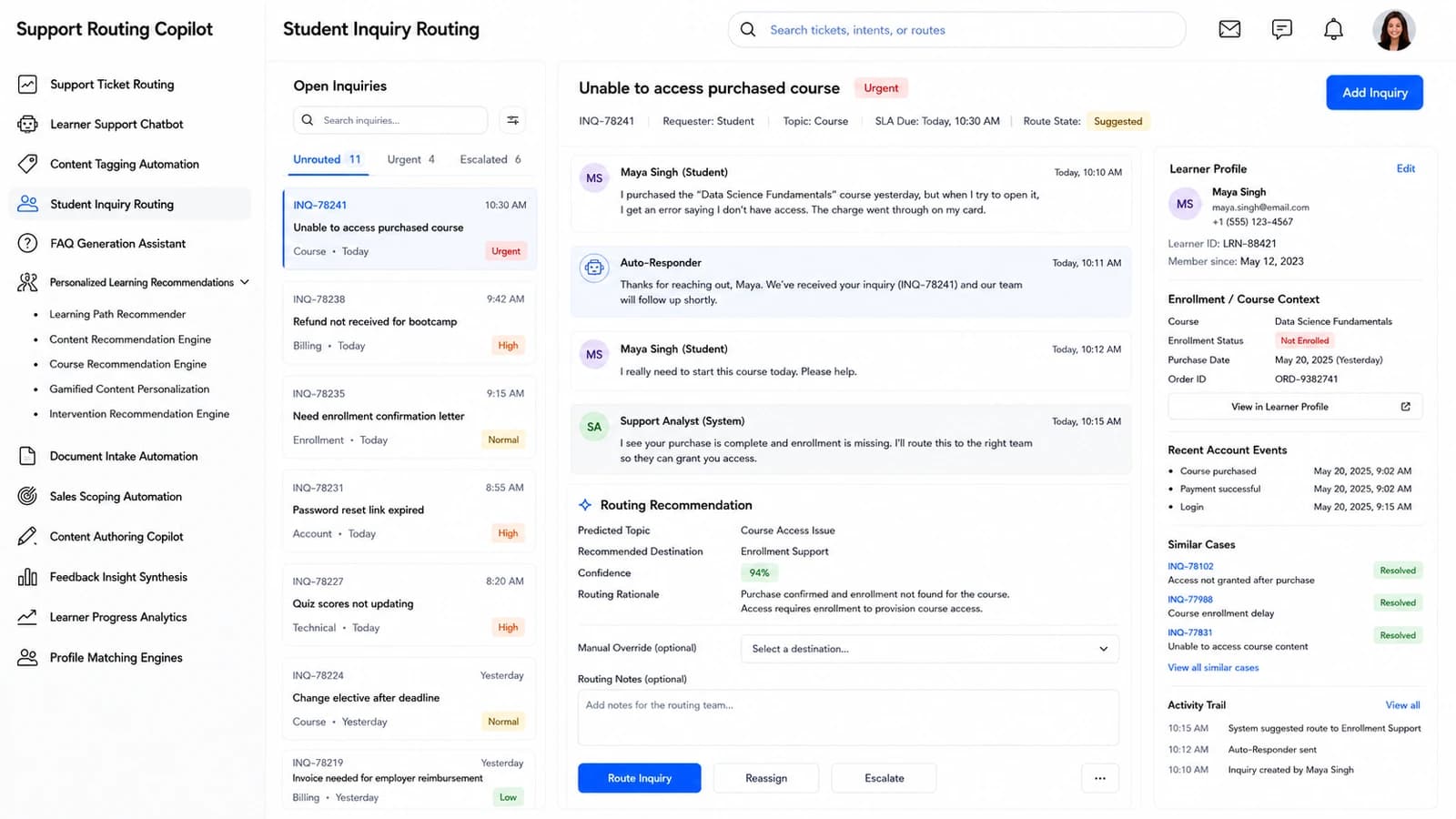
Every inquiry lands on the desk that can answer it.

Incoming student inquiries triaged by topic, priority and SLA due. The model names the destination team, queue or department, its confidence and the reasoning — so operations sees exactly why a case was routed where it was.

SLA-aware queueUrgent and Unroutable inquiries surface first; SLA Due stays in the row.
Reassign safelyRoute, Reassign, Escalate — each move is timestamped in the case history.
Student Inquiry Routing dashboard — Every inquiry lands on the desk that can answer it.
FAQ Generation Assistant

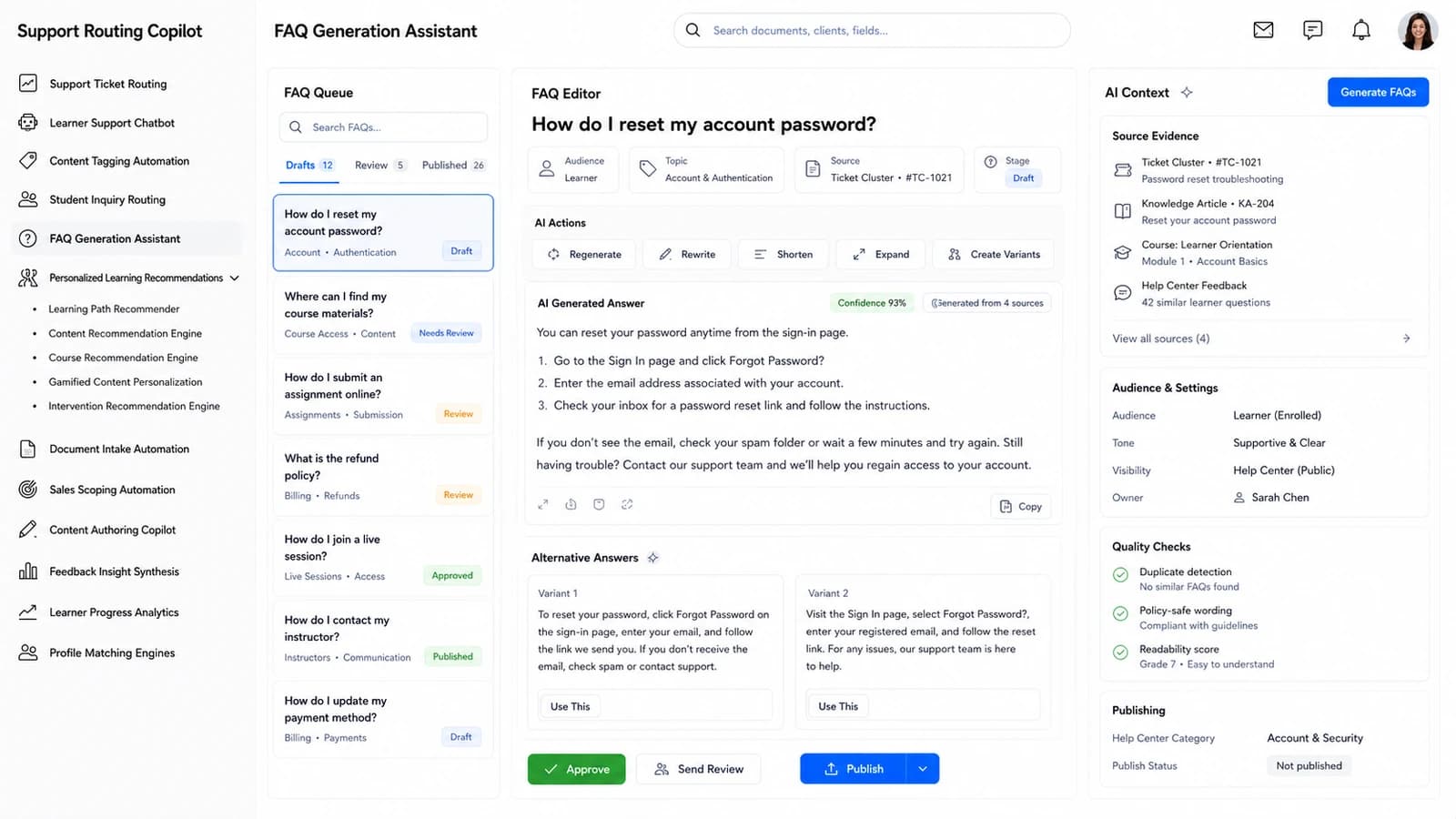
Turn recurring tickets into a published FAQ.

A board of AI-drafted FAQ candidates from ticket clusters, knowledge articles and course content — grouped Drafts, Needs Review, Published. Every candidate carries its topic, audience (Learner / Parent / Instructor / Admin) and its source evidence.

Editable in placeEdit the question and answer, tune the audience, publish — no export loop.
Ticket-cluster sourcedEach FAQ points back at the tickets that made it worth writing.
FAQ Generation Assistant dashboard — Turn recurring tickets into a published FAQ.
Personalized Learning Recommendations

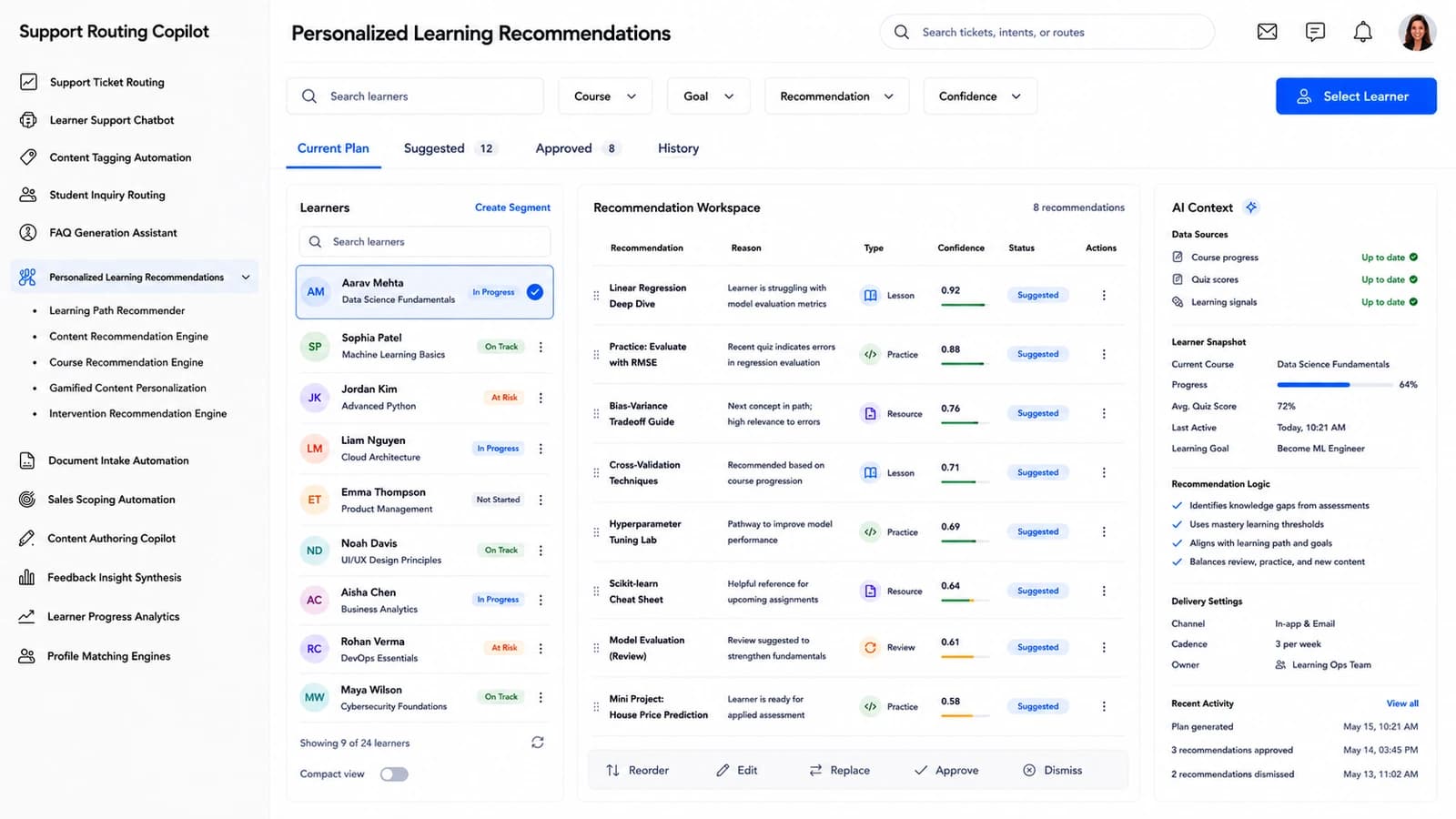
A learner's next step, ranked and explained.

For the selected learner, the model ranks recommended lessons, practice tasks, reviews and resources with a reason drawn from their progress and goals. Approve, edit, replace or dismiss before anything is delivered.

Reason attachedEvery recommendation carries a short explanation an advisor can defend.
Advisor stays in controlNothing is delivered until Approved; History shows what was picked.
Personalized Learning Recommendations dashboard — A learner's next step, ranked and explained.
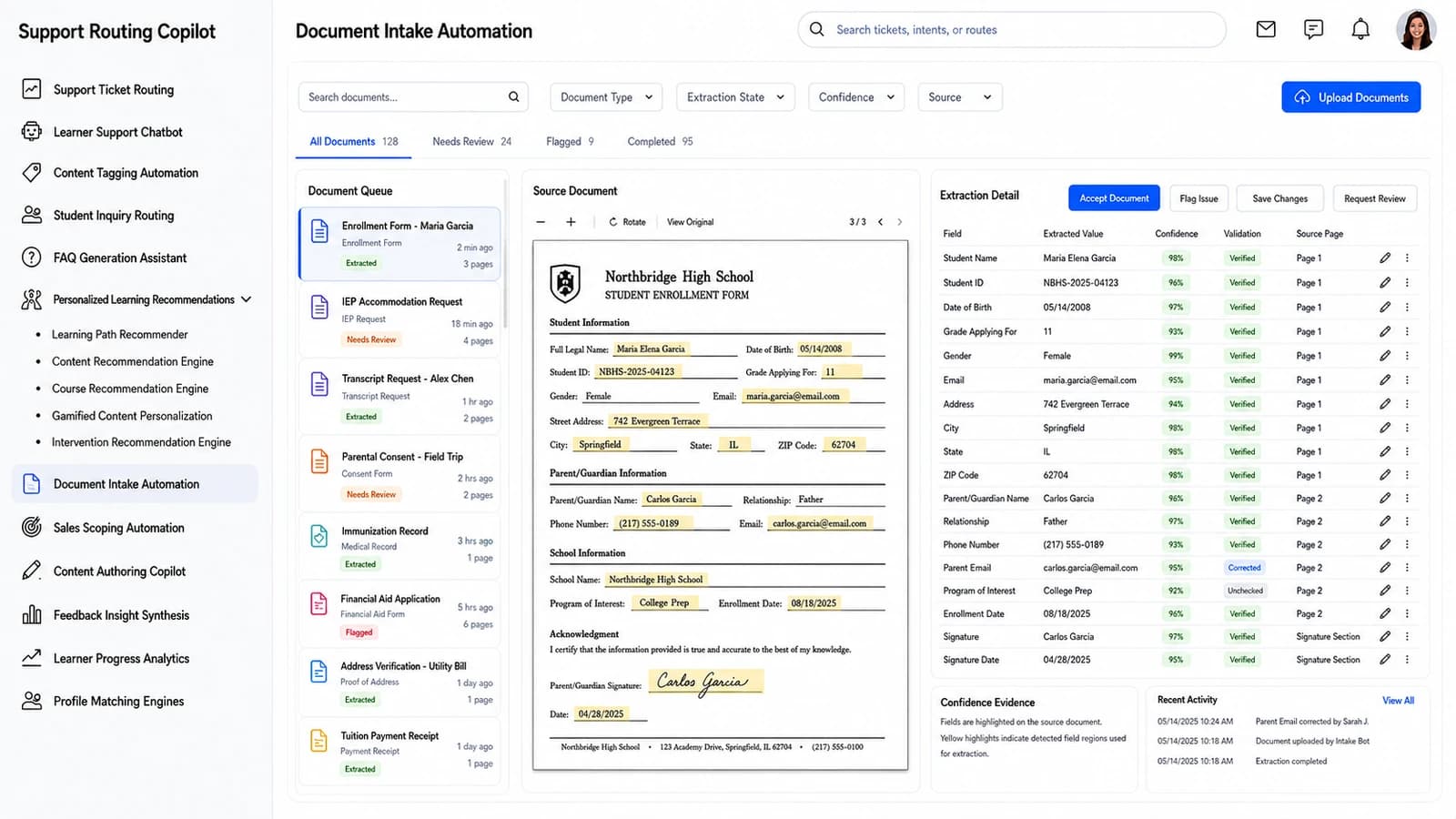
Document Intake Automation

Enrollment documents, field by field, beside the page.

The source PDF alongside every extracted field, its confidence and its validation state — Unchecked, Verified, Corrected, Flagged. Verify or edit a field with the row action; flag issues in bulk before the record lands in the SIS.

Grounded in the pageEvery value cites its Source Page so a reviewer never guesses.
Bulk-safe validationAccept Fields, Flag Issues — the queue clears in one pass.
Document Intake Automation dashboard — Enrollment documents, field by field, beside the page.
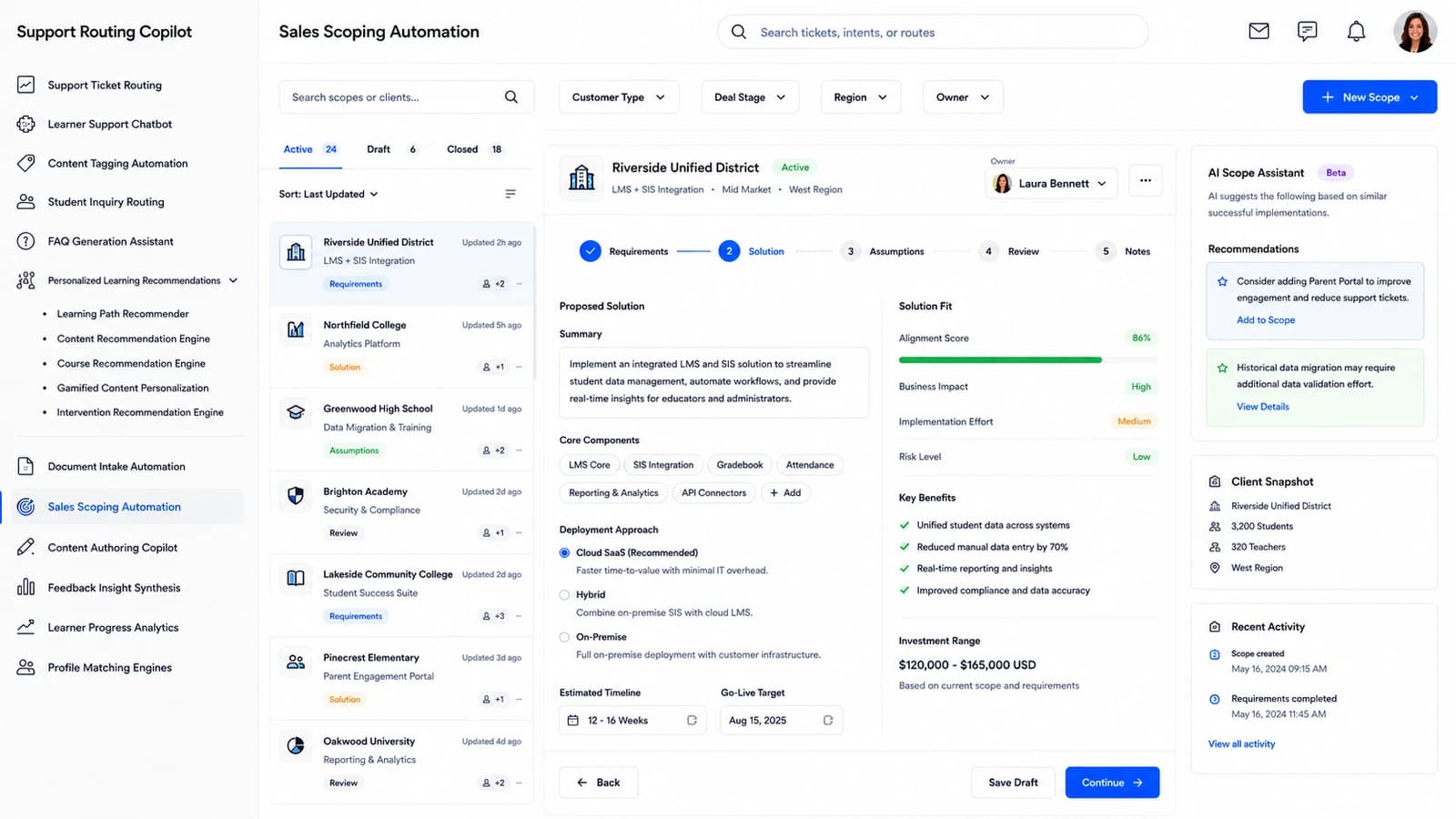
Sales Scoping Automation

An education customer request, scoped as a solution.

Requirements captured as rows — Product, Integration, Data, Security, Support — with complexity, scope state (Captured / Clarify / Confirmed / Excluded) and a short technical note. AI drafts the interpretation and assumptions; the scoper edits.

Assumptions kept honestThe Assumptions tab makes every scoping decision reviewable.
Faster to a proposalRegenerate the scope once details firm up — no rewrites from scratch.
Sales Scoping Automation dashboard — An education customer request, scoped as a solution.
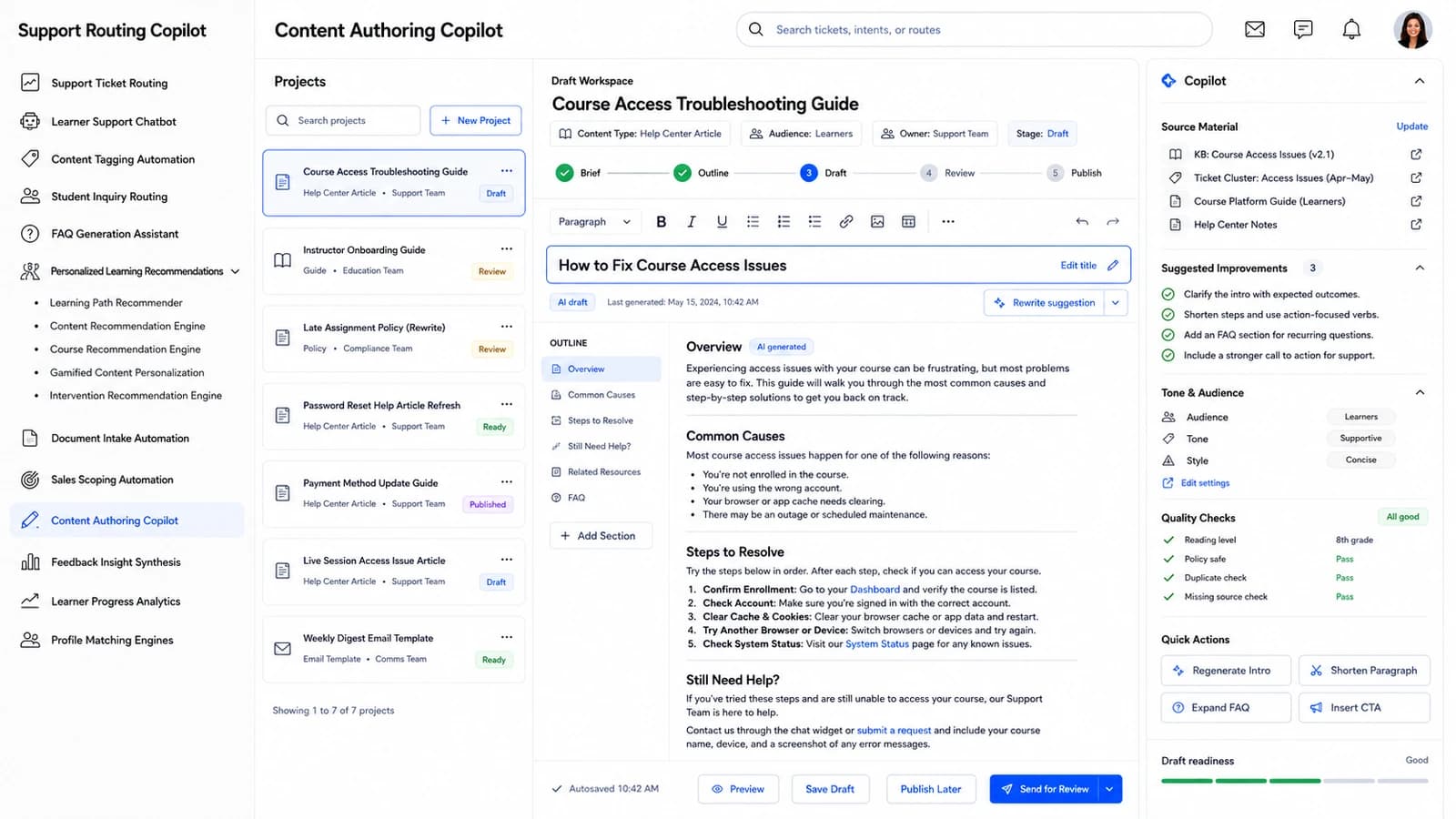
Content Authoring Copilot

Draft, refine and approve learning content in one place.

Lesson sections, objectives, examples, activities and assessments — each with an AI state, a reading level and a grounded / needs-source flag. Rewrite, expand, shorten or approve at section level; keep the outline and the draft in the same workspace.

Grounded by defaultSections marked Needs Source can't slip through to Approved unchecked.
Reading-level awareEvery section carries a reading level appropriate to its audience.
Content Authoring Copilot dashboard — Draft, refine and approve learning content in one place.
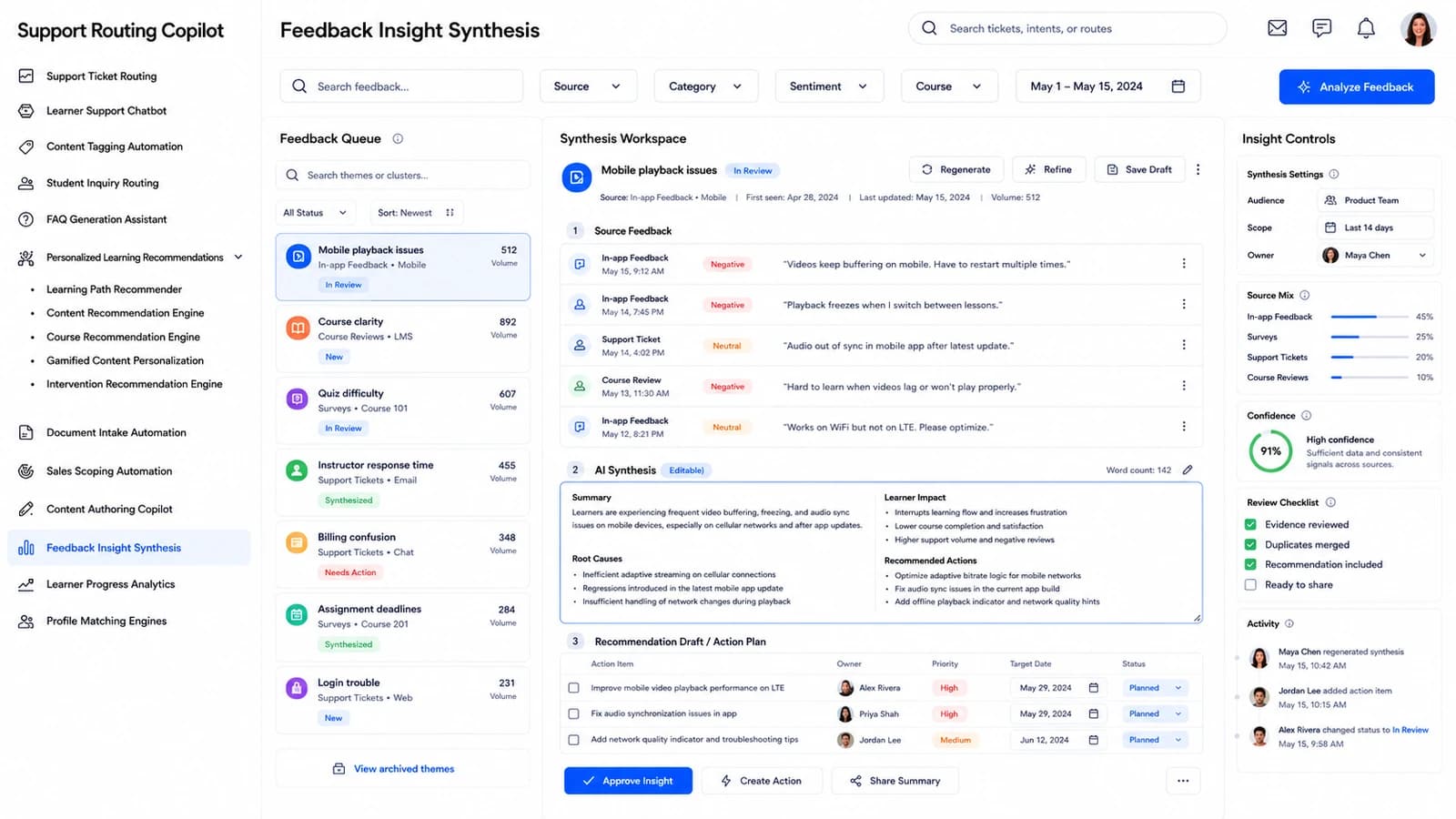
Feedback Insight Synthesis

Learner feedback, clustered into acts you can ship.

AI-synthesised insights from open-text feedback, tagged by theme (Content / Usability / Support / Assessment) and sentiment (Positive / Neutral / Mixed / Negative). Merge related insights, validate the evidence and turn each into a follow-up action.

Evidence attachedEvery insight opens to the raw feedback excerpts behind it.
Action, not a reportCreate Action turns an insight into an owned piece of work.
Feedback Insight Synthesis dashboard — Learner feedback, clustered into acts you can ship.
Learner Progress Analytics

See the learner whose progress is slipping.

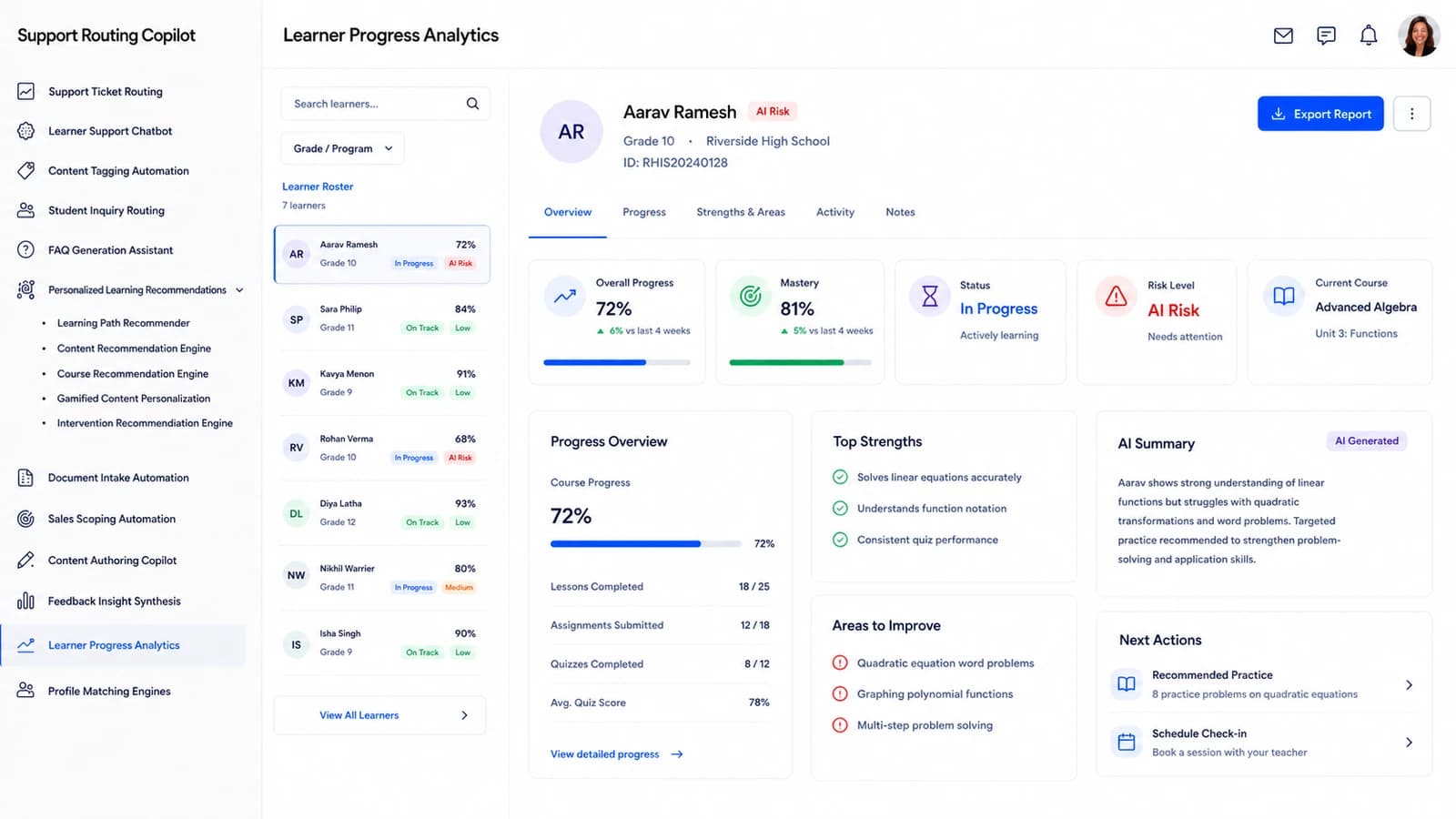
The at-risk queue by course, cohort, progress state (On Track / Slowing / Stalled / At Risk) and last activity. Every row carries a recommended next step — review, outreach, practice, support — and the row actions to open the learner or start an intervention.

Signals in contextRecent activity, blockers and AI interpretation sit inside the learner detail.
Interventions loggedCreate Intervention lands as a tracked action, not a note on a spreadsheet.
Learner Progress Analytics dashboard — See the learner whose progress is slipping.
A school building on a summer afternoon
Library stacks
A university campus lawn
A modern faculty building
In the institution

Built for the places learning actually happens.

Books and learning materials on a classroom desk

And the rest of the platform.

Support Ticket Routing

The main queue — every ticket routed by intent, urgency and cohort, with a drafted reply attached and an audit trail on every reassignment.

Course Recommendation Engine

Six courses that fit out of dozens, scored against the learner's goals and academic record, with prerequisite logic checked before anything reaches the plan.

Sentiment Trend Analysis

Sentiment classified across feedback and support, tracked as a trend so cohort mood shifts show up before the escalations do.

At-Risk Learner Alerts

Alerts pulled from the risk score, activity drop and assessment misses — with the evidence attached so advisors don't have to chase it.

Onboarding Document Automation

New-learner onboarding forms parsed field by field, each value carrying a confidence score and a validation state before it lands in your SIS.

Mentor Matching Engine

Match a mentor to a learner from goals, availability and prior mentorship success — with the reasoning and eligibility checks kept alongside the pick.

How it works

Three steps from an inbox to a routed ticket with a drafted reply.

01

Connect your ticket sources

Pipe in email, live chat, SIS inquiries and phone-call notes from the systems you already run. Nothing is re-keyed and no new data-entry lands on your team.

02

The model routes every ticket

Kindesk AI tags each ticket with intent, urgency and a routed destination — with the reasoning and a drafted reply attached, ranked by which cases will slip the SLA first.

03

Agents work a ranked queue

The urgent queue and the ready-drafts queue land in front of your support team, and today's routing forecast updates as they clear them.

90%

Model confidence on every routed ticket

72%

Of routes come with a ready-to-send draft

91%

Drafts approved by agents unchanged

14 min

Average SLA saved per ticket handled

Compliance

Held to the standards education support runs on.

Kindesk AI is built around the regulations that govern student data, accessibility and support-desk operations — here is what it supports out of the box.

FERPA

Family Educational Rights & Privacy Act (20 U.S.C. § 1232g)

Support tickets, drafts and audit logs are handled as a school-official third party under FERPA disclosure, access and consent rules.

COPPA

Children's Online Privacy Protection Act (16 CFR Part 312)

The learner chatbot and inquiry routing collect the minimum data needed for under-13 users and honour verifiable parental consent and deletion.

GDPR

EU General Data Protection Regulation (2016/679)

Tickets from EU learners are processed on a documented lawful basis with access, rectification and erasure workflows built into the routing pipeline.

WCAG 2.1 AA

Web Content Accessibility Guidelines 2.1 AA (aligned to ADA Title III and Section 508)

The accessibility review queue, agent console and learner-facing help surfaces are built and tested against WCAG 2.1 AA success criteria.

SOC 2 Type II

AICPA SOC 2 Type II — Trust Services Criteria

Access, encryption, change management and monitoring for every ticket and draft the platform processes operate under a SOC 2 Type II programme.

Products

The classroom hardware that feeds the platform.

Field-ready devices that pair with Kindesk AI — each one wired to a module, so the readings land on your dashboard without re-keying.

Kindesk Admissions Doc Scanner

Kindesk Admissions Doc Scanner

Compact USB duplex scanner for the front desk that captures transcripts, IDs and eligibility forms. Every page streams straight into your Document Intake Automation dashboard for parsing and metadata tagging.

Kindesk Learner ID Barcode Reader

Kindesk Learner ID Barcode Reader

Handheld USB 1D/2D barcode and QR reader that a support agent uses to look up a learner in a second. Each scan opens the matching profile and pre-fills the Student Inquiry Routing queue.

Kindesk Accessibility Review Headset

Kindesk Accessibility Review Headset

Wired USB headset with a noise-cancelling boom mic for the accessibility and escalation desks. Call handling events feed the Support Ticket Routing queue so response times and SLA saves stay measurable.

Starting at

$200/mo

Flat for the whole support desk, billed monthly. Cancel or change any time — your tickets and drafts export with you.
Pricing

One plan. Every module.

No seat counting as ticket volume grows and no feature held back for a higher tier. Talk to us and we’ll shape it around your desks, SLAs and ticket sources.

Every module, every deskNo per-seat maths and no tier to decode.
Live routing + draftsThe urgent queue, the ready-drafts queue, the routing forecast.
SLA reportingSLA saved, first-response and drafts-approved, tracked.
Onboarding includedTicket-source mapping and support from the first week.
Know more
Onboarding

What your onboarding fee covers

A one-time setup that gets your support desk live before the first billing cycle — we connect your ticket sources (email, live chat, SIS inquiries), map your desks and SLAs, and tune the routing, drafting and intake modules to your programs and intake calendar. Each fee below is a starting point: the final onboarding is scoped once we understand your environment, security needs, integrations, ticket volume, compliance requirements and deployment model.

Essential

$1,000+one-time
  • Kickoff call and onboarding plan scoped to your desks and intake calendar
  • Workspace provisioning and admin, agent and supervisor account setup
  • Import of your desks, queues, SLAs and canned-response library
  • Ticket source connected — inbound email plus one live-chat channel
  • Core modules configured — Support Ticket Routing, Learner Support Chatbot
  • Intent taxonomy tuned to your desks and case types
  • Roles and permissions set for support, admissions and accessibility teams
  • Live-readiness check before your first billing cycle

Plus

Most support teams
$2,500+one-time

Everything in Essential, plus:

  • Guided migration of historical tickets and resolved cases, validated
  • Two integrations with your SIS, LMS or ticketing tool (Banner, Canvas, Zendesk and the like)
  • Student Inquiry Routing rules mapped to your teams, queues and support desks
  • Draft-reply templates tuned to your tone, top intents and cohort context
  • Live training session for agents and admissions, with a recording
  • Dedicated onboarding specialist through go-live

Enterprise

$5,000+one-time

Everything in Plus, plus:

  • Tailored rollout across multiple campuses, faculties or intake seasons
  • Bespoke integrations with SSO and your student-data APIs
  • Bulk case history migration with cleansing and reconciliation across systems
  • FAQ Generation and Content Tagging modules configured to your voice and taxonomy
  • Role-based training tracks for agents, supervisors and administrators
  • Named onboarding manager with a go-live date and an SLA-savings baseline
Where it runs

Two ways to deploy the platform

Same subscription either way — only the onboarding may differ by your requirements.

Cloud (SaaS)

Fastest to start

Runs in Nestack's managed cloud — nothing to provision, updates and scaling handled for you. The quickest path from onboarding to your first routed ticket.

Private / self-hosted

Data stays with you

The same platform deployed inside your own infrastructure — your cloud, VPC or on-prem — for teams handling sensitive student support tickets. Routing, drafting and audit logs run where your FERPA-governed data already lives, and the subscription stays the same.

FAQ

Questions education support teams ask first.

What does Kindesk AI do?

It reads every incoming learner, parent, instructor and admin ticket, tags it with intent and urgency, routes it to the desk that can answer it, and drafts a reply the agent can approve. Agents work a ranked queue of urgent cases and ready-drafts instead of an inbox.

Where does the ticket data come from?

Your existing support channels — inbound email, live chat, SIS inquiries, phone-call notes — plus the learner record you already keep. It reads them together rather than one channel at a time, so nothing has to be re-keyed and no new data-entry lands on your team.

How are intent, urgency and destination decided?

Every ticket carries a confidence score for the detected intent, a severity for urgency, and a named destination team, queue or department — each with the reasoning shown alongside. The routing forecast projects how many tickets each desk will take today so operations can staff for it.

What happens to tickets flagged as urgent?

They land in the Urgent Risk queue with the severity, the detected intent and the case history attached, ranked by how likely they are to slip the SLA. Accessibility and platform-access cases are the ones the model expects to need the fastest review.

Do agents stay in control of the reply?

Yes. Nothing is auto-sent. The model routes, drafts and explains; the agent approves, edits or rejects. The dashboard tracks the split so you can see how much of the drafted work your team is actually approving unchanged.

Which institutions does it fit?

Schools, colleges, universities and training providers — anywhere a support desk takes in learner tickets, parent inquiries, instructor requests and admin cases across email, chat and SIS.

How do we try it on our own ticket stream?

Book a demo and pick the modules you want to see. We will walk Kindesk AI through a slice of your own recent tickets — routing, confidence, draft replies and the SLA save, end to end.

Book a demo

See Kindesk AI on your own tickets.

Tell us who you are, pick what you want to see, then grab a time — we’ll run Kindesk AI on a slice of your own recent tickets.

Step 1 of 3

First, who should we prep for?

Takes a few seconds — so we come ready for your support desk.