Qenvorix AI brings the entire creative and branding process into one connected workspace. It helps teams understand client requirements, define the right scope, plan effort and capacity, develop creative work, manage feedback and approvals, validate final artwork, and organize approved assets for future use. AI works throughout the process by reading briefs, identifying missing information, estimating effort, predicting scheduling risks, assisting creative development, consolidating feedback, checking brand and production quality, and making approved assets easier to find and reuse.
Eight modules · eight working screens · one project record
The command screen
Your Creative Operations, All in One View
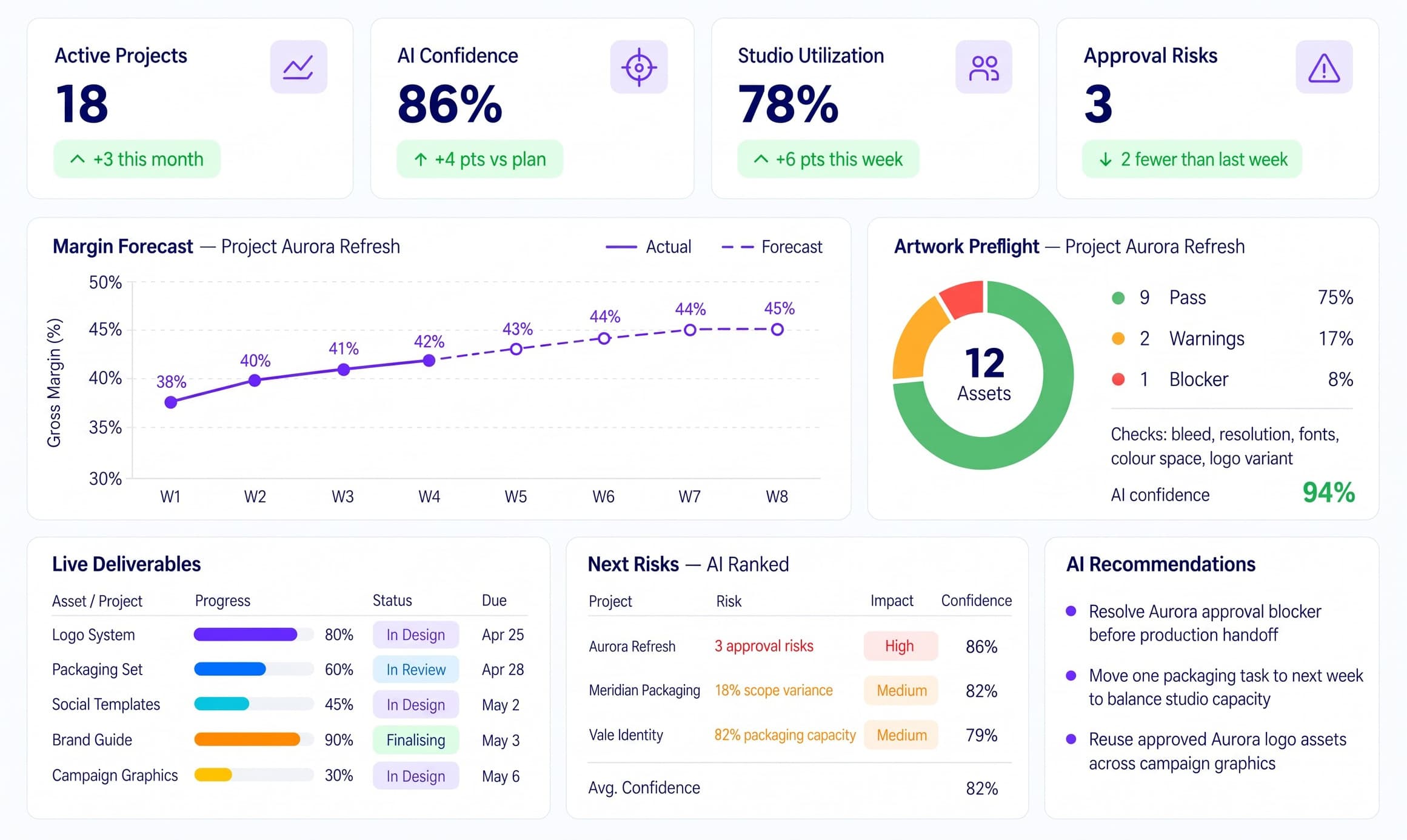
The dashboard brings together the key signals across your creative work, including active projects, studio utilization, AI confidence, approval risks, margin trends, artwork readiness, live deliverables, and priority issues. It helps teams understand the current state of work at a glance, spot delays or risks early, and focus on the areas that need immediate attention without moving between multiple screens.
app.qenvorix.ai/dashboard
Qenvorix AI — Creative Operations Dashboard
Proven business impact & ROICreative operations benchmark
78%
Faster Creative Turnaround
From scattered steps to one connected process
Reduce delays across brief scoping, planning, reviews, production, and final delivery so creative work moves forward much faster.
94%
Workflow Accuracy
Fewer missed requirements and production issues
AI helps identify missing brief details, scope gaps, conflicting feedback, version problems, and artwork risks before they affect delivery.
14+ hrs
Saved Per Project
Less manual coordination and checking
Cut time spent on repeated follow-ups, file searches, feedback consolidation, scheduling checks, and production validation.
2.8x
More Projects Managed
Without expanding the operating team
Handle more active creative work by reducing administrative effort, improving studio coordination, and keeping project information connected from brief to final asset.
Aggregated across Qenvorix AI studio workspaces · rolling twelve-month operational sample · not a live dashboard reading.
The Nestack advertising & marketing suite
Built for every corner of advertising.
Design studios, creative agencies, marketing agencies and MarTech teams each run their work differently — different teams, briefs, approvals and deliverables. Qenvorix AI is one of a family of Nestack platforms, each built around the way its part of the industry actually works.
Explore how Qenvorix AI supports the whole studio workflow — from reading the client brief and pricing the proposal to scheduling the team, developing and approving the designs, preparing print-ready artwork and keeping every approved asset ready to reuse. Each module shows one clear part of the process, with AI helping the team work faster, catch issues early and make better decisions.
app.qenvorix.ai/brief-scoping
Brief Scoping — Qenvorix AI
Brief Scoping
Turn Client Briefs Into a Clear, Approved Scope
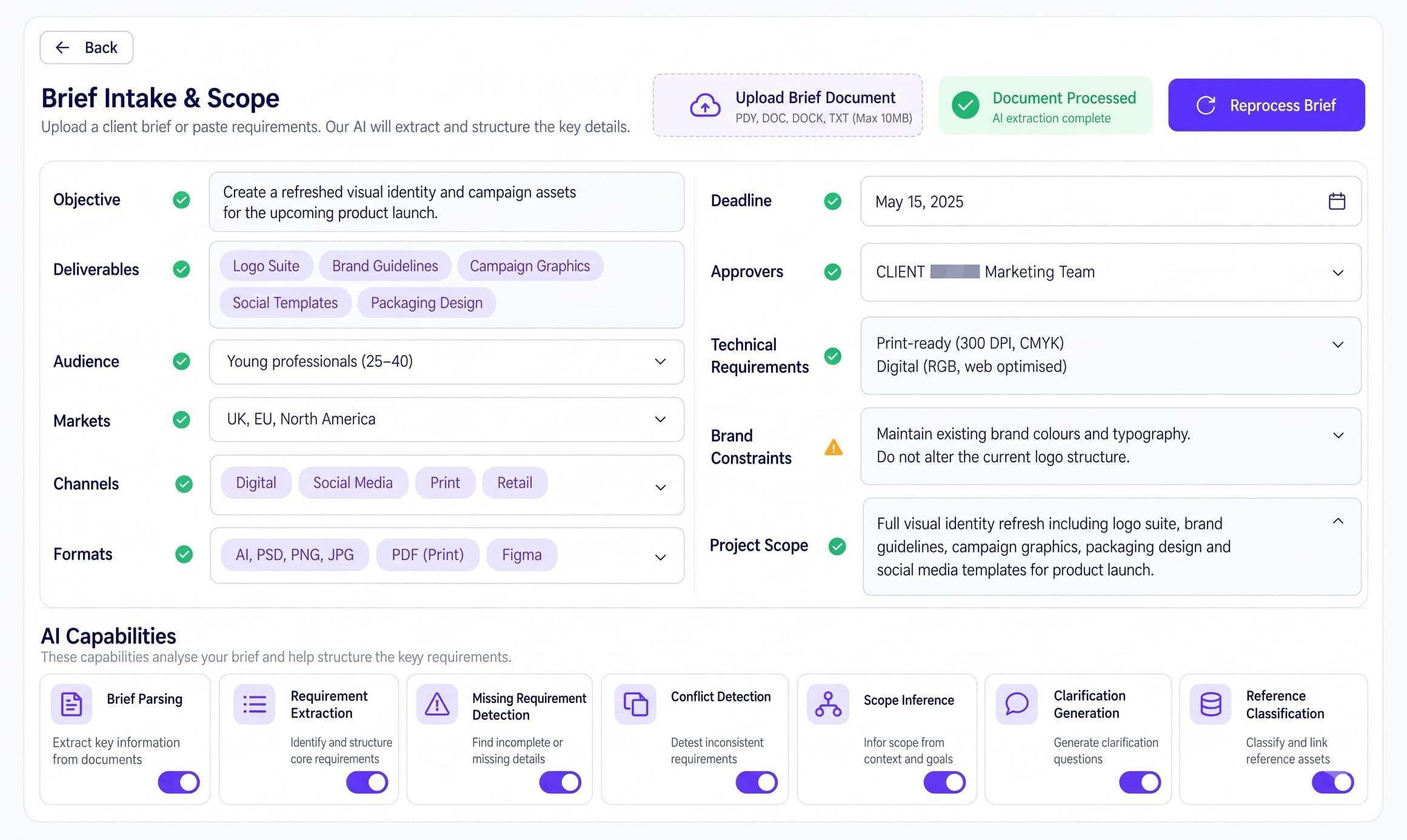
Upload the client brief or paste the requirements, and AI structures the objective, deliverables, audience, markets, channels, formats, deadline, approvers, technical specs and brand constraints. Every field is checked, anything that needs attention is flagged, and clarification questions are drafted before the scope is signed off.
app.qenvorix.ai/proposal-planning
Proposal Planning — Qenvorix AI
Proposal Planning
Price the Work Before You Promise It
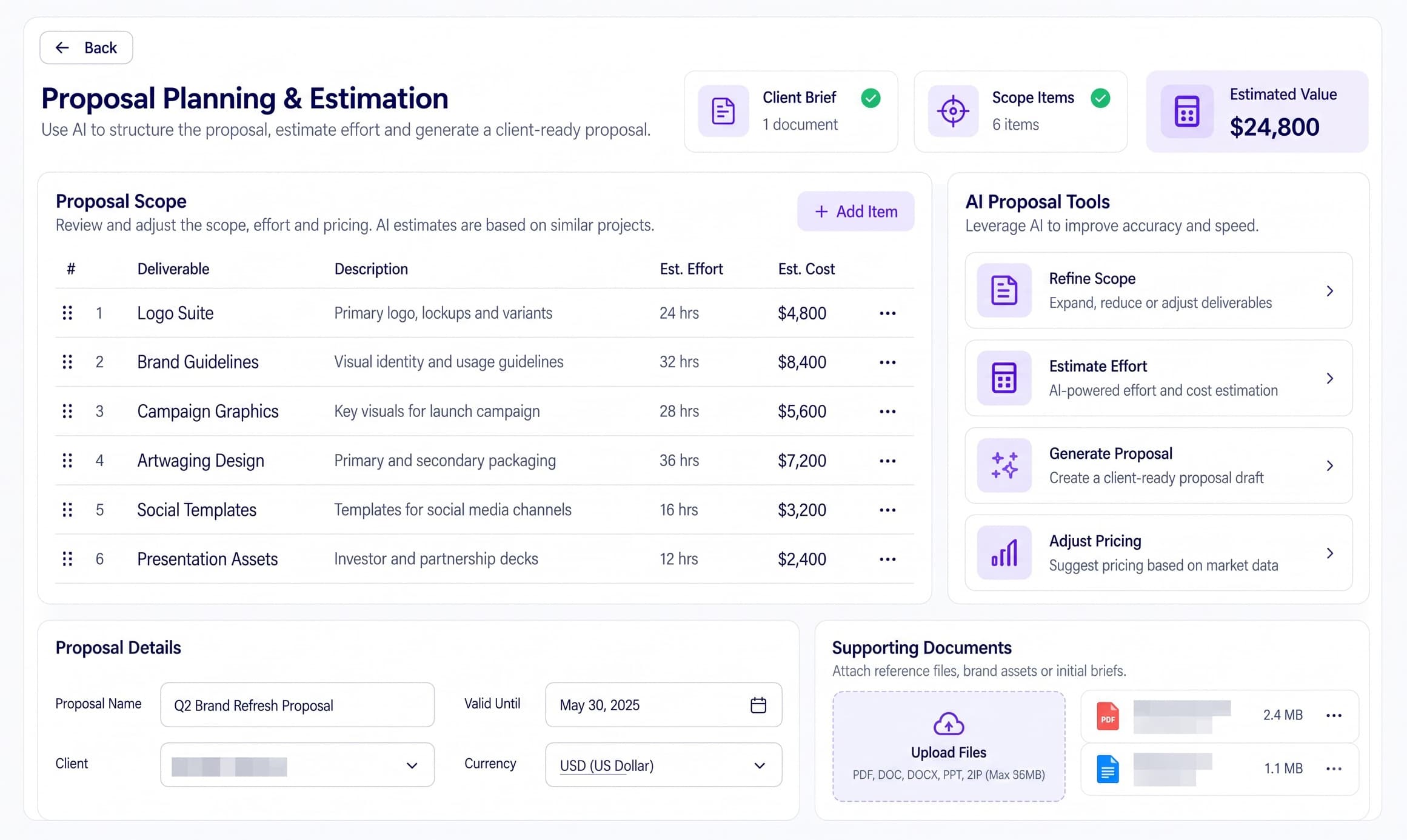
Each deliverable is listed with its description, estimated effort and cost, and rolled into one estimated value for the client. AI refines the scope, estimates effort from similar past projects, adjusts pricing against market data and drafts a client-ready proposal with the supporting documents attached.
app.qenvorix.ai/studio-scheduling
Studio Scheduling — Qenvorix AI
Studio Scheduling
Put the Right Designer on the Right Job
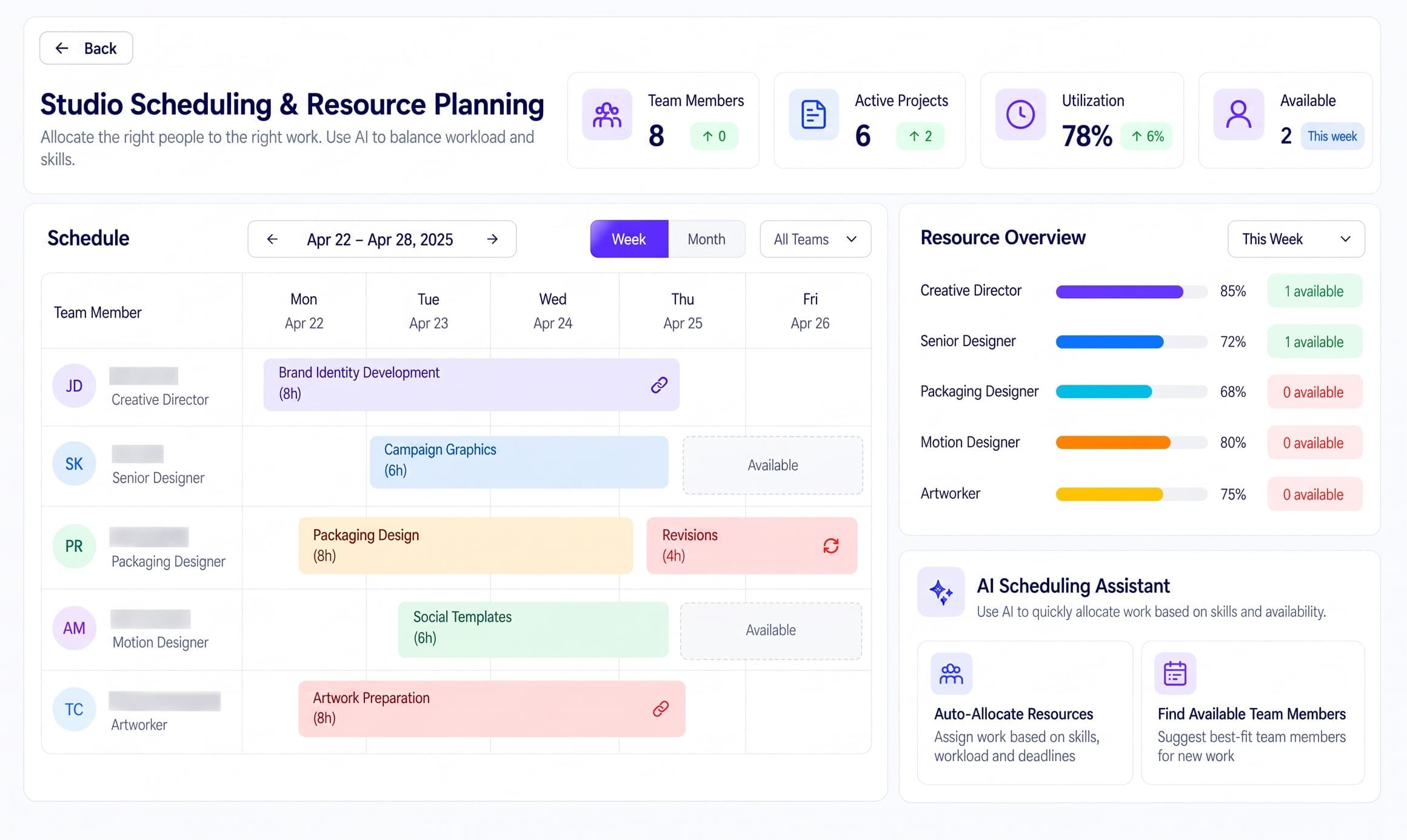
Plan the week or the month by team member, with every work package on the calendar and open time marked as available. Utilization and availability are tracked by role, and the AI Scheduling Assistant auto-allocates work by skill, workload and deadline or suggests who is free to take the next job.
app.qenvorix.ai/design-development
Design Development — Qenvorix AI
Design Development
Keep Every Design Direction Moving
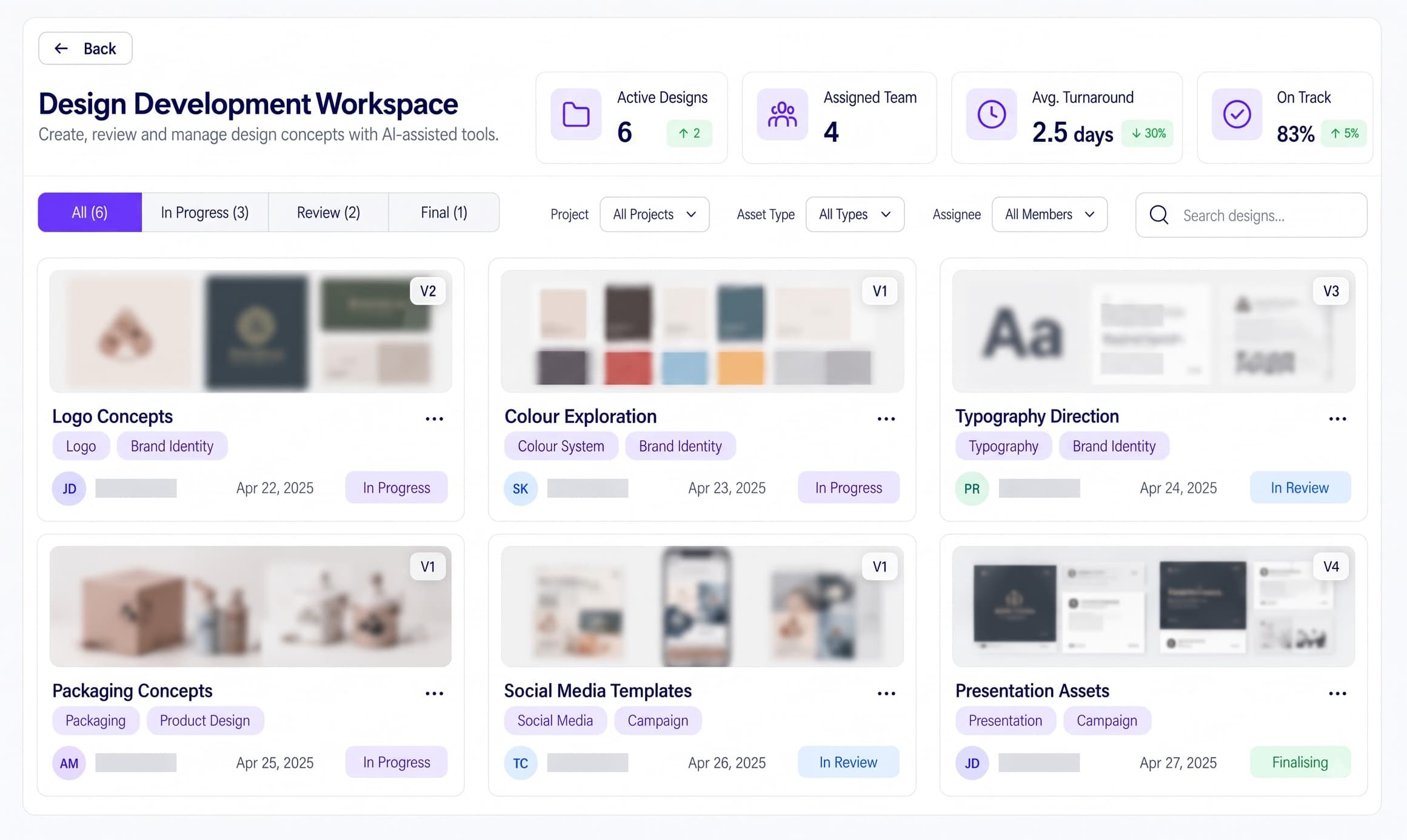
Logo concepts, colour systems, typography, packaging, social templates and presentation assets live in one workspace — each with its version, owner, date and status. Filter by project, asset type or assignee, and see turnaround time and on-track rate for the studio at a glance.
app.qenvorix.ai/creative-approval
Creative Approval — Qenvorix AI
Creative Approval
Get Clean Sign-Off on the Right Version
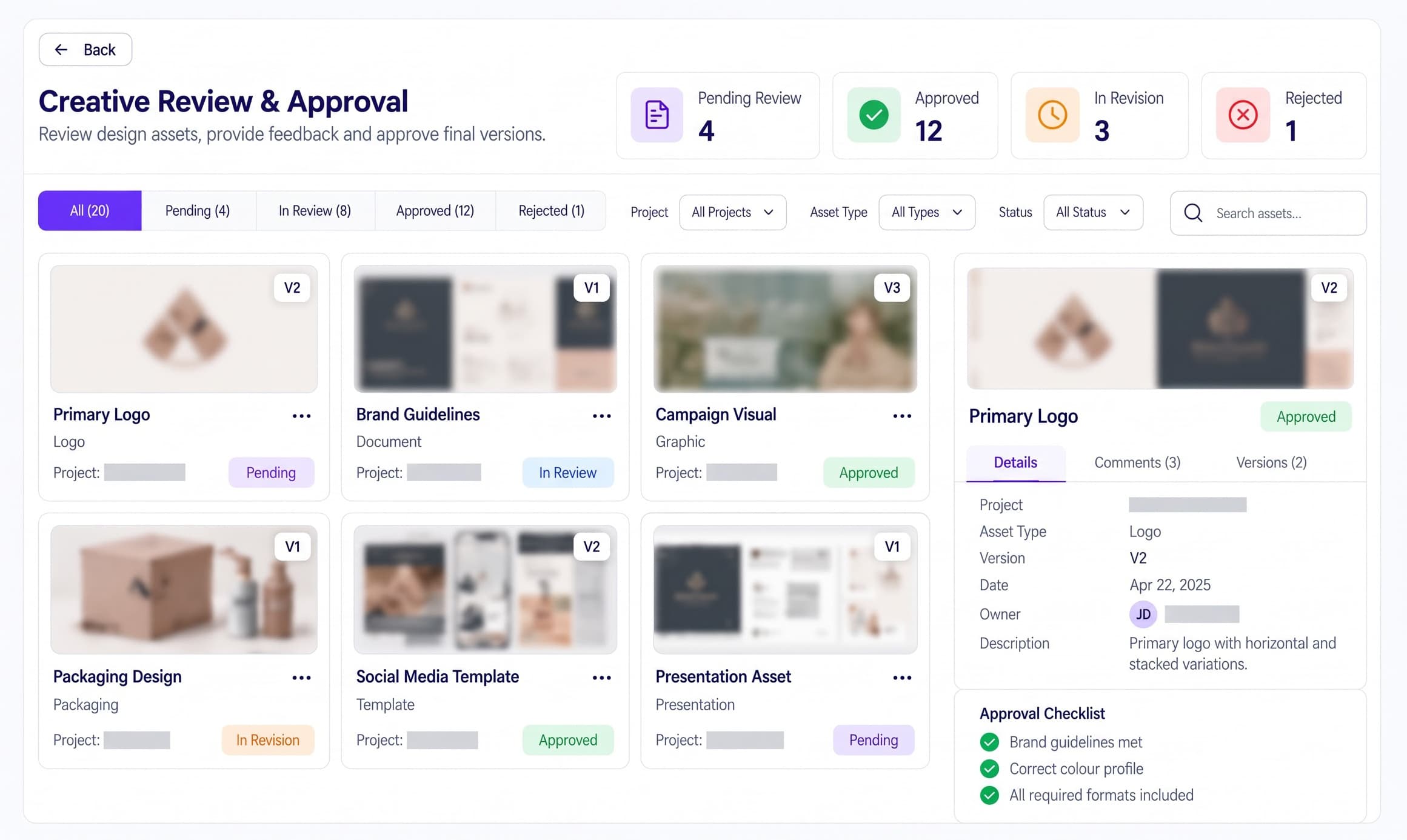
Every asset moves through Pending, In Review, In Revision, Approved or Rejected on one board. Open any asset to see its details, comments and version history, and clear the approval checklist — brand guidelines met, correct colour profile, all required formats included — before it is marked approved.
app.qenvorix.ai/artwork-production
Artwork Production — Qenvorix AI
Artwork Production
Catch Print Problems Before They Cost You
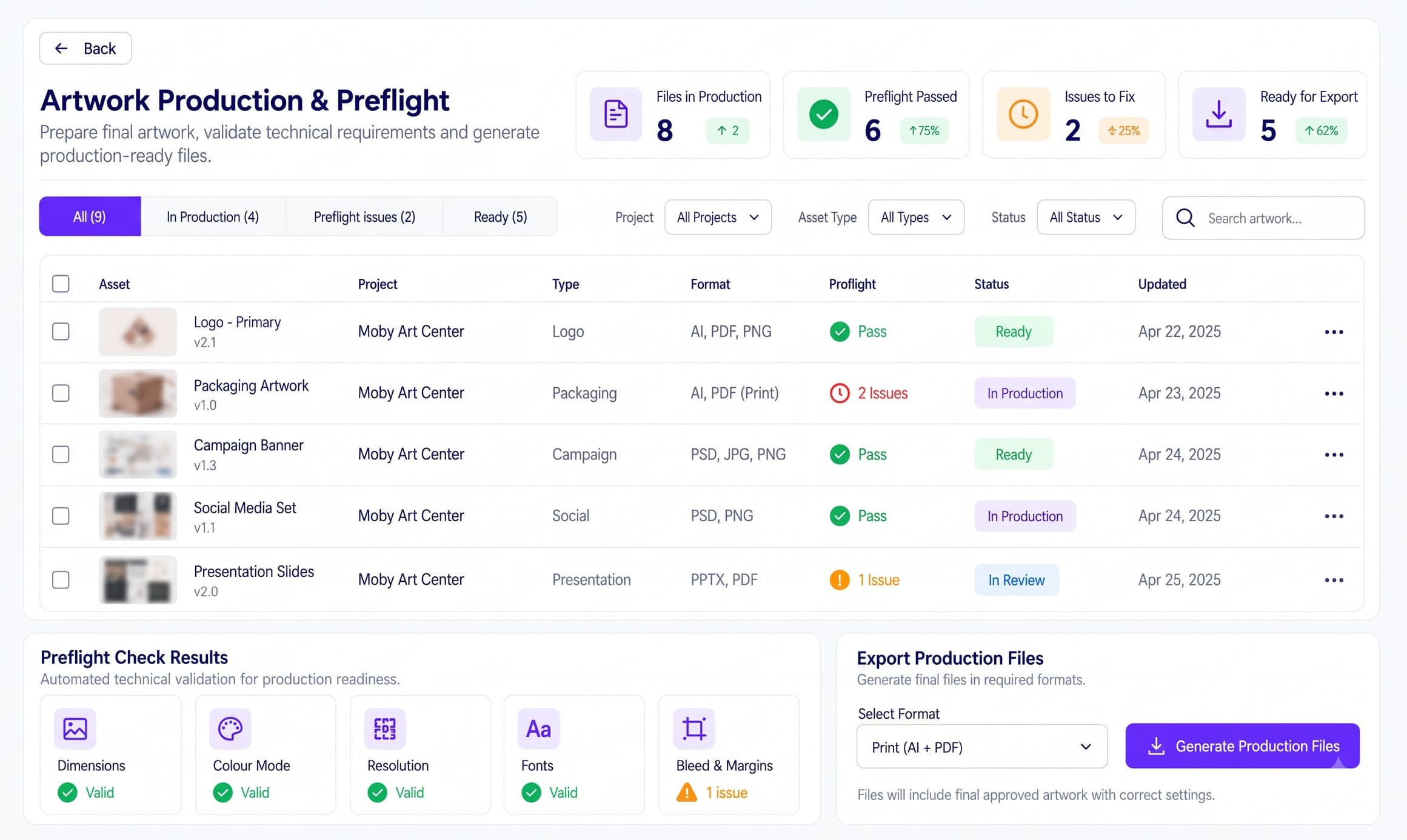
Final artwork is validated before release: dimensions, colour mode, resolution, fonts, bleed and margins are checked for every file, and each issue is shown against the asset that has it. Once the files pass, production-ready exports are generated in the format the printer or channel needs.
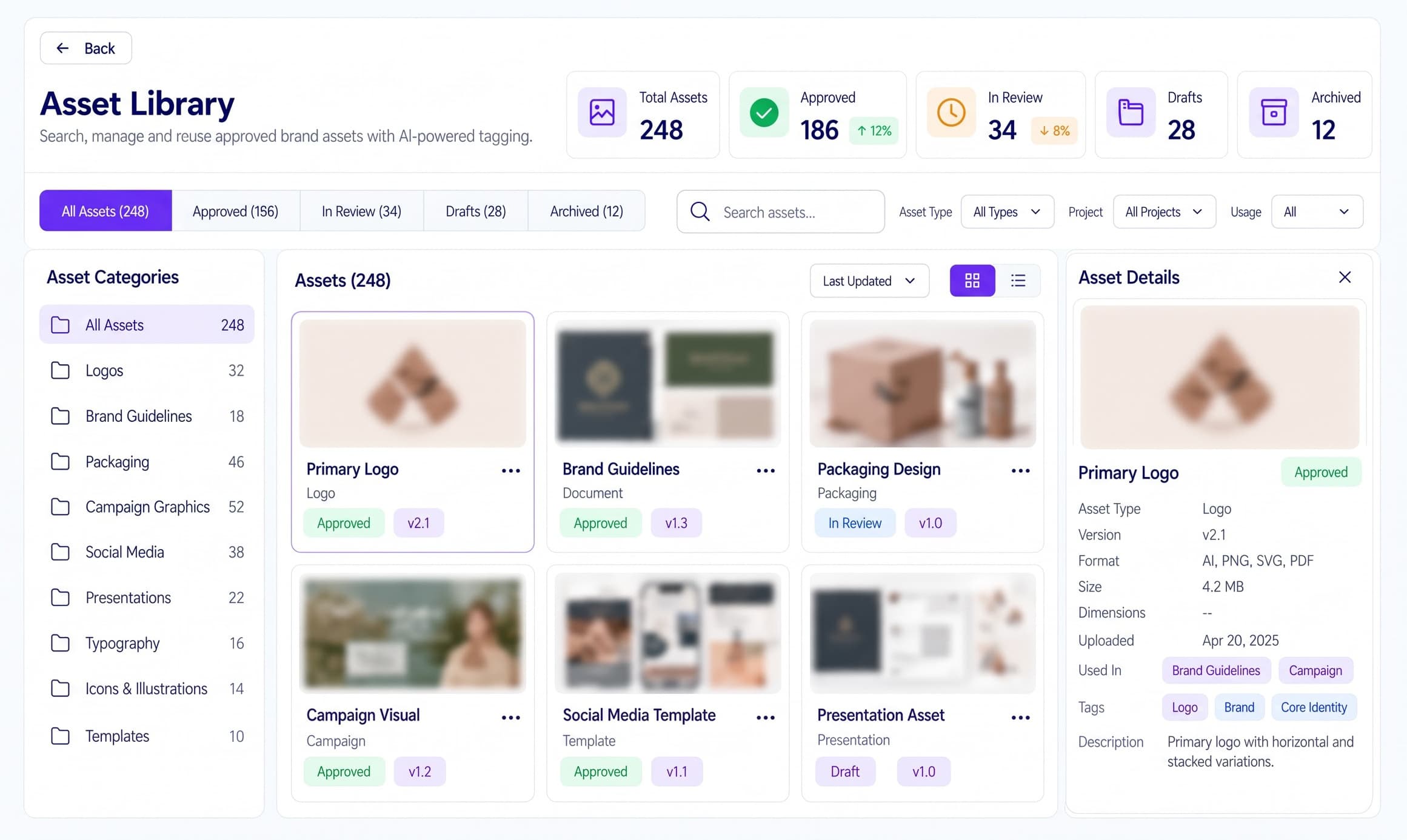
app.qenvorix.ai/asset-library
Asset Library — Qenvorix AI
Asset Library
Find and Reuse Approved Brand Assets
Approved logos, guidelines, packaging, campaign graphics, social media, presentations and typography are stored in one searchable library with AI-powered tagging. Each asset carries its version, format, size, upload date, tags and where it is used, so the team reuses the approved file instead of recreating it.
how it works
From client brief to press-ready work
Qenvorix AI fits into the studio workflow you already run — same briefs, same design tools, same clients. AI handles the heavy preparation; your team stays in control of scope, creative direction, approvals and what goes to print.
01
intake
Start With the Client Brief
Emails, PDFs, decks and meeting notes land in one place. The brief is structured into objective, deliverables, audience, channels, formats and brand constraints, with gaps and conflicts flagged before anyone quotes a price.
02
ai prep
AI Prepares the Plan
Effort and cost are estimated from similar past work, a client-ready proposal is drafted, and the job is matched to designers with the right skills and free hours. Scheduling and dependency risks show up before the calendar is set.
03
create
Your Team Designs and Approves
Designers develop every direction in one workspace; reviewers comment, compare versions and clear the approval checklist on the same record. People decide what is approved — AI keeps versions, feedback and status in order.
04
deliver
Preflight, Release, Reuse
Approved artwork is preflighted for dimensions, colour mode, resolution, fonts and bleed, exported in the right production format, then filed in the Asset Library with version, tags and usage — ready for the next brief.
Traditional SaaS vs Qenvorix AI
Don’t settle for the AI your software chose.
Most creative tools bolt on one model for every task. Qenvorix AI is an orchestration layer: each step from brief to asset library routes to the model that fits — document reading, estimation, feedback, asset search or private inference — while your studio keeps one project record.
Traditional SaaS
Built-in AI
One model, one pass, and no step you can point somewhere else.
You work within its limits.
QENVORIX AI — ROUTED WORKFLOW
01
Read the client brief
PDFs, decks and email threads are OCR’d and chunked so objectives, deliverables, formats, deadlines and brand constraints land as structured fields linked back to the source.
MISTRAL
Document OCR
02
Extract and classify requirements
Open models classify the request, pull out deliverables and technical specs, and flag missing or conflicting requirements before Proposal Planning opens.
HUGGING FACE
Inference providers
03
Estimate effort and draft the proposal
Effort, cost and scope are estimated against similar past projects, and a client-ready proposal draft is written with under-scoping and margin risk called out.
GEMINI
Gemini API
04
Consolidate feedback and client notes
Reviewer comments across versions are summarised into one change list, and client-facing approval notes are drafted inside the project record.
CLAUDE
Anthropic Messages API
05
Tag, search and match assets
Approved assets are embedded and auto-tagged so the library can find the right logo, template or packaging file by meaning, not by file name.
COHERE
Embed & rerank
06
Keep client IP inside your boundary
Unreleased campaigns, source files and confidential briefs can stay on private inference for search and long-context work without leaving your perimeter.
LLAMA
Private deployment
One structured project recordEvery module — one thread — client-ready view
Note: Model and provider names are illustrative of integration patterns; trademarks belong to their respective owners. Routing is configured per tenant and data boundary.
Connectivity
Your whole stack, connected.
Qenvorix AI plugs into the design tools, file stores, project trackers and sign-off tools your studio already runs. Briefs, source files, approvals and final assets sync through governed APIs — so work moves without re-uploading or re-keying between systems.
Adobe Creative Cloud
Figma
Canva
Google Drive
Microsoft SharePoint
Dropbox
Box
Google Workspace
Microsoft 365
Slack
Microsoft Teams
Asana
Monday.com
Jira
Adobe Acrobat Sign
DocuSign
Adobe Creative Cloud
Figma
Canva
Google Drive
Microsoft SharePoint
Dropbox
Box
Google Workspace
Microsoft 365
Slack
Microsoft Teams
Asana
Monday.com
Jira
Adobe Acrobat Sign
DocuSign
ClickUp
Trello
Notion
Airtable
Frame.io
HubSpot
Salesforce
Zapier
Make
Miro
OneDrive
Bynder
Brandfolder
Cloudinary
Vimeo
Dropbox Sign
ClickUp
Trello
Notion
Airtable
Frame.io
HubSpot
Salesforce
Zapier
Make
Miro
OneDrive
Bynder
Brandfolder
Cloudinary
Vimeo
Dropbox Sign
Note: Tool names and marks belong to their respective owners. No endorsement or partnership implied. Integration availability depends on existing systems, licences, API access, vendor approval, security configuration and implementation scope.
Standards we support
Built for Responsible Creative Work
Qenvorix AI provides the controls, records and checks that help a design studio handle client data lawfully, disclose AI-generated imagery, ship accessible digital work and hand printers press-ready files — within defined legal and regulatory boundaries.
GDPR
EU General Data Protection Regulation (2016/679)
Client briefs, contact lists, model and talent releases and campaign photography carry personal data. Access to briefs and assets is role-based, retention is set per project, and the Asset Library records where each file containing a person is used — so a removal or access request can be answered from one place.
Images and copy generated or materially altered with AI must be disclosed where the law requires it. AI-assisted work is flagged on the asset and its version history in Design Development, and the flag travels through Creative Approval and into the Asset Library — so no synthetic image ships unlabelled.
WCAG 2.2 AA
W3C Web Content Accessibility Guidelines 2.2, Level AA
The accessibility benchmark behind the European Accessibility Act (EN 301 549) and most public-sector briefs. Colour contrast, text legibility and alt-text checks can be added to the Creative Approval checklist, so digital deliverables are checked before they are approved.
PDF/X-4
ISO 15930-7 — Prepress digital data exchange using PDF (PDF/X-4)
The print-handoff format printers expect. Artwork Production preflights dimensions, colour mode, resolution, embedded fonts and bleed against it and blocks release until every issue is cleared, so files leave the studio press-ready and reprints are avoided.
Note: Qenvorix AI provides technical capabilities that support these standards and requirements. It is not itself certified against them, it does not independently certify your studio as compliant, and availability may depend on product configuration, configured integrations and customer operating practices.
Qenvorix AI ships
Creative operations, in production, on live studio work.
From client brief through proposal, scheduling, approval, preflight and the asset library — Qenvorix AI keeps one project record so every module reads the same context.
Brief intake & requirement-extraction agents
Proposal, preflight & asset-tagging agents
Catalogued for advertising, design & branding workflows
Your advertising & creative AI agents, run like production systems.
Telemetry, evaluations, guardrails, human review, and a crew on call when a creative agent starts drifting — before brand, budget or compliance issues reach your clients.
Advertising & creative agents are catalogued on Nestack Agents.
Add-ons
The kit your studio floor needs.
The proprietary companion kit that pairs with Qenvorix AI — every device streams into a named module, so what it captures on the studio floor lands inside the platform as a usable record rather than another file on someone’s desktop.
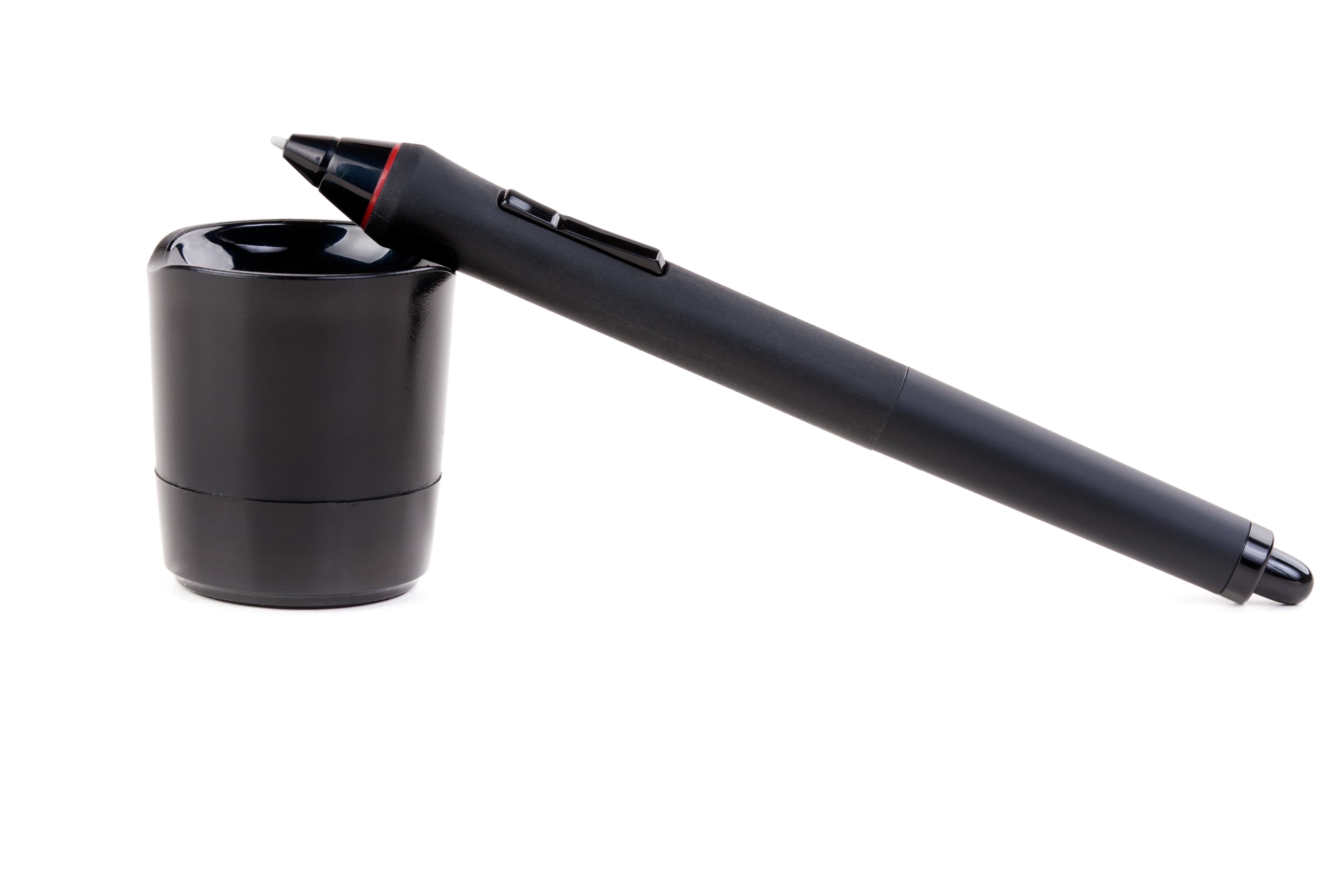
Smart Pen
Capture handwritten notes, review comments, and quick creative inputs during client meetings or studio sessions and send them into the project record digitally. The pen helps reduce manual re-entry and keeps important feedback connected to the right brief, project, or approval activity.
Proof Scanner
Scan physical proofs and production samples to open the correct project record, verify the approved artwork version, and log the handoff.
Note: Hardware, installation, and integration are not included in the standard subscription. Additional charges apply based on the hardware selected, integration modules required, and implementation scope.
our prices
Priced for the studio you run.
the whole studio
$200/mo
Qenvorix AI runs on a single monthly subscription, covering every client project your studio takes on — from the first brief and proposal through scheduling, design review, approval, preflight and the asset library, on one project record.
Note: AI API usage is charged separately. Clients must recharge their AI credit balance based on their usage.
Onboarding is a separate one-time fee, set out below.
Onboarding
What your onboarding fee covers
A one-time setup that gets your studio fully live on Qenvorix AI before your first recurring cycle — we import your client roster, brand guidelines and asset library, wire up your creative and prepress toolchain, configure the approval stages you actually run, and tune every module from Brief Scoping to Artwork Production to the way your studio already works. Each fee is a starting point, not a fixed quote: the final figure is scoped once we understand your environment, security needs, integrations, data volume, compliance requirements and deployment model.
Essential
$1,000+one-time
Kickoff call and rollout plan scoped to your client roster
Workspace provisioning with your studio branding and admin accounts
Import of your active clients, projects and brand guidelines
Core modules switched on: Brief Scoping, Proposal Planning and Studio Scheduling
Preflight ruleset seeded against your standard print and digital specs
Approval stages and reviewer groups set for your top accounts
Roles and seat permissions set for your first pod of users
Live-readiness check before your first recurring cycle
Plus
Recommended
$2,500+one-time
Everything in Essential, plus:
Guided migration of historical projects, approved assets and version history, with validation
Design Development, Creative Approval and Artwork Production configured to your pipeline
Custom brief, proposal and preflight templates matched to your service lines
Asset Library structured to your taxonomy, with rights and usage rules loaded
Live training for creative directors, designers, artworkers and account leads, with a recording
Dedicated onboarding specialist for the rollout
Enterprise
$5,000+one-time
Everything in Plus, plus:
Tailored implementation across multiple offices, brands or white-label studios
Bespoke integrations, SSO and API wiring into your existing creative stack
Bulk migration of every client's asset library with de-duplication and reconciliation
Custom approval routing tuned to your reviewer hierarchy and client sign-off rules
Role-based training tracks and admin enablement across teams
Named onboarding manager with a defined go-live date and SLA
Where it runsSame platform · same recurring subscription
Cloud (SaaS)
Runs in Qenvorix AI’s managed cloud — the fastest way to start. We host, patch and scale the platform for you, so your studio is scoping briefs and clearing preflight from day one with nothing to stand up.
Private / self-hosted
The same platform deployed inside your own infrastructure — your cloud, VPC or on-prem — for studios with sensitive client IP. Client briefs, source files, press-ready artwork and the asset library never leave your environment, and the recurring subscription stays the same.
The subscription is identical on either model; only the onboarding scope differs by your security and deployment requirements.
FAQs
Before you subscribe.
01What does the monthly subscription include?
One flat monthly price covers the whole studio — the Dashboard and all seven modules from Brief Scoping to the Asset Library, every client and every project. There is no per-seat ladder to decode and no extra charge for "turning on" preflight, AI proposals or the scheduling assistant. The number on Pricing is a starting point: we tailor it to the size of your studio, and what you are quoted is what your account manager stands behind.
02How is the onboarding fee different from the subscription?
The subscription is what keeps Qenvorix AI running month to month. Onboarding is a one-time setup so you are not rebuilding your studio in a new tool on day one — we import your clients, projects, brand guidelines and approved assets, set up your approval stages and preflight rules, and run a live-readiness check before your first billing cycle. Essential, Plus and Enterprise are cumulative starting fees ($1,000+, $2,500+, $5,000+); the final figure is scoped once we know your integrations, file volume and whether you need cloud or private hosting.
03We already have Adobe, Figma, a project tracker and a shared drive — why add this?
Keep them — Qenvorix AI connects to the tools you design in. The problem is everything in between: the brief buried in an email thread, the proposal that under-quoted the packaging, the senior designer booked on two jobs, the "final_v7_FINAL" nobody is sure the client approved, and the reprint because a file went out in RGB. Qenvorix AI is the one record that carries a job from brief to approved, press-ready asset, so your best people stop chasing files and start billing for design.
04Who is it built for — independent studios, agencies or in-house brand teams?
Teams that deliver branding, packaging, campaign and print work for more than one client or brand at a time — independent design studios, branding and creative agencies, and in-house brand and creative teams. If your week is briefs, quotes, resourcing, review rounds, client sign-off and print handoffs, you are the audience. One plan scales with your studio, not with how many modules you switch on.
05Will it actually cut scope creep and unpaid revision rounds?
It makes both visible before they cost you. Brief Scoping flags missing or conflicting requirements before you quote, Proposal Planning prices every deliverable against real effort, and the Dashboard tracks margin against forecast week by week. In Creative Approval every round is a numbered version with its comments attached — so when a client asks for “one more change”, you can see what was agreed, what changed and what it did to the margin.
06Is our clients' work safe — can we keep files and IP in our own environment?
Yes. Cloud SaaS is the fastest way to start, with nothing to install. Private or self-hosted runs the same platform in your own cloud, VPC or on-prem, so unreleased campaigns, source files and client briefs never leave your environment — and the monthly subscription does not change. Access is role-based either way, and only the onboarding scope changes with your security, SSO and integration needs.
07What if we subscribe and it is not the right fit?
You are billed monthly and can cancel any time — no long lock-in hidden in the fine print. Before you spend anything, book a demo: a 45-minute working walk-through of the modules you care about, run on the kind of work your studio actually does, not a generic slide deck. Onboarding is scoped in writing up front, so you know exactly what “live” means before the first recurring charge.
08What support do we get after we buy?
Onboarding gives you a named rollout: workspace setup, client and project imports, roles, approval stages and preflight rules, then a live-readiness check (Plus adds live training for designers, artworkers and account leads and a dedicated onboarding specialist; Enterprise a named onboarding manager with a go-live date and SLA). Questions before you buy? Use the booking form above or email info@nestack.com — we will walk through your tools, client roster and print workflow so the quote matches how your studio really works.