VIDEO & MULTIMEDIA MARKETING PRODUCTION

FROM THE FIRST BRIEF TO THE FINAL APPROVED FRAME

Reelattice AI brings video and multimedia marketing production into one connected workflow. Scope brand films, product demos, customer stories and social cutdowns; prepare scripts and storyboards; coordinate crew, kit and locations; and carry footage through edit, grade, mix and clearance. Keep estimates, creative versions, talent releases, music rights and final acceptance tied to the job, from the first brief to delivery and closeout.

SIX PRODUCTION MODULES · ONE CONNECTED JOB RECORD

The production command center

EVERY SHOOT, EVERY APPROVAL, EVERY INVOICE, CONNECTED.

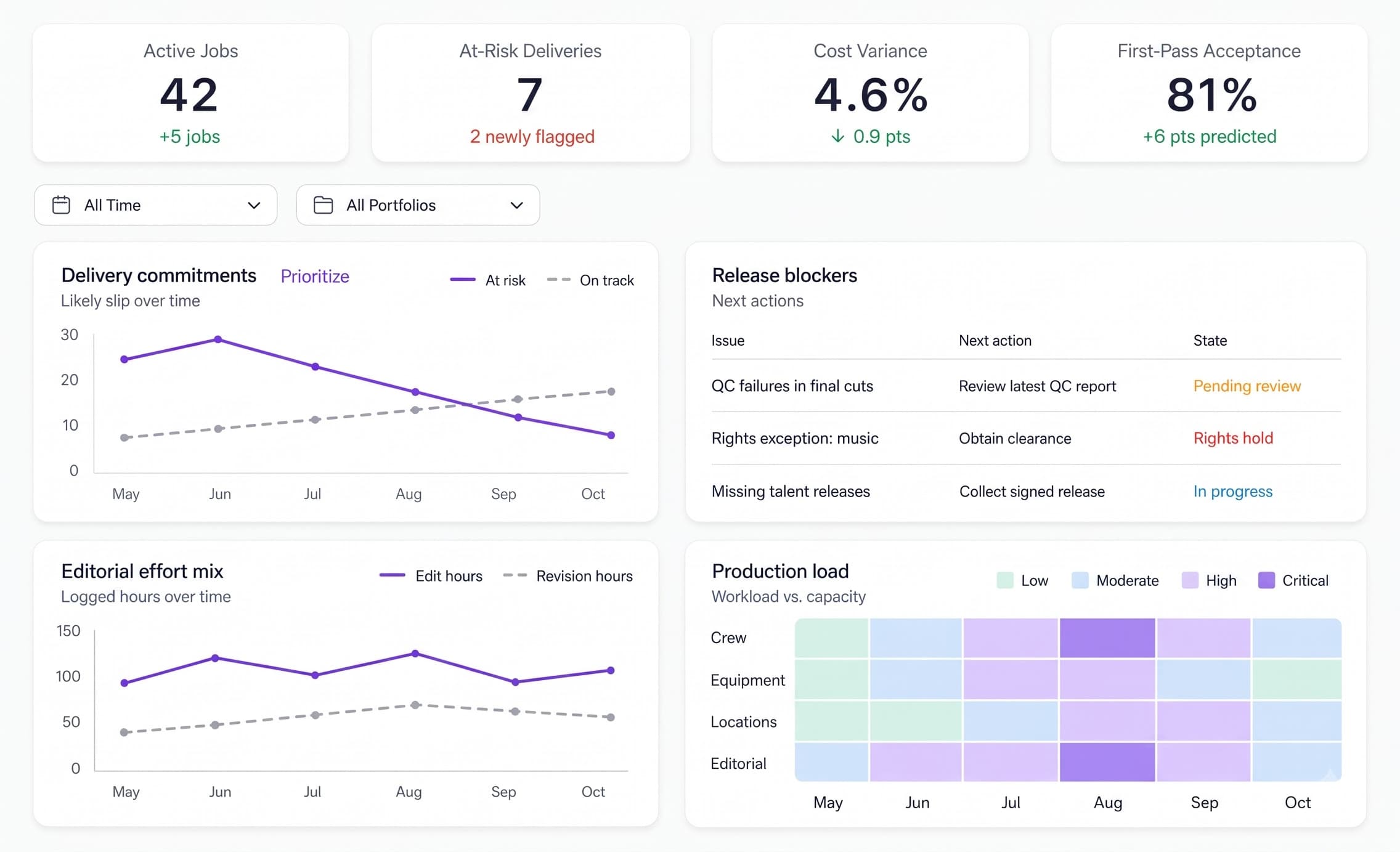
The Reelattice AI Dashboard brings active jobs, at-risk deliveries, cost variance and first-pass acceptance into one view. Producers can review delivery commitments, editorial effort, release blockers and production load across crew, equipment, locations and editorial. QC failures, music-rights holds and missing talent releases stay visible before a master is released.

Reelattice AI — Video Production Dashboard
1

Delivery Commitments

Compare at-risk and on-track delivery commitments over time. These illustrative values help the producer identify jobs that need attention before the client handover date.

1 / 3
Production measures that matterOperational measures
  • Jobs

    Production Commitments

    Know what is due and who owns it.

    Review active films, cutdowns and delivery deadlines before promising another production slot.

  • QC

    First-Pass Acceptance

    Review the cut against the delivery brief.

    Keep technical findings and client acceptance visible alongside the relevant master version.

  • Hours

    Editorial Effort

    See edit time and revision time together.

    Use logged editorial effort to review revision allowances, remaining work and production capacity.

  • Cost

    Estimate Versus Actual

    Keep production exposure visible.

    Review crew, equipment, location and post-production costs against authorized scope.

Note: These are operational measures, not guaranteed performance improvements. Definitions and targets depend on the production brief and agreed delivery specifications. Dashboard values shown on screen are synthetic demonstration data.

The Nestack advertising & marketing suite

Built for every corner of advertising.

Design studios, creative agencies, marketing agencies and MarTech teams each run their work differently — different teams, briefs, approvals and deliverables. Reelattice AI is one of a family of Nestack platforms, each built around the way its part of the industry actually works.

The video production workflow

FROM FIRST BRIEFTO THE FINAL, APPROVED MASTER.

Explore how Reelattice AI connects video and multimedia marketing production: scope and estimate the job, prepare the creative, coordinate the shoot, manage media and post, clear the final cut, and hand over approved deliverables. Producers, editors, reviewers and finance work from the same production record, with decisions tied to the relevant version.

Intake & Estimates — Reelattice AI
Intake & Estimates

Scope the Film Before the First Shoot Day.

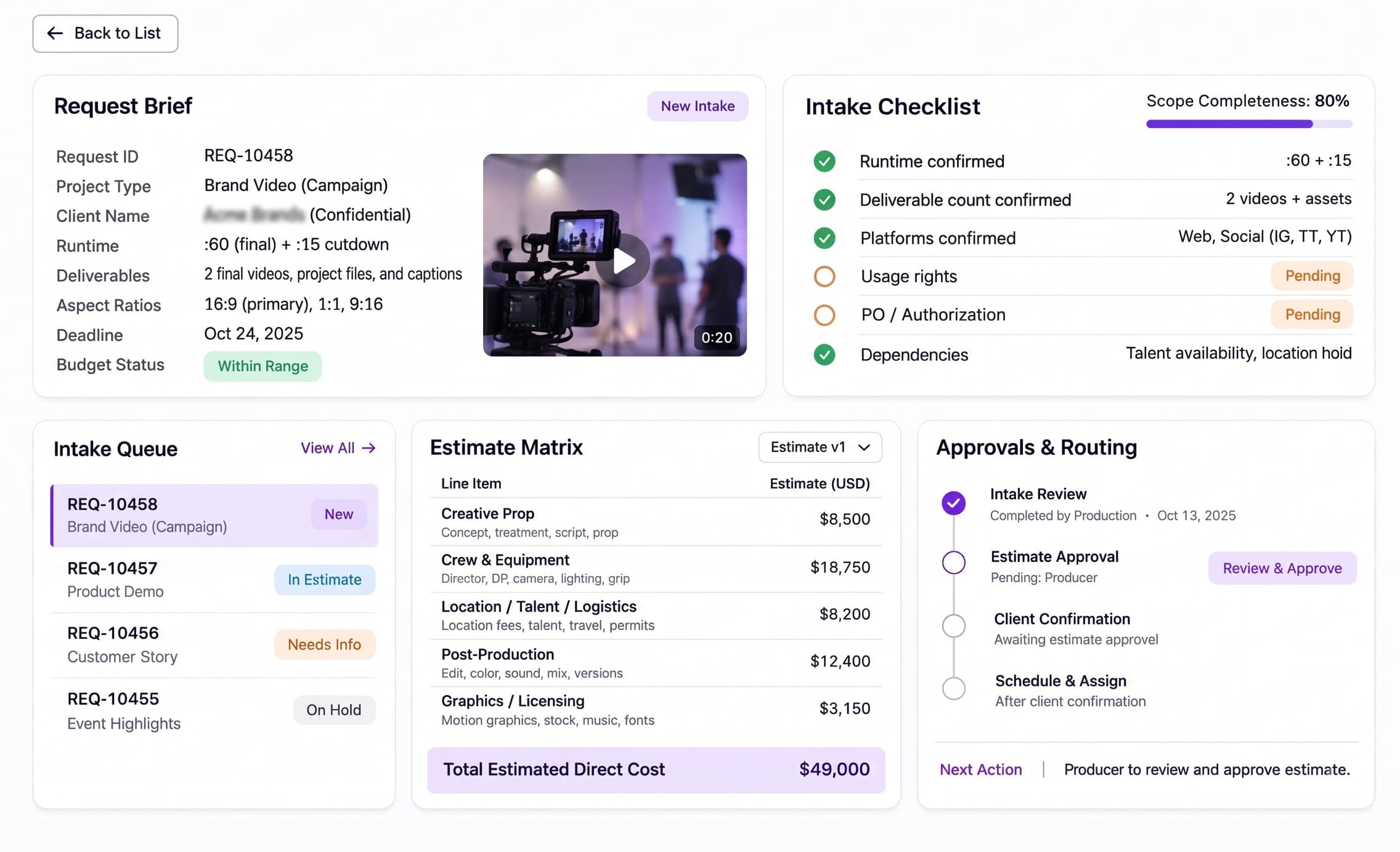
Confirm runtime, deliverable count, aspect ratios, target platforms and usage rights against the client brief. Review creative prep, crew, equipment, location, talent, post-production and licensing costs in the estimate matrix. Keep the PO, budget authorization and client confirmation together before scheduling.

Creative Prep — Reelattice AI
Creative Prep

Turn the Approved Brief Into a Shootable Plan.

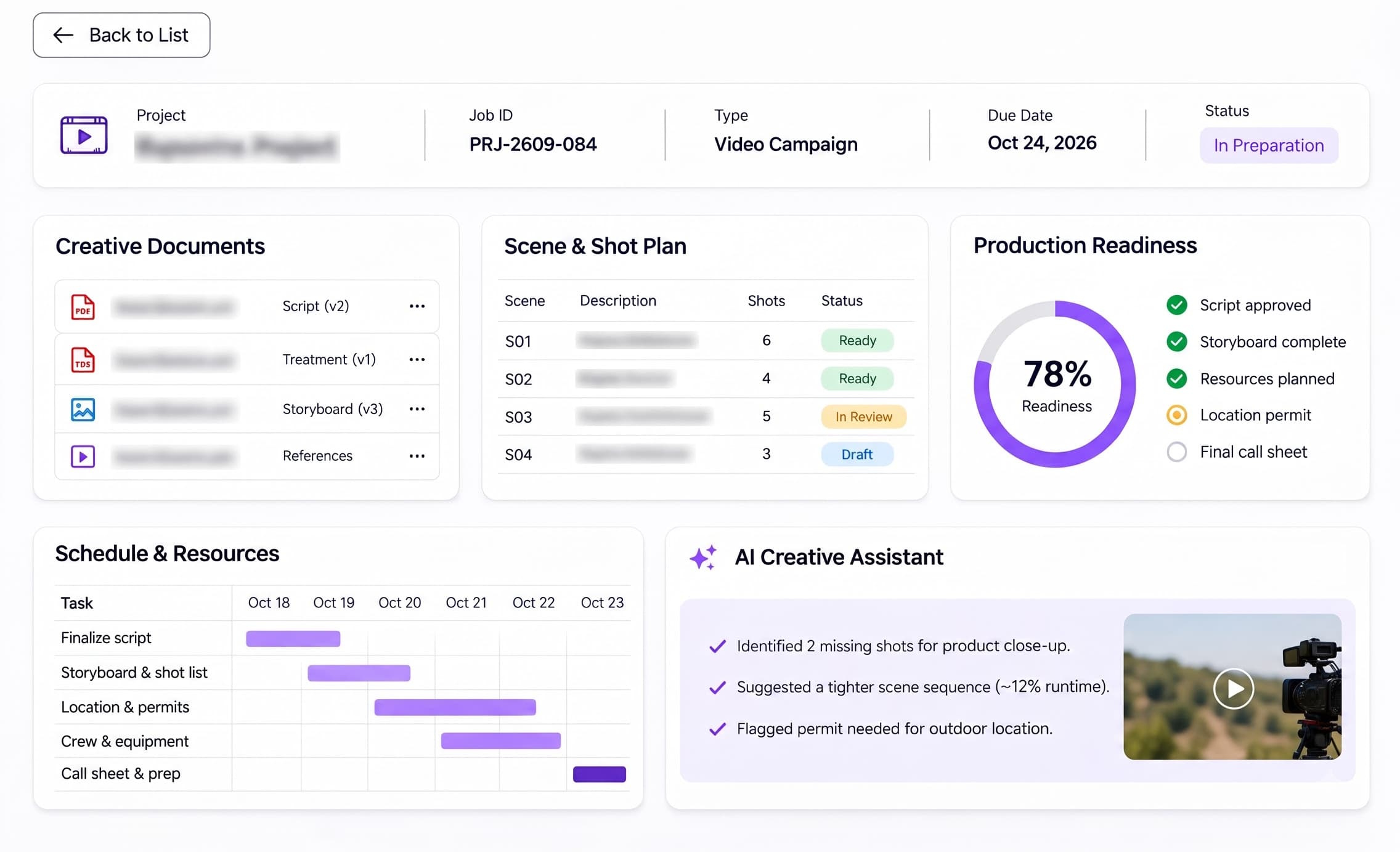
Keep the treatment, script, storyboard and shot list tied to the agreed deliverables. Coordinate casting, location requirements, props and brand references before the pre-production meeting. Resolve creative dependencies and obtain the right approvals before crew and equipment are committed.

Production Desk — Reelattice AI
Production Desk

Bring Crew, Kit and Locations Onto the Same Call Sheet.

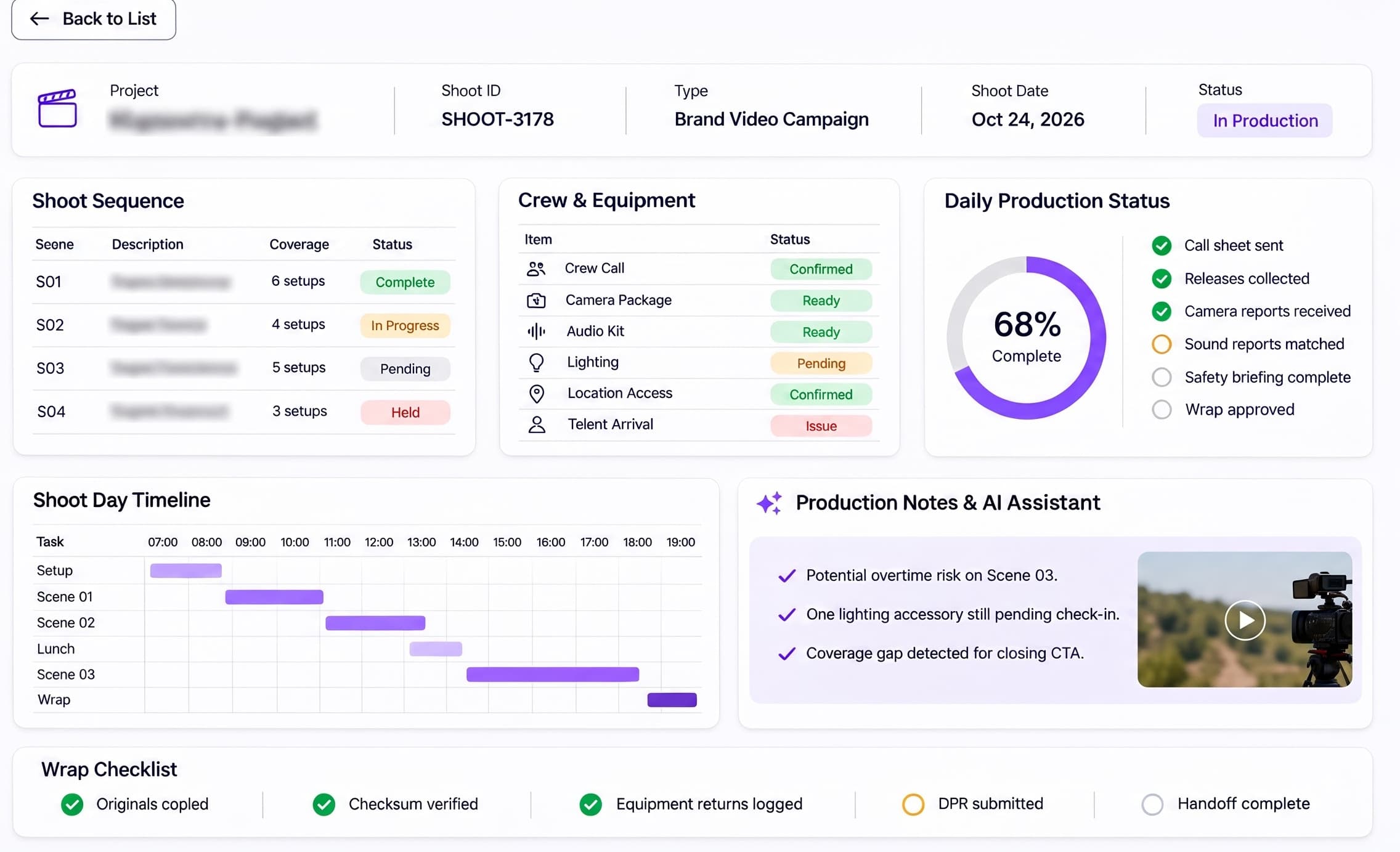
Coordinate shoot dates, crew assignments, equipment bookings and location readiness. Track call sheets, daily production progress and outstanding dependencies so the producer can resolve conflicts before they stop a shoot. Keep changes visible to the production team and the client lead.

Media & Post — Reelattice AI
Media & Post

Carry Every Take Through Edit, Grade and Mix.

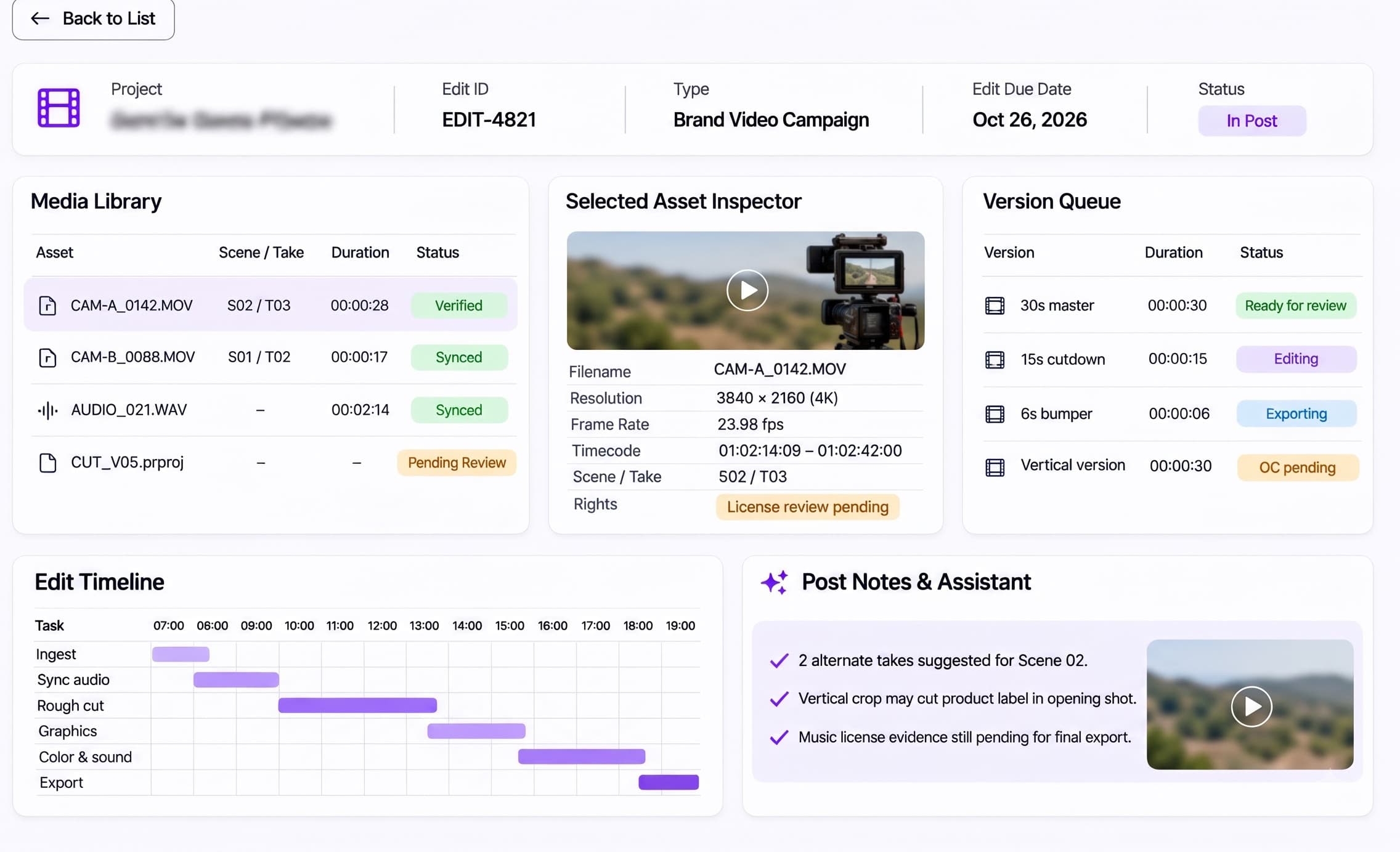
Organize camera originals, audio, proxies and editorial versions through post-production. Coordinate edit, motion graphics, color grading, sound mix and caption deliverables. Keep the approved cut and its platform-specific versions traceable while editors resolve feedback and prepare final masters.

Review & Clearance — Reelattice AI
Review & Clearance

Clear the Exact Cut You Intend to Release.

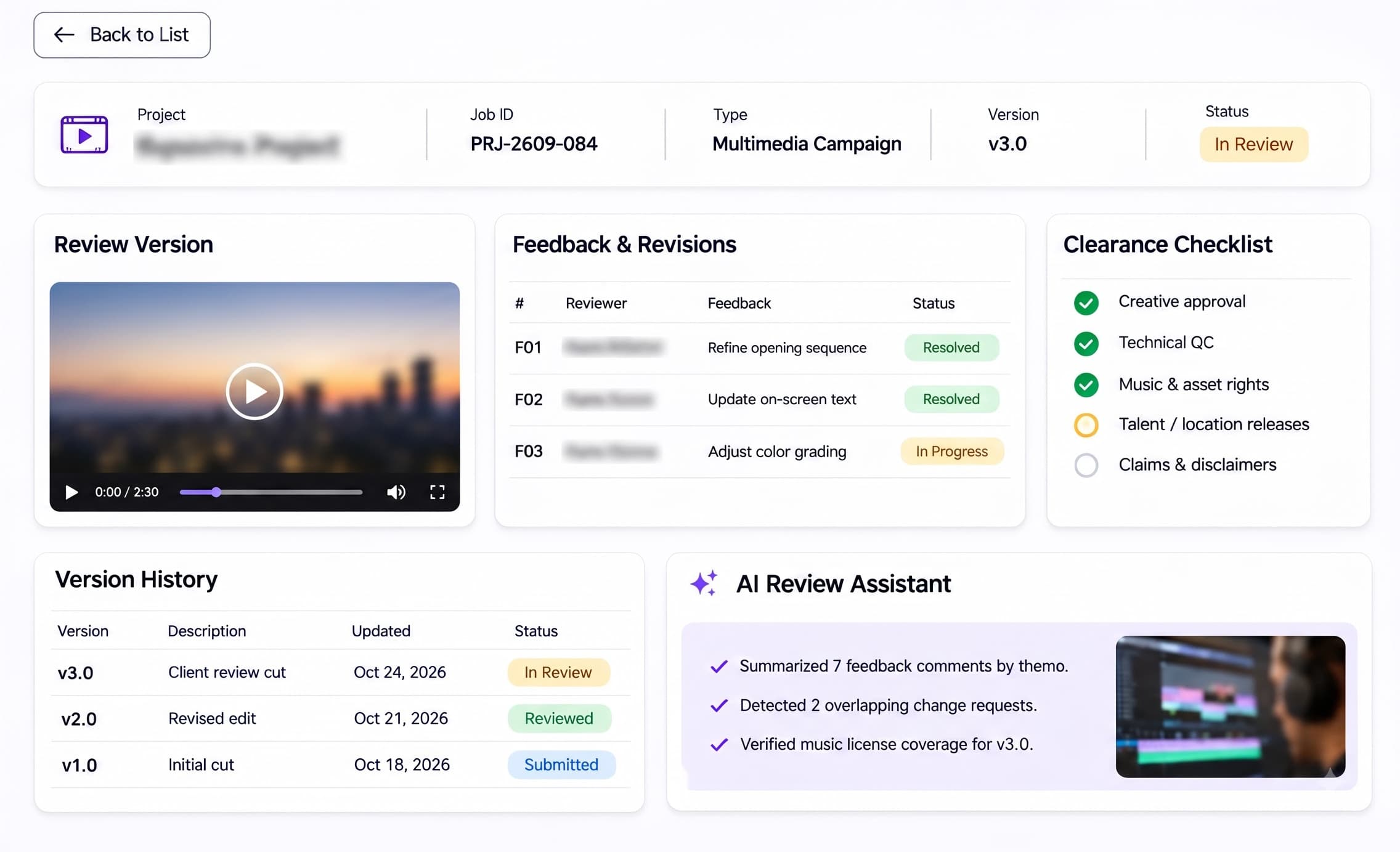
Review final cuts against the brief, brand requirements and delivery specifications. Keep QC findings, music and stock licences, talent releases and client sign-off with the relevant version. Resolve rights holds and technical failures before approving a master for handover; final clearance remains a human decision.

Delivery & Closeout — Reelattice AI
Delivery & Closeout

Deliver the Masters. Close the Production Record.

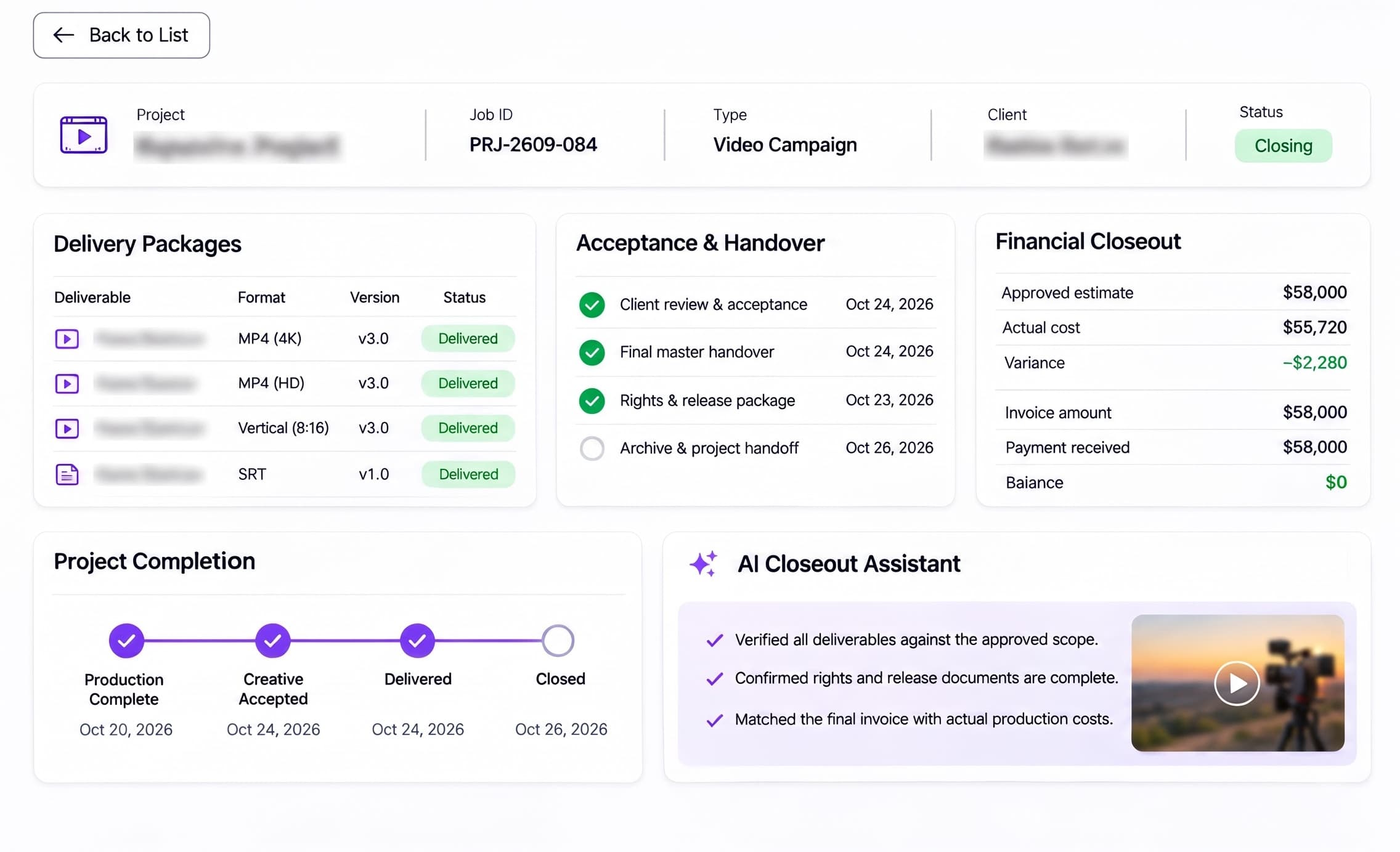
Hand over approved masters, cutdowns, caption files and agreed project assets against the delivery manifest. Record acceptance, reconcile supplier costs and approved scope changes, and prepare the final invoice. Keep usage terms, handover evidence and archive references available after the production wraps.

how it works

From first brief
to accepted final masters

Reelattice AI follows the practical sequence of a video production: agree the scope, prepare the shoot, capture the footage, finish the edit, clear rights and technical checks, then deliver and close the job. Each handoff keeps the approved brief, version and responsibility in view.

  1. 01
    intake & estimates

    Verify the Brief and Authorize the Estimate

    Confirm runtime, cutdown count, aspect ratios, platforms, usage territory and delivery date. Cost crew days, kit hire, locations, talent, edit, grade, mix and licences. Secure scope approval and the client PO before commitments.

  2. 02
    creative prep & production

    Prepare the Creative and Run the Shoot

    Approve the treatment, script, storyboard and shot list. Confirm casting, locations and equipment, circulate the call sheet, then track shoot progress and production changes. Preserve camera-card and sound-roll identities for the post handoff.

  3. 03
    media, post & clearance

    Edit, Review and Clear the Final Cut

    Carry media through ingest, edit, motion graphics, grade, mix and captions. Resolve timecoded review notes, check delivery specifications and verify music, stock and talent permissions against the exact master submitted for approval.

  4. 04
    delivery & closeout

    Hand Over the Masters and Settle the Job

    Check the delivery manifest, obtain acceptance and hand over the agreed masters, cutdowns and caption files. Reconcile crew and supplier invoices, authorized changes and final charges; retain the agreed archive and rights records.

Traditional SaaS vs. Reelattice AI

Don’t settle for disconnected tools.
Connect the whole video production workflow.

Video production teams use separate tools for briefs, budgets, call sheets, editing, review, delivery and invoices. Reelattice AI connects the operational handoffs around those tools, with AI assistance subject to configured integrations and human review.

Traditional Tools
Disconnected
Tools

Producers retype brief changes into estimates and call sheets. Editors receive feedback through emails and spreadsheets, while finance reconciles supplier bills separately. Every transfer can lose a version, an approval or a rights restriction.

Disconnected production workflows

REELATTICE AI — CONNECTED PRODUCTION WORKFLOW
  • 01

    Verify the Production Brief

    Review runtime, deliverable count, aspect ratios, usage terms and missing client requirements before estimating.

    • Claude
  • 02

    Prepare the Estimate and Creative

    Keep crew, kit, talent, location and post costs alongside the treatment, script and shot list.

    • OpenAI
  • 03

    Coordinate the Shoot

    Keep call sheets, assignments and production dependencies visible to the producer.

    • Mistral AI
  • 04

    Organize Media and Post

    Carry source references, edit versions and timecoded feedback through editorial review.

    • Claude
  • 05

    Review Rights and Technical Findings

    Bring music licences, talent releases and QC findings together for human clearance.

    • OpenAI
  • 06

    Prepare Delivery and Closeout

    Compare agreed deliverables, acceptance evidence and supplier costs before final invoicing.

    • Mistral AI
One connected platform • Connected production records • Traceable approvals • Financial reconciliation

Note: Model and provider names are illustrative of integration patterns; trademarks belong to their respective owners. Routing is configured per tenant and data boundary. Supported and evaluated ecosystem models include OpenAI, Anthropic / Claude, Google / Gemini, Cohere, Mistral, Meta / Llama, xAI, and DeepSeek.

Connectivity Tools and Integration

Your production tools, connected.

Reelattice AI brings production communications, creative documents, media storage and financial records into the same workflow. Scope connections around your existing edit, review and delivery processes, from the client brief and estimate to final-cut clearance and closeout.

OpenAI
Claude
Mistral AI
Gmail
Microsoft Outlook
Google Drive
Google Docs
Google Sheets
Slack
Microsoft Teams
OpenAI
Claude
Mistral AI
Gmail
Microsoft Outlook
Google Drive
Google Docs
Google Sheets
Slack
Microsoft Teams
OpenAI
Claude
Mistral AI
Gmail
Microsoft Outlook
Google Drive
Google Docs
Google Sheets
Slack
Microsoft Teams
Adobe Creative Cloud
Frame.io
Vimeo
Dropbox
Box
Amazon S3
DocuSign
Monday.com
QuickBooks Online
Xero
Adobe Creative Cloud
Frame.io
Vimeo
Dropbox
Box
Amazon S3
DocuSign
Monday.com
QuickBooks Online
Xero
Adobe Creative Cloud
Frame.io
Vimeo
Dropbox
Box
Amazon S3
DocuSign
Monday.com
QuickBooks Online
Xero

Note: Tool names and marks belong to their respective owners. No endorsement or partnership implied. Integration availability depends on your existing systems, licences, API access, security configuration and implementation scope.

Reelattice AI — Video Production

Connected production operations, from brief to final master.

Reelattice AI follows the production record from the approved brief and estimate to creative prep, the shoot, media and post, review and clearance, and delivery and closeout. Keep production dependencies, editorial versions, rights evidence and acceptance together. AI assists with configured workflows; producers and authorized reviewers approve.

  • Intake & Estimates: Scope the Film Before the First Shoot Day.
  • Creative Prep: Turn the Approved Brief Into a Shootable Plan.
  • Production Desk: Bring Crew, Kit and Locations Onto the Same Call Sheet.
  • Media & Post: Carry Every Take Through Edit, Grade and Mix.
  • Review & Clearance: Clear the Exact Cut You Intend to Release.
  • Delivery & Closeout: Deliver the Masters. Close the Production Record.

Built for video and multimedia marketing production

Sister platform — Nestack AgentsProduction playbooks

Your advertising & creative AI agents, run like production systems.

The AI agents behind briefs, scripts and post-production work need monitoring too. Nestack Agents, a separate Nestack service, adds telemetry, evaluations, guardrails, human review, and a crew on call when an agent starts drifting — before rights, budget or delivery issues reach your clients.

186
Failure modes
77
SEV-1 failure modes
2850+
Baseline eval cases
24/7
Agent monitoring
Explore Advertising and Creative AI Agents

Advertising & creative agents are catalogued on Nestack Agents.

Standards we support

Built for Accountable
Video Production

Reelattice AI supports review records for advertising claims, talent and music rights, personal data and technical delivery checks. Producers and authorized reviewers remain responsible for deciding which laws, codes and delivery specifications apply to each film, market and distributor.

  • FTC ACT §5 / 16 CFR 255

    US advertising claims and endorsement guidance

    Brand films, testimonials and product demos need substantiated claims and appropriate disclosure of material connections. Keep the reviewed script, supporting evidence, disclosure wording and exact approved cut together in Review & Clearance. FTC guidance does not itself certify a production.

  • COPYRIGHT & RELEASES

    Copyright, music licensing and talent permissions

    Check composition synchronisation and sound-recording master-use permissions, stock footage, artwork, fonts and signed talent releases against the intended territory, media and term. Review & Clearance keeps rights exceptions visible; a purchase receipt alone may not grant every required use.

  • CPA 2019 / ASCI

    Indian Consumer Protection Act, 2019 and ASCI Code

    Separate CCPA statutory enforcement from ASCI self-regulatory review. Retain claim evidence, advertising disclosures and authorized corrections for Indian-market films. Neither a production approval nor an ASCI review transfers the licensee’s legal obligations to Reelattice AI.

  • CAP / BCAP

    UK non-broadcast and broadcast advertising codes

    Review UK-facing advertising against the applicable CAP or BCAP Code and destination clearance requirements. Preserve script and master versions, substantiation and correction decisions. ASA sanctions are distinct from a broadcaster’s technical rejection of a file.

  • GDPR / UK GDPR

    Personal data in footage, releases and production records

    Identifiable footage, talent contact details, signatures and call sheets can contain personal data. Confirm the applicable lawful basis, notices, access restrictions, processor terms and retention schedule. A signed appearance release and a data-protection lawful basis serve different purposes.

  • EBU R 128

    Audio loudness normalisation and permitted maximum level

    For deliveries that specify EBU R 128, check the integrated programme loudness target of −23 LUFS and the applicable true-peak and short-form requirements. Keep the measured QC report with the master in Review & Clearance. Web, broadcaster and streaming specifications can differ; use the actual destination brief.

  • SET SAFETY

    Applicable workplace safety law and production risk assessment

    Crew, electrical distribution, rigging, vehicles and location hazards require competent planning and local safety compliance. Keep call sheets and relevant readiness records in Production Desk. A production workflow does not replace competent supervision, required permits or physical safety inspections.

Note: These are standards the platform is built to support inside your workflows — obligations that fall on you as the licensee. They are not certifications held by us, and support in the product is not a substitute for your own counsel or compliance officer.

Add-ons

The kit your production floor needs.

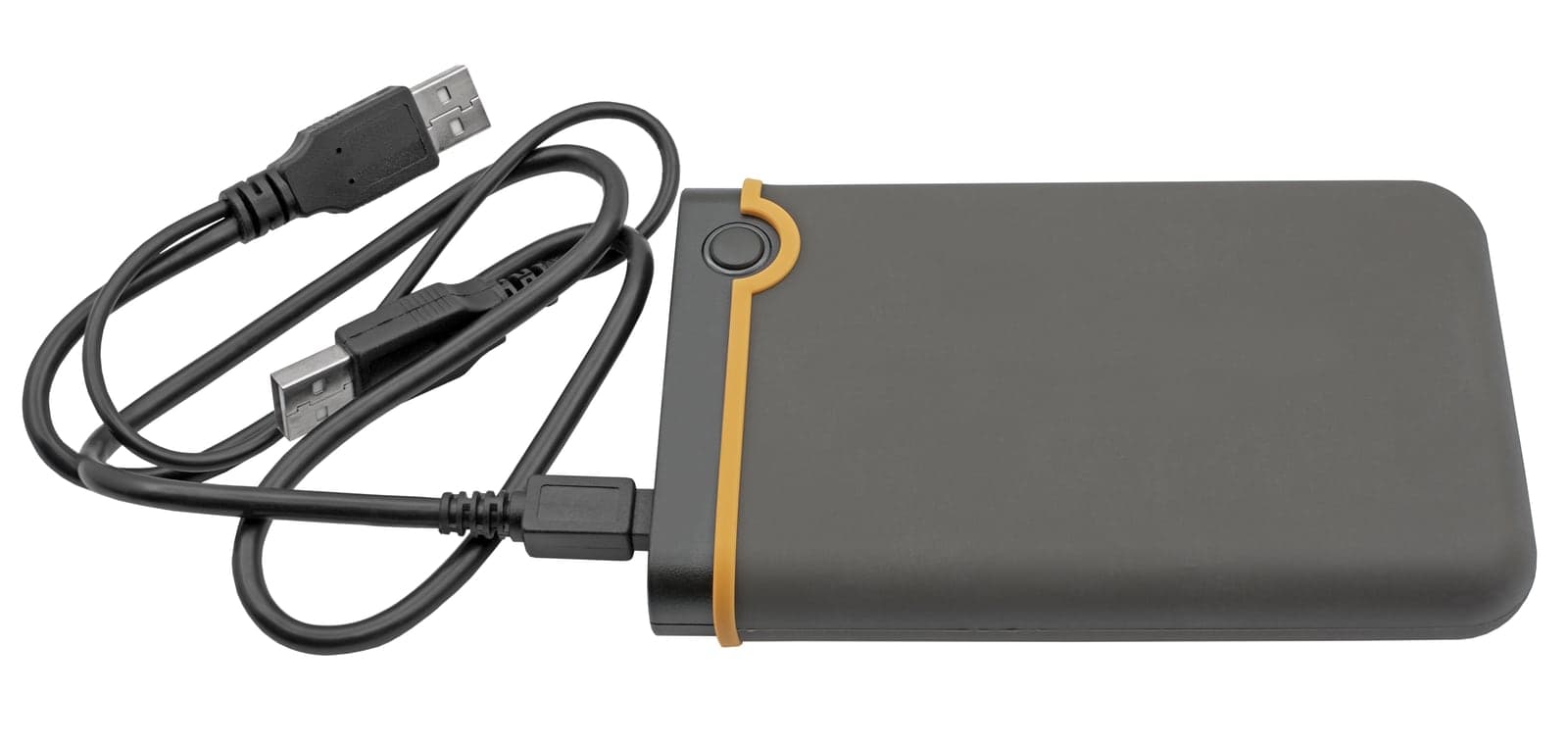
Production hardware used alongside Reelattice AI. Portable storage supports camera-media transfer, editorial handoffs and delivery of large video masters. Devices require compatible connections and an agreed ingest process; storage alone does not automatically synchronize files into the platform.

Portable SSD

Portable SSD

From Camera Media to the Edit Suite.

Transfer camera originals, production audio, proxies and approved masters between set and post-production. Use checksum-verified copies and the agreed backup process before reusing camera cards. A portable drive is a storage device; ingest and any platform connection require a compatible workstation and separately scoped configuration.

Note: Hardware, installation, and integration are not included in the standard subscription. Additional charges apply based on the hardware selected, integration modules required, and implementation scope.

our prices

One platform. Every stage of your video production.

The Video Production Plan

$200/mo

Reelattice AI connects Intake & Estimates, Creative Prep, Production Desk, Media & Post, Review & Clearance, and Delivery & Closeout. Coordinate producers, crew, editors, reviewers and finance around the same job, from the authorized estimate to the accepted final master.

Note: AI API usage is charged separately. Clients must recharge their AI credit balance based on their usage.
  • All six video production modules included
  • One connected record for every brief, cut and delivery
  • AI-assisted workflows from estimate to production closeout
Book a Demo

Onboarding is a separate one-time fee, set out below.

Onboarding

What your onboarding fee covers

A one-time setup that connects your studio to Reelattice AI before your next production begins. We configure your workspace, establish approval workflows, set up user roles and permissions, connect approved data sources, and organize the journey from intake and estimates through creative prep, production, media and post, review and clearance, and delivery and closeout. We also configure brief fields, estimate and rate templates, delivery specifications, rights and licence records, and AI workflow settings to match your operating process. The final setup is scoped according to your team size, integration needs, active production volume, compliance requirements, and deployment model.

Essential

$1,000+one-time
  • Kickoff call and rollout plan scoped to your active productions
  • Workspace provisioning with your studio branding and admin accounts
  • Import of your client records, brand guidelines and active briefs
  • Core modules switched on: Intake & Estimates, Creative Prep and Production Desk
  • Estimate and rate-card templates seeded with your labor rates and margin rules
  • Approval stages and reviewer groups set for your primary clients
  • Roles and seat permissions set for your first production team
  • Live-readiness check before your first production cycle

Plus

Recommended
$2,500+one-time

Everything in Essential, plus:

  • Guided migration of historical SOWs, production estimates, releases and edit version history, with validation
  • Media & Post, Review & Clearance, and Delivery & Closeout configured to your delivery pipeline
  • Master delivery specifications and delivery-manifest templates matched to your channels
  • Asset library structured to your taxonomy, with releases, licences and usage terms loaded
  • Live training for producers, production managers, editors, clearance reviewers and finance, with a recording
  • Dedicated onboarding specialist for the rollout

Enterprise

$5,000+one-time

Everything in Plus, plus:

  • Tailored implementation across multiple studios, offices or client business units
  • Bespoke integrations, SSO and API wiring into your existing finance, CRM and storage stack
  • Bulk migration of each client's production archive with de-duplication and reconciliation
  • Custom approval routing tuned to client sign-off authority and legal review rules
  • Closeout workflows aligned to client PO, procurement and tax-invoice requirements
  • Named onboarding manager with a defined go-live date and SLA
Where it runs

Cloud (SaaS)

Runs in Reelattice AI’s managed cloud — the fastest way to start. We host, patch and scale the platform for you, so your production, editorial and finance teams are verifying briefs and closing jobs from day one with nothing to stand up.

Private / self-hosted

The same platform deployed inside your own infrastructure — your cloud, VPC or on-prem — for studios with sensitive client IP. Briefs, unreleased footage, rights records and billing data never leave your environment, and the recurring subscription stays the same.

Note: The subscription is identical on either model; only the onboarding scope differs by your security and deployment requirements.

FAQs

Before you subscribe.

01How does Reelattice AI follow a video production from brief to delivery?

Six working modules follow the job: Intake & Estimates, Creative Prep, Production Desk, Media & Post, Review & Clearance, and Delivery & Closeout. The Dashboard brings commitments, costs, editorial effort and release blockers into one view.

02What should a production brief and estimate include?

Runtime, number of masters and cutdowns, aspect ratios, platforms, shoot dates, delivery deadlines, usage territory and duration, revision rounds and the authorized client contact. Estimate crew, equipment, locations, talent, post-production and licences; confirm the PO before booking.

03Can producers coordinate crew, locations and equipment?

Production Desk presents production scheduling, assignments and readiness alongside the job. The producer still confirms availability, issues the call sheet and resolves location, crew and equipment conflicts before the shoot.

04How are edit versions, feedback and final-cut clearance handled?

Media & Post organizes the editorial handoff and production versions. Review & Clearance keeps QC findings, rights exceptions, talent-release gaps and client sign-off visible before an approved master moves to Delivery & Closeout.

05Does a review replace legal clearance or a broadcast QC check?

No. The licensee must secure music, stock, font and talent permissions and meet the destination specification. Broadcaster loudness, codec, frame rate, caption and other requirements differ. Authorized people must review findings and approve release.

06Which tools can the production team connect?

Connectivity depends on the existing creative, storage, communication and finance systems, their APIs, licences and security settings. The tools shown illustrate integration patterns; the implemented connections and data boundaries are agreed during scoping.

07Are AI usage and production hardware included in the subscription?

AI API usage is charged separately and clients must recharge their AI credit balance based on usage. Hardware, installation, integration and one-time onboarding are separately scoped. Confirm subscription entitlements and implementation charges in the agreement.

08What happens at delivery and closeout?

Check approved masters, cutdowns, captions and agreed project files against the manifest; record client acceptance; reconcile supplier invoices and authorized changes; and retain the agreed archive and rights evidence. Finance approves the final invoice.