Turn projectintake intowinningbids.

SCOPORAX AI · SAAS PLATFORM OVERVIEW

ScoporaX AI is an all-in-one platform that manages your project from start to finish. Upload RFPs, drawings, briefs, and documents, and AI understands and organizes the information. It helps with project evaluation, site analysis, design, sustainability, and compliance. Finally, it brings everything together to create a complete proposal ready for review.

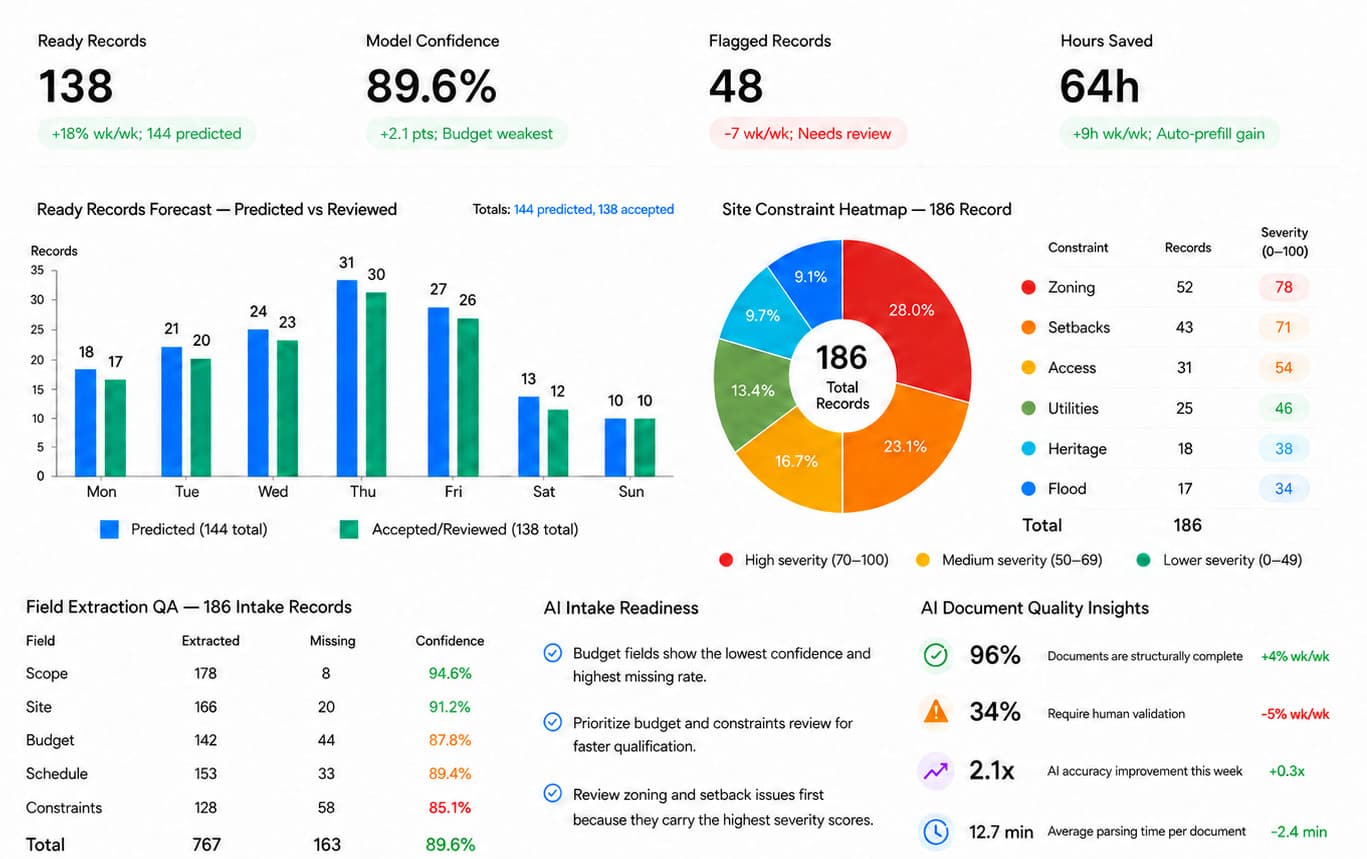
The Intelligent Command Center

One central view for all your project intakes.

Scoporax AI connects the entire construction project workflow — from the first project file to the final proposal. Each module manages a key stage of the process, helping your team work faster, stay organized, and ensure no critical project requirement is missed.

Proven Business Impact & ROI

Enterprise SaaS Benchmark
75%
From days to hours

Faster Bid Delivery

Turn weeks of proposal drafting into hours so your team submits winning bids faster.

95%
Fewer human errors

Intake Accuracy

Catch every key project detail, deadline, and requirement with automated AI checks.

12+ hrs
Less manual work

Saved Per Project

Eliminate manual data entry so your team can focus on client relationships and design.

3x
Without extra hiring

More Proposals Won

Respond to more project opportunities and client requests without increasing your team size.

The Core Modules

Everything you need from intake to proposal.

Scoporax AI connects your entire project, from the first file to the final proposal. Each module manages an important step in the process, keeping everything simple and clear. This helps your team work faster and makes sure no important project requirement is missed.

Swipe through all 7 modules — tap any screen to open it full size.

Intake & RFP Hub01/7

Turn raw files and RFPs into organized project data

Upload your drawings, technical specifications, and RFP documents. The AI instantly pulls out key details like project budgets, deadlines, and site sizes into a clean dashboard.
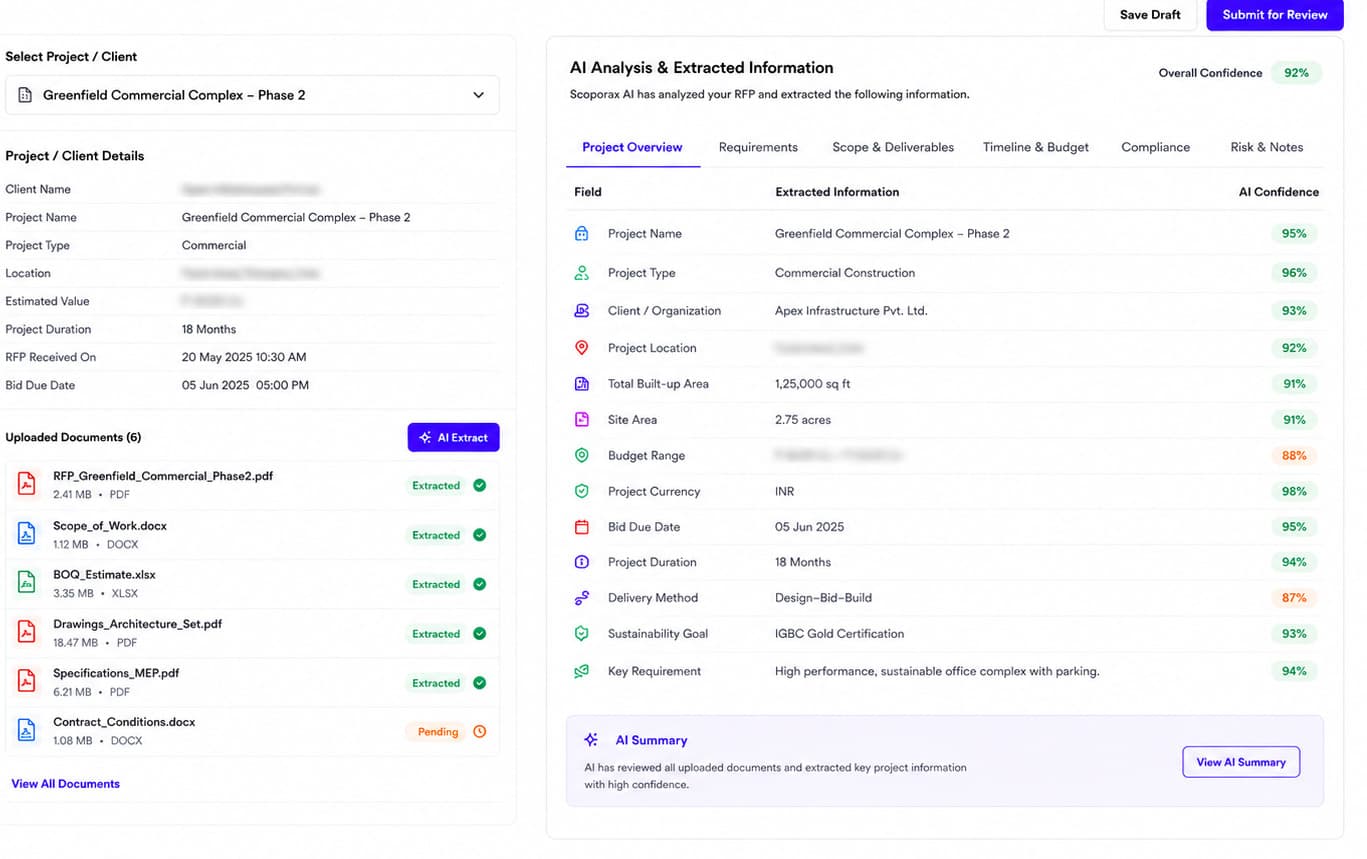
  • Upload drawings, RFPs, and project documents
  • Instant extraction of budgets, dates, and site details
  • Team verification before moving to the next step
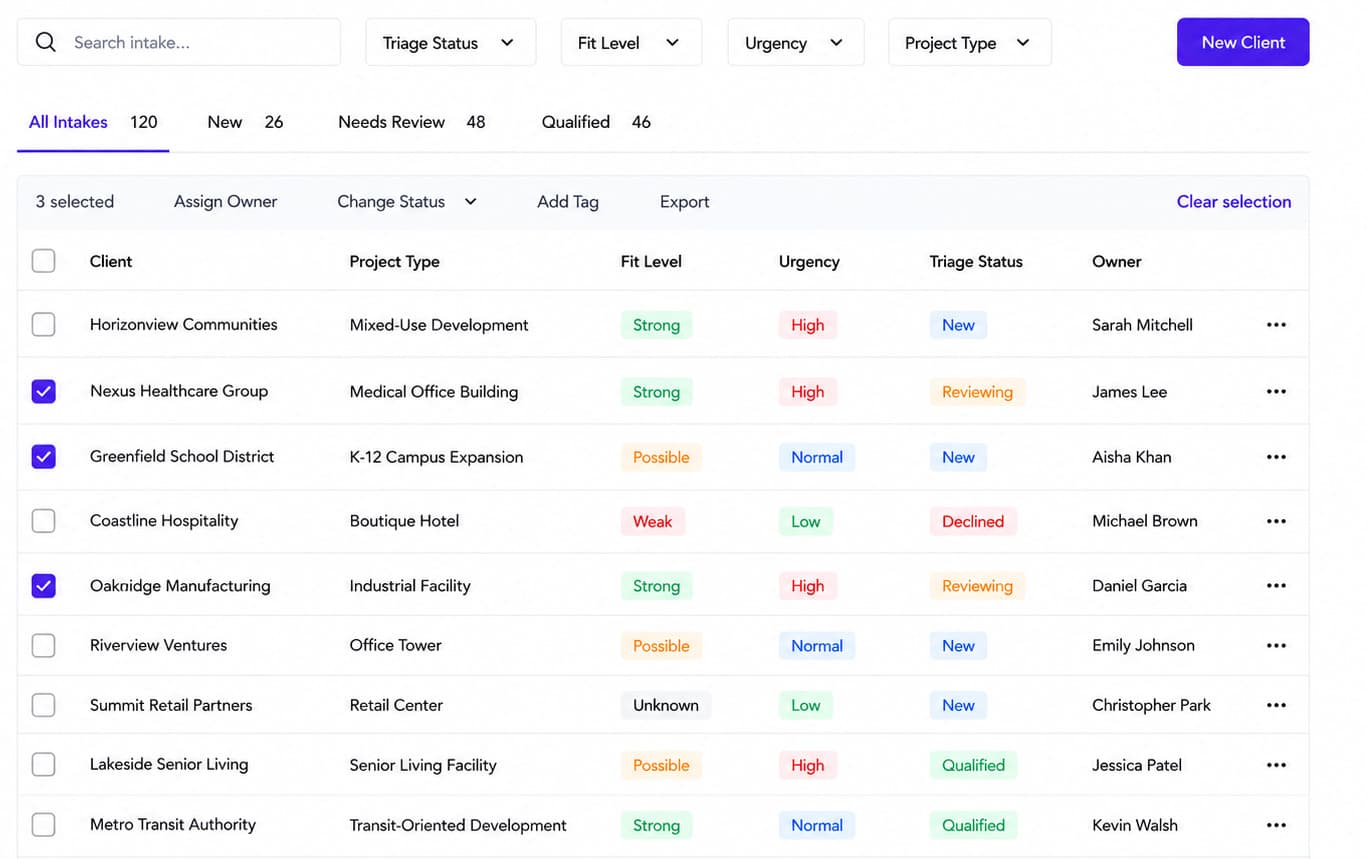
Client Triage02/7

Qualify and route new leads automatically

Review incoming project inquiries before assigning your team. The system evaluates project fit, detects tight deadlines, and routes the request to the right team lead.

  • Quick check on client fit and project feasibility
  • Highlights urgent submission deadlines
  • Assigns leads to team members automatically
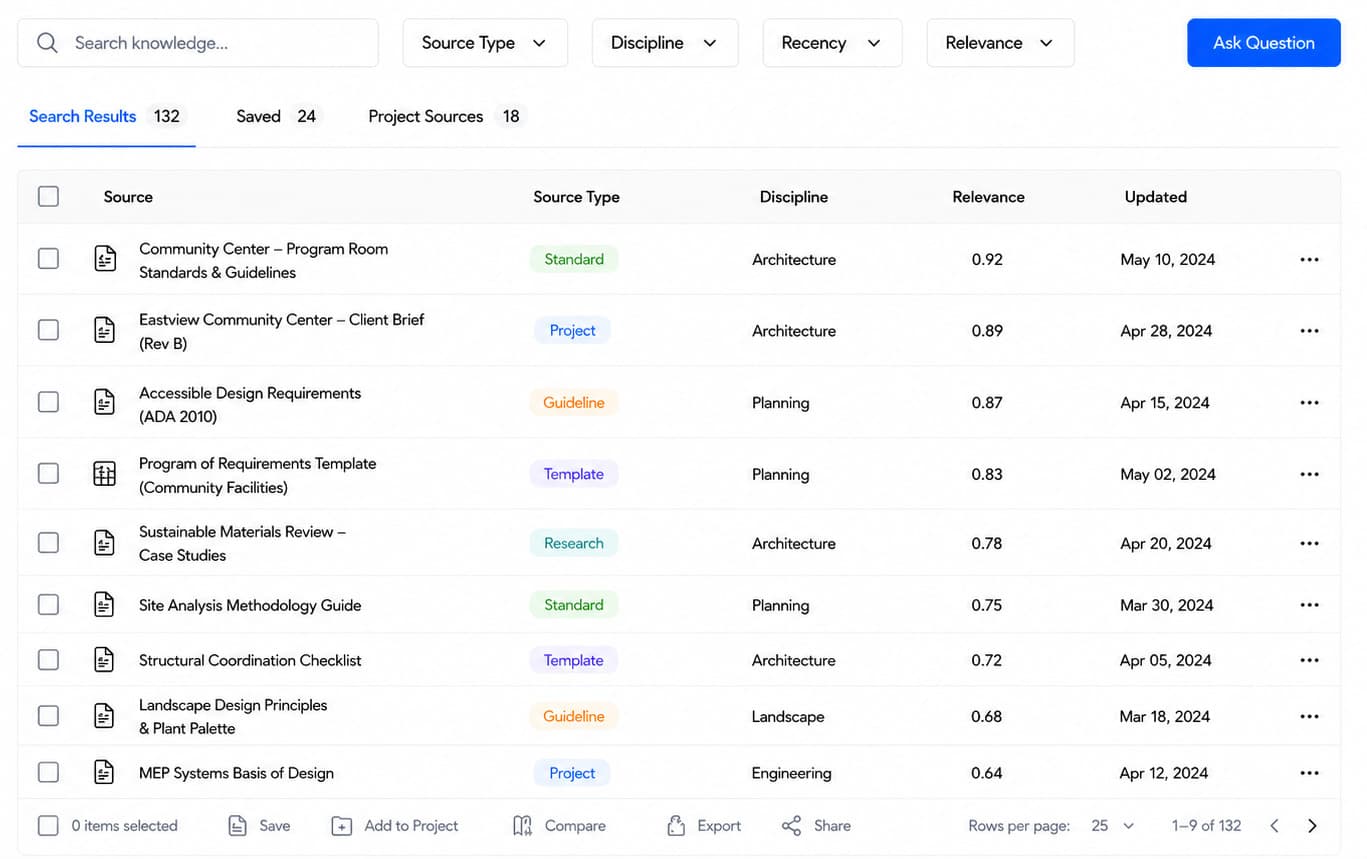
Knowledge Retrieval03/7

Search past project records and cost history

Search your firm's entire history of past projects, drawings, and cost data. Find similar building examples and benchmarks in seconds using simple search terms.

  • Fast search across all previous projects and drawings
  • Instant access to past costs and building examples
  • Easy filters by building type and year
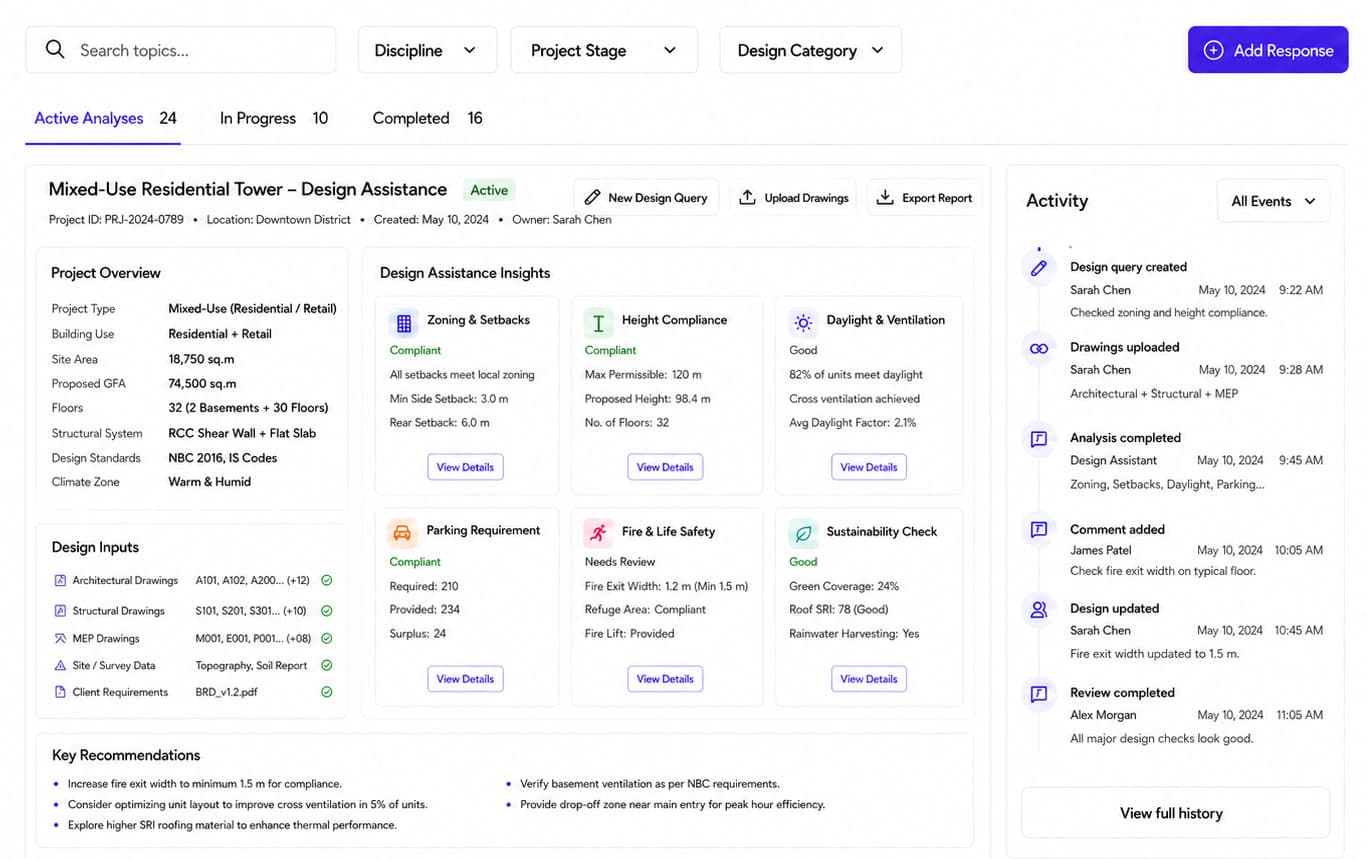
Design Assistance04/7

Optimize architectural designs with intelligent insights

Streamline your architectural design review instantly. The AI evaluates key structural parameters to verify project feasibility. Our automated analyzer processes this data in real-time, flagging critical risks to ensure flawless construction.

  • Prevents costly revisions by catching design flaws early
  • Accelerates project approvals with highly accurate compliance data
  • Builds client confidence through transparent feasibility tracking
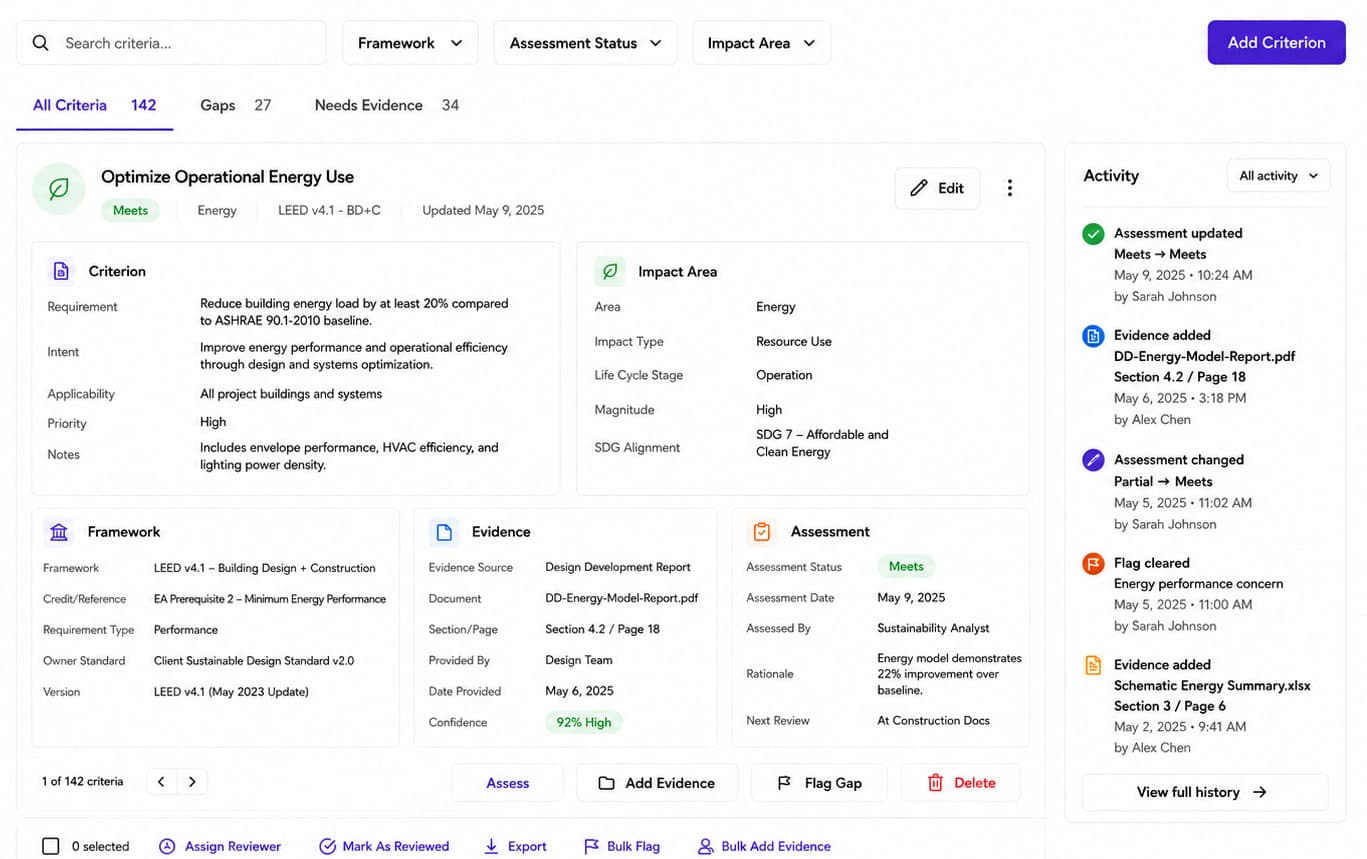
Sustainability Analysis05/7

Analyze projects sustainability data

Evaluate your project's environmental impact to prevent severe ecological risks. The platform tracks key sustainability metrics for strict compliance. Our system instantly processes this data, flagging potential hazards before they escalate.

  • Instantly see your project's overall environmental impact
  • Easily track energy use and material waste
  • Automatically receive alerts for potential environmental risks
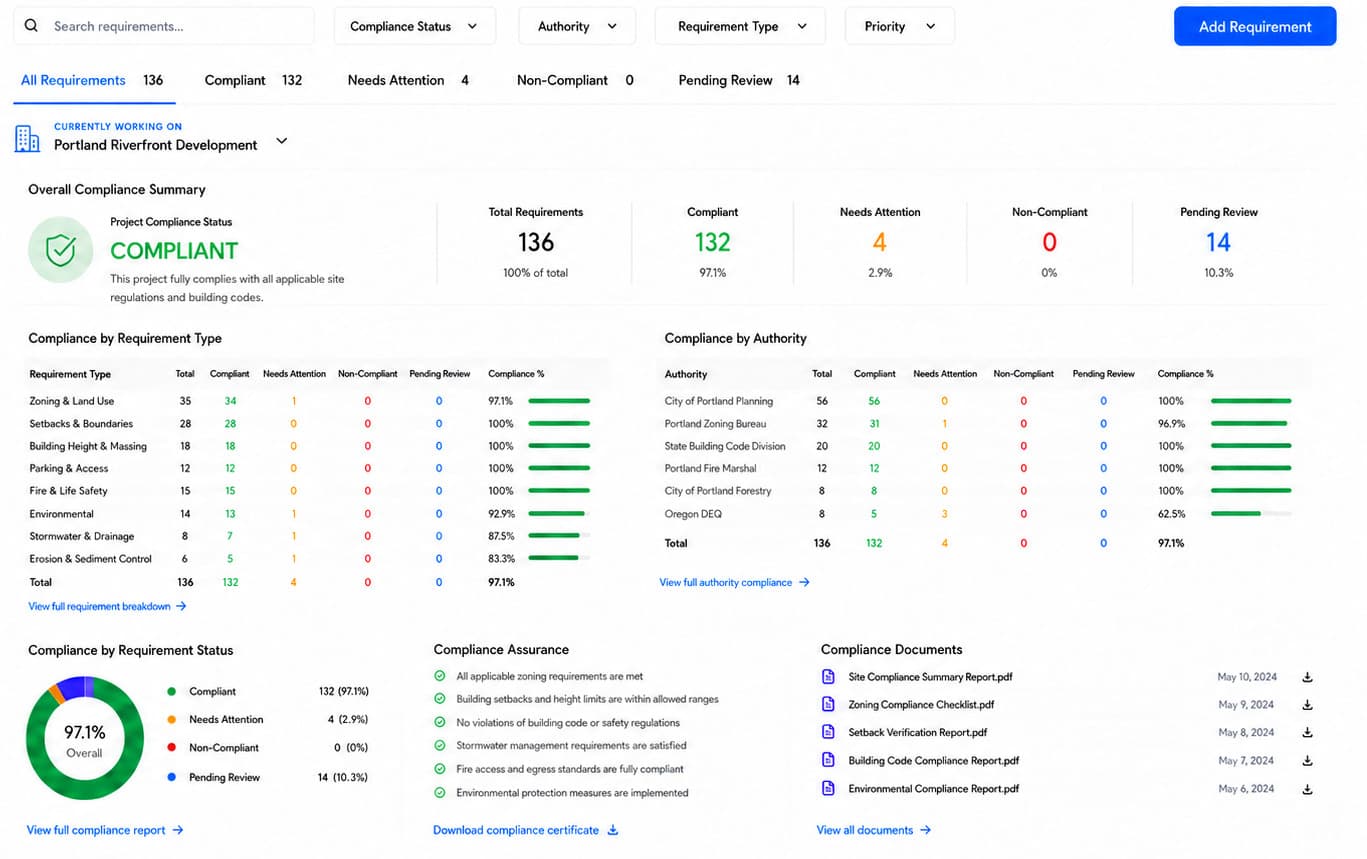
Site Compliance06/7

Automate site compliance and spot hidden risks early

Evaluate your project's site compliance to prevent severe construction delays. The platform tracks key zoning laws and permit rules for strict adherence. Our system instantly processes this data, flagging hidden hazards before they escalate.

  • Tracks city zoning laws and building code rules
  • Early alerts for boundary setbacks and flood zones
  • Structured records ready for permit review
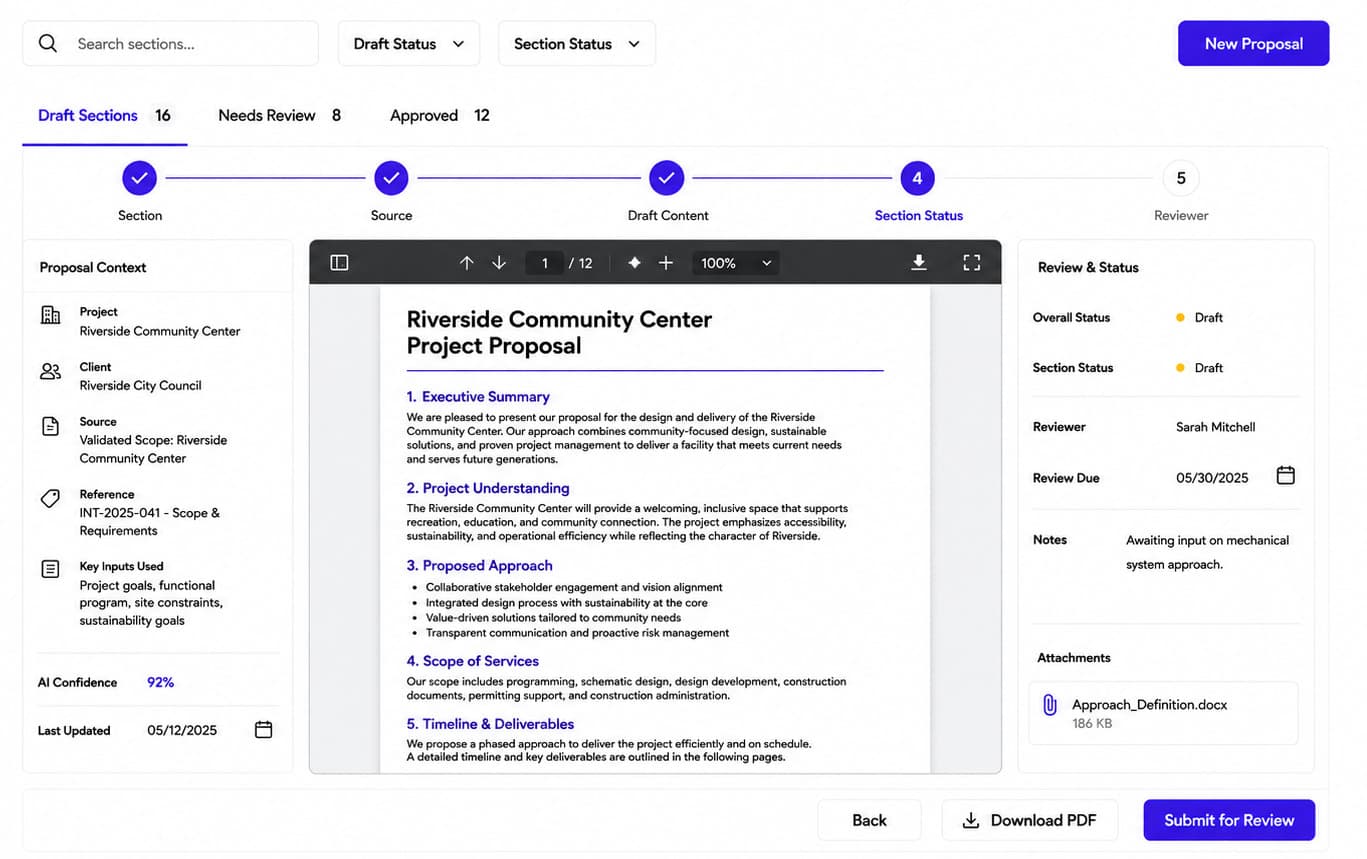
Proposal Drafting07/7

Draft complete proposals from your verified intake data

Create full project proposals using the data you've already saved. The system writes accurate documents and connects every detail directly to the client's original request.

  • Instantly write complete project proposals
  • Connect every detail back to the client's request
  • Export final documents with one click
How It Works

From raw documents to ready proposals in four steps.

A seamless, four-step workflow that eliminates manual data entry, catches project risks early, and accelerates your proposal turnaround.

01Step 1 of 4

Ingest Any Document

Upload drawings, specs, RFPs, or paste portal links. Scoporax unifies scattered files into one active workspace.

Drawings · RFPs · Briefs · Links
02Step 2 of 4

AI Extraction & Structuring

Scoporax AI reads every page and drawing note, automatically organizing project scope, site acreage, budgets, and milestones.

Key Parameters Auto-Mapped
03Step 3 of 4

Validate & Review

Automated checks highlight low-confidence items and conflicts, giving your team a clean dashboard for fast validation.

Risk Flags & Team Sign-off
04Step 4 of 4

Generate Proposals & Scope

Verified records feed directly into scoping breakdowns, client triage, and auto-drafted proposal sections ready for submission.

Proposal Drafts & CRM Sync
Traditional SaaS vs Scoporax

Don’t settle for the AI your software chose.

Most platforms ship one model and you work inside its limits. Scoporax puts an orchestration layer between the document and the model, so every step of an intake runs on the intelligence that suits it.

Traditional SaaS
Built-in
AI

One model, one pass, and no step you can point somewhere else.

You work within its limits.

Scoporax · routed intake
  1. 01

    Read the scanned drawings and specs

    Layout-aware OCR holds multi-column specs and title blocks that a general model flattens

    MistralMistral API
  2. 02

    Classify all 380 pages

    A fine-tuned classifier beats a frontier model per page, at a fraction of the cost

    Hugging FaceInference Providers API
  3. 03

    Read the whole pack in one pass

    Long context holds the full tender, so a clause on p.9 still binds a field on p.318

    GeminiGemini API
  4. 04

    Extract scope, site, budget and schedule

    Strict schema, so the record never comes back malformed into your CRM

    OpenAIOpenAI Responses API
  5. 05

    Draft the requirement and constraint notes

    Holds structure across thousands of words and cites the source line for each one

    ClaudeAnthropic Messages API
  6. 06

    Score every field, flag what is weak

    Cheap enough to score all 214 fields twice, which is what makes the flags trustworthy

    DeepSeekDeepSeek API
One structured intake record214 fields · 89.6% mean confidence · 6 held for review

Note: Model names and marks are the property of their owners and appear here to say which APIs an intake step can be routed to. No endorsement or partnership is implied. Families are named without version numbers because the frontier re-ranks faster than a page can be edited.

Connectivity

Your whole stack, connected.

Revit, ArcGIS, HubSpot, Dropbox, Autodesk — and the rest of what your practice already runs on. 24 integrations across 4 stages of an intake, every one of them reading the tool’s own public API.

  • Gmail
  • Drive
  • Dropbox
  • Box
  • Egnyte
  • Zapier
  • Autodesk
  • Revit
  • AutoCAD
  • Archicad
  • SketchUp
  • Rhino
  • ArcGIS
  • Mapbox
  • Google Maps
  • OpenStreetMap
  • HubSpot
  • Airtable
  • Notion
  • Sheets
  • Asana
  • Trello
  • Xero
  • QuickBooks

Note: Tool names and marks belong to their respective owners. No endorsement or partnership implied.

Compliance

The standards your project answers to, on the record from the first document.

Scoporax automatically pulls building, accessibility, energy, and sustainability rules from your documents and organizes them into one clear checklist. This makes it easy for your team to see exactly which rules apply, what is already handled, and what still needs proof.

  • IBC + Zoning

    International Building Code & Local Zoning

    Zoning, setback and building-code requirements are extracted from source documents and tracked to the applicable authority.

  • ADA

    ADA Standards for Accessible Design

    Accessibility requirements are extracted into discrete, reviewable criteria instead of staying buried in project documents.

  • IECC / Title 24

    Energy codes (IECC · ASHRAE 90.1 · CA Title 24)

    Envelope, lighting and HVAC criteria are logged against the named framework, each carrying the evidence supplied so far.

  • LEED

    LEED green-building rating

    A client's certification target and its criteria are recorded at intake, with an assessment and supporting evidence per criterion.

  • Note: Scoporax structures and tracks these requirements so nothing is missed at intake. It does not certify compliance, check drawings against a code, or replace review by a licensed professional.

    Scoporax ships

    An intake agent, in production, reading real project documents.

    Which is the easy half. It runs every day against tenders nobody proofread, on a model that shifts under it, for a practice that finds out something drifted when a field comes back wrong.

    • Tender & estimating assistants
    • RFI & document-control agents

    Both catalogued in playbook 2.07

    Sister platform — Nestack Agent Care2.07 · 23 playbooks

    Your Architecture & Planning AI agents, run like production systems.

    Telemetry, evaluations, guardrails, human review, and a crew on call when one of them starts drifting at 3am.

    38
    Failure modes catalogued
    15
    Rated SEV-1
    1,950+
    Baseline eval cases
    24/7
    Agent monitoring
    Open the Construction playbook

    Architecture & planning agents are catalogued under Construction — playbook 2.07.

    Add-ons

    Add the hardware your workflow needs.

    Two connected site devices. Both write straight into the intake record, so what was measured on the walk-through is in the file before anyone gets back to the studio.

    SiteScan Laser Rangefinder
    Bluetooth site scanner

    SiteScan Laser Rangefinder

    Captures room and site dimensions on the walk-through, so the record carries measured geometry instead of a number retyped from a notebook.

    Lands inIntake & RFP Hub

    As a field input, device recorded as the source

    Daylight Sensor
    Wireless illuminance sensor

    Daylight Sensor

    Logs daylight and light levels across a space, under whichever sustainability framework the project is being assessed against.

    Lands inSustainability Analysis

    As evidence against a criterion

    Note: Hardware, installation, and integration are not included in the standard Scoporax AI subscription. Additional charges apply based on the hardware selected, integration modules required, and implementation scope.

    Pricing

    One plan. Every intake workflow.

    Starting at$200/mo

    Flat, for the whole platform. Every module included — extraction, scoping, RFP parsing, proposals, compliance and knowledge retrieval. No per-seat maths, no tiers to decode.

    Note: AI API usage is charged separately. Clients must recharge their AI credit balance based on their usage.
    Book a demo
    • Per seat
    • Per module
    • Per document parsed
    • Per integration
    • Tier upgrade
    Onboarding

    What your onboarding fee covers

    A one-time setup that gets your practice live before the first monthly cycle — projects imported, inboxes and drives wired in, every module tuned to how your studio starts a job.

    Each fee is a starting point. We scope the final number against:

    • Environment
    • Security
    • Integrations
    • Data volume
    • Compliance
    • Deployment

    Essential

    01/3
    $1,000+one-time

    8 deliverables

    • Kickoff and intake-mapping workshop scoped to how your studio takes on projects
    • Workspace provisioning with your disciplines, project types, and studio branding
    • Import of your active projects and existing intake records
    • Technical Extraction, Intake Form, and Scoping modules configured to your field set
    • Email and shared-drive intake connected so briefs, forms, and attachments land automatically
    • Roles and permissions set for principals, project architects, and coordinators
    • Extraction confidence thresholds and review rules tuned before your first live intake
    • Onboarding handbook and self-serve help for the whole team

    Plus

    02/3
    Most studios
    $2,500+one-time

    Everything in Essential, plus 6

    • Guided migration of historical RFPs, briefs, and past-project documents with field validation
    • Two integrations with the tools you already run — CAD/BIM file stores, a DMS, or your CRM
    • Custom scope areas, disciplines, and proposal templates configured to your practice
    • RFP-parsing and Client-Triage rules tuned to your bid and qualification workflow
    • Live training session for architects and coordinators, with a recording
    • Dedicated onboarding specialist through go-live

    Enterprise

    03/3
    $5,000+one-time

    Everything in Plus, plus 6

    • Multi-office rollout plan across your project types, disciplines, and regions
    • Bespoke integrations and SSO — permitting portals, submission systems, and API endpoints
    • Bulk migration of your project archive with de-duplication and reconciliation
    • Sustainability and Site-Compliance modules configured to your codes and targets (IBC/zoning, ADA, IECC/Title 24, LEED)
    • Role-based training tracks and admin enablement for studio leads
    • Named onboarding manager with a defined go-live date
    Deployment
    same monthly subscription, either way

    Scoporax AI handles the sensitive material your studio wins work on — client RFPs, project briefs, drawings, and the extraction and scoring predictions built on them. Run it whichever way your data policy requires.

    Cloud (SaaS)

    Runs in Nestack’s managed cloud — nothing to provision, fastest way to get your practice live. We handle hosting, updates, and scaling so your team just logs in and works.

    Private / self-hosted

    The same platform deployed inside your own infrastructure — your cloud, VPC, or on-prem — for data-sensitive teams. Your RFPs, drawings, and predictions never leave your environment, and the monthly subscription stays exactly the same.

    FAQ

    Frequently asked questions

    How Scoporax structures, checks, and hands off intake records from your project-start documents.

    See the platform
    What is Scoporax AI?

    Scoporax AI is an intelligent project intake and proposal platform built for architecture, engineering, and planning practices. It automatically transforms complex documents — such as 100-page RFPs, technical drawings, specifications, and client briefs — into verified, structured project records to accelerate proposal turnaround.

    What types of files can I upload?

    You can upload RFPs, technical drawing sets (PDF & CAD), specification documents, Word briefs, emails, and client forms, or directly paste links from procurement portals. No rigid formatting or manual templates required.

    What does the platform produce?

    A comprehensive, structured project brief containing verified scope items, site parameters, budget limits, milestone schedules, and compliance requirements — with every detail traceable to its source document.

    How does the platform ensure data accuracy?

    We use smart extraction with built-in quality checks. Every detail links directly back to its exact page in your documents, and any uncertain items are instantly flagged for your team to review.

    What are flagged records?

    Flagged records are items that need a quick human check because of missing or unclear details in your files. We highlight them clearly on your dashboard so you always stay in full control.

    How does this connect to our existing workflow?

    Your verified data flows directly into your proposals, scoping breakdowns, and client triage. It also syncs smoothly with the CRM and project management tools you already use.

    Who is Scoporax AI designed for?

    It's built for architecture, engineering, and planning practices. It is perfect for bid managers and project leaders who want to eliminate manual review and respond to new projects faster.

    Book a demo

    See Scoporax AI on your own intake.

    Pick a time, tell us who you are, then choose what you want to see — we’ll run Scoporax AI on your own project-start documents.