AI platform for commercial & industrial construction
One Platform for End-to-End Construction Management
Struvoryq.AI is a connected project intelligence platform for commercial construction and general contractors that brings intake, surveys, drawings, estimating, planning, field operations and closeout into one place — with AI reading every document, flagging risks early and recommending the next action.
Every project, every risk, every decision — on one screen.
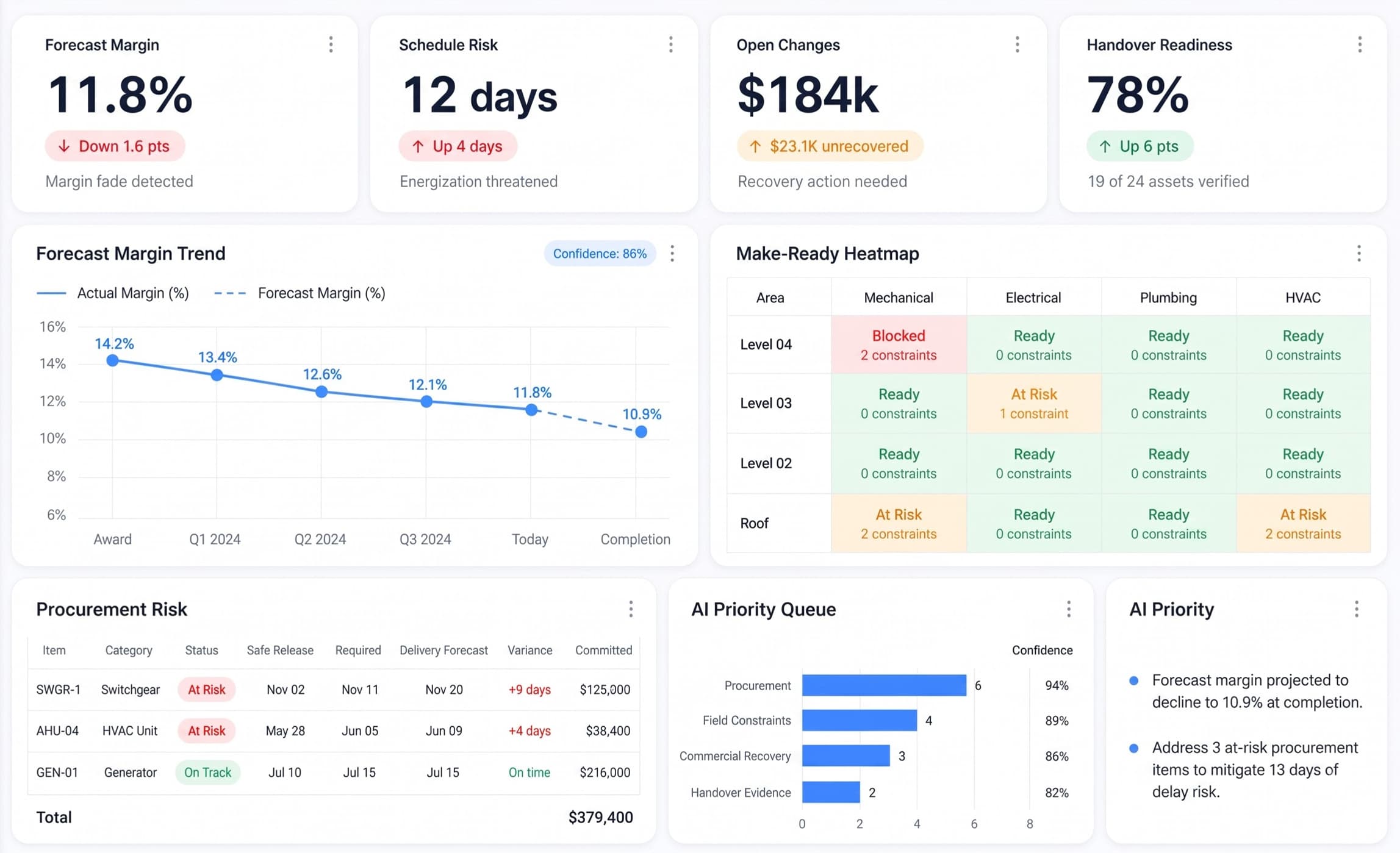
Most leaders still piece together project status from emails, spreadsheets and separate tools — and problems often stay hidden until they reach the field. The Struvoryq.AI dashboard brings your entire operation into one live view, with AI watching every project for you — so you always know what needs attention and can act while there is still time to fix it.
app.struvoryq.com/dashboardLIVE · DASHBOARD
Struvoryq.AI — project dashboard with risk matrix, budget trends and AI insights
One project, on one record
88%
+14%vs last month
Drawings auto-extracted
Sheet intake across architectural, structural, and MEP as soon as revision packs land.
94%
+6%vs benchmark
Takeoff precision
Line-item takeoff confidence with direct plan-sheet coordinate trace back to drawing source.
16
+4pending review
Human in the loop
Decisions waiting on a person — trade overlaps, RFI blockers, and high-risk change claims AI will not sign off on its own.
7
3within 7 days
Critical deadlines
Equipment release dates, switchgear lead times, and punch closeouts tracked with owners across every project.
Figures read from the sample dashboard above · illustrative, not a customer benchmark.
The Nestack construction suite
Built for every corner of construction.
Construction moves differently in every field, with unique teams, workflows, documents, and decisions. Your tools should be built to work the way your industry does.
Each module uses AI to handle the heavy lifting across your project lifecycle — reading documents, spotting problems early and keeping your team aligned. Everything connects back to your dashboard so leaders always see the full picture.
app.struvoryq.com/opportunityLIVE · DASHBOARD
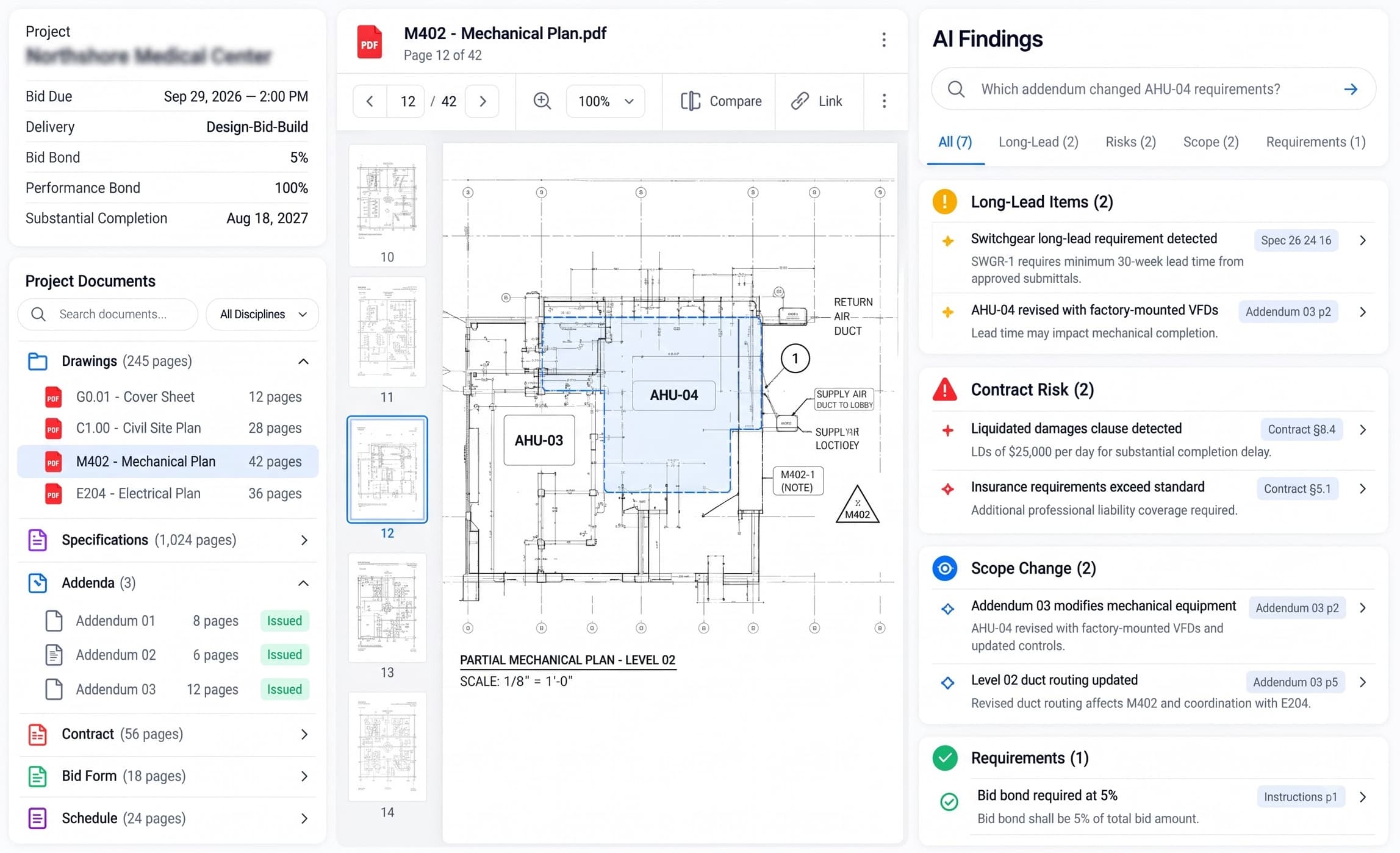
Opportunity Intelligence — Struvoryq.AI
Opportunity Intelligence
Start every bid with instant intelligence and risk detection
Most bid risks are buried deep in tenders, addenda, and contracts. AI interrogates your project documents as soon as they arrive — extracting long-lead items, liquidated damage clauses, and scope amendments before your team commits time or budget.
Extracts contract & liquidated damage risks
Flags addenda & drawing revisions
Automated document triage
app.struvoryq.com/preconstructionLIVE · DASHBOARD
Preconstruction Studio — Struvoryq.AI
Preconstruction Studio
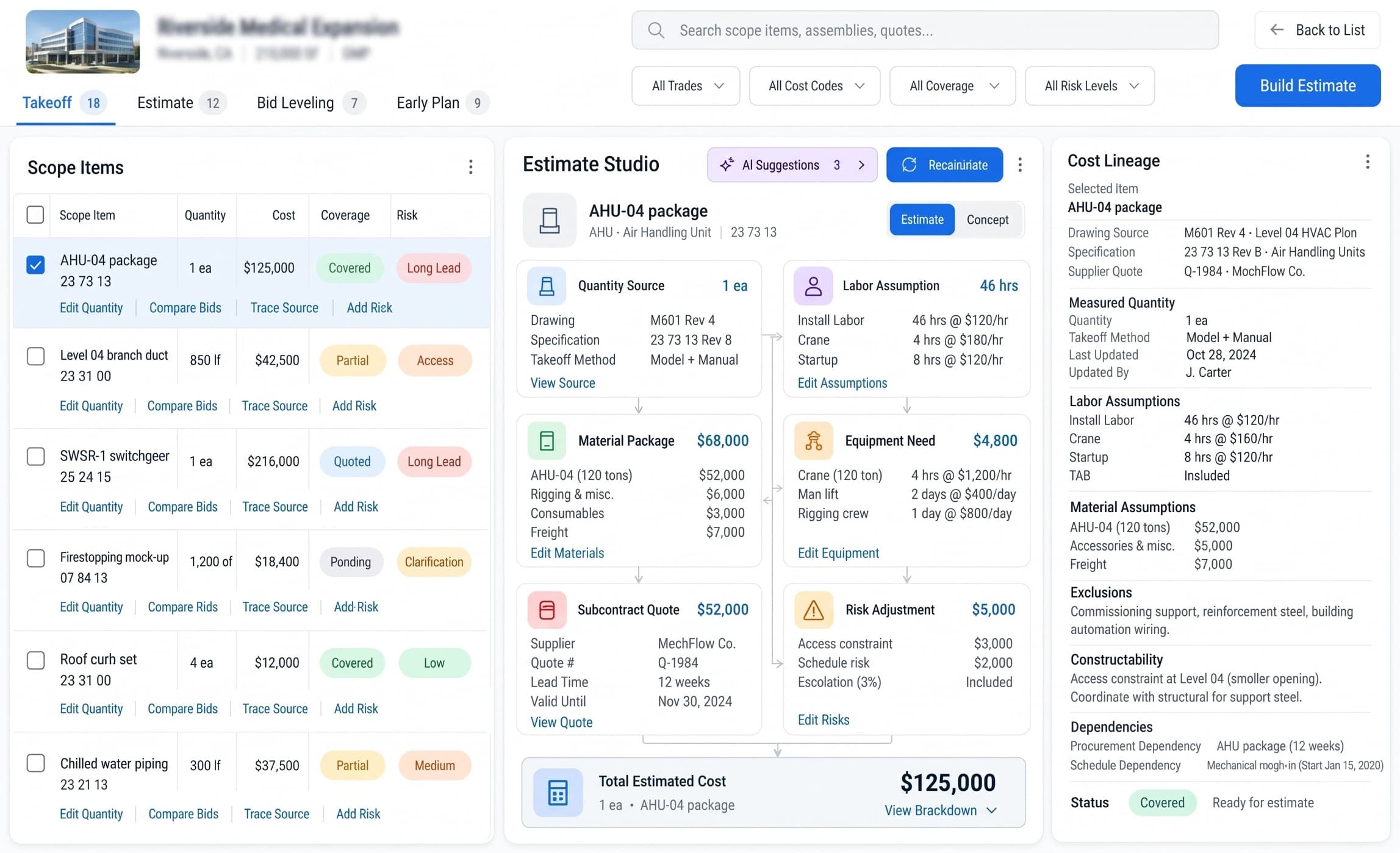
Automated quantity takeoff, cost lineage and bid leveling
Bidding fast should not mean bidding blind. AI pulls quantities directly from your drawing sheets into living cost sheets, tracks full cost lineage, compares subcontractor quotes, and prices risk accurately.
Automated 2D/3D quantity extraction
Full cost lineage trace
Subcontractor bid leveling
app.struvoryq.com/procurementLIVE · DASHBOARD
Procurement Control — Struvoryq.AI
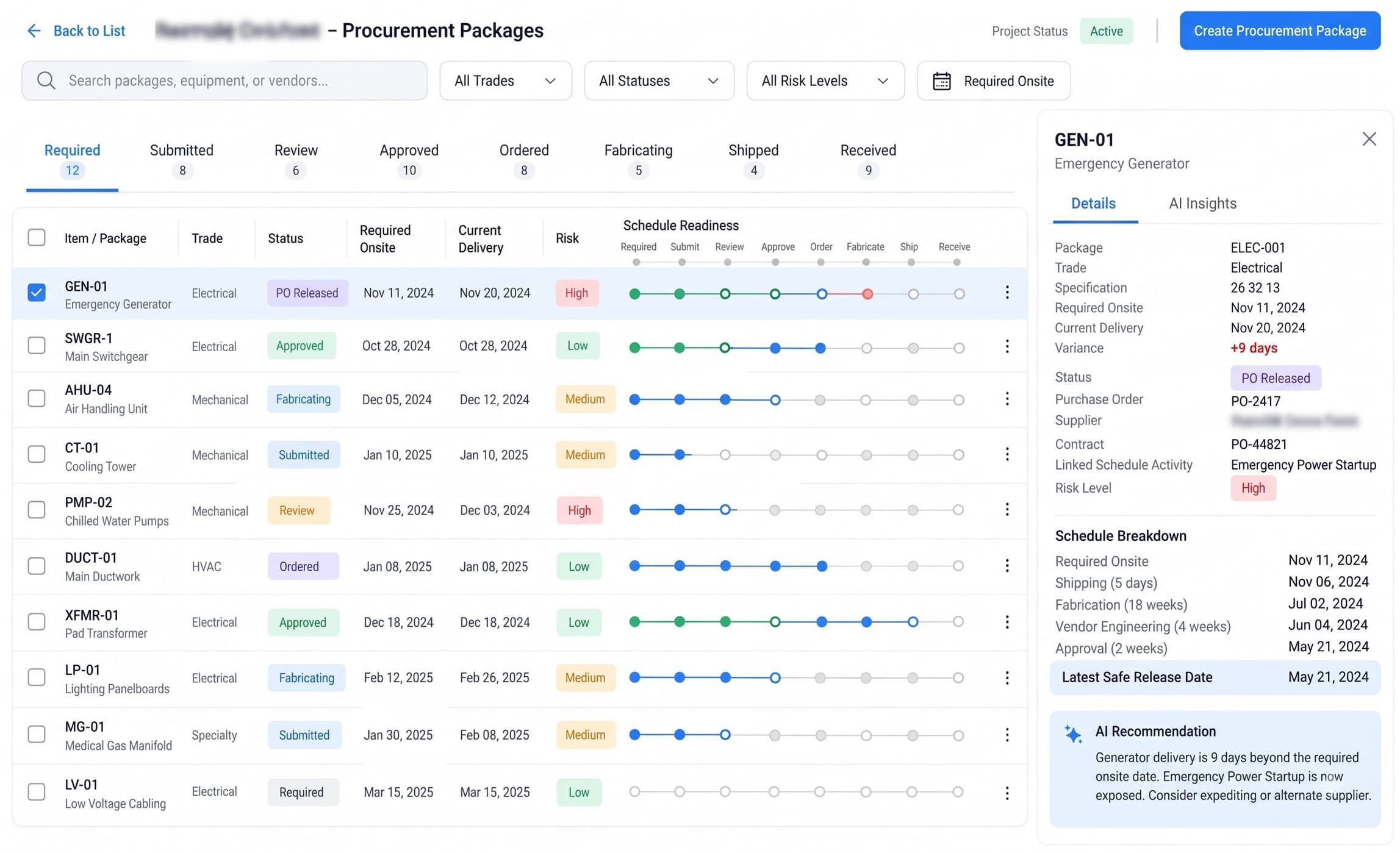
Procurement Control
Keep long-lead equipment and materials ahead of schedule
One delayed delivery or missing approval can stall an entire site. AI tracks lead times, calculates safe release dates, and flags packages at risk — so project managers adjust before the critical path slips.
Lead-time drift alerts
Milestone readiness timeline
Critical path protection
app.struvoryq.com/fieldLIVE · DASHBOARD
Field Operations — Struvoryq.AI
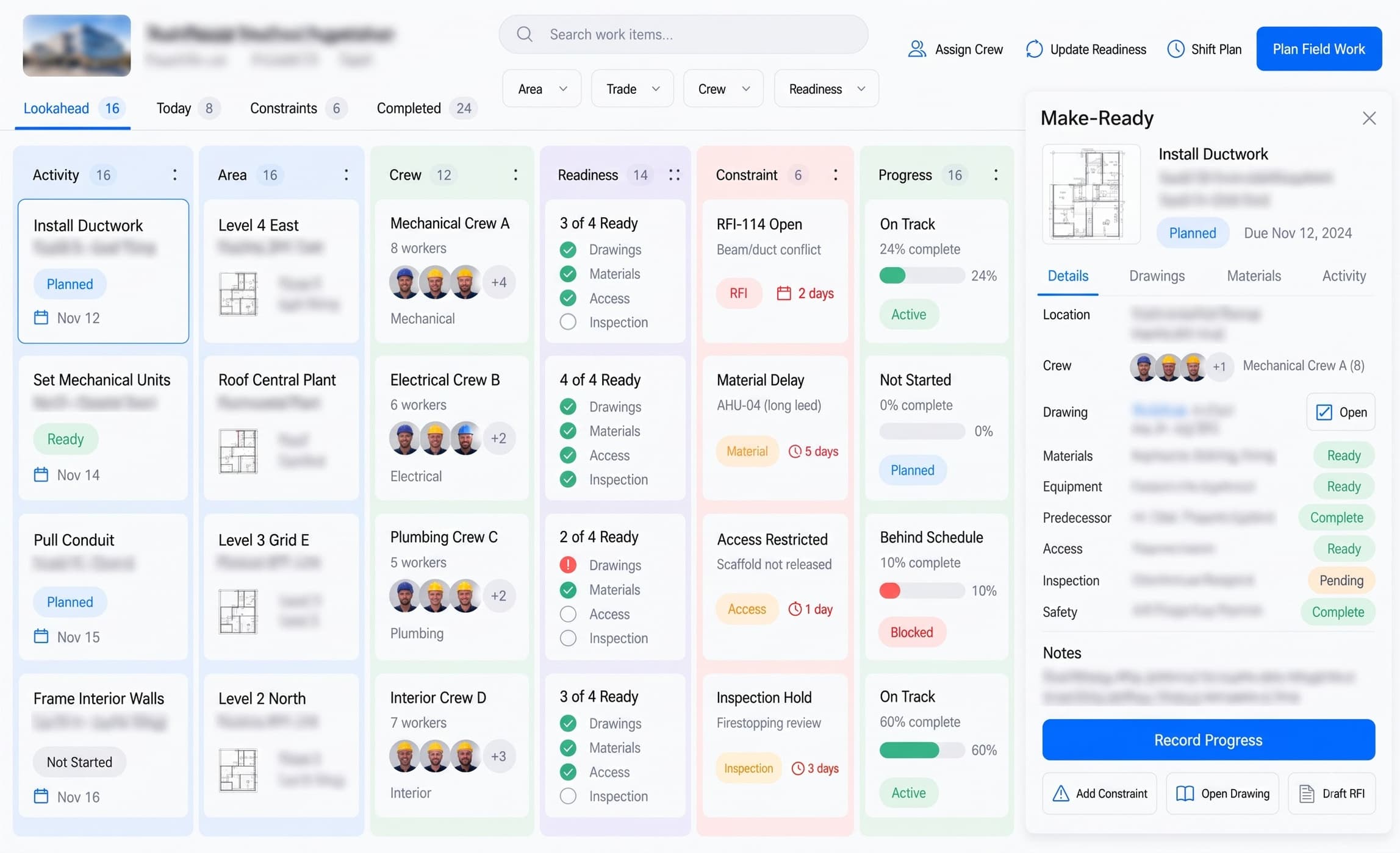
Field Operations
Live make-ready workflows and real-time site execution
End the gap between the field and the office. Validate trade readiness across drawings, materials, access, and inspections before daily work begins — giving you live progress updates and stopping rework before it happens.
Daily trade make-ready checklists
Constraint & RFI clearance
Live progress vs schedule
app.struvoryq.com/commercialLIVE · DASHBOARD
Commercial Control — Struvoryq.AI
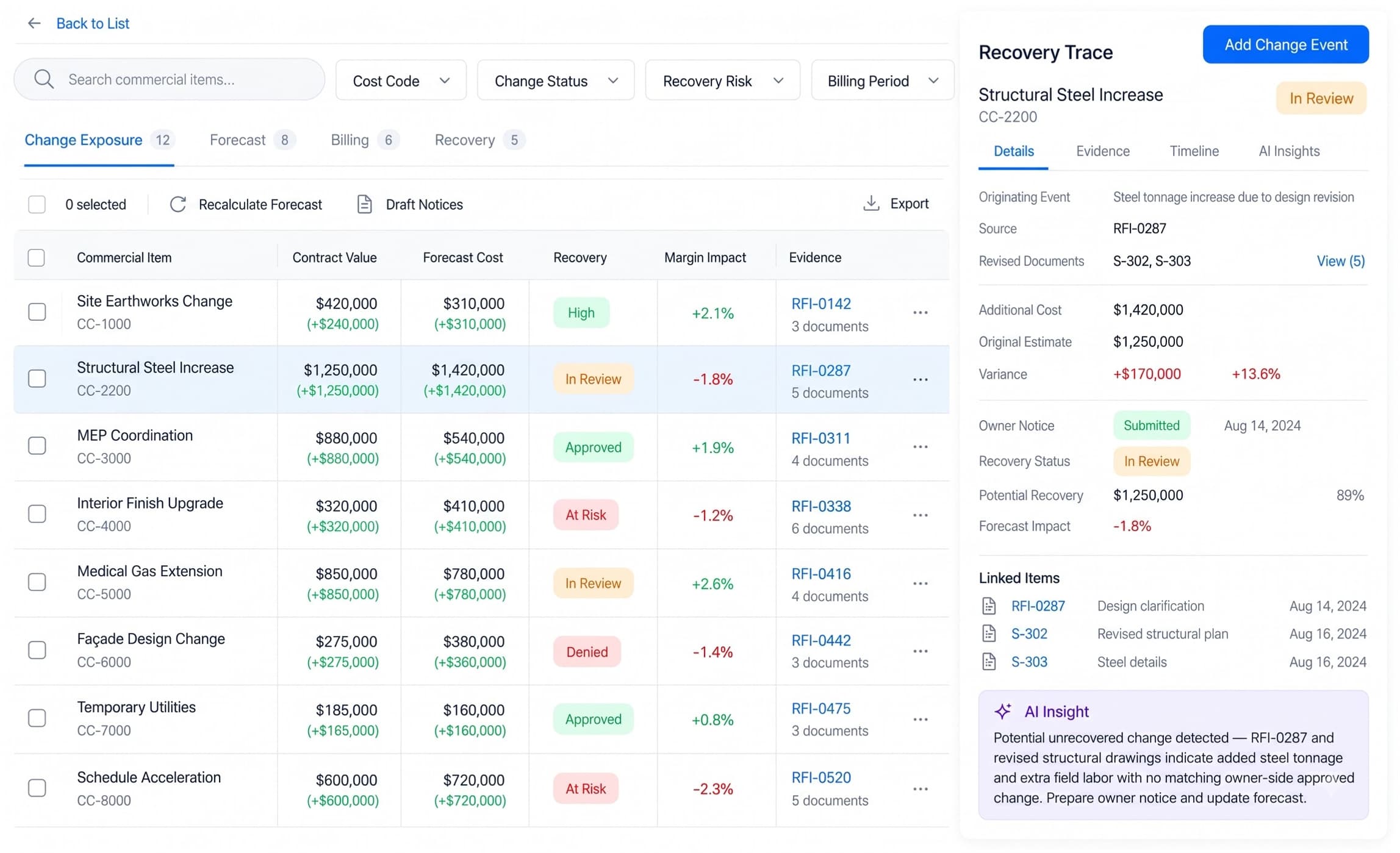
Commercial Control
Protect project margin with instant change order recovery
Never let unrecovered change events erode your bottom line. AI monitors revised drawings, site logs, and RFIs against the baseline contract scope — automatically assembling recovery evidence and updating forecasts in real time.
Unrecovered change detection
Automated RFI evidence trace
Live margin forecasting
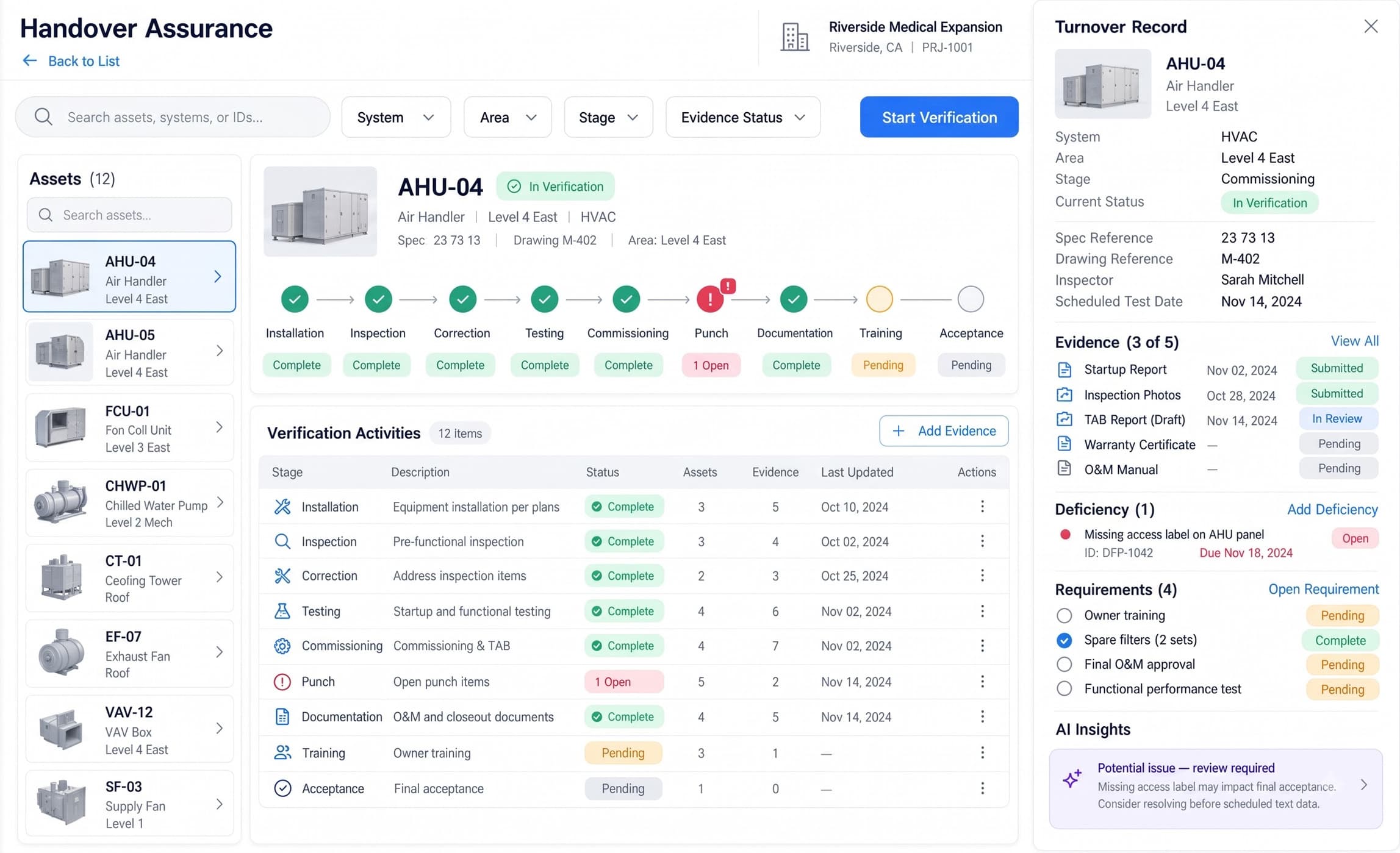
app.struvoryq.com/handoverLIVE · DASHBOARD
Handover Assurance — Struvoryq.AI
Handover Assurance
Close projects faster with zero missing closeout evidence
All required certificates, test results, commissioning logs, and punch items are tracked continuously from day one — compiling audit-ready turnover packages automatically as systems go live so you get paid faster.
Progressive verification audit
Auto-assembles handover packs
Faster final payment & signoff
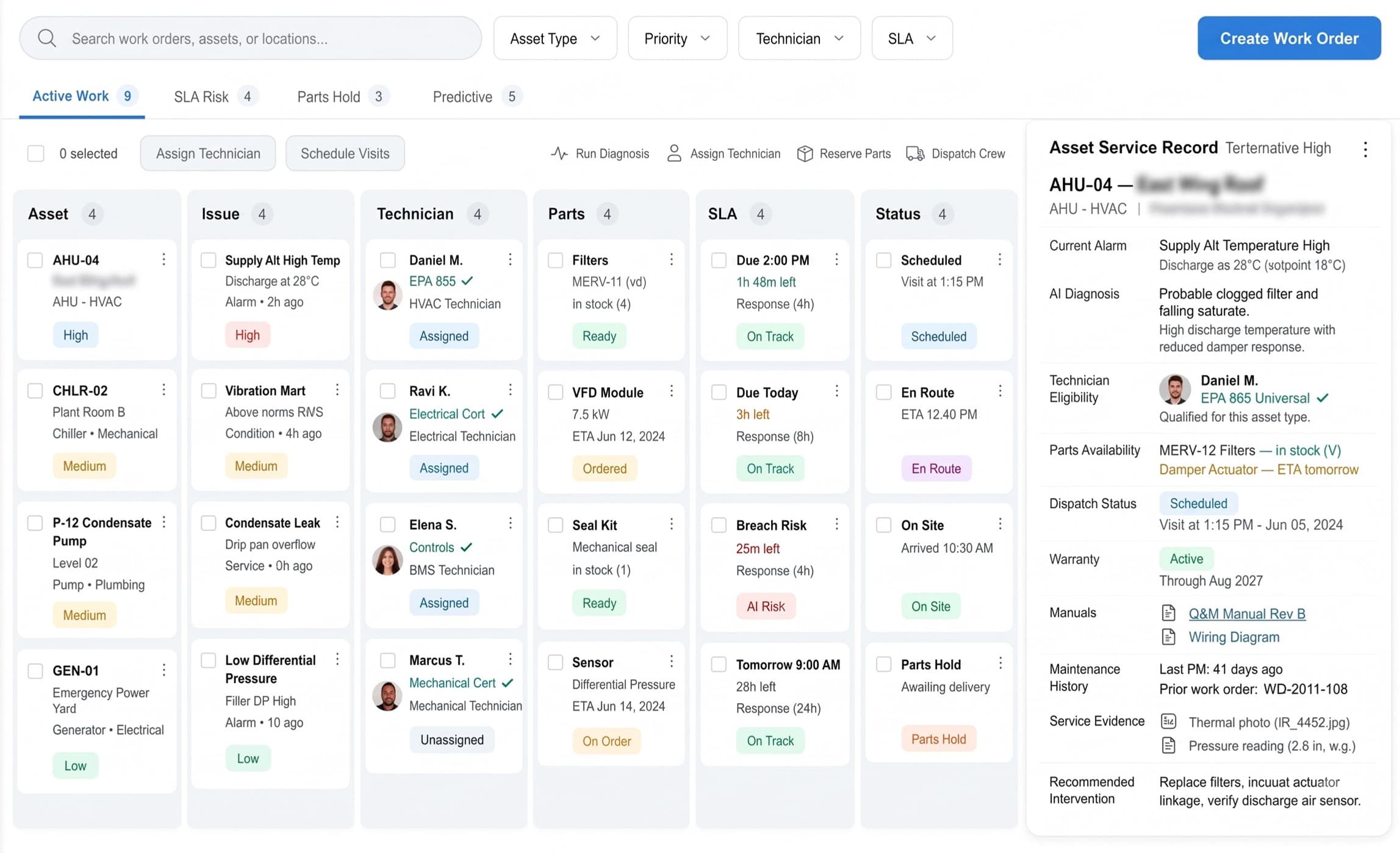
app.struvoryq.com/assetsLIVE · DASHBOARD
Asset Operations — Struvoryq.AI
Asset Operations
Turn handover data into high-uptime facility operations
Bridge construction turnover directly into daily facility lifecycle operations. Track asset health, schedule preventive maintenance, dispatch qualified technicians, and access connected equipment history, warranties, and O&M manuals from day one.
Predictive maintenance dispatch
Live equipment service records
Connected warranty & O&M lineage
How It Works
Your workflow, from documents to decisions.
01
Import your project data
Tenders, surveys, drawings, specifications and field records land in one workspace. AI organises each upload, structures the information and flags what is still missing before your team commits schedule or budget.
02
Run every stage connected
Intake, survey, drawing review, estimating, planning, field operations, quality and closeout work as linked modules — alongside your CAD, BIM, ERP and project-management tools, without re-keying between stages.
03
Lead from the command dashboard
Portfolio health, per-project risk and AI-prioritized alerts live on one screen — so engineering, field and leadership teams see what needs attention before problems reach the site.
Traditional SaaS vs Struvoryq.AI
Don’t settle for the AI your software chose.
Most platforms ship one model and you work inside its limits. Struvoryq.AI puts an orchestration layer between the document and the model, so every step of an extraction runs on the intelligence that suits it.
Traditional SaaS
Built-in AI
One model, one pass, and no step you can point somewhere else.
You work within its limits.
Struvoryq.AI · Routed extraction
01
Read plan sheets and spec tables
OCR, layout detection and table structure on every page.
Mistral
Document AI
02
Classify every sheet
Structural, architectural, MEP, civil and spec pages tagged by discipline.
Open Weights
Inference Providers
03
Hold the whole document set in context
Cross-sheet references, title blocks and revision chains kept together.
Gemini
Gemini API
04
Extract callouts, dimensions and metadata
Structured fields with source regions and per-field confidence.
OpenAI
Responses API
05
Draft code-audit and compliance notes
Findings tied to OSHA 1926, ACI 318, and IBC requirements.
Claude
Messages API
06
Score confidence and route the review queue
Low-confidence fields held for human verification before export.
DSDeepSeek
DeepSeek API
ONE VERIFIED EXTRACTION RECORD
87,620 ENTITIES · 91% WEIGHTED CONFIDENCE · 412 HELD FOR REVIEW
Note: Model names are the property of their owners and appear here only to say which APIs an intake step can be routed to. No endorsement or partnership is implied. Models are named without version numbers because the frontier re-ranks faster than a page can be edited.
Compliance
Mapped to the codes your work is inspected against.
Struvoryq.AI recognises these standards in your documents, tags each callout to the reference it belongs to and keeps the evidence trail your reviewers and inspectors ask for. Sign-off stays with your engineers.
ACI 318
American Concrete Institute — Building Code Requirements for Structural Concrete
Struvoryq.AI extracts and tags concrete specifications, rebar schedules and design notes so structural sheets can be checked against ACI 318 requirements.
ASTM
ASTM International — Standard Specifications and Test Methods for Construction Materials
Struvoryq.AI recognises ASTM designations in material notes and submittal packages and links each callout to the referenced standard.
OSHA 1926
OSHA 29 CFR 1926 — Safety and Health Regulations for Construction
Field Operations enforces the daily inspections, safety audits, and incident reporting required under OSHA's construction standard.
IBC
International Building Code
Preconstruction and Engineering Review validate architectural and structural plans against IBC provisions adopted by the local authority.
Note: These are standards the platform is built to support inside your workflows — obligations that fall on you as the licensee. They are not certifications held by us, and support in the product is not a substitute for your own counsel or compliance officer.
Add-ons
Add the hardware your workflow needs.
An optional field device that streams live measurements into your extraction workspace — reconciling what your crew captures on site against your survey points and extracted plan-sheet dimensions.
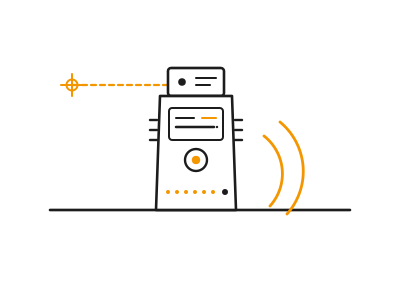
Bluetooth Laser Distance Meter
A pocket laser rangefinder that captures on-site distances, heights and areas and streams every reading over Bluetooth into your workspace — auto-reconciling field measurements against digitized survey points and extracted plan-sheet dimensions.
Survey & Site Data
Field Operations
Drawings & Engineering Review
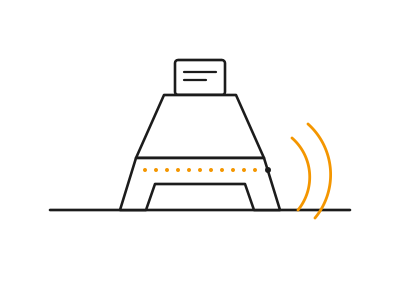
Struvoryq Concrete Cure Sensor
A rebar-clipped wireless sensor cast into fresh pours that streams temperature and maturity readings into your Field Operations dashboard, so crews strip forms on measured strength instead of the calendar.
Field Operations
Quality, Progress & Safety
Note: Hardware, installation, and integration are not included in the standard subscription. Additional charges apply based on the hardware selected, integration modules required, and implementation scope.
Connectivity
Your whole stack, connected.
Salesforce, Procore, Primavera, SharePoint — and the rest of what your projects already run on. 15 integrations across the construction pipeline, every one reading the tool’s own public API.
Salesforce
Pipedrive
Outlook
SharePoint
OneDrive
Teams
MS Project
Slack
DocuSign
Monday
Procore
Fieldwire
Acumatica
Primavera P6
Smartsheet
Salesforce
Pipedrive
Outlook
SharePoint
OneDrive
Teams
MS Project
Slack
DocuSign
Monday
Procore
Fieldwire
Acumatica
Primavera P6
Smartsheet
Salesforce
Pipedrive
Outlook
SharePoint
OneDrive
Teams
MS Project
Slack
DocuSign
Monday
Procore
Fieldwire
Acumatica
Primavera P6
Smartsheet
Slack
DocuSign
Monday
Procore
Fieldwire
Acumatica
Primavera P6
Smartsheet
Salesforce
Pipedrive
Outlook
SharePoint
OneDrive
Teams
MS Project
Salesforce
Pipedrive
Outlook
SharePoint
OneDrive
Teams
MS Project
Slack
DocuSign
Monday
Procore
Fieldwire
Acumatica
Primavera P6
Smartsheet
Salesforce
Pipedrive
Outlook
SharePoint
OneDrive
Teams
MS Project
Slack
DocuSign
Monday
Procore
Fieldwire
Acumatica
Primavera P6
Smartsheet
Note: Tool names and marks belong to their respective owners. No endorsement or partnership implied.
Pricing
One plan. Every extraction workflow.
Simple, flat pricing for the whole platform — no per-seat maths, no tiers to decode. Talk to us and we’ll tailor it to your engineering team.
Starting at
$200/mo
Full access to every module — extraction, surveys, blueprints, estimates, maintenance, field reporting, code audits, vision and routing.
Note: AI API usage is charged separately. Clients must recharge their AI credit balance based on their usage.
Hardware, installation, and integration are not included in the standard subscription. Additional charges apply based on the hardware selected, integration modules required, and implementation scope.
Onboarding
What your onboarding fee covers
A one-time setup that gets your project team running Struvoryq before the first monthly cycle — we load your bid documents, drawings, and historical projects, tune extraction and forecasting to your trades, and wire every module from opportunity intake through asset operations to how your organization actually runs. The fees below are a starting point: your final onboarding is scoped once we understand your environment, security posture, integrations, data volume, compliance requirements, and deployment model.
Essential
$1,000+one-time
Kickoff call and rollout plan scoped to your preconstruction and field teams
Workspace provisioning and admin account setup for your organization
Import of a sample bid package, drawings, and specifications
Extraction tuned to your core trades and standard scope templates
Dashboard, KPI thresholds, and AI Priority Queue configured to your practice
Roles and permissions set for estimators, PMs, and field superintendents
Live-readiness check on a real project before your first monthly cycle
Onboarding handbook and self-serve help resources
Plus
Most teams
$2,500+one-time
Everything in Essential, plus:
Guided migration of historical bid records, RFIs, and vendor pricing
Two integrations — accounting, scheduling, document control, or CRM
Custom assemblies, cost codes, and confidence thresholds configured
Procurement Control wired to your vendors, lead times, and safe-release rules
Live training for estimators, PMs, and superintendents, with a recording
Dedicated onboarding specialist for the rollout
Enterprise
$5,000+one-time
Everything in Plus, plus:
Tailored rollout across multiple offices, divisions, or active projects
Bespoke integrations, API, and SSO configuration
Bulk project-history migration with cleansing and reconciliation
Role-based training tracks for executives, estimators, PMs, and admins
Compliance and audit-trail configuration for defensible bids and turnover
Named onboarding manager with a committed go-live date
Where it runs
Run the platform whichever way your team’s data policy needs — the subscription is the same either way; only onboarding may differ by environment.
Cloud (SaaS)
Runs in Nestack's managed cloud — the fastest way to start. We provision your workspace and your teams are running Struvoryq the same week, with updates and scaling handled for you.
Private / self-hosted
The same platform deployed inside your own infrastructure — your cloud, VPC, or on-prem — for teams that keep bid documents, project financials, and vendor pricing in-house. Your project data never leaves your environment, and the monthly subscription stays the same.
The subscription is identical on either model; only the onboarding scope differs by your security and deployment requirements.
Struvoryq.AI ships
Extraction agents, in production, reading real engineering documents.
Structured records from plan sets, submittals and field forms — live in your CAD, BIM, GIS and ERP targets through documented API integrations, with each agent mapped to the modules your team already runs.
Document extraction and blueprint parsing agents
Field reporting and code-permit audit agents
Both catalogued in playbook 2.07
Sister platform — Nestack Agent Care
P 07 · 23 playbooks
Your construction AI agents, run like production systems.
Telemetry, evaluations, guardrails, human review and incident response — pinned to the Construction industry playbook so extraction and routing agents stay reliable from intake through export.
Subscriptions start at $200/month with no per-seat pricing. Your final subscription is based on the needs of your construction and project team, so you are not forced into a larger package just to add estimators, project managers, superintendents or other users. We confirm the final scope and price with you before rollout.
Are there any costs beyond the monthly subscription?
Yes. There is a one-time onboarding fee to configure Struvoryq.AI around your projects, trades, documents and existing systems. Onboarding can include data migration, extraction tuning, permissions, integrations and team training. Optional hardware and custom integration work are priced separately, so you know what is included before you commit.
Do we have to replace Procore, Primavera or the tools we already use?
No. Struvoryq.AI is designed to work alongside the systems your team already relies on. It can connect project documents, schedules, field information and operational data across tools such as Procore, Primavera P6, Microsoft Project, SharePoint and other construction systems, helping your team reduce re-keying without forcing a rip-and-replace rollout.
How quickly can our team start using it?
For a standard cloud rollout, we provision your workspace, configure users and permissions, load representative project documents and validate the workflow with your team before the first monthly cycle. More complex rollouts involving historical data, multiple offices, SSO or custom integrations are scoped during onboarding so there are no surprises at go-live.
Can we test Struvoryq.AI on one of our own projects before buying?
Yes. The best way to evaluate Struvoryq.AI is against work your team already understands. During the product walkthrough, we can use a representative bid package, drawing set, project workflow or turnover scenario so your estimators, PMs and operations team can see where the platform would save time and surface risk in your own environment.
What happens when the AI is not confident about a drawing or document?
The system is designed for reviewable construction workflows, not blind automation. Extracted information can carry confidence scores and source references back to the original drawing or document. Low-confidence or higher-risk items can be held for human verification so your team stays in control of estimates, scope decisions and project records.
How do we know the platform will deliver enough value to justify the subscription?
Struvoryq.AI is built around problems that directly affect project economics: time spent reading bid packages, missed scope, repeated data entry, long-lead procurement risk, field constraints, unrecovered changes and incomplete closeout records. The goal is not to give your team another dashboard — it is to reduce manual work and expose schedule, cost and scope risks early enough for your team to act.
What support do we get during rollout and after we subscribe?
Onboarding includes workspace setup, workflow configuration and readiness checks, with training and migration support available based on your rollout package. Larger deployments can include a dedicated onboarding specialist, role-based training, integrations and a named rollout manager so estimators, PMs, superintendents and administrators are supported through adoption.