A dense wall of rack-mounted compute and cabling in a dark facility
Technology · Emerging Domains

Signal
into structure

TriageFlow reads every inbound signal a technology team gets — tickets, leads, intakes, inquiries, incidents, documents and questions — then routes, extracts and answers them with a confidence score you can audit.

Patch panels and structured cabling inside a lit network rack
Eleven live modulesOne platform across support, revenue, delivery and reliability.Routing, qualification, intake, extraction, grounded answers, quoting, code quality, anomaly prediction and content.
The main console

Every ticket,
already routed

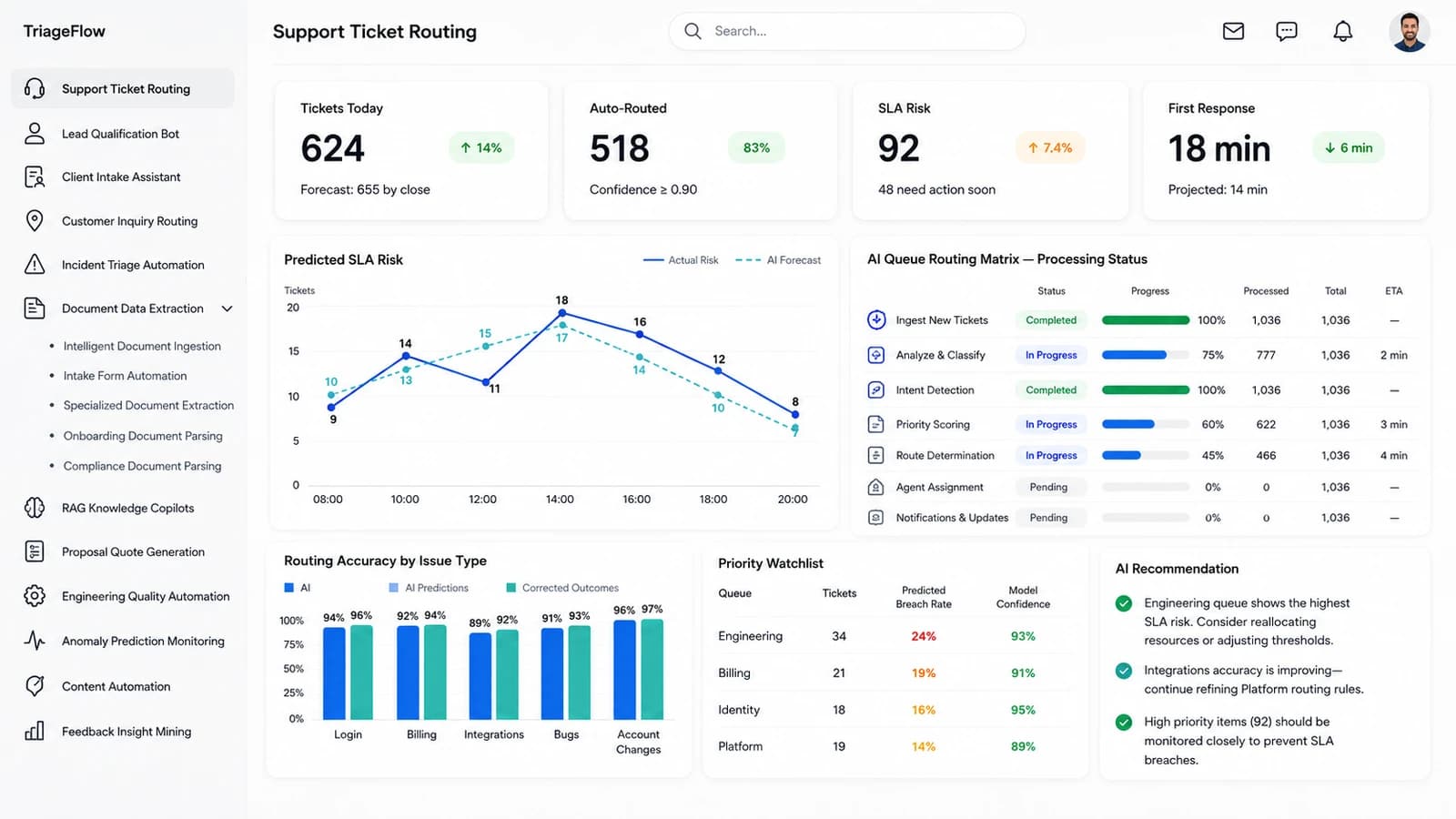
This is the screen the support floor actually runs on. Volume, auto-routing rate, predicted SLA breaches and first-response time across the top; the live routing pipeline and the day’s risk forecast beneath. Click any marker to read what that element does.

TriageFlow — the Support Ticket Routing dashboard
11
Modules live
7
Routing stages
0.90
Confidence floor
100%
Decisions logged
The modules

Ten more
working screens

Each module below is a real screen in TriageFlow, shown at full size. They share one ingest layer, one confidence model and one audit trail — so a lead, a contract and a Sev 1 are all handled the same way.

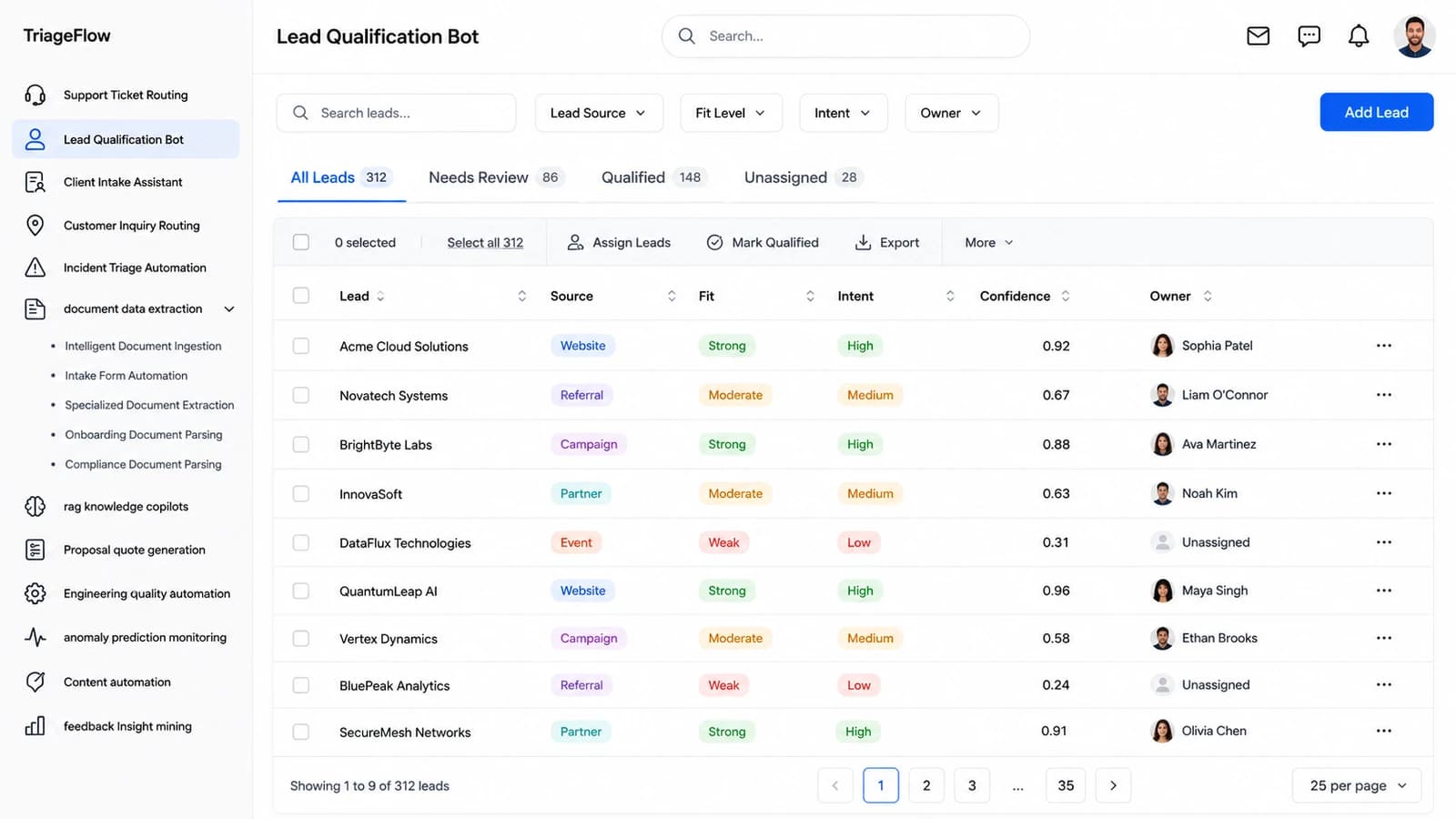
TriageFlow — the Lead Qualification Bot dashboard
02 — Module

Lead Qualification Bot

Every inbound lead scored for fit and intent the moment it lands, with the confidence figure that drove the call sitting in the same row.

  • Fit and intent graded Strong / Moderate / Weak against your own closed-won history
  • A 0–1 confidence score per lead — anything weak stays in Needs Review rather than auto-assigning
  • Source, owner and assignment in one table, so nothing sits unclaimed
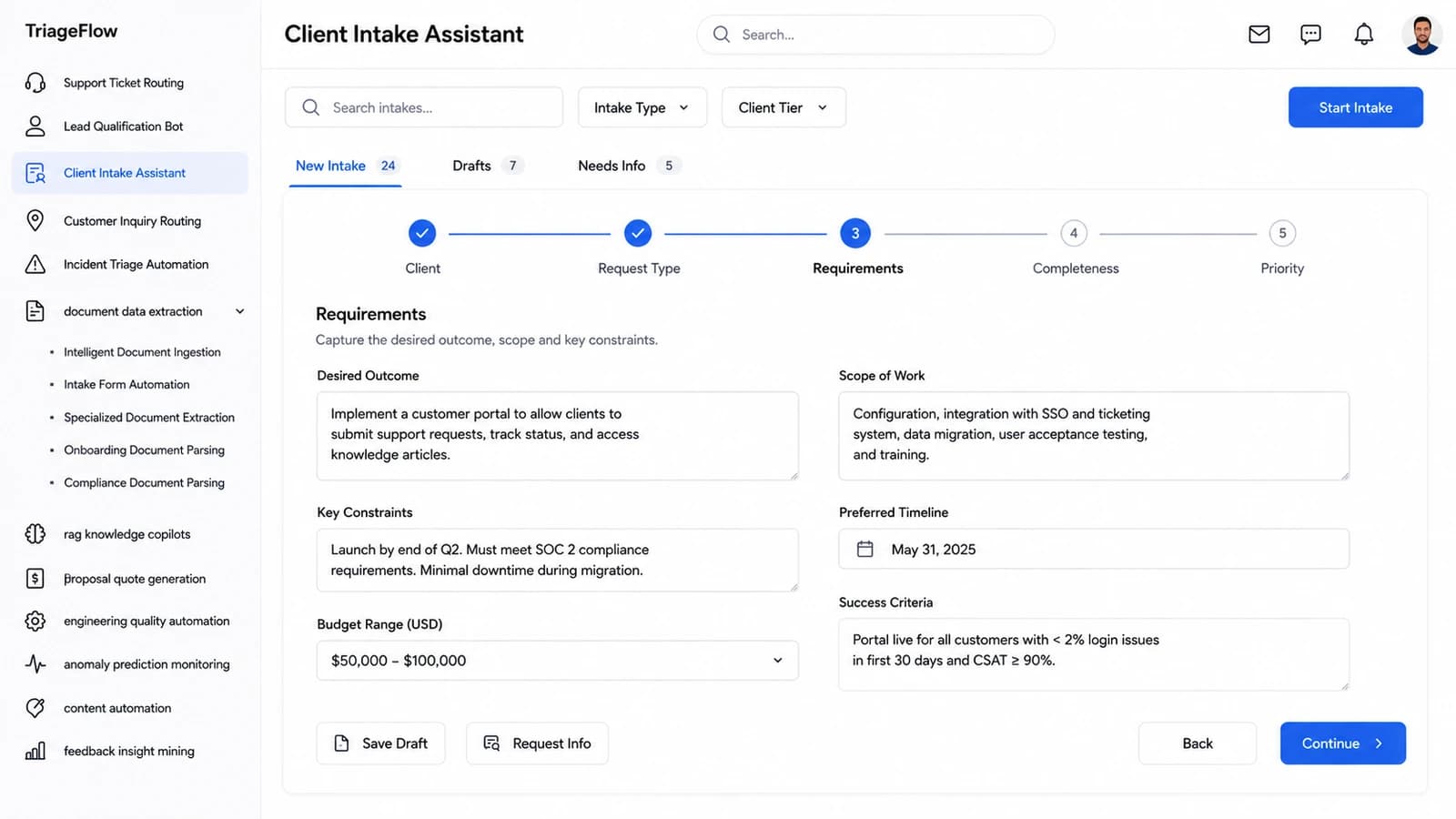
TriageFlow — the Client Intake Assistant dashboard
03 — Module

Client Intake Assistant

A guided five-step intake that captures outcome, scope, constraints and success criteria before a single engineer is pulled in.

  • Client → Request Type → Requirements → Completeness → Priority, with progress carried across sessions
  • Free-text requirements parsed into structured scope, timeline and budget fields
  • Completeness scoring flags the gaps and raises a Request Info loop automatically
TriageFlow — the Customer Inquiry Routing dashboard
04 — Module

Customer Inquiry Routing

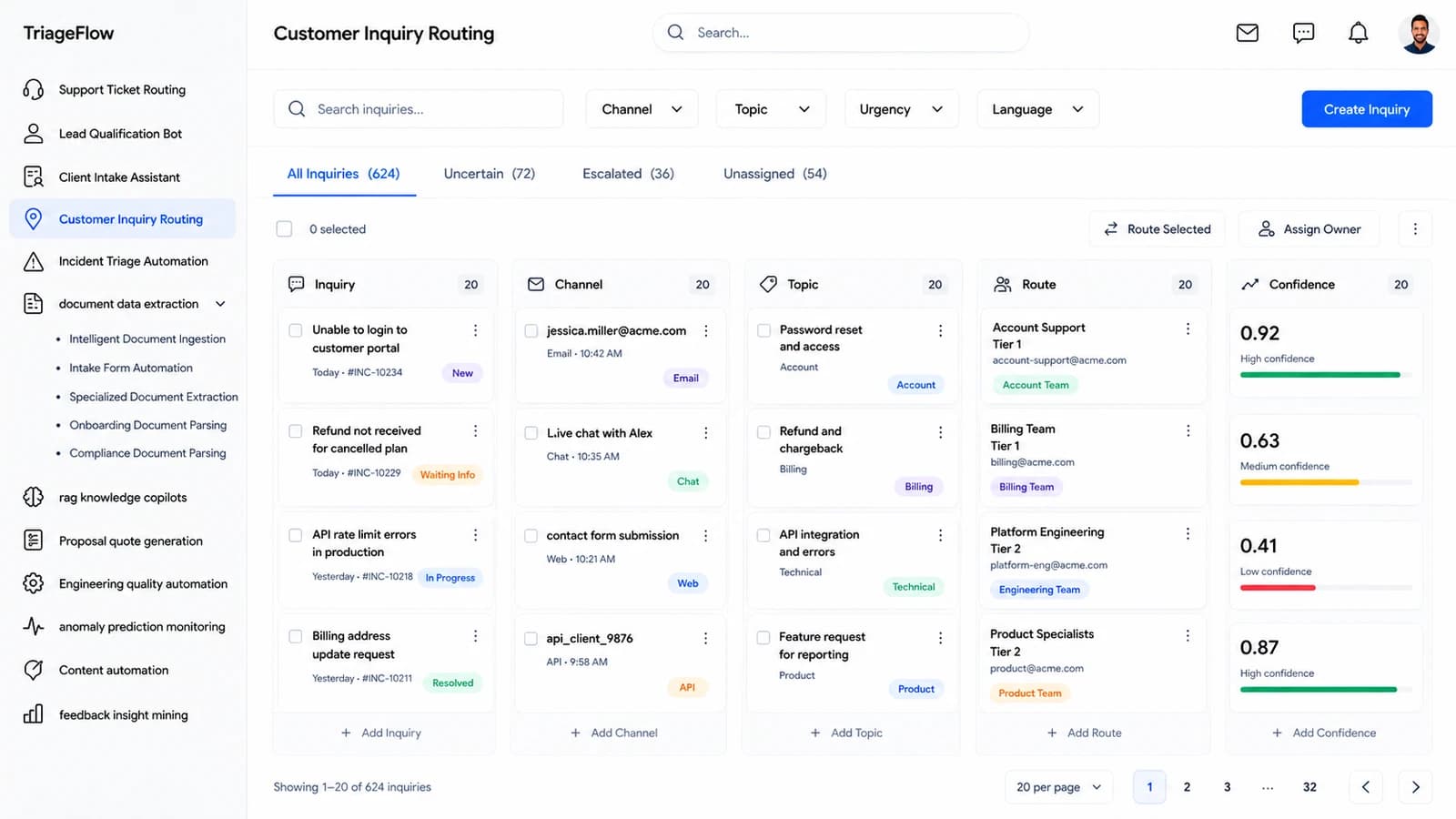
The routing decision broken into its parts — inquiry, channel, topic, destination and the confidence behind each hop.

  • Email, chat, web and API inquiries normalised into one queue
  • Topic and destination team proposed side by side, each with its own confidence bar
  • Low-confidence routes drop into Uncertain instead of guessing at a team
TriageFlow — the Incident Triage Automation dashboard
05 — Module

Incident Triage Automation

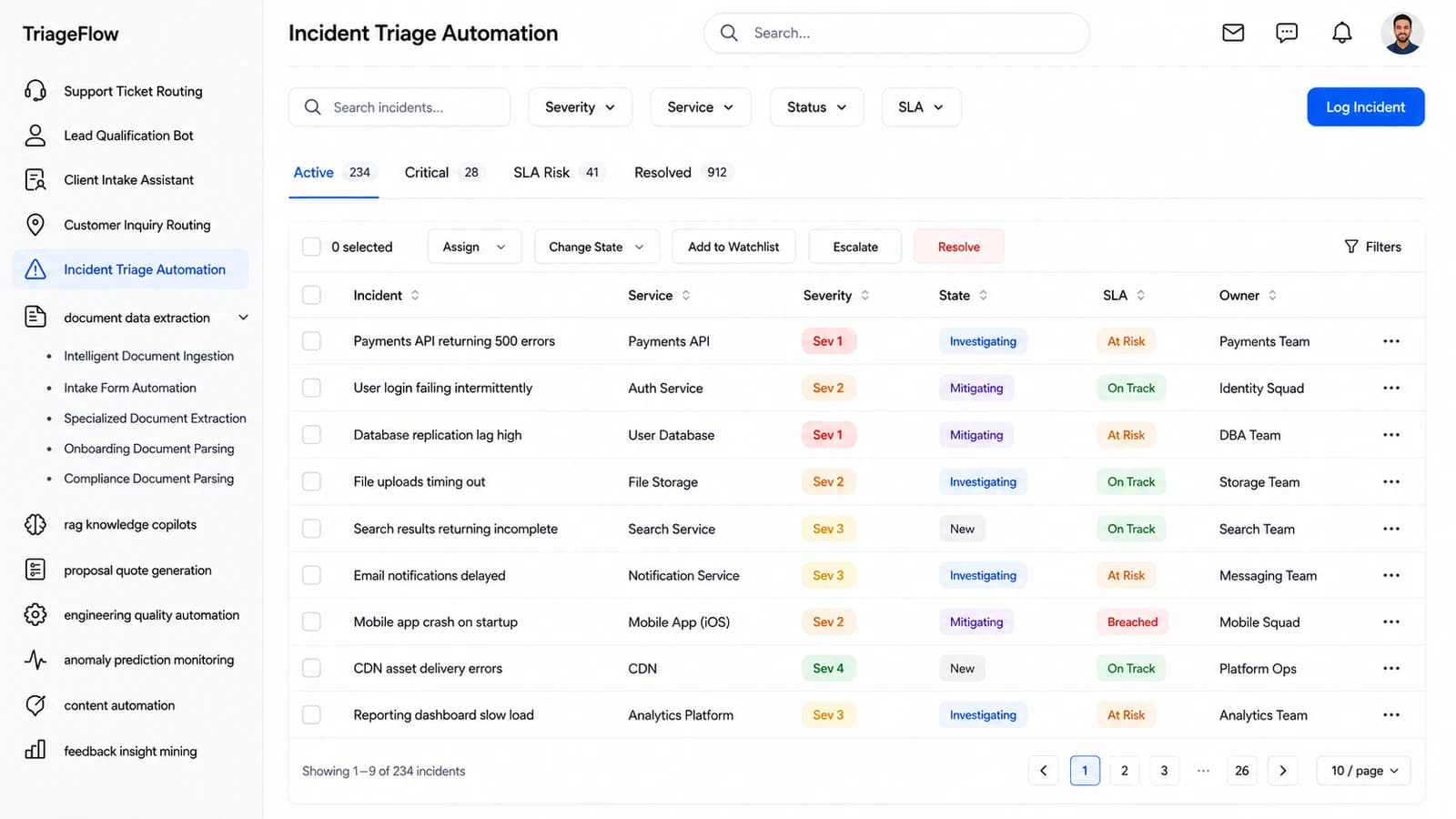
Live incidents graded by severity and SLA state, with the owning squad already attached when the row appears.

  • Sev 1–4 assigned from the symptom text and the affected service
  • SLA state tracked as On Track / At Risk / Breached across every active incident
  • Assign, escalate, change state and resolve as bulk actions on a selection
TriageFlow — the Document Data Extraction dashboard
06 — Module

Document Data Extraction

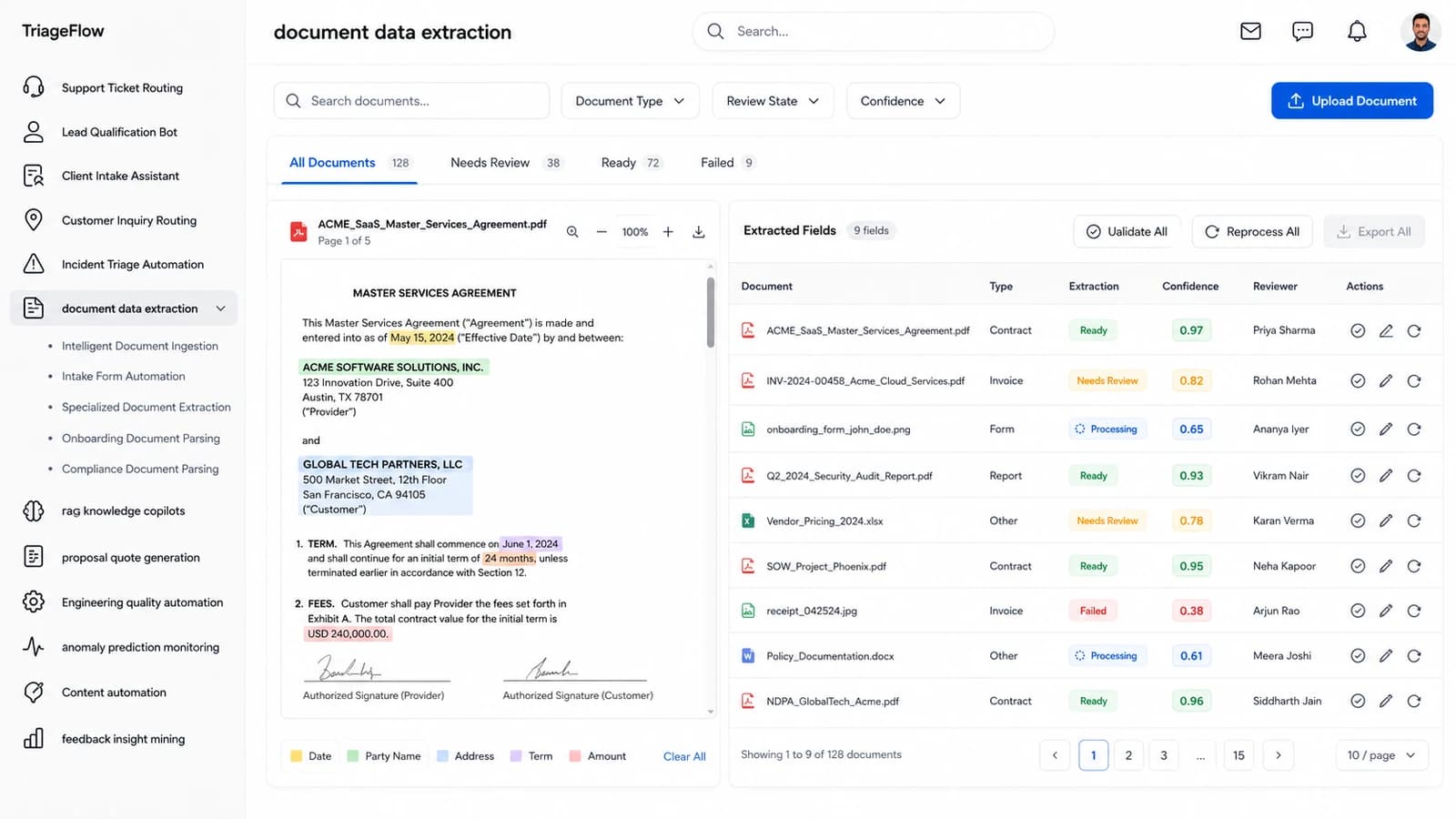
The source document and its extracted fields side by side, every value colour-linked back to the span it came from.

  • Dates, party names, addresses, terms and amounts highlighted in the original PDF
  • Per-document confidence with Ready / Needs Review / Failed states and a named reviewer
  • Validate, correct or reprocess a document without leaving the split view
TriageFlow — the RAG Knowledge Copilots dashboard
07 — Module

RAG Knowledge Copilots

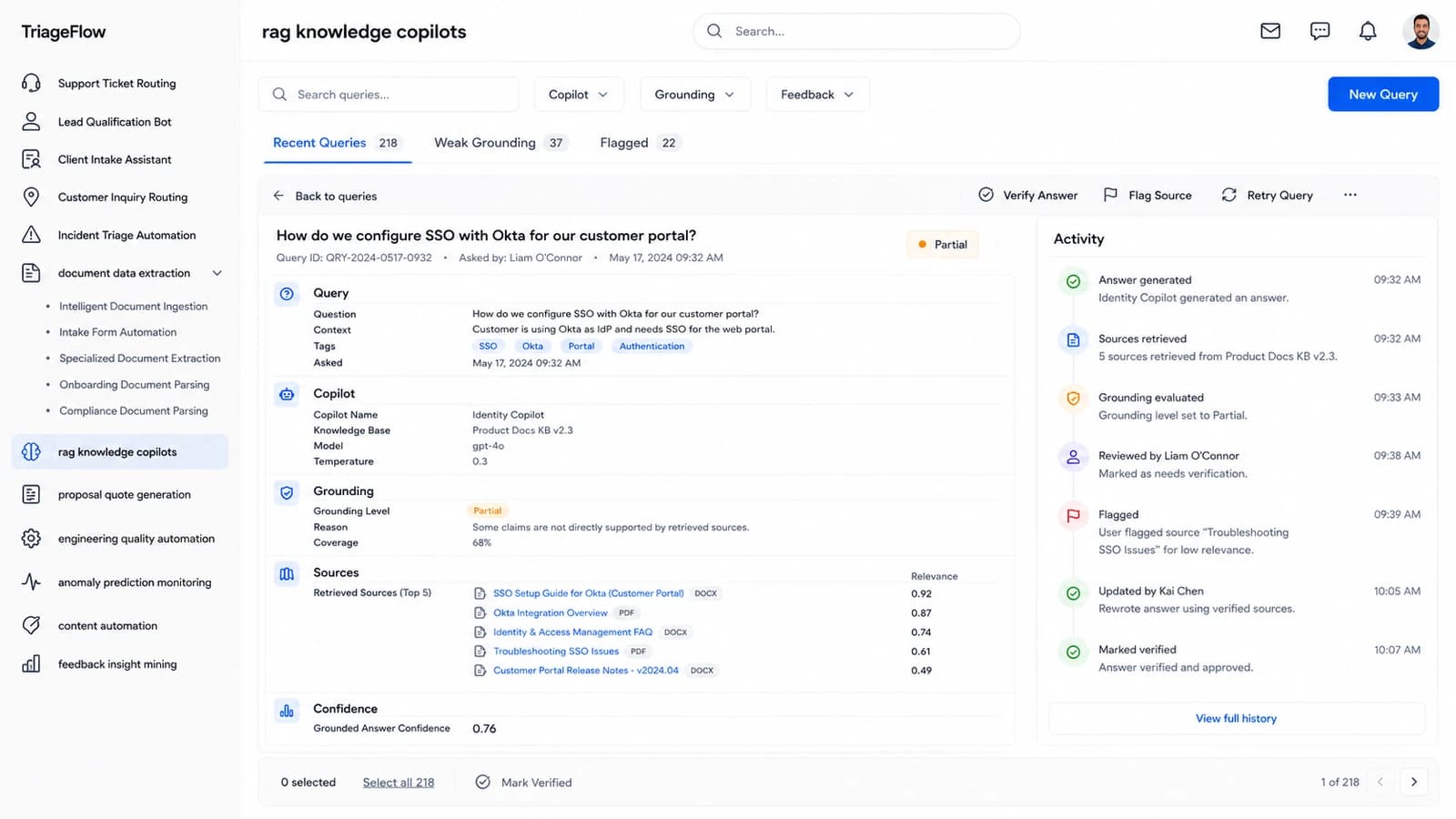
An answer you can audit: the question, the copilot and model behind it, the grounding level, and every source it actually read.

  • Grounding scored Full / Partial with an explicit coverage percentage and reason
  • Top retrieved sources listed with relevance scores, so a weak citation is visible
  • A full activity trail — generated, reviewed, flagged, rewritten, verified — per answer
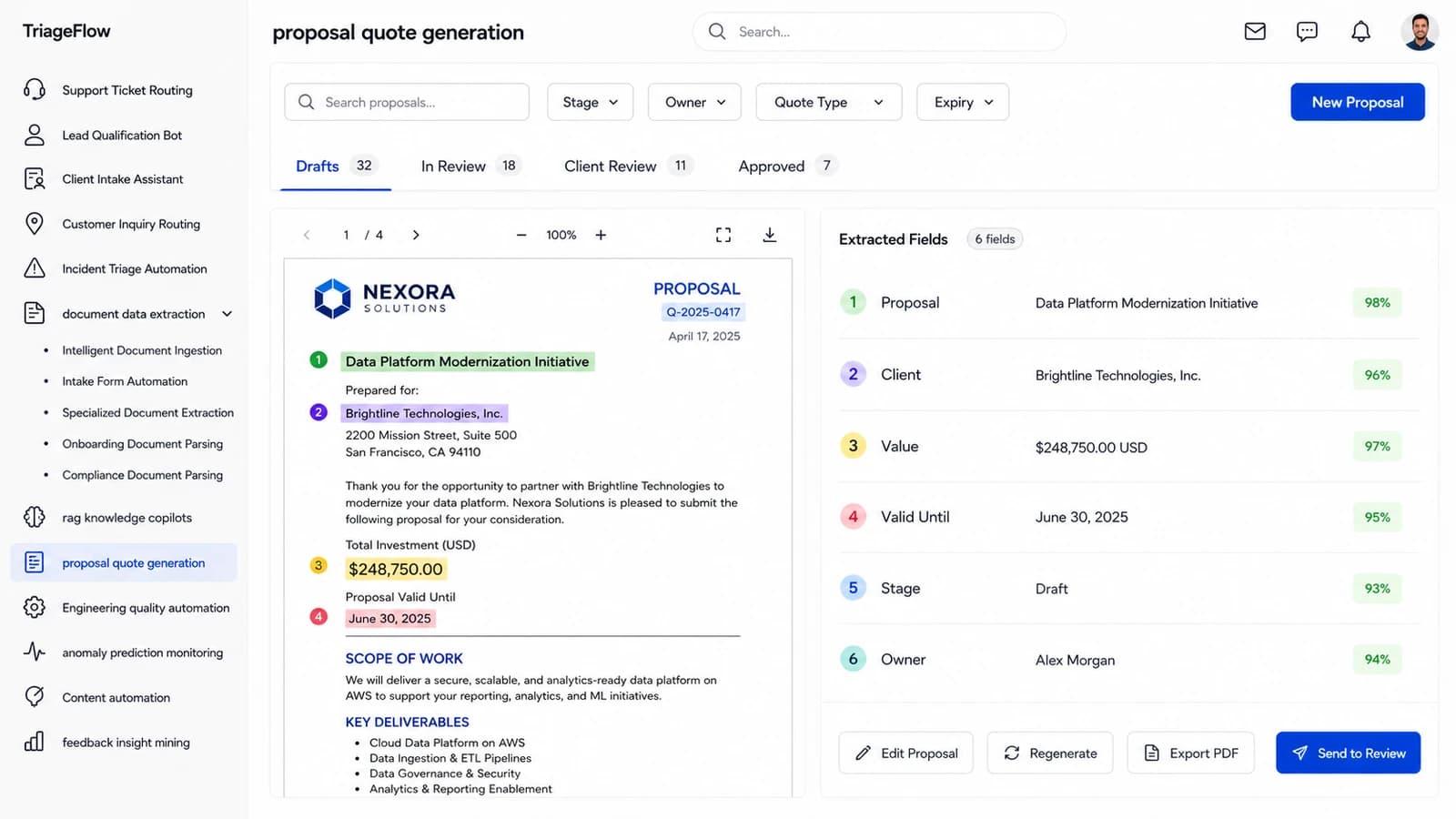
TriageFlow — the Proposal Quote Generation dashboard
08 — Module

Proposal Quote Generation

Drafted proposals with the commercial terms pulled out and numbered against the exact place they appear in the document.

  • Proposal, client, value, validity, stage and owner extracted with per-field confidence
  • Numbered markers tie each extracted field to its highlighted span in the draft
  • Drafts → In Review → Client Review → Approved, with export and send-to-review in place
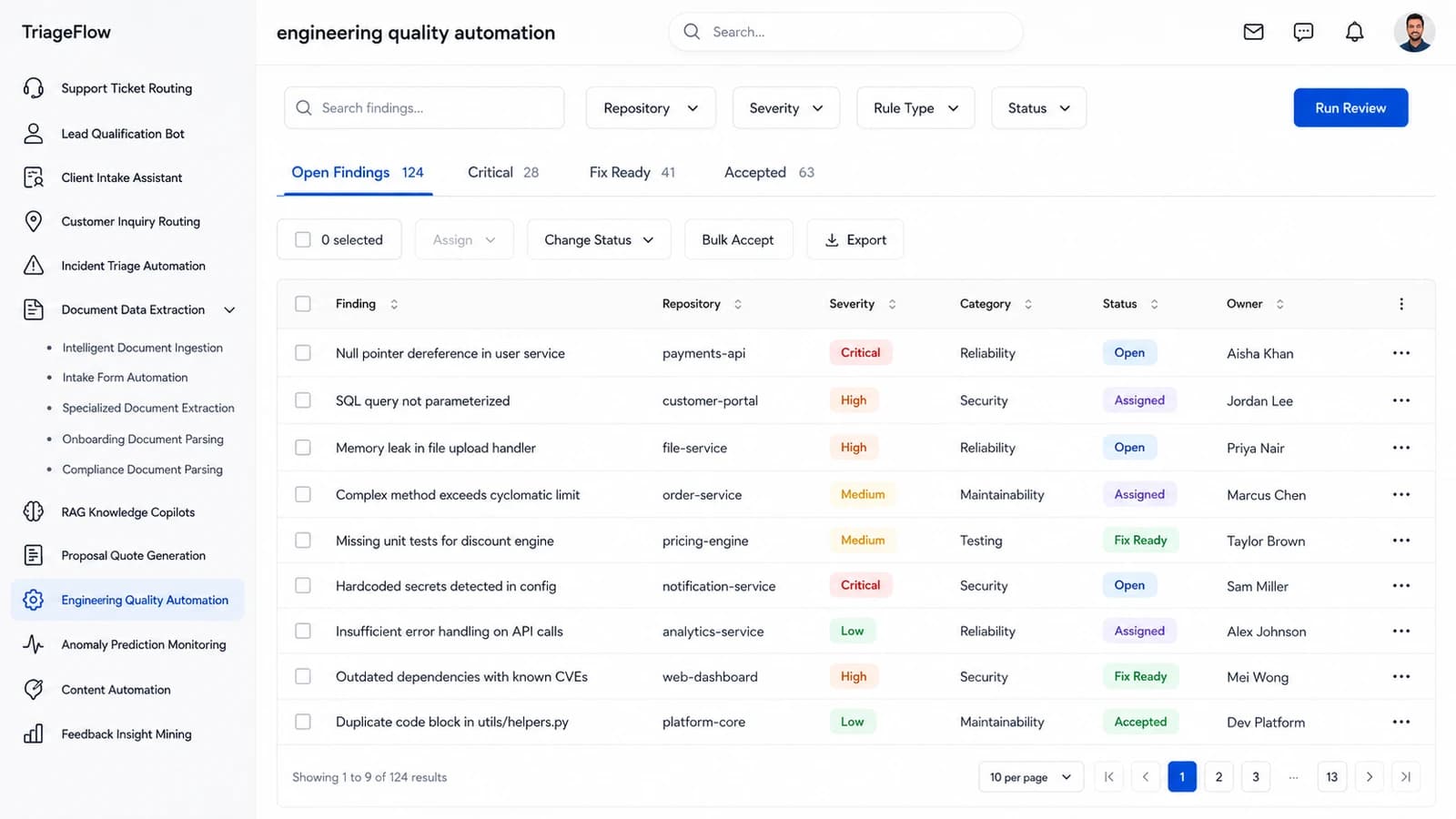
TriageFlow — the Engineering Quality Automation dashboard
09 — Module

Engineering Quality Automation

Findings across every repository in one queue, graded by severity and category rather than buried in CI logs.

  • Reliability, security, maintainability and testing findings unified across repos
  • Critical / High / Medium / Low severity with Open, Assigned, Fix Ready and Accepted states
  • Bulk accept and assign so a review pass closes out in one sitting
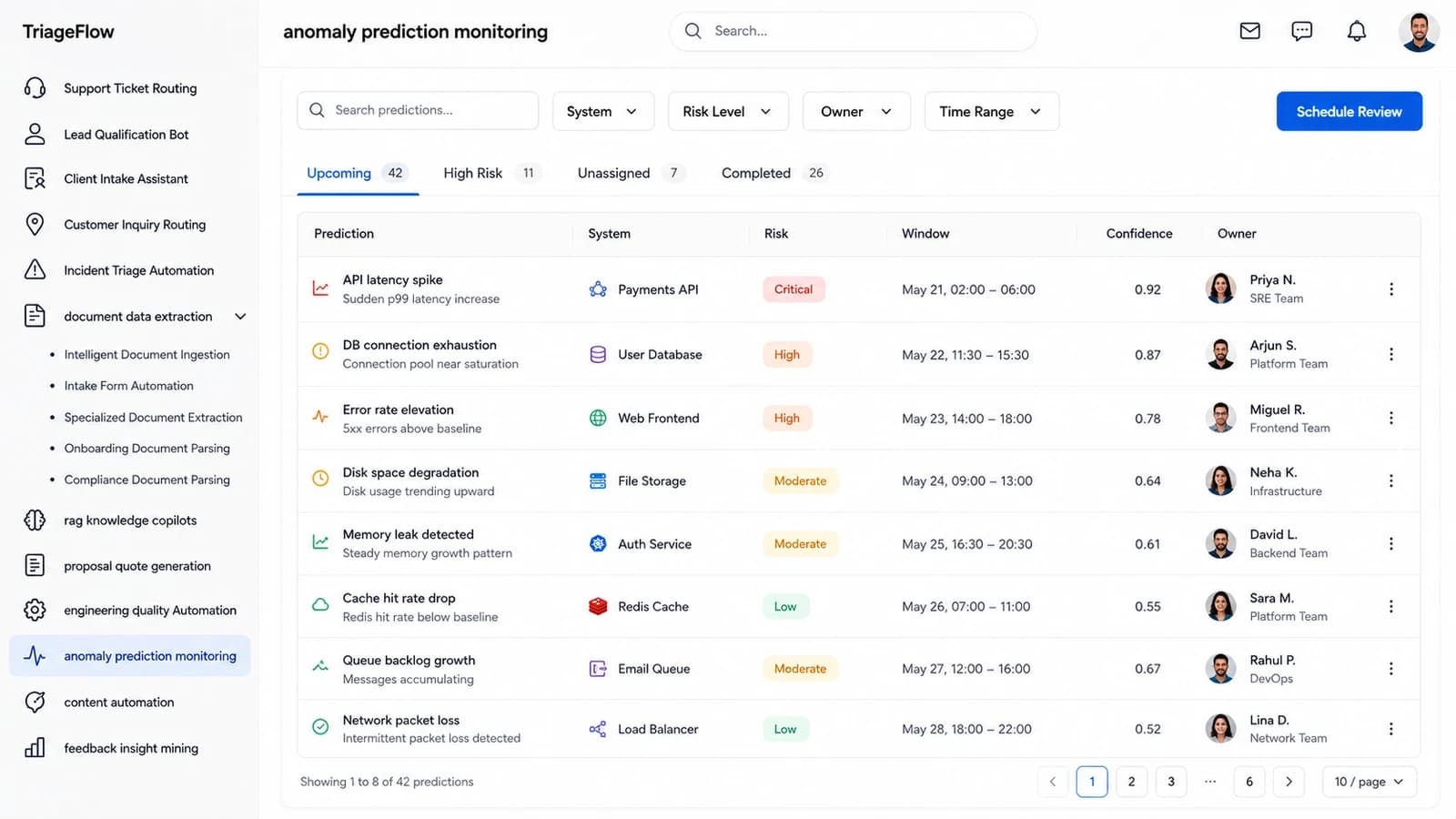
TriageFlow — the Anomaly Prediction Monitoring dashboard
10 — Module

Anomaly Prediction Monitoring

Predictions rather than alerts — the system, the risk grade, the window it is expected in, and how sure the model is.

  • Latency spikes, pool exhaustion, memory leaks and packet loss forecast ahead of impact
  • Each prediction carries a dated window and a 0–1 confidence, not just a red light
  • Risk graded Critical → Low with an owning team attached to every row
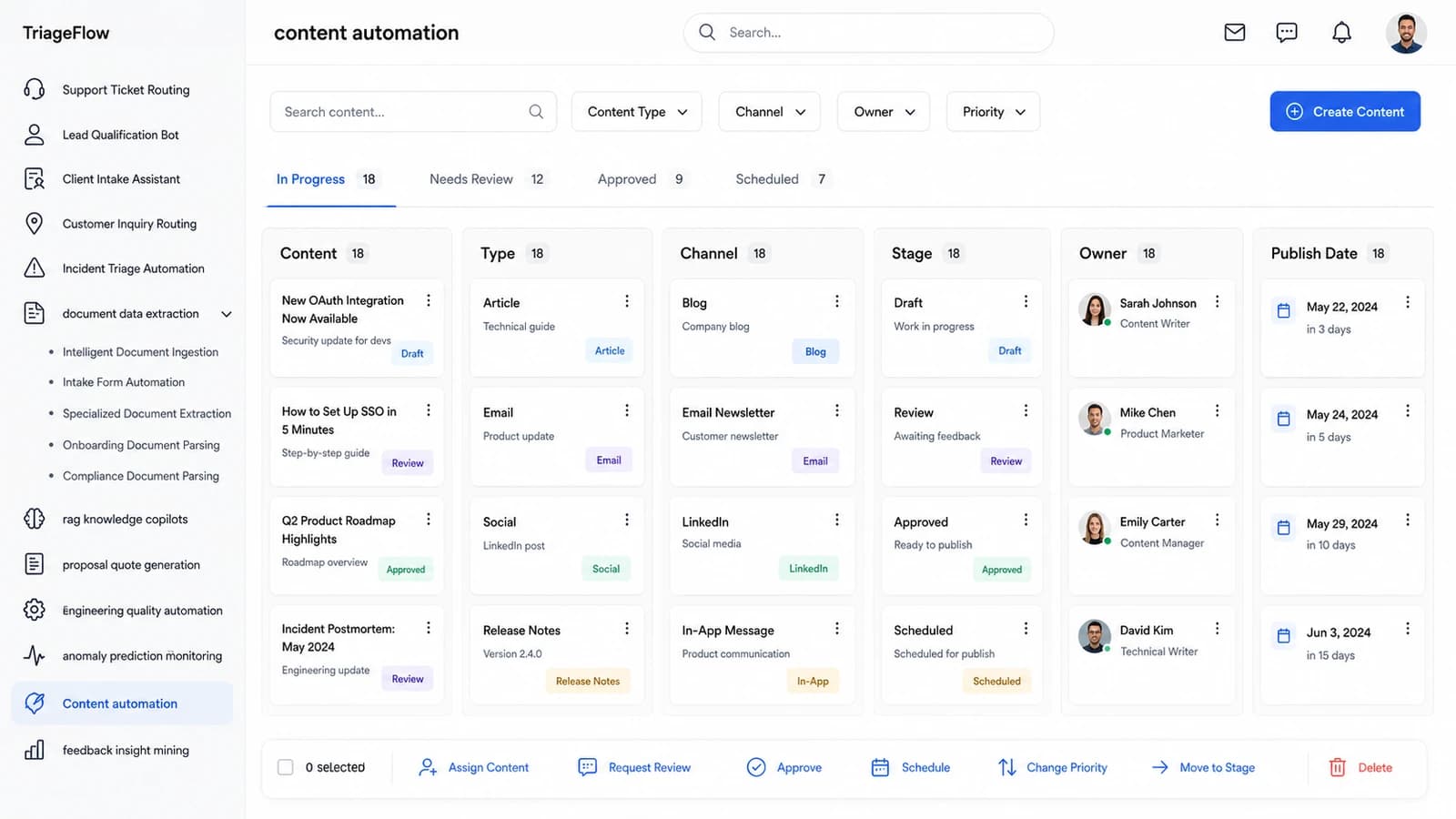
TriageFlow — the Content Automation dashboard
11 — Module

Content Automation

The content pipeline laid out column by column — piece, type, channel, stage, owner and publish date.

  • Articles, emails, social posts and release notes tracked in one board
  • Draft → Review → Approved → Scheduled, with the publish date and countdown visible
  • Assign, request review, approve, schedule and re-prioritise from the action bar
Why one ingest layer
One pipeline, every signal

Four stages
between inbox
and outcome

Most teams bolt a separate tool onto each queue and end up with eleven models, eleven audit trails and no shared idea of what “confident” means. TriageFlow runs one ingest layer underneath all of it, so the same thresholds, the same reviewers and the same log cover every module on this page.

Rows of server cabinets in a data hall
01

Ingest

Helpdesk, inbox, chat, web forms, API and repository events land in one normalised stream. Card numbers and secrets are redacted at the door, before any model reads the body.

A processor die seated on a printed circuit board
02

Resolve

Intent, entities, severity and priority are read off the raw text. Documents are parsed field by field; questions are answered against your own indexed sources, never the open web.

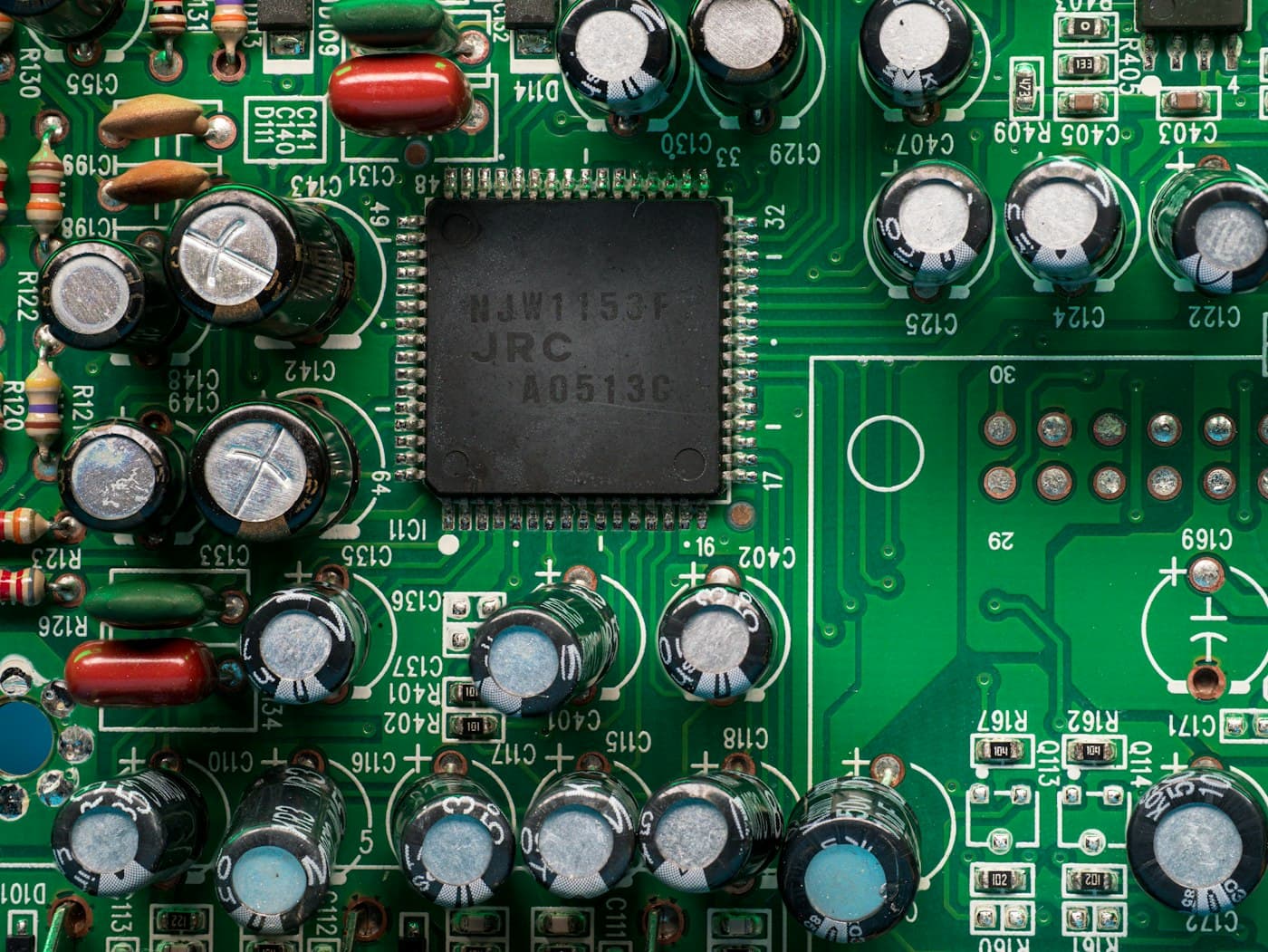
A dense circuit board packed with electronic components
03

Act

The work is assigned, escalated, quoted or answered — with the confidence score attached. Anything under your floor stops for a named human instead of guessing.

A large array of networked electronic equipment
04

Learn

Every correction a reviewer makes is captured as a labelled example. Thresholds, routing rules and grounding coverage are re-measured against your own outcomes, continuously.

Compliance

Built to
pass review

The standards a technology buyer’s security, legal and procurement teams actually ask about — and what the platform does to support each one.

SOC 2

System and Organization Controls 2 (AICPA Trust Services Criteria)

The audit US buyers ask for before they hand over customer data — security, availability and confidentiality controls. Every routing, extraction and booking action is written to an immutable, exportable audit trail.

ISO/IEC 27001

Information Security Management Systems

The international standard for running a documented information-security programme. Access controls, encryption and retention rules are configurable per workspace and evidenced in the admin console.

ISO/IEC 42001

Artificial Intelligence Management Systems

The AI-specific management standard covering model governance, risk and oversight. Every model decision here carries a confidence score, a named reviewer and a human-override record.

GDPR

EU General Data Protection Regulation 2016/679

Governs how EU personal data is stored, processed and erased. Data-subject export and deletion run across tickets, intakes, documents and extracted fields in one request.

EU AI Act

Regulation (EU) 2024/1689 on Artificial Intelligence

Sets transparency and human-oversight duties for AI systems by risk tier. Automated routing and qualification are disclosed to end users and every decision stays reversible by a human reviewer.

NIST AI RMF 1.0

NIST Artificial Intelligence Risk Management Framework

The US framework for mapping, measuring and managing AI risk. Grounding coverage, drift and weak-confidence rates are measured continuously and surfaced on the monitoring dashboards.

WCAG 2.2 AA

Web Content Accessibility Guidelines 2.2, Level AA

The accessibility bar for public-sector and enterprise procurement. Every operator console ships keyboard-navigable, screen-reader labelled and contrast-checked at AA.

PCI DSS 4.0

Payment Card Industry Data Security Standard v4.0

Applies wherever cardholder data touches a support or billing queue. Card numbers are detected and redacted at ingest, so they never reach the routing model or the ticket body.

Companion hardware

Devices that
feed the console

First-party TriageFlow devices that pair with your workspace and stream their readings into a named dashboard module — so the signal reaches the platform without anyone re-typing it.

Lattice Edge Telemetry Probe

Lattice Edge Telemetry Probe

A palm-sized Wi-Fi probe that samples latency, error rate and queue depth at the edge of your stack. It streams those readings straight into your Anomaly Prediction Monitoring dashboard, so a drift shows up as a scored prediction hours before it pages anyone.

Lattice Intake Scanner

Lattice Intake Scanner

A compact USB sheet-feed scanner pre-paired with your workspace. Contracts, invoices and signed intake forms land directly in Document Data Extraction, where fields are parsed and confidence-scored without anyone emailing a PDF around.

Lattice Ops Beacon

Lattice Ops Beacon

A Bluetooth desk beacon that turns amber the moment a Sev-1 opens and clears when the incident does. Press to acknowledge and the state syncs back to your Incident Triage Automation queue with your name on it.

Lattice Queue Tag

Lattice Queue Tag

A BLE tag that pairs to a support pod and reports live handling capacity to the platform. Support Ticket Routing reads that signal and stops assigning work to a queue that has already run out of headroom.

Lattice Grounding Recorder

Lattice Grounding Recorder

A USB-C conference microphone that captures customer calls and pushes clean transcripts into your RAG Knowledge Copilots index. Answers stay grounded in what was actually said, with the source turn linked on every citation.

Lattice Field Signal Hub

Lattice Field Signal Hub

A small ethernet hub that collects readings from every Lattice device on site and forwards them over one encrypted uplink. It keeps the dashboards fed when a site has no reliable Wi-Fi, buffering locally until the link returns.

Pricing

One plate.
Every module.

Flat pricing for the whole platform — no per-seat arithmetic, no module unlocks, no tier that hides the audit log behind it.

Starting at
$200/mo

Full access to TriageFlow — routing, qualification, intake, extraction, grounded answers, quoting, code quality, anomaly prediction and content, on one confidence model and one audit trail.

Modules
All 11 included
Seats
Unlimited operators
Audit trail
Full export
Deployment
Cloud or private
Know more
Onboarding

What your
onboarding fee covers

A one-time setup that gets your queues, documents and knowledge base fully live before the first monthly cycle — we connect your helpdesk, CRM and repositories, import your historical tickets and documents, and tune every routing, extraction and grounding threshold against your own back-catalogue so day-one confidence scores reflect your data, not a generic baseline. Each fee below is a STARTING point: we scope the final onboarding once we understand your environment, security needs, integrations, data volume, compliance requirements and deployment model — so the exact figure lands after that conversation, never before.

Essential

from$1,000+one-time
  • Kickoff and discovery session across your support, sales and engineering queues
  • Workspace provisioning, SSO-ready admin accounts and role setup
  • One helpdesk or ticketing connector wired in (inbound and status write-back)
  • Historical ticket and inquiry import, with taxonomy mapped to your own queues
  • Support Ticket Routing and Customer Inquiry Routing tuned on your back-catalogue
  • Document Data Extraction configured for your three highest-volume document types
  • Confidence thresholds and human-review rules set per queue
  • Live-readiness check and operator handbook before your first monthly cycle

Plus

from$2,500+one-time

Everything in Essential, plus:

  • RAG Knowledge Copilots indexed against your docs, runbooks and release notes
  • Two further integrations — CRM, repository, observability or billing
  • Incident Triage Automation mapped to your severity matrix and on-call rotas
  • Proposal Quote Generation templated to your pricing and approval chain
  • Live training for operators and reviewers, with a recording you keep
  • Dedicated onboarding specialist through to go-live

Enterprise

from$5,000+one-time

Everything in Plus, plus:

  • Multi-team or multi-region rollout plan with staged cutover per business unit
  • Bespoke API, SSO/SCIM and data-residency configuration
  • Bulk historical migration with de-duplication, cleansing and reconciliation
  • Engineering Quality Automation wired to your repositories and CI gates
  • Anomaly Prediction Monitoring baselined against your own incident history
  • Named onboarding manager, agreed go-live date and post-launch tuning window
Two ways to run it

Cloud (SaaS)

Runs in Nestack's managed cloud — we handle hosting, scaling, model updates and backups. Fastest to start: your queues are routing and your documents are parsing without any infrastructure to stand up.

Private / self-hosted

The same platform deployed inside your own infrastructure — your cloud, VPC or on-prem — for teams whose tickets, contracts and source code cannot leave their environment. Your documents, embeddings and model outputs stay entirely inside your perimeter, and the monthly subscription stays exactly the same.

Questions

Before you
ask us

The six things technology teams ask about TriageFlow before they put a queue through it.

Do we have to adopt all eleven modules?

No. Most teams start with one or two queues — usually support routing and document extraction — and switch the rest on once the confidence scores have settled against their own history. The subscription covers every module either way, so turning one on later costs nothing extra.

What happens when the model is not confident?

Nothing automatic. Anything below your configured floor stops and lands in a review state with a named owner — Needs Review on leads, Uncertain on inquiries, Needs Review on documents. The platform never guesses at a route to keep a queue looking clean, and every override a reviewer makes is captured as a labelled example.

Where does the answer in a knowledge copilot come from?

Only from sources you have indexed — your docs, runbooks, release notes and past resolutions. Each answer records its grounding level, an explicit coverage percentage, and every source it retrieved with a relevance score, so a weakly-grounded answer is visible rather than confident-sounding.

Can this run inside our own infrastructure?

Yes. The same platform deploys into your cloud, VPC or on-prem estate for teams whose tickets, contracts and source code cannot leave their perimeter. Your documents, embeddings and model outputs stay entirely inside your environment, and the subscription is unchanged — only the one-time onboarding differs by requirements.

How long does it take to get live?

Onboarding is scoped per team, but the shape is consistent: connect a helpdesk or repository, import the back-catalogue, tune thresholds against it, then run a shadow period where the platform proposes and your team decides. Teams are usually routing live traffic before the first monthly cycle closes.

What do you do with our data?

It stays yours. Card numbers and secrets are redacted at ingest before any model reads the body; nothing is used to train shared models; and data-subject export or deletion runs across tickets, intakes, documents and extracted fields in a single request. The audit trail is exportable in full at any time.

Book a demo

See TriageFlow on your own queues.

Tell us who you are, pick what you want to see, then grab a time — we’ll run TriageFlow against a queue, document set or knowledge base you already have.

Step 1 of 3

First, who should we prep for?

Takes a few seconds — so we come ready for your team.