Aerospace, Defense & Space · Aviation Services

Connect aircraft service intake, work scoping, parts readiness, maintenance execution, release records and financial reconciliation in one AI workspace.

Intelligent AviationOperations

Book a walk-through

See Turbalyx on your fleet

Grab a time, tell us who you are, then pick the modules you want to see. We’ll run Turbalyx AI against documents, records and workflows that look like yours.

  1. STEP 01/03Time
  2. STEP 02/03Details
  3. STEP 03/03Modules
NX-01 · Demo console

Select a date & time

Detecting your timezone…

November 2026
Select an open date and time.

TURBALYXPlatform module

Every hold,
traced to evidence

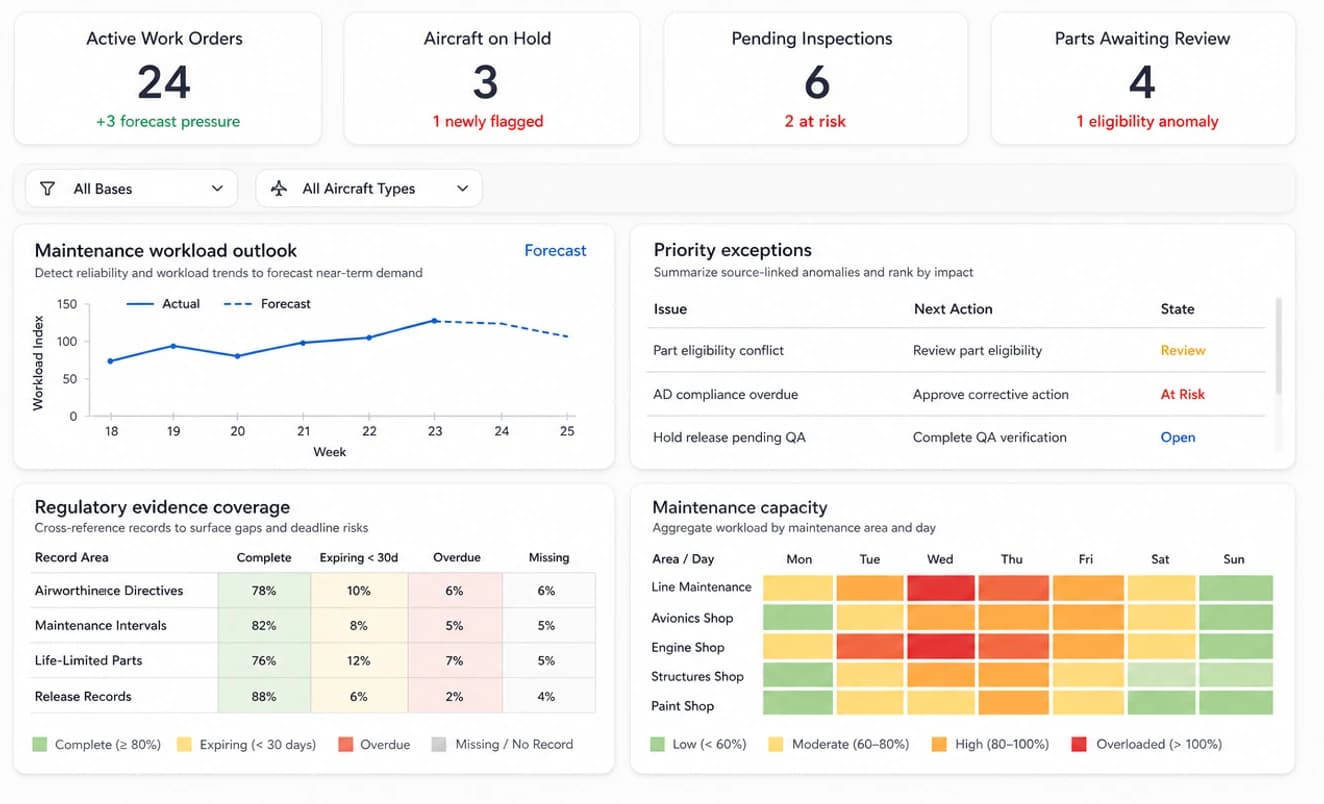
NX-01 · Main dashboard

Dashboard

Tap markers or expand the dashboard to inspect callouts. Click the screen to open it full size.

Turbalyx AI aviation services dashboard: workload, parts readiness, release status and reconciliation exceptions.
1
Callout 1 of 4Work Packages At Risk

Work packages requiring immediate action: flagged due to pending parts release and open airworthiness directive reviews.

Exception monitor

The AI compares records across modules and flags delays, missing documents and approval bottlenecks before they delay an aircraft release, and names the team that needs to act.

Workflow impact across all modules

Illustrative aviation services scenario

94%

On-Time Maintenance

Illustrative share of work packages completed by the agreed maintenance date.

92%

First Review Pass

Illustrative share of release packages with complete evidence at first review.

96%

Parts Readiness

Illustrative share of scheduled tasks with eligible parts available.

2.4%

Billing Exceptions

Illustrative share of invoice lines requiring reconciliation before closure.

Note:Illustrative figures for an aviation services workflow, not measured customer results.

Modules

Connected screens, one evidence chain

Every screen below is a module in the same workspace. Each one finishes its part of the order and hands its approved record to the next, from service intake to financial closure, without being re-keyed.

NX-02

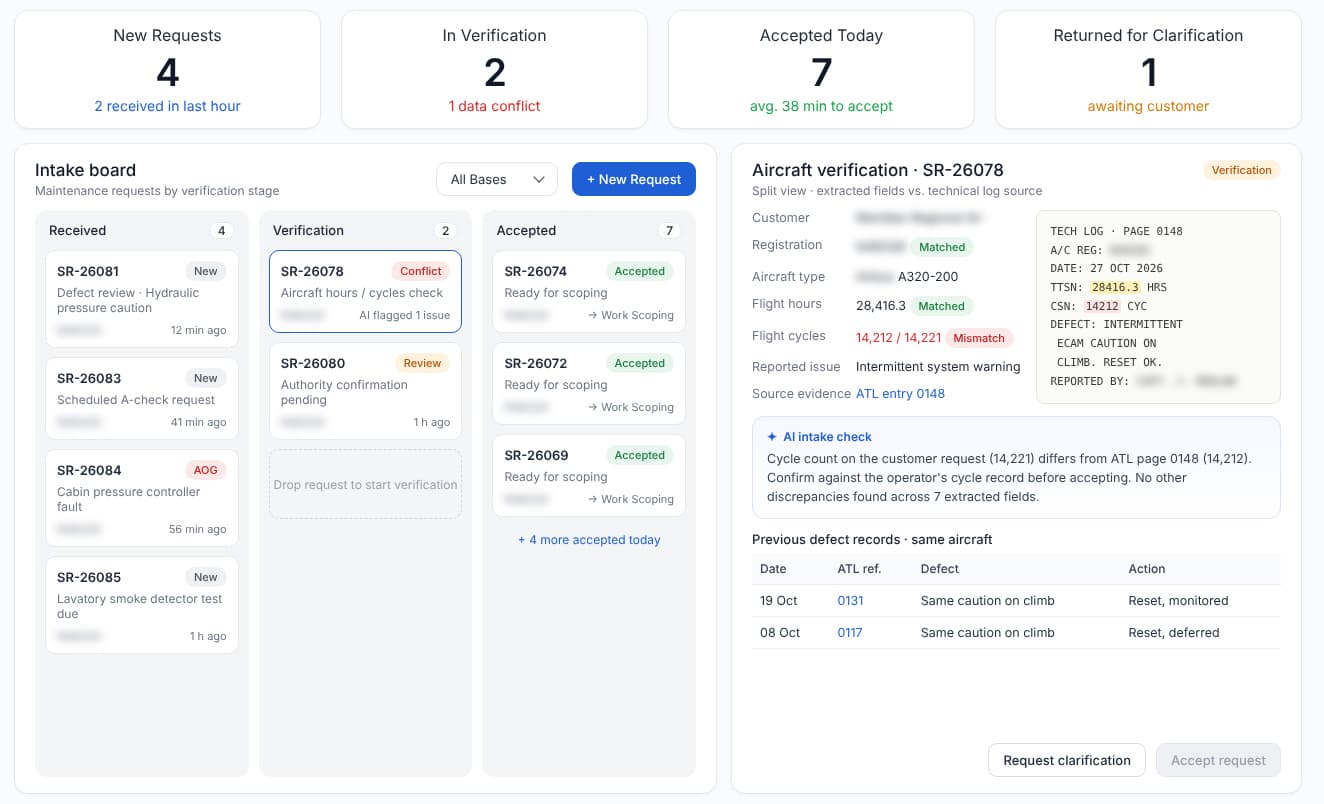
Service Intake

Turn incoming service requests into verified maintenance work. AI checks aircraft identity, customer details, reported defects and supporting records, then flags missing information before a request is accepted.

Turbalyx AI Service Intake screen showing aviation maintenance records, review queues and AI findings.
NX-03

Work Scoping

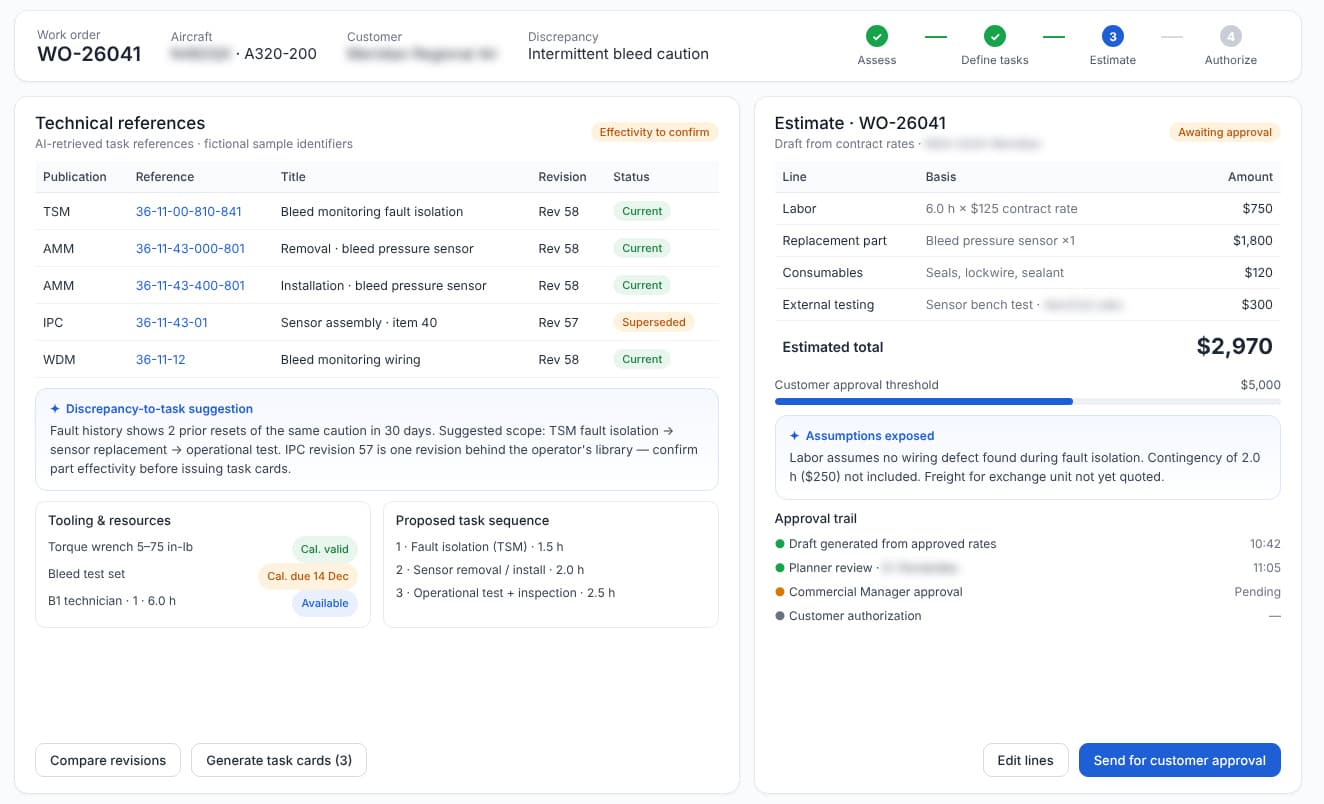
Build a work package around the aircraft and its reported condition. Compare requested tasks, applicable maintenance instructions, labor estimates and exclusions, and route scope changes for customer approval.

Turbalyx AI Work Scoping screen showing aviation maintenance records, review queues and AI findings.
NX-04

Parts Control

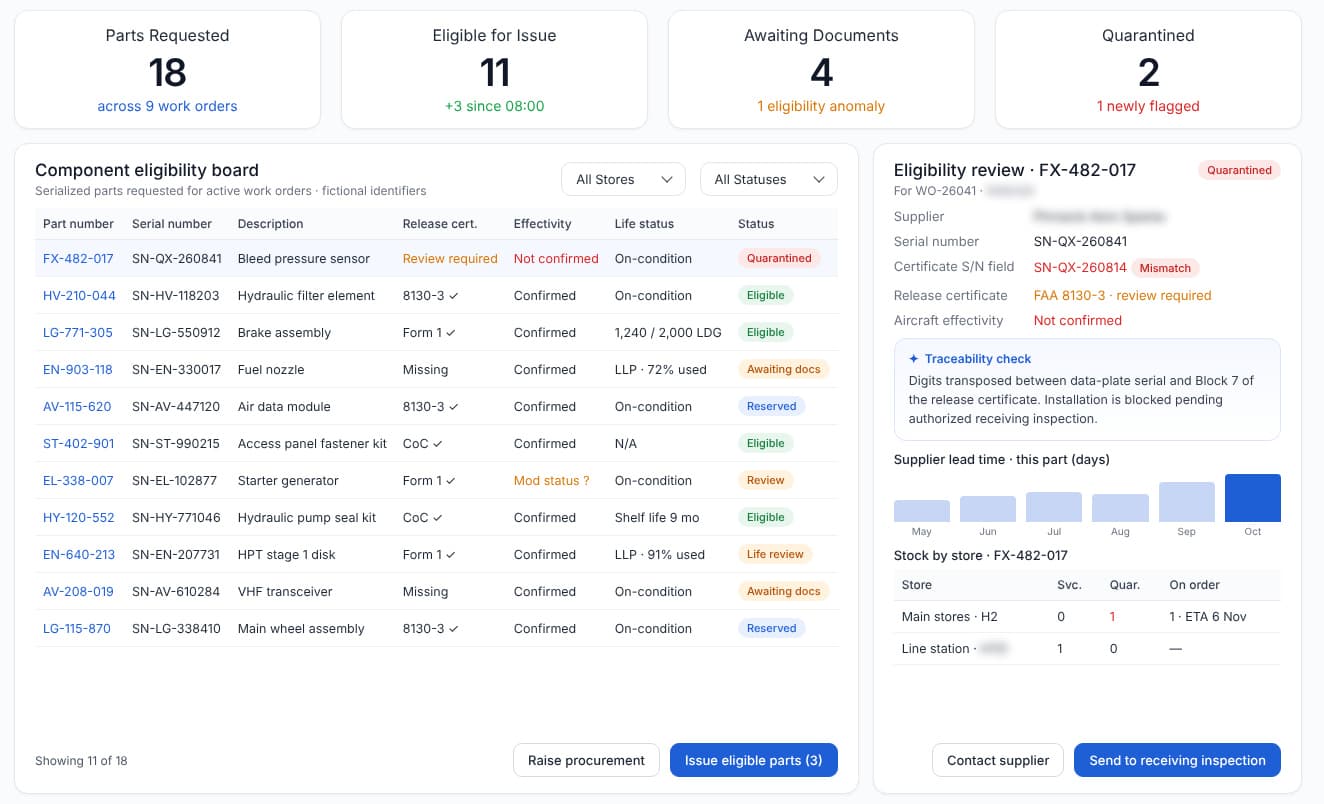
Keep eligible parts ready for the job. Review part numbers, serial numbers, life limits, stock status and release documents; quarantine discrepancies and surface shortages before they delay a maintenance slot.

Turbalyx AI Parts Control screen showing aviation maintenance records, review queues and AI findings.
NX-05

Maintenance Optimization

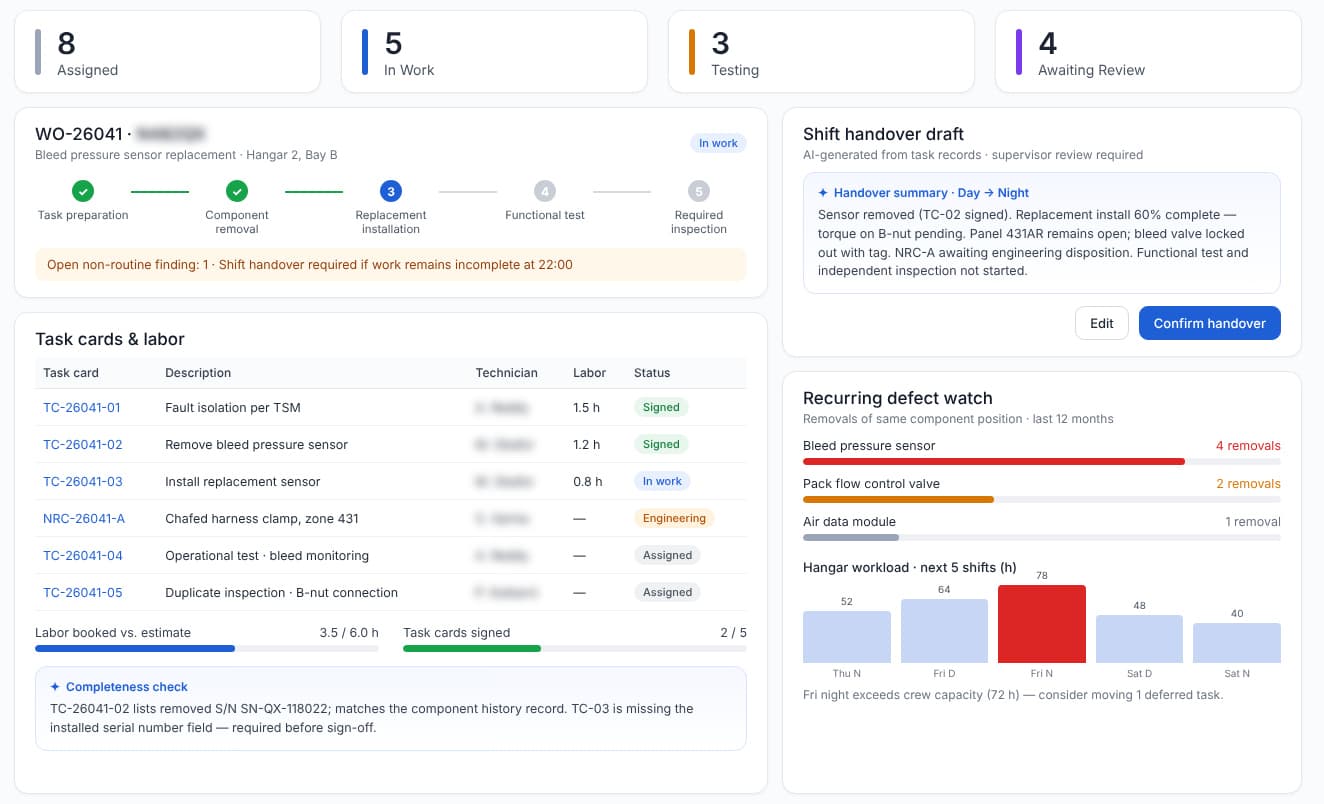
Coordinate technicians, bays, tools and task cards in one maintenance plan. Track work in progress, recurring defects and shift handovers so planners can resolve blockers and adjust the schedule.

Turbalyx AI Maintenance Optimization screen showing aviation maintenance records, review queues and AI findings.
NX-06

Quality & Release

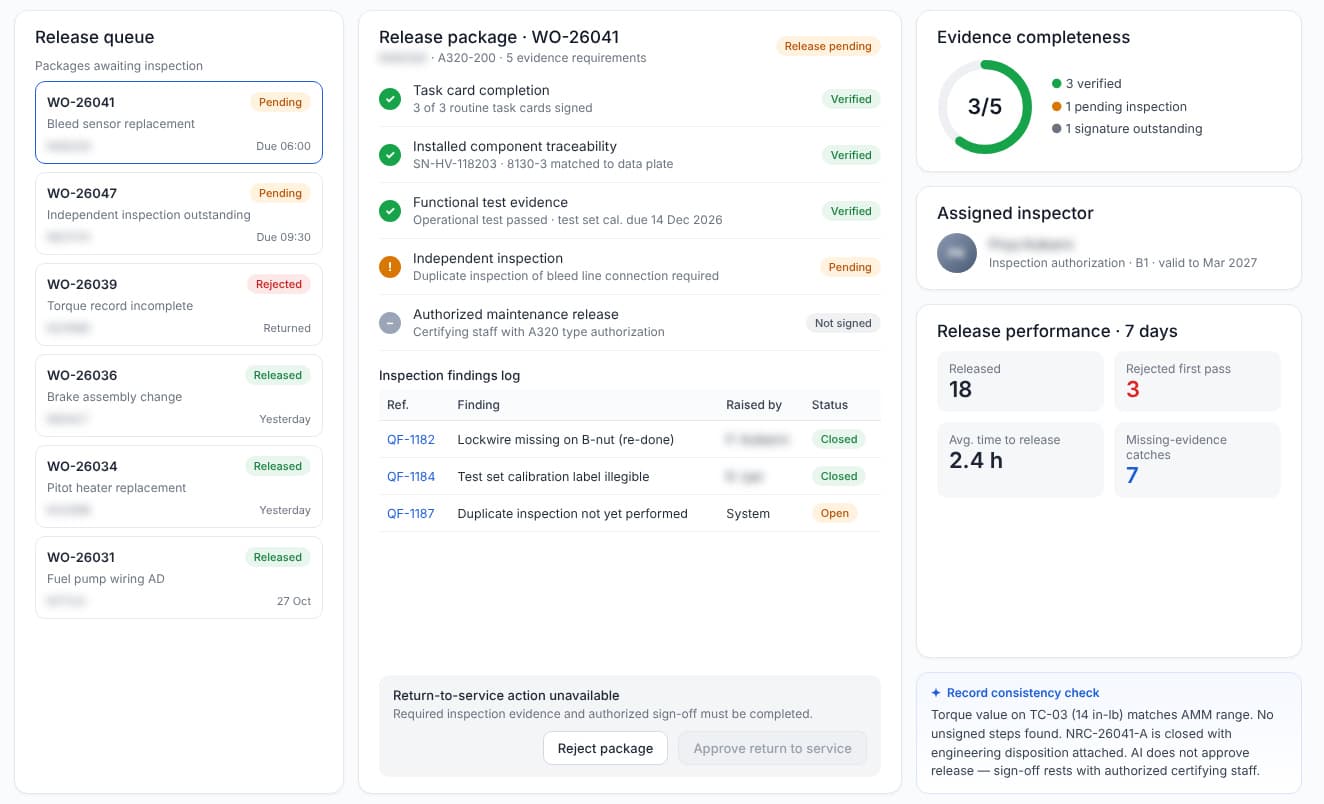
Bring task completion, inspection findings, functional tests and authorized signatures together for release review. AI highlights evidence gaps; appropriately authorized personnel retain every return-to-service decision.

Turbalyx AI Quality & Release screen showing aviation maintenance records, review queues and AI findings.
NX-07

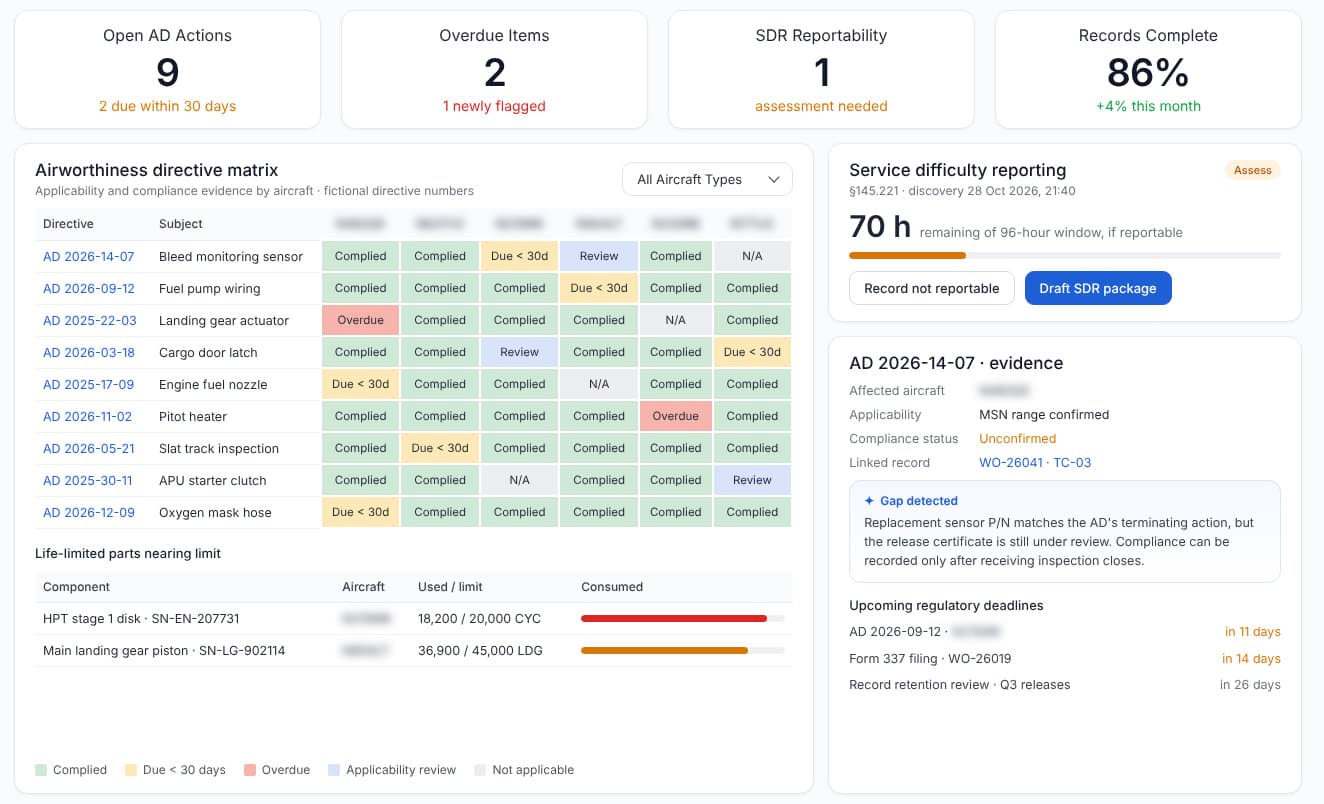
Compliance Records

Organize aircraft maintenance records, airworthiness directive status, component history and inspection evidence. Link each compliance action to its supporting document and keep upcoming reviews visible.

Turbalyx AI Compliance Records screen showing aviation maintenance records, review queues and AI findings.
NX-08

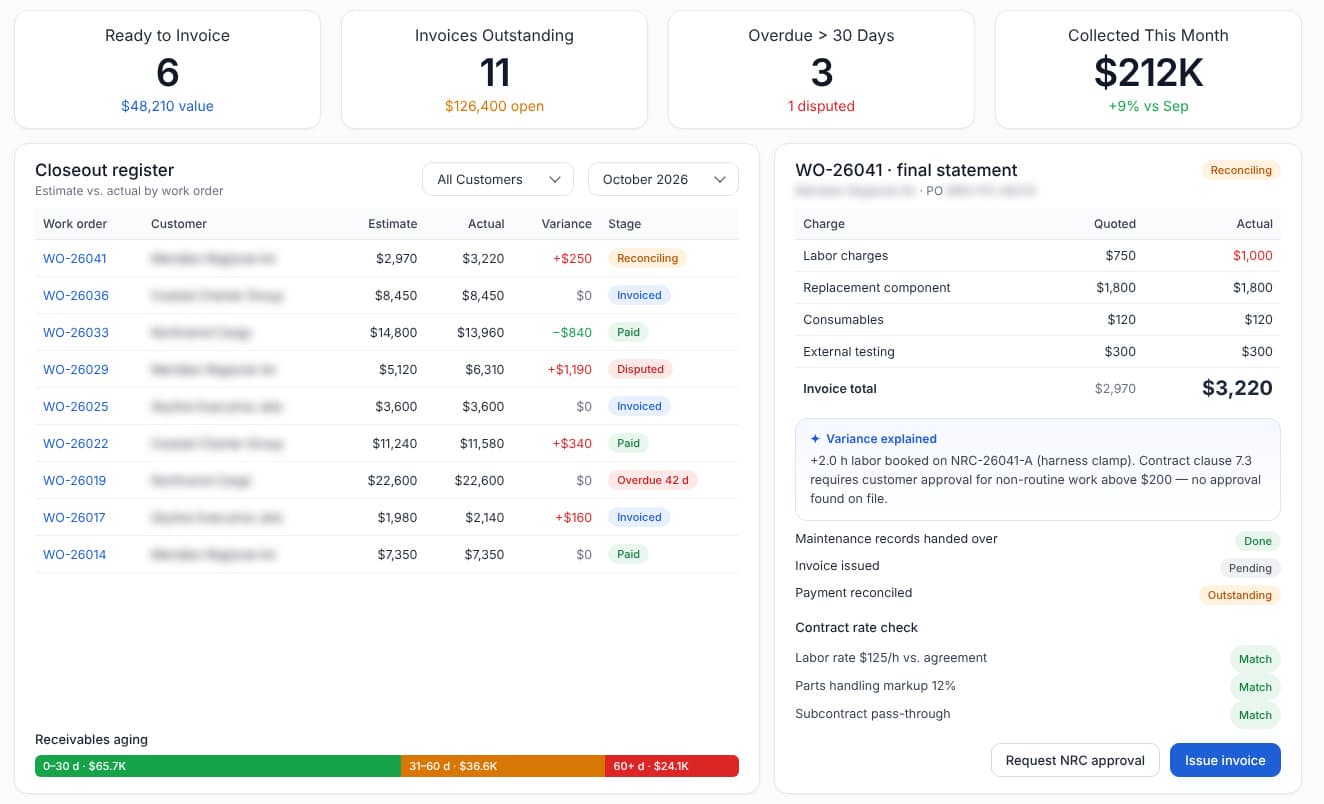
Maintenance Reconciliation

Reconcile approved scope, completed labor, consumed parts and customer charges. Identify unbilled work, disputed items and missing evidence before an authorized reviewer closes the maintenance invoice.

Turbalyx AI Maintenance Reconciliation screen showing aviation maintenance records, review queues and AI findings.
Traditional tools vs Turbalyx AI

Stop stitching aircraft maintenance work together by hand. Keep one connected evidence flow.

Turbalyx AI intelligently routes tasks to suitable AI models while keeping maintenance planning requirements, material traceability, inspection evidence, approvals, and contractual records connected throughout maintenance.

Traditional tools

Disconnected · manual

Aircraft Logs, Work Packs & Task Cards

Work Scoping revisions, maintenance instructions, and hangar records maintained across printed documents and emails.

Shared Spreadsheets, ERP & File Folders

Material certificates, inspection results, maintenance execution records, and invoices manually reconciled between departments.

“You reconcile it across every handoff.”

  • service request requirements are manually re-entered during maintenance planning review.
  • Material traceability and inspection evidence become disconnected between departments.
  • Labor, installed parts and invoices do not always match approved work scopes.

Turbalyx AI

Workflow-aware · routed per task

B1 · WorkflowPick an example task

B2 · Across the workflow

AI Orchestration Layer

  1. 1Identify Module & Task
  2. 2Apply Data Security Policy
  3. 3Select Model & Retrieve Evidence
  4. 4Return Results & Next Action

Frontier and specialist models by tier

The following are example model options suitable for evaluation in an orchestration platform. Their inclusion does not imply they are already integrated, commercially licensed, approved for controlled defense data, or accessible under every deployment.

Supported

Preferred models for document-heavy aviation services workflows.

  • AnthropicClaude Sonnet 4.5(selected for this task)
  • OpenAIGPT-5
  • GoogleGemini 2.5 Pro(selected for this task)

Available

Additional models selectable according to workflow requirements.

  • xAIGrok 4
  • Mistral AIMistral Medium 3

Specialist

Models considered for reasoning, retrieval, and technical verification assistance.

  • OpenAIo3
  • CohereCommand A

Roadmap

Open-weight and alternative models for future evaluation.

  • MetaLlama 4
  • DeepSeekDeepSeek V3
  • AlibabaQwen 2.5

B3 · Best model for the task

Long-Context Document Model

Retrieves and compares relevant Service Intake, maintenance planning drawings, material certificates, maintenance task cards, and inspection records to identify missing requirements and inconsistencies.

B4 · Best result

One Connected Handoff

Verified information moves through Service Intake → Work Scoping → Parts Control → Maintenance Optimization → Quality & Release → Compliance Records → Maintenance Reconciliation, with source evidence and required human approvals retained at each stage.

Note:Model and provider names are illustrative of integration patterns; trademarks belong to their respective owners. Routing is configured per tenant and data boundary. Supported and evaluated ecosystem models include OpenAI, Anthropic / Claude, Google / Gemini, Cohere, Mistral, Meta / Llama, xAI, and DeepSeek.

How it works

From scattered program data to cited maintenance planning answers

Technicians with inspection equipment beside a jet in a maintenance hangar
Technician inspecting aircraft systems in a maintenance bay
Aircraft receiving ground servicing in winter conditions
Step 01

Connect your sources

Connect maintenance planning records, aircraft logs, parts inventory, task cards and accounting exports. Index each record with its aircraft, work order and revision.

  • MRO / maintenance planning
  • ERP / accounting
  • Task cards & aircraft logs
Step 02

Parse and ground

Maintenance instructions, component release certificates, task cards and inspection reports become structured records. Every extracted value, such as a revision, serial number or characteristic, carries a confidence score and a citation back to its source page.

  • Confidence score
  • Page citation
  • Revision check
Step 03

Route and review

Work goes to the role with authority: contracts, maintenance planning, quality or the material review board. Low-confidence items and nonconformances wait for human review, and each approval is kept as evidence.

  • Authority routing
  • Certifying staff review
  • Audit trail
Maintenance technician working on an aircraft engine
Aircraft cockpit controls and instruments
Glass-cockpit avionics displays with flight crew
Step 04

Monitor and close

The Dashboard watches every stage. Maintenance Optimization, Quality & Release, Compliance Records and Maintenance Reconciliation run on the same grounded record, so each aircraft release and invoice carries its evidence.

  • Dashboard exceptions
  • Quality & Release
  • Compliance Records
  • Maintenance Reconciliation
Industry AI agents

Your Aviation Services AI agents, run like maintenance execution systems.

- Maintenance Optimization agents, not chatbots -

Agents
That Close
The Loop

Aircraft maintenance technician inspecting onboard systemsEvidence · linked
  • Scoped to your programs and data
  • Every action logged for audit

Always-on agent monitoring

Each run is traced end to end, inputs, tool calls, outputs and approvals, so a failed step is caught before it ever reaches a work order.

  • Human approval on every write-back
  • Run history kept with the record

One workflow, end to end

Maintenance scope change intake, traced from the inbound notice to approved, released work.

Maintenance scope change intakeLive chain
  1. 01 · Workflow

    Maintenance scope change notice arrives from the customer

  2. 02 · AI agents

    Agents work the change in sequence

    • Parse service request
    • Check aircraft applicability
    • Flag affected work orders
    • Draft work-package update
  3. 03 · Connected tools

    Reads and writes your systems

    • MRO
    • ERP
    • Hangar records
  4. 04 · Execution

    Updated task card routed to the maintenance planner for approval

  5. 05 · Outcome

    Affected aircraft identified, revised work package approved, evidence filed with the record

Explore Aviation Services AI agents (opens nestackagents.com in a new tab)

Opens the Nestack Agents Transportation industry page.

TOOLS & INTEGRATIONS

Your Existing Tools Become Part of the Workflow

Engineering & Configuration

Engineering drawings, product revisions, and manufacturing specifications.

  • Siemens TeamcenterPLM / Configuration

    Manages engineering revisions, BOMs, and controlled product definitions.

  • PTC WindchillPLM / Change Management

    Maintains engineering changes, product configurations, and revision history.

  • SOLIDWORKSCAD / Engineering

    Provides technical drawings, 3D component models, and design documentation.

Procurement & Materials

Supplier purchasing, inventory, and material traceability.

  • SAP S/4HANAERP / Procurement

    Provides purchase orders, supplier records, and material availability.

  • Oracle Fusion Cloud ERPERP / Supply Chain

    Provides supplier information, purchasing records, and inventory data.

  • Epicor KineticManufacturing ERP

    Connects material purchasing, receiving, and manufacturing orders.

Quality & Supplier Records

Inspection results, supplier compliance, and quality documentation.

  • Net-InspectFAI / Quality

    Manages first article inspection reports and quality evidence.

  • ETQ RelianceQMS / Compliance

    Manages nonconformance reports, corrective actions, and quality processes.

  • ZEISS CALYPSOCMM / Metrology

    Provides dimensional measurement reports and inspection results.

Contracts, ERP & Finance

Customer quotations, purchase orders, and financial reconciliation.

  • Microsoft Dynamics 365CRM / Finance

    Connects sales opportunities, customer records, and financial workflows.

  • SAP S/4HANAERP / Finance

    Provides customer orders, contract pricing, invoices, and payment records.

  • Oracle Fusion Cloud ERPFinance / Accounting

    Supports invoice processing, receivables, and financial reconciliation.

Shop Floor & Metrology

Manufacturing instructions, CNC programming, and dimensional inspection.

  • MastercamCAM / CNC

    Provides CNC programs, machining instructions, and manufacturing preparation data.

  • Hexagon PC-DMISCMM / Inspection

    Provides measured dimensions, tolerances, and inspection results.

  • Autodesk FusionCAD / CAM

    Supports component design, machining preparation, and manufacturing documentation.

Export & Controlled Data

Contractual acceptance, controlled technical records, and authorized data handling.

  • DoD PIEE / WAWFDefense / Acceptance

    Supports government receiving reports, contractual acceptance, and payment requests.

  • Siemens TeamcenterPLM / Controlled Documents

    Maintains controlled engineering records and configuration history.

  • Microsoft PurviewData Governance / Protection

    Supports information classification, sensitivity labeling, and data protection policies.

Note:Tool names and marks belong to their respective owners. No endorsement or partnership implied. Integration availability depends on your existing systems, licences, API access, security configuration and implementation scope.

Compliance

Mapped to the rules your programs answer to

Regulatory frame · 04 standards · 03 domains
Maintenance records01 / 04
STD-01

14 CFR Part 43

FAA maintenance, preventive maintenance, rebuilding and alteration

Organize task descriptions, completion records and authorized maintenance sign-off.

Maintenance organizations02 / 04
STD-02

14 CFR Part 145

FAA repair stations

Keep work packages and inspection evidence linked within the scope of your repair-station approval.

Maintenance organizations03 / 04
STD-03

EASA Part-145

Approved maintenance organizations

Link maintenance data, task completion, release certificates and supporting records for authorized certifying staff.

Continuing airworthiness04 / 04
STD-04

Part-M / Part-ML

Continuing airworthiness records

Connect aircraft history, maintenance status and supporting evidence for applicable continuing-airworthiness reviews.

Note:These are standards the platform is built to support inside your workflows — obligations that fall on you as the licensee. They are not certifications held by us, and support in the product is not a substitute for your own counsel or compliance officer.

Aviation ServicesHardware add-ons

Add the hardware your workflow needs.

Drawing
NX-01 / HW
Items
05
Type
Third-party
Pricing
Quote-based
  1. 01Hardware
  2. 02Interface
  3. 03Module
  4. 04Use case
  5. 05Result
01Item 01
Hardware

Ground-equipment condition sensor + gateway

Condition sensors for supported maintenance test benches and ground-support equipment.

Interface
MQTTOPC UA

The gateway publishes readings to the platform's ingestion endpoint.

Feeds module

Maintenance Optimization

Use case → Result

Track equipment usage, maintenance intervals and downtime alongside the jobs that rely on it.

Downtime and utilization visibility now, and failure prediction only once the data is validated.

02Item 02
Hardware

2D DataMatrix part-marking and lot-tag reader

Fixed or handheld imager that reads serialized part marks and material lot tags.

Interface
USB HIDSerial / TCPWebhook

Each scan is posted to the platform as a serialized part or lot event.

Feeds module

Maintenance Optimization

Use case → Result

Scan serialized components at receiving, installation and removal to link each movement to an aircraft work order.

Traceable component movements with identity mismatches flagged for review.

03Item 03
Hardware

Maintenance records document scanner

Duplex, high-volume scanner for drawings, task cards, release certificates and certificates of conformance.

Interface
TWAIN / ISISScan-to-folderSFTP

A watched-folder connector picks up every scanned batch.

Feeds module

Parts Control

Use case → Result

Digitize paper task cards, printed drawings, certificates of conformance and component release certificates.

Searchable, structured records instead of paper files.

04Item 04
Hardware

Process and test data acquisition (DAQ) unit

Multi-channel temperature, torque and pressure acquisition on maintenance rigs, chambers and leak-test stands.

Interface
Ethernet / LXISCPICSV / TDMS

Run files are ingested through the file-drop or REST connector.

Feeds module

Quality & Release

Use case → Result

Pull functional-test readings, torque records and leak-test results into report templates.

Draft process and test records with pass/fail against spec, minutes after the run.

05Item 05
Hardware

Digital inspection gauge / borescope

Captures dimensional checks or visual findings during aircraft and component maintenance.

Interface
CSVTXTNative report

Measurement reports are exported and uploaded through the API.

Feeds module

Quality & Release

Use case → Result

Compare inspection findings with applicable maintenance limits and attach evidence for review.

Inspection evidence linked to task cards with exceptions flagged for authorized review.

Note:Hardware, installation, and integration are not included in the standard subscription. Additional charges apply based on the hardware selected, integration modules required, and implementation scope.

Pricing

One plan for the whole program

A fighter jet banking through a sunset sky
NX-01 · All 8 modulesOne plan · Full platform

Starting at

$200/mo

The full platform for your program team. Onboarding is a separate one-time fee, set out just below.

Included

  1. 01Dashboard
  2. 02Service Intake
  3. 03Work Scoping
  4. 04Parts Control
  5. 05Maintenance Optimization
  6. 06Quality & Release
  7. 07Compliance Records
  8. 08Maintenance Reconciliation
Note

AI API usage is charged separately. Clients must recharge their AI credit balance based on their usage.

Know moreTalk to us about your program.

Onboarding

What your onboarding fee covers

OB-01One-time

- Onboarding tier -

Essential

from$1,000+one-time

Starting price. Final scope set to your requirements.

  • Kickoff workshop and an onboarding plan scoped to one aircraft service operation
  • Workspace provisioning with an SSO-ready admin console and access policies
  • Import of your technical document library (drawings, specifications, task cards and material certificates), indexed for cited search
  • Aircraft and maintenance-task ingestion for one program, mapped into Work Scoping
  • Compliance requirement register set up from the standards your program works to
  • Core modules configured: the Dashboard, Service Intake, Work Scoping and Quality & Release
  • Roles and permissions for maintenance planning, quality and program-management users
  • Live-readiness check against your own sample questions and documents before go-live
OB-03One-time

- Onboarding tier -

Enterprise

from$5,000+one-time

Starting price. Final scope set to your requirements.

Everything in Plus, plus:

  • Multi-program, multi-site rollout with a phased plan for each site
  • Private VPC or on-prem deployment, with the controlled-data (ITAR / CUI) boundary configured to your environment
  • Custom integrations and an AI model-routing policy set to your data-handling rules
  • Audit-trail export set up for your quality and compliance reviews
  • A named onboarding manager from kickoff through go-live
Deployment

Two ways to run the platform

Your subscription is the same either way. Only the one-time onboarding may differ with your requirements.

DP-01

Cloud (SaaS)

Runs in Nestack's managed cloud, with hosting, scaling, updates and backups handled for you. It is the fastest route to live: your document library becomes searchable and your dashboards fill up without any infrastructure to stand up.

DP-02

Private / self-hosted

The same platform deployed inside your own cloud, VPC or on-prem environment. Controlled technical data (ITAR / EAR-regulated drawings, specifications and CUI) stays within your boundary, and the monthly subscription stays exactly the same.

FAQ

Before you subscribe

What does the subscription include?

One subscription gives your aviation services team access to the full platform, without separate module tiers. Connect maintenance planning, parts readiness, release evidence and financial reconciliation in one workspace. The current starting monthly price is shown in Pricing; onboarding and AI usage are charged separately.

View subscription pricing
What should we budget beyond the monthly subscription?

Allow for a one-time onboarding fee and usage-based AI credits. Optional hardware, installation and hardware integration are quoted separately. Onboarding scope depends on your aircraft records, locations, integrations and deployment requirements, so ask for a quote covering these items before committing.

Review onboarding costs
How can we tell whether Turbalyx AI will pay for itself?

Start with the costs your team already sees: time chasing missing release documents, maintenance delays caused by parts gaps, repeated data entry and completed work that has not been billed. Use the walkthrough to assess those bottlenecks against your workflow, then compare the potential savings with subscription, onboarding and AI usage costs. Published scenario figures are illustrative, not guaranteed savings.

Discuss your business case
Can we see how it fits our operation before subscribing?

Yes. Book a free, 45-minute walkthrough and tell us where your maintenance operation loses time or revenue. We will demonstrate relevant workflows and discuss your aircraft records, existing systems and deployment needs so you can assess fit before making a purchase decision.

Book your walkthrough
Will we need to replace our existing maintenance or finance systems?

The platform is designed to connect the records between your existing systems. Supported APIs and file exports are assessed during onboarding. Bring your maintenance planning, inventory and accounting system names to the walkthrough so we can identify the available connections and quote any integration work before you subscribe.

Check your system fit
How do we introduce AI without giving up maintenance control?

Your authorized personnel retain inspection, approval and return-to-service decisions. AI prepares checks and drafts, links findings to supporting records and routes uncertain items for review. During onboarding, we define roles and approval steps around your operation; the subscription does not replace your maintenance approvals or airworthiness responsibilities.

Can we keep restricted aircraft and customer records in our own environment?

Private cloud, VPC and on-premises deployment options are available alongside managed cloud. The monthly subscription is the same across these options, while implementation costs depend on your requirements. Agree the data boundary, access rules and permitted AI processing during scoping before selecting a deployment.

Compare deployment options
What help will our planners and maintenance teams get during rollout?

Onboarding covers workspace setup, record imports, access roles and readiness checks using your sample documents. The Plus tier adds role-based training with recordings; Enterprise includes a named onboarding manager through go-live. Confirm the ongoing support channels, service hours and response commitments in your proposal so your team knows what assistance to expect after launch.

Compare onboarding support
What subscription terms should we confirm before signing up?

Ask for written confirmation of the billing cycle, minimum commitment, renewal and cancellation terms, AI credit charges and data export arrangements. Review these alongside the implementation scope and support commitments before purchase, especially if you are coordinating procurement across several maintenance bases.

Request a subscription proposal