


Energy & Utility Consulting · Oil & Gas Services & Operations

From work intaketo accepted field delivery.

Valvexia AI is the operations platform for oil and gas service teams. Connect work intake, job planning, work orders and inspections, permit coordination, permit extraction, quality and integrity, and closeout billing in one evidence-linked job record.

Eight modules, one unified engagement lifecycle01 Dashboard · Operational Oversight

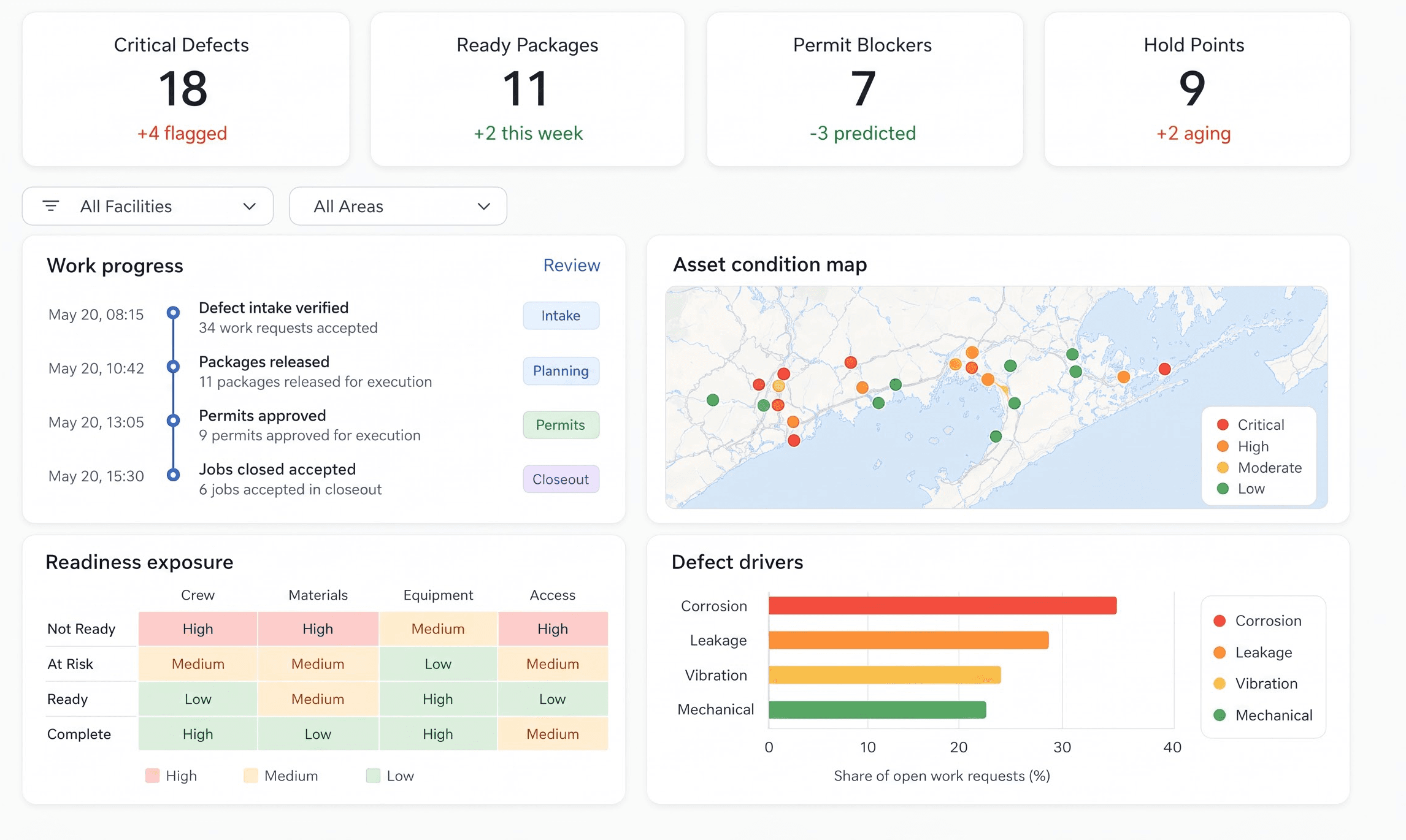
Module 01 · P1/Workspace: Dashboard

One Command Center for Oil & Gas Service Delivery

Track active jobs, crew readiness, inspection holds, permit status and commercial closeout across upstream, midstream and downstream service operations.

What this module does

  • Review job status and overdue actions
  • Monitor permit and inspection hold points
  • Track accepted work and outstanding invoices
Valvexia AI executive dashboard showing active jobs, permit blockers, inspection holds and quality findings

Built around field service delivery

Oil & Gas Operations

Swipe through impact metrics →

  • 08

    connected operational modules


    One Job Lifecycle

    Keep requests, planning, inspection, permits, integrity and billing connected to one oil and gas service record.

  • 01

    equipment-linked evidence trail


    Traceable Field Delivery

    Review work orders alongside equipment tags, inspection findings, test results and client acceptance.

  • P2–P8

    from request to commercial closeout


    Visible Handoffs

    Track prerequisite documents, responsible owners and unresolved actions before a job advances.

  • Human

    approval for critical decisions


    Controlled Acceptance

    Site authorities approve permits, engineers accept inspection evidence and commercial teams approve invoices.

These figures describe platform structure and review responsibilities. Operational outcomes depend on your workflows, data and implementation.

The Nestack Operations Suite

Multi-Industry AI Ecosystem

Built for every corner of professional operations.

Operations, technical reviews, and advisory mandates move differently in every field, with unique teams, workflows, documents, and decisions. Explore our specialized sister platforms engineered for complex delivery.

Swipe to explore suite →

Every Nestack platform operates on shared AI orchestration, verified evidence tracing, and industry-tailored ingestion models.

Engagement Lifecycle · P2 to P8/Seven Operational Modules

From work authorization to commercial closeout.

Following executive oversight in the Dashboard (P1), active service jobs advance chronologically through seven dedicated operational modules. Every equipment tag, permit record, inspection finding, and field test is recorded on one unified engineering system of record.

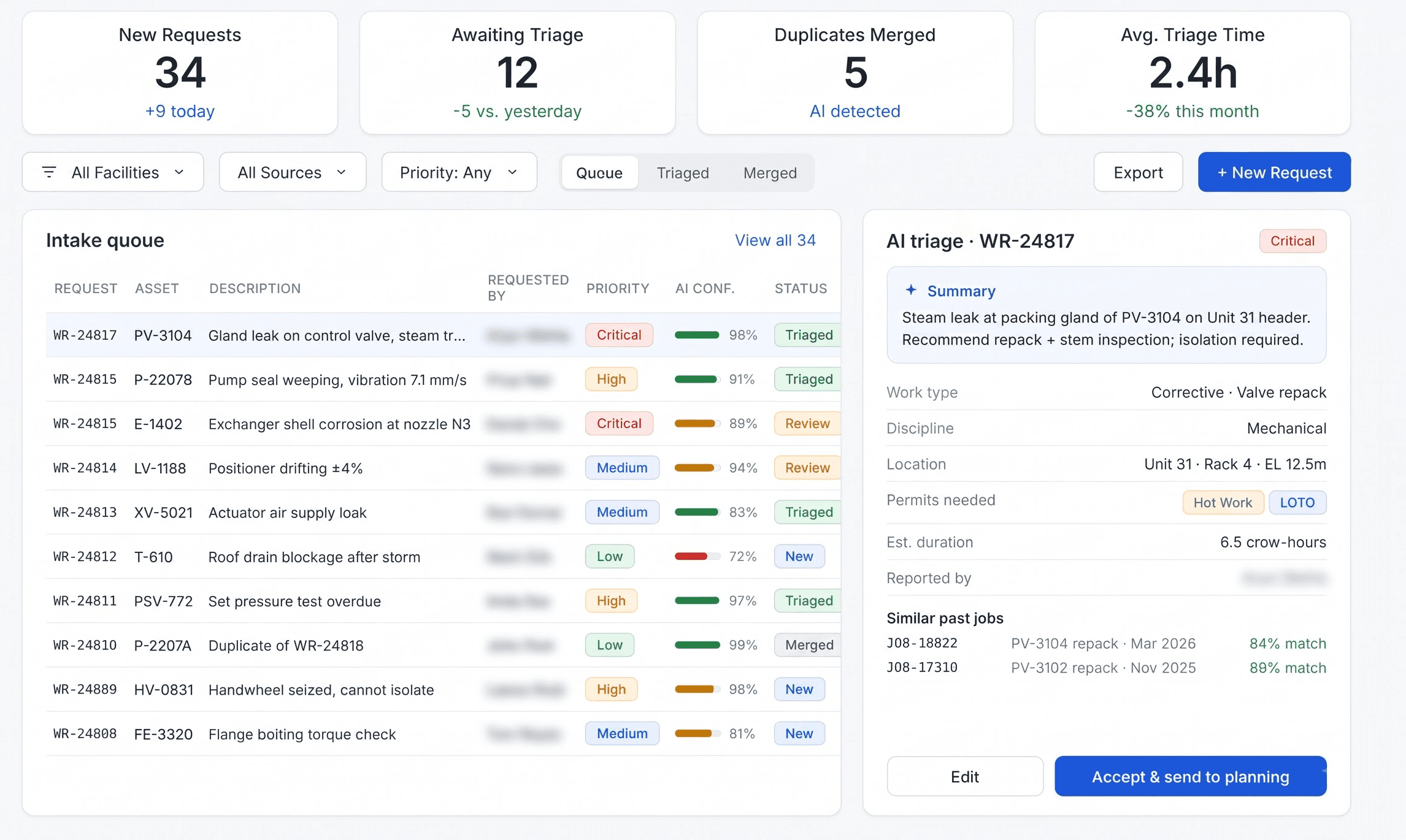
P2Module 02 · Work Intake/Request Qualification

Turn Service Requests into Verified Job Records

Capture operator requests, equipment tags, site conditions and contract scope. Identify missing drawings, access requirements and inspection history before committing crews.

What this module does

  • Extract asset tags and service requirements
  • Validate site access and client scope
  • Route requests to the responsible planner
Valvexia AI: Module 02 Work Intake (Request Qualification)
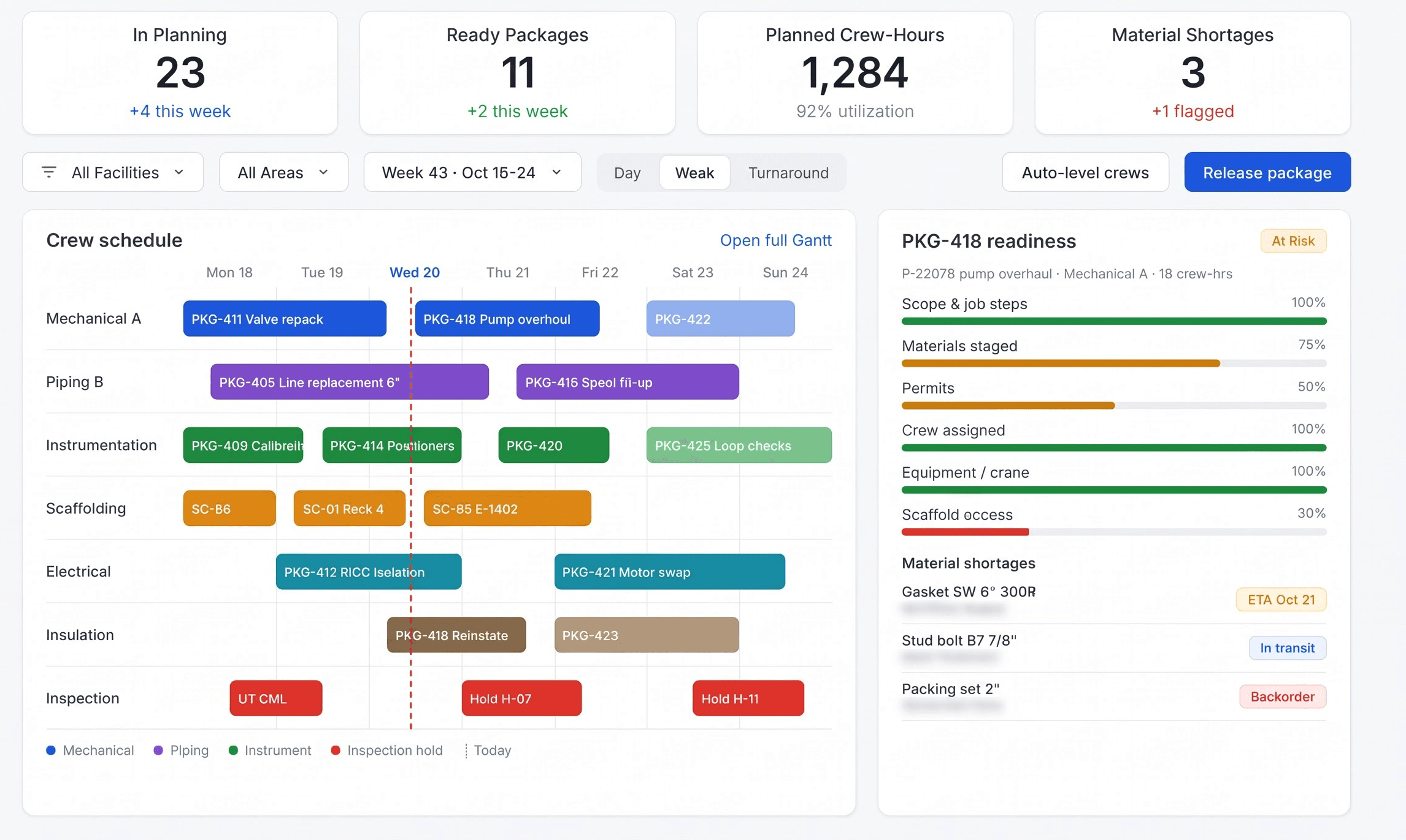
P3Module 03 · Job Planning/Resource & Scope Planning

Build Executable Plans for Field Service Jobs

Combine work scope, materials, crew competencies, equipment availability and shutdown windows into a reviewed job plan. Flag missing prerequisites before mobilization.

What this module does

  • Plan crews, materials and specialist tools
  • Link method statements and risk assessments
  • Review schedule conflicts and readiness gates
Valvexia AI: Module 03 Job Planning (Resource & Scope Planning)
P4Module 04 · Work Orders & Inspection/Execution & Inspection

Connect Every Work Order to Its Inspection Evidence

Issue controlled work orders for maintenance and inspection activities. Link equipment history, inspection checklists, field observations and client witness points to the same job.

What this module does

  • Record field findings against equipment tags
  • Track hold points and inspection actions
  • Review completed work before acceptance
Valvexia AI: Module 04 Work Orders & Inspection (Execution & Inspection)
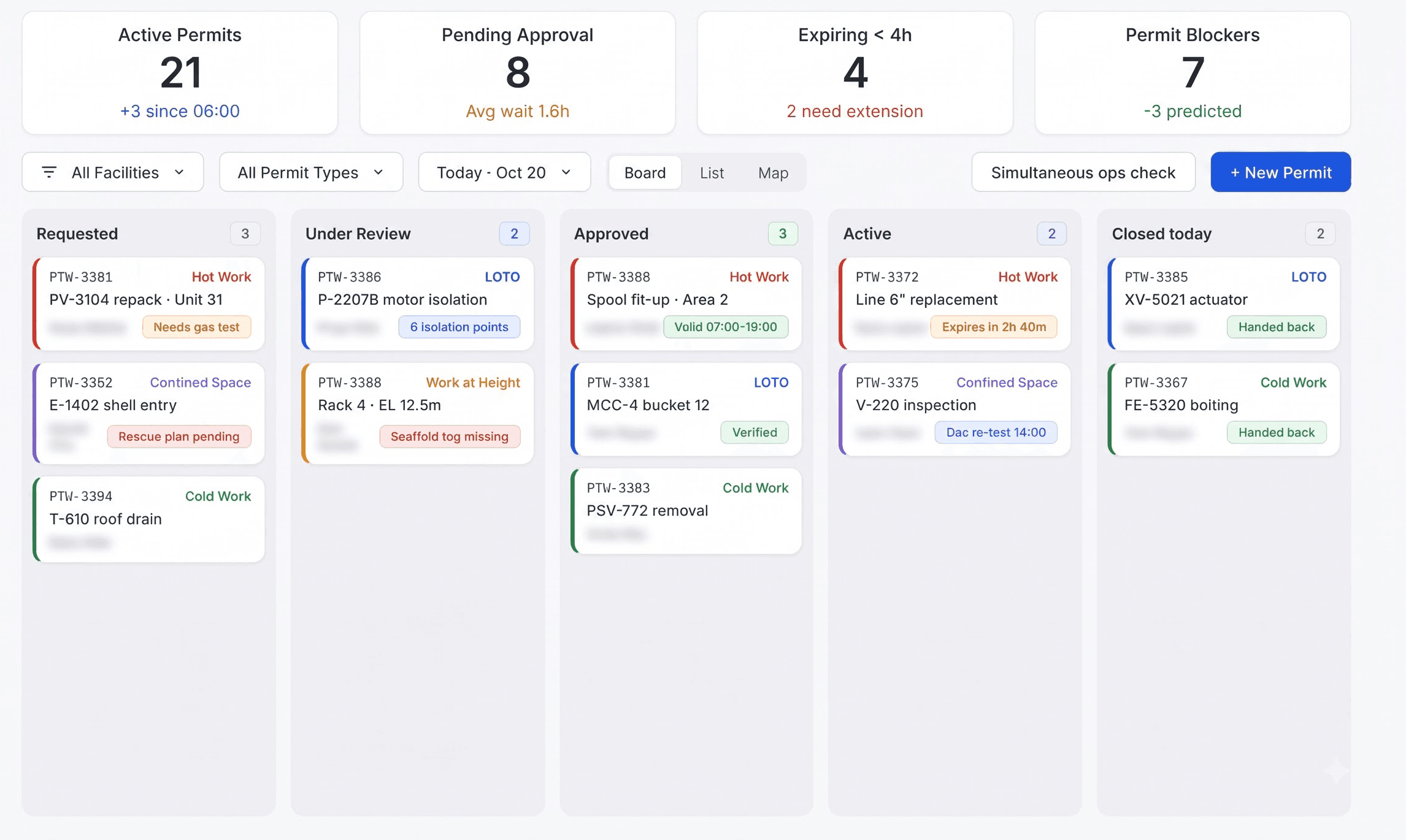
P5Module 05 · Work Permits/Permit Coordination

Coordinate Work Permits Before Field Execution

Track permit requests, isolation evidence, simultaneous operations conflicts and validity windows. Authorized site personnel retain responsibility for issuing, suspending and closing permits.

What this module does

  • Check permit prerequisites and validity
  • Link isolation and gas-test evidence
  • Track permit handovers and closure
Valvexia AI: Module 05 Work Permits (Permit Coordination)
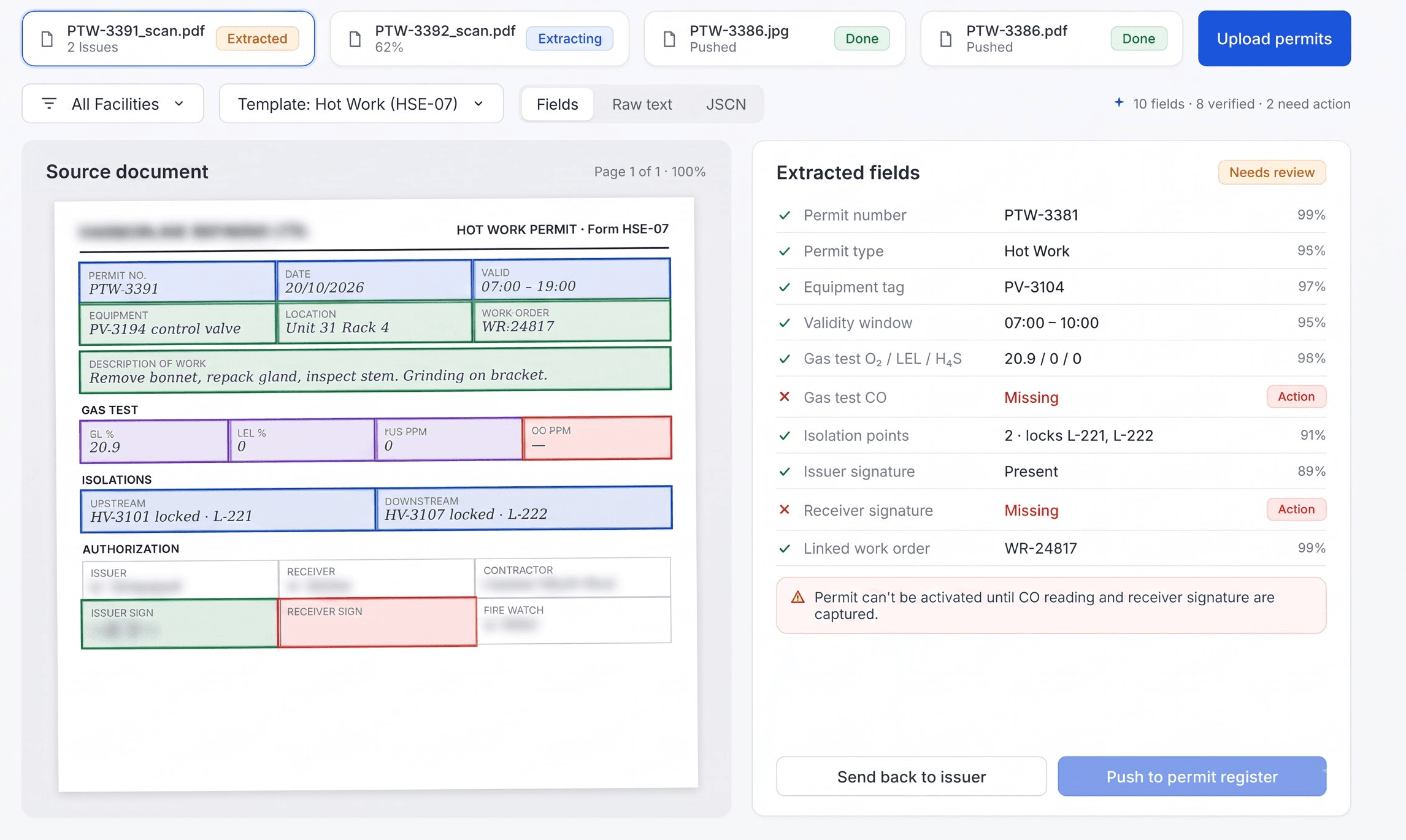
P6Module 06 · Permit Extraction/Document Intelligence

Extract Permit Details into Reviewable Job Records

Read submitted permit forms and identify equipment references, authorized activities, validity periods and required precautions. Route uncertain fields and discrepancies to reviewers.

What this module does

  • Extract permit fields with document references
  • Flag inconsistent dates and equipment tags
  • Require human review before accepting records
Valvexia AI: Module 06 Permit Extraction (Document Intelligence)
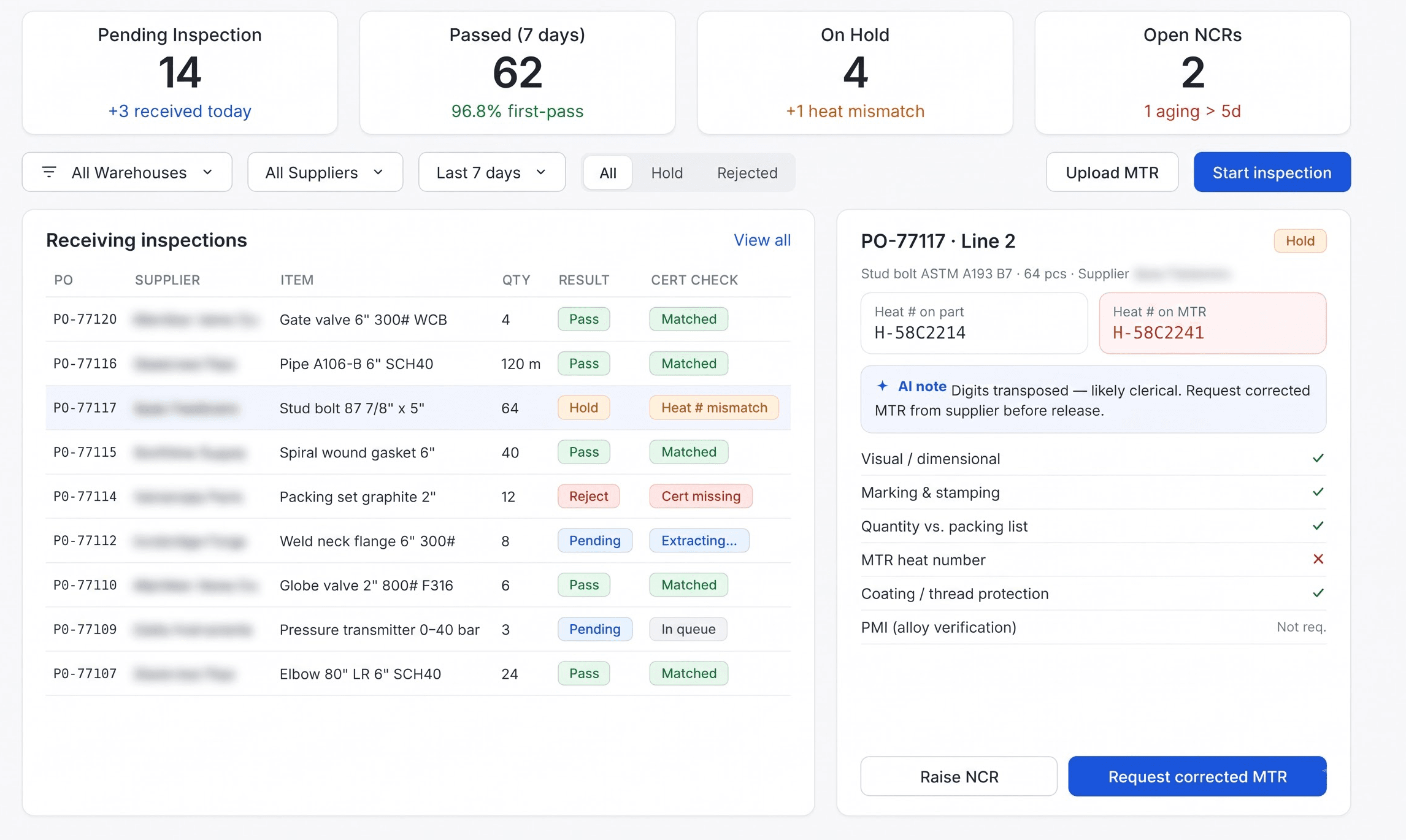
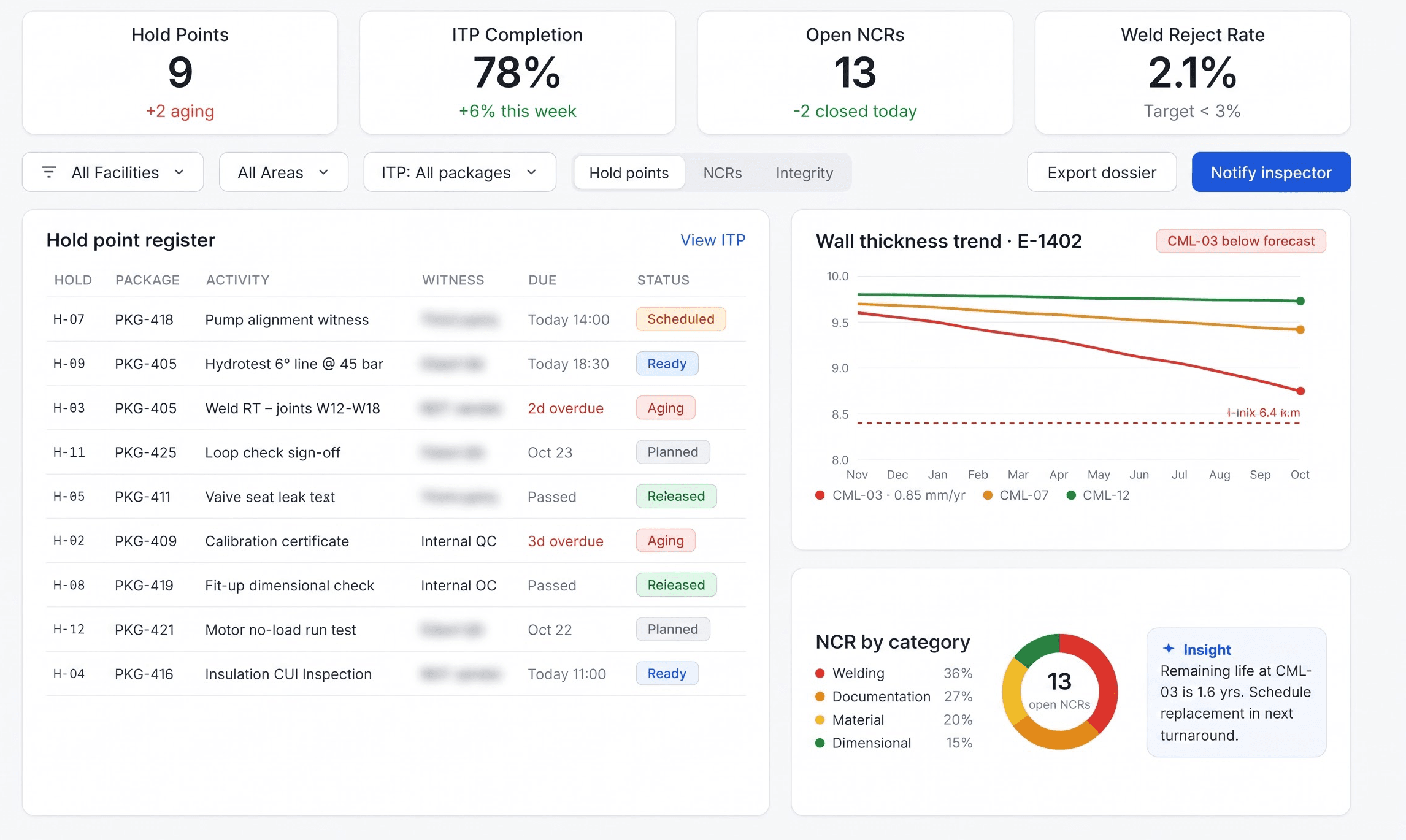
P7Module 07 · Quality & Integrity/Technical Assurance

Close Quality Findings with Traceable Evidence

Consolidate inspection reports, test results, material certificates and nonconformance records. Track corrective actions and technical acceptance against the approved job requirements.

What this module does

  • Link test results and material traceability
  • Track nonconformances and corrective actions
  • Obtain responsible engineer acceptance
Valvexia AI: Module 07 Quality & Integrity (Technical Assurance)
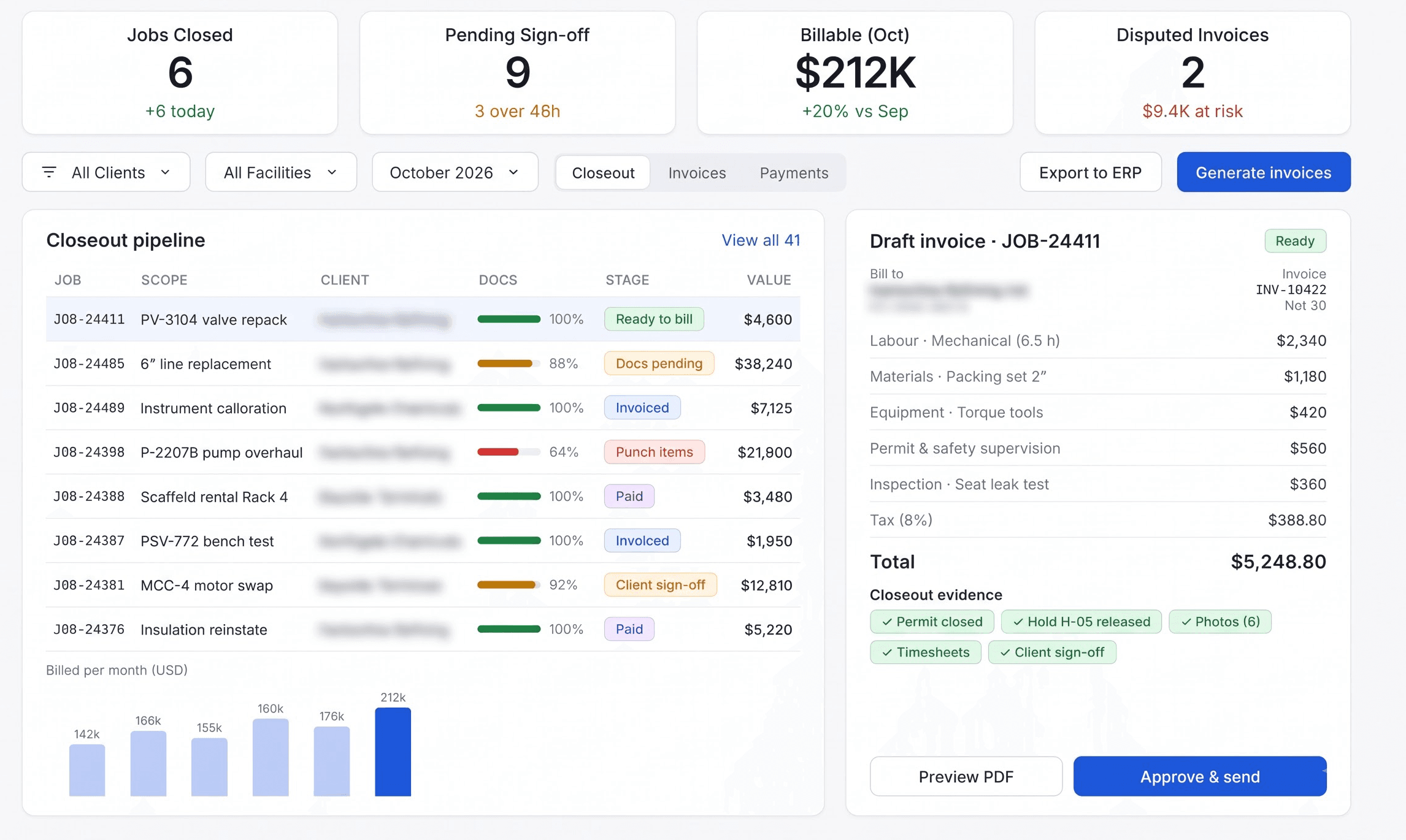
P8Module 08 · Closeout & Billing/Commercial Handover

Move Accepted Field Work into Defensible Billing

Assemble signed service tickets, approved variations, inspection releases and completion dossiers. Reconcile accepted quantities and contract rates before commercial review and invoicing.

What this module does

  • Match tickets, timesheets and approved rates
  • Resolve missing client acceptance evidence
  • Deliver completion dossiers and billing packs
Valvexia AI: Module 08 Closeout & Billing (Commercial Handover)

How it works

From service request to accepted job closeout

One connected service lifecycle: requests arrive from operators, Valvexia AI coordinates the job record, and your team reviews permits, inspection evidence and commercial acceptance.

Swipe through steps →

  • 01

    Qualify the request and plan the job

    Capture operator scope, equipment tags, drawings and site constraints. Assign crews, tools and materials against a reviewed work plan.

  • 02

    Coordinate permits and record field evidence

    Link work orders to permit records, inspection checklists and test results. Review extracted permit details and resolve missing prerequisites with the site authority.

  • 03

    Accept the work and reconcile billing

    Close quality findings, obtain technical and client acceptance, then reconcile service tickets and approved contract rates into a completion dossier.

Connectivity

Your whole stack, connected.

Connects with the CRM, collaboration, document, data and signature systems your firm already runs on through documented APIs. Client records, files, staffing signals and status updates move into Valvexia AI — and back out — without repeated manual entry.

Note: Tool names and marks belong to their respective owners. No endorsement or partnership implied. Integration availability depends on your existing systems, licences, API access, security configuration and implementation scope.

Regulatory & Engineering Standards

Engineered for oil and gas service assurance

Valvexia AI is architected to support the controlled work procedures, inspection evidence and technical acceptance records required by oil and gas consulting practices and licensed service engineers.

Swipe through standards →

  • Controlled Work Procedures

    Permit and Isolation Evidence

    Link permits, isolation certificates, gas-test records and validity windows to the authorized job. Permit issuance and safety decisions remain with responsible site personnel.

  • Inspection & Test Plans

    Hold Points and Acceptance Records

    Record client witness points, approved inspection procedures, test results and responsible engineer acceptance against the equipment and job scope.

  • Material Traceability

    Certificates and Equipment Identity

    Connect material certificates, equipment tags, calibration records and inspection reports to the corresponding work order for review.

  • Quality Management

    Nonconformance and Corrective Actions

    Track findings, assigned owners, corrective evidence and review status through technical closeout. Applicable standards are configured for each contract.

  • Contract Evidence

    Service Tickets and Completion Dossiers

    Assemble signed field tickets, approved variations, inspection releases and handover records for commercial reconciliation.

Note: Standards and protocols listed reflect technical data structures, calculation methodologies, and reporting schemas that Valvexia AI workflows are designed to support. Valvexia AI is a software platform and does not issue independent certifications or legal determinations; all formal regulatory filings and audit reports remain the professional responsibility of the licensed engineer or practitioner.

Valvexia AI ships

Production agents for consulting playbooks.

Not a chatbot on the side. Nestack Agents run the workflows your firm already sells — with the operational bar delivery expects.

Sister platform — Nestack Agents

Nestack Agents · Oil & Gas Services

01 · 05 playbooks

Connect your team to Work intake & scope review with evidence ready for review.

Extract equipment tags, operator requirements and missing attachments from service requests.

  • Job

    Scoped records

  • Linked

    Document evidence

  • Role

    Review routing

  • Human

    Final approval

Explore service operations agents

Draft outputs require review by the responsible operations, engineering or commercial team.

Field & Office Hardware

Extend Valvexia AI with field hardware.

Connect compatible document scanners, power meters, and field loggers. Each device has a named route into an operational module so interval measurements land on the engineering record without manual re-keying.

Swipe through hardware →

  • Field Document Scanner

    TWAIN / Optical Scanner → Module 02 Intake

    Digitize service requests, equipment certificates, permit forms and signed field tickets into the job evidence record. Hardware and connectivity are scoped separately.

  • Field Inspection Data Capture

    Inspection records → Work Orders & Inspection

    Bring reviewed instrument readings and inspection exports into equipment-linked job records. Retain calibration references, timestamps and operator acceptance evidence.

Note: Hardware, installation, and integration are not included in the standard subscription. Additional charges apply based on the hardware selected, integration modules required, and implementation scope.

Predictable Pricing

One subscription for the whole oil and gas service team.

The Entire Platform

$200/mo

Valvexia AI runs on a single monthly subscription, covering every engagement your practice runs — from work intake and job planning through work orders and inspections, work permits, permit extraction, quality and integrity, and closeout billing.

Note: AI API usage is charged separately. Clients must recharge their AI credit balance based on their usage.
  • All eight modules included (Dashboard through Closeout & Billing)
  • Every job on one shared equipment and service record
  • Managed Cloud or Private VPC deployment
  • Permit, inspection and commercial review workflows

Onboarding is a separate one-time fee, set out below.

Onboarding

What your onboarding fee covers

Configure Valvexia AI around your oil and gas service lifecycle: equipment records, active work orders, permit forms, inspection evidence, quality gates and commercial closeout. Fees are starting prices scoped to your data, integrations and deployment.

Swipe through onboarding tiers →

Essential

01
from

$1,000+

one-time · a starting point, scoped to your firm

The foundation:

  • Map work intake, job planning and client acceptance steps
  • Configure operations, permit reviewer, inspection and commercial roles
  • Import equipment registers and active job records
  • Load work order, permit and inspection templates
  • Connect email and calendar for site visits and coordination
  • Train core users and review go-live readiness

Enterprise

03
from

$5,000+

one-time · a starting point, scoped to your firm

Everything in Plus, plus:

  • Roll out multiple operator sites and service lines
  • Configure operator-specific permit and acceptance requirements
  • Map SSO, access controls and audit retention requirements
  • Migrate historical work orders and completion dossiers
  • Assign an onboarding lead and agreed rollout milestones

How it runs

Two ways to run Valvexia AI — same platform, same ongoing subscription price. Only the onboarding may differ by your requirements.

Cloud (SaaS)

Managed hosting for service coordinators, inspection reviewers and commercial teams, with platform updates and maintenance handled by Nestack.

Private / self-hosted

Deploy within your cloud, VPC or on-premises environment to meet operator data and security requirements. Subscription pricing stays the same; setup depends on the agreed infrastructure.

Common questions

Your questions. Answered plainly.

Bringing new software into an oil and gas service team raises fair questions. These are the ones operations directors and procurement ask us before they subscribe.

01What is included in the subscription?

All eight Valvexia AI modules, from Work Intake and Job Planning to Work Orders & Inspection, Work Permits, Permit Extraction, Quality & Integrity, and Closeout & Billing. Pricing is shown above; onboarding and AI usage are separate.

02Who is the platform for?

Oil and gas service contractors, maintenance teams, inspection providers and operations consultants coordinating work across operator sites and equipment portfolios.

03Does AI authorize permits or certify inspections?

AI extracts document fields, highlights missing evidence and drafts summaries for review. Authorized site personnel issue permits, responsible engineers accept technical findings, and your commercial team approves billing.

04Can we retain our existing inspection and permit procedures?

Onboarding maps your forms, equipment identifiers, role permissions and approval steps to the job lifecycle. Your operator and contract requirements determine the documents and reviews needed.

05How does closeout connect to billing?

Signed service tickets, approved variations, accepted quantities and inspection releases remain linked to the job. Commercial reviewers reconcile these records against contract rates before issuing invoices.

06Can the platform run in our own environment?

Cloud and private deployment options are available at the same subscription rate. Onboarding scope depends on your security, infrastructure and integration requirements.

07What should we bring to the demo?

A representative service request, work order, permit form, inspection report and closeout checklist help us demonstrate your workflow. Use redacted records when appropriate.

08What happens during onboarding?

We map your service lifecycle, import equipment and active job records, configure review roles and document templates, connect agreed systems and train the team for go-live.