Professional Services · CFO & Financial Consulting
CFO consulting, fromintake to closeout.
Vruqelthyn AI helps fractional CFOs and financial consulting firms manage client work in one place. Agree the scope, collect and check financial records, plan cash flow, prepare advice and review reports. Then deliver the approved work, record client acceptance and track billing — with a clear owner at every step.
One connected financial consulting workflowDashboard
Dashboard
Keep every client engagement on track.
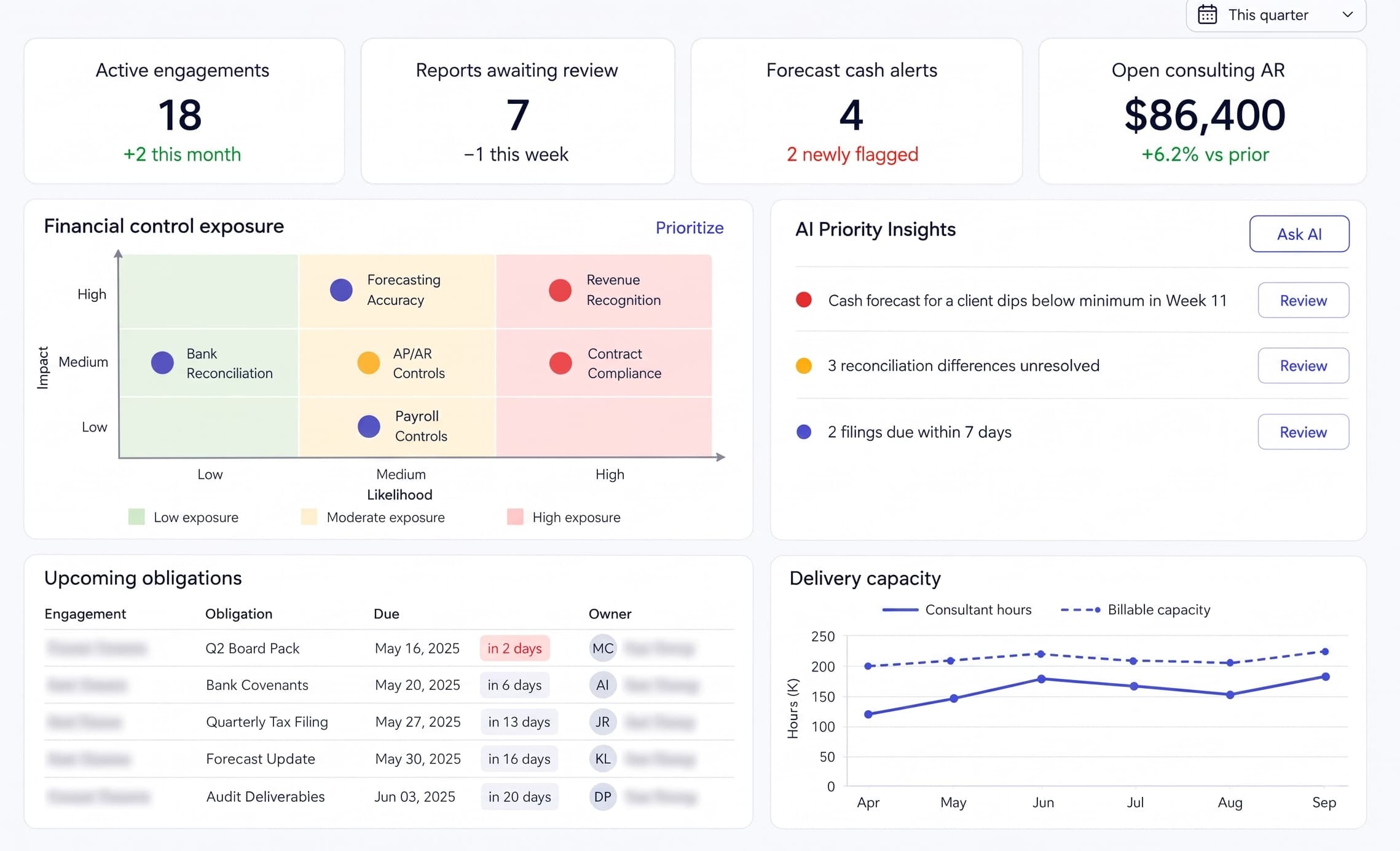
Dashboard brings work from every module into one practice overview. Use it to prioritize blocked engagements, coordinate reviews, follow reporting dates and track outstanding fees with clear owners.
Vruqelthyn AI: CFO Consulting Dashboard with engagement status, financial exceptions, reporting deadlines and review readiness
Financial Consulting DashboardCoordinate client work, financial reviews and delivery responsibilities across your practice.
Estimated Workflow Impact
Illustrative planning targets
Swipe through product benefits →
30%estimated time saved
Spend less time preparing records
Aim to reduce document collection, sorting and report preparation time with AI-assisted extraction and drafting.
20%estimated efficiency gain
Move client work forward efficiently
Target less coordination and rework by keeping responsibilities, review findings and approvals in one workflow.
50%estimated AI-assisted tasks
Let AI support routine work
Aim to assist half of eligible extraction, classification and first-draft tasks, while consultants verify outputs and make financial decisions.
1 / 3
30%estimated time saved
Spend less time preparing records
Aim to reduce document collection, sorting and report preparation time with AI-assisted extraction and drafting.
20%estimated efficiency gain
Move client work forward efficiently
Target less coordination and rework by keeping responsibilities, review findings and approvals in one workflow.
50%estimated AI-assisted tasks
Let AI support routine work
Aim to assist half of eligible extraction, classification and first-draft tasks, while consultants verify outputs and make financial decisions.
Note: ILLUSTRATIVE ESTIMATES ONLY, NOT MEASURED CUSTOMER RESULTS OR GUARANTEED SAVINGS. TIME AND EFFICIENCY TARGETS ARE RELATIVE TO YOUR MANUAL BASELINE; AI ASSISTANCE REFERS ONLY TO ELIGIBLE ROUTINE TASKS. ACTUAL RESULTS DEPEND ON DATA QUALITY, WORKFLOW AND ADOPTION.
Nestack Suite · Professional Services
Specialist products for the work your firm delivers.
Start with Vruqelthyn AI for CFO consulting, then explore related Nestack products for consulting, audit, transactions and engineering services.
Each module has a clear purpose: agree the work, prepare the records, verify the figures, plan ahead, deliver advice, review quality and complete the engagement.
Swipe through modules →
Client Intake
Agree the work before it begins.
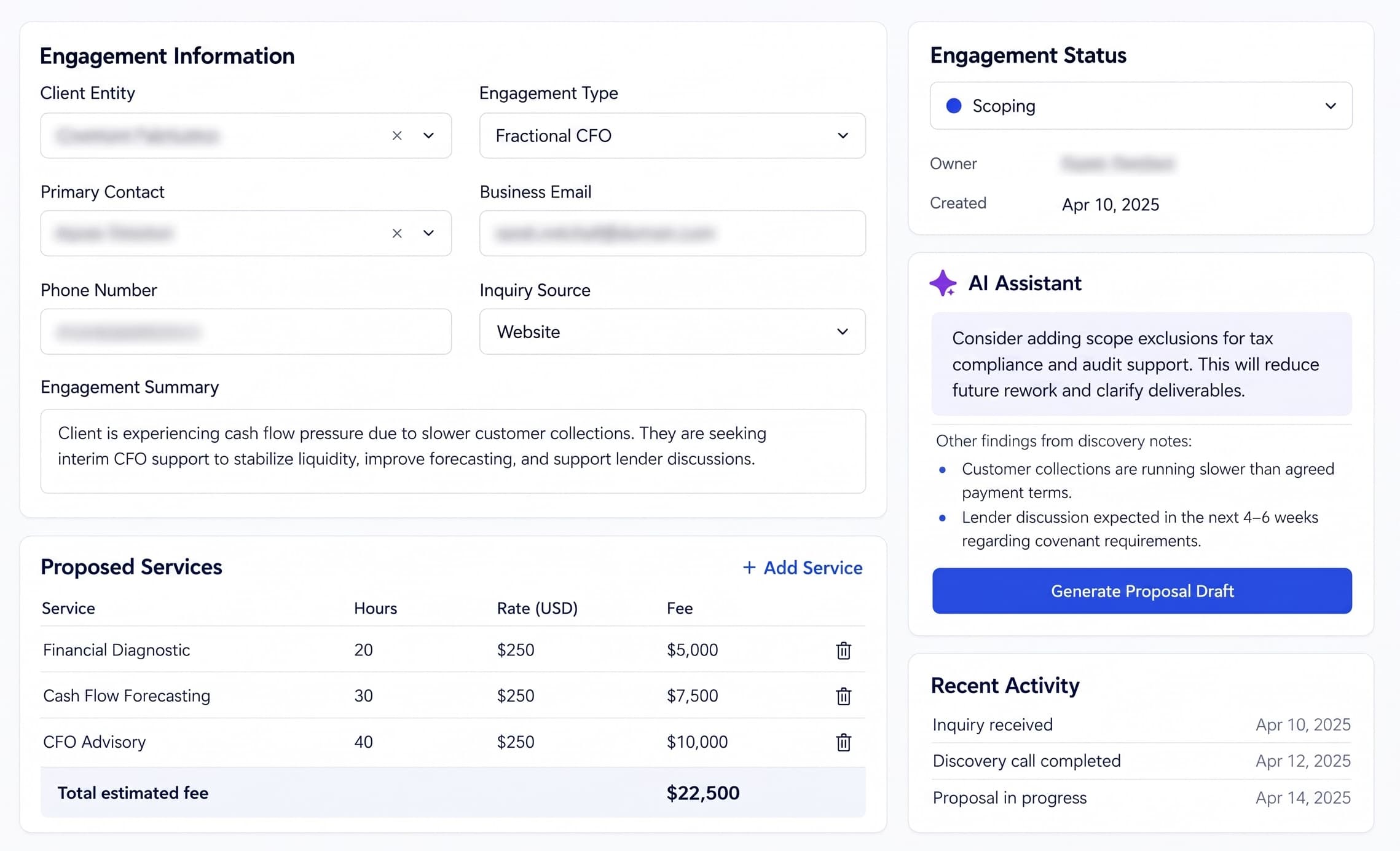
Client Intake turns an inquiry into an agreed engagement. Record the client’s needs, check conflicts, define deliverables, estimate effort and fees, and obtain an approved scope before assigning the work.
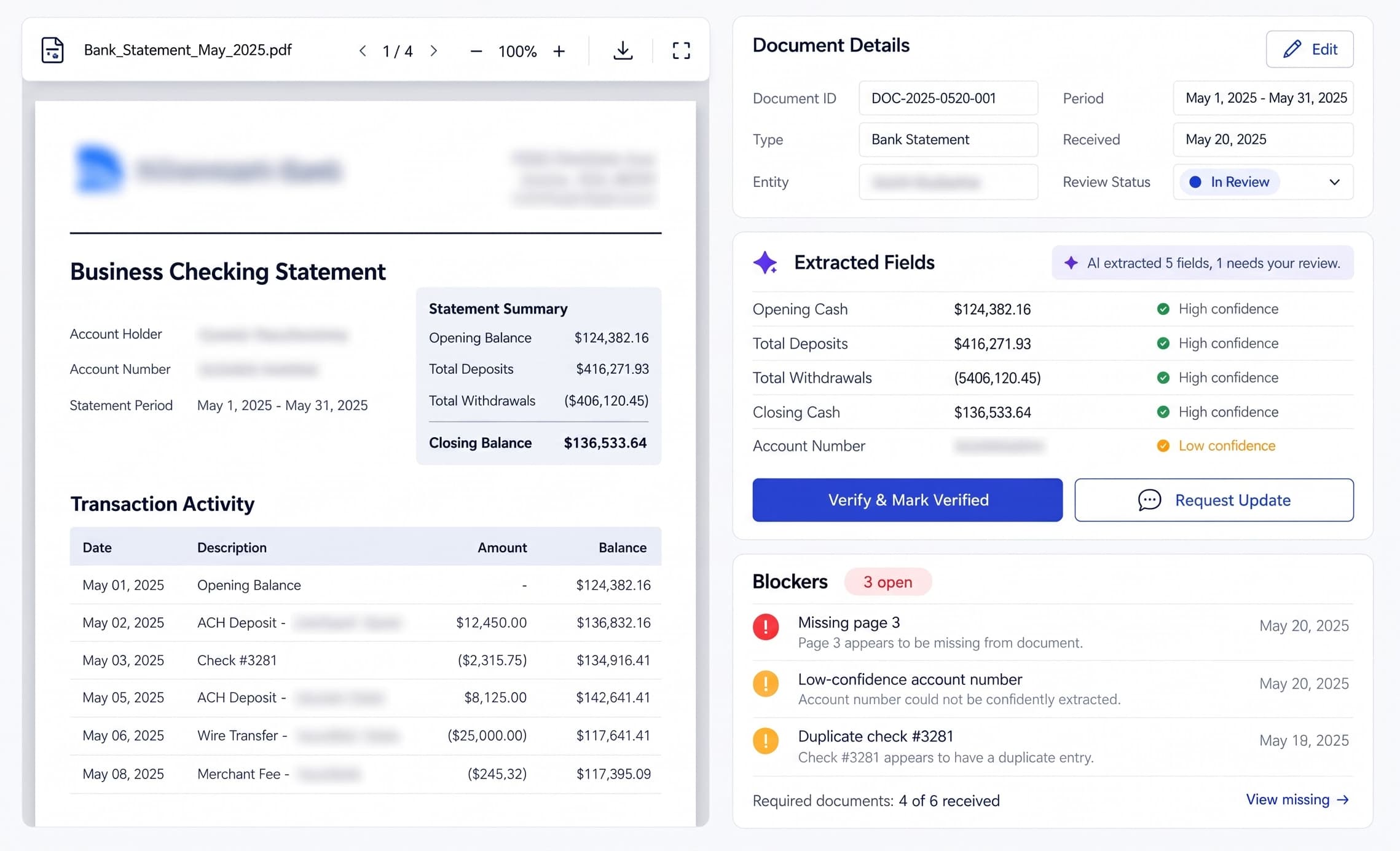
Document Intake collects the statements, ledgers and schedules needed for an engagement. Organize each file by client, entity, period and version, verify extracted information, and request missing records before analysis.
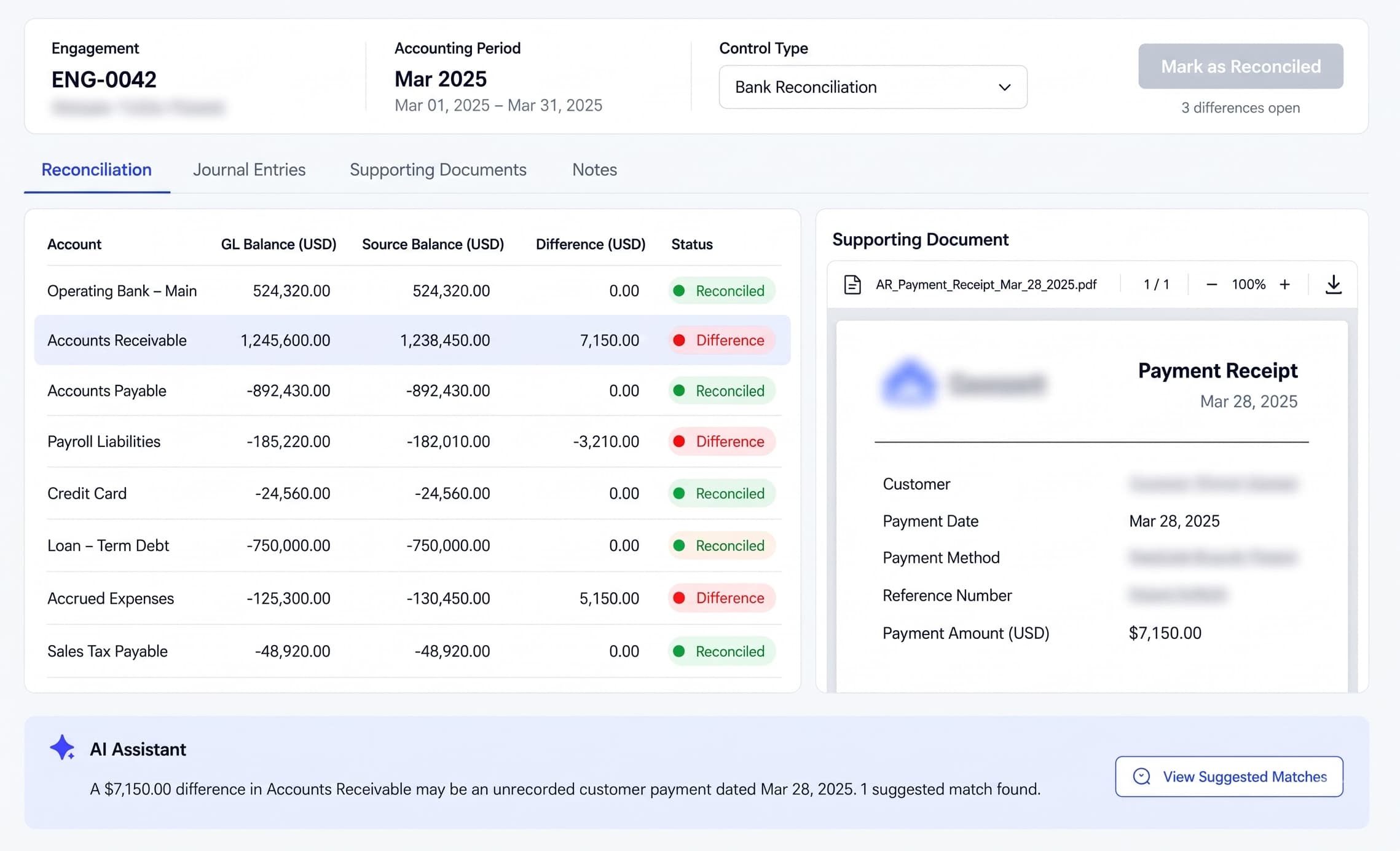
Reconciliation compares ledger balances with bank statements and supporting schedules. Investigate differences, record corrections and unresolved items, and approve a clear financial baseline for planning and reporting.
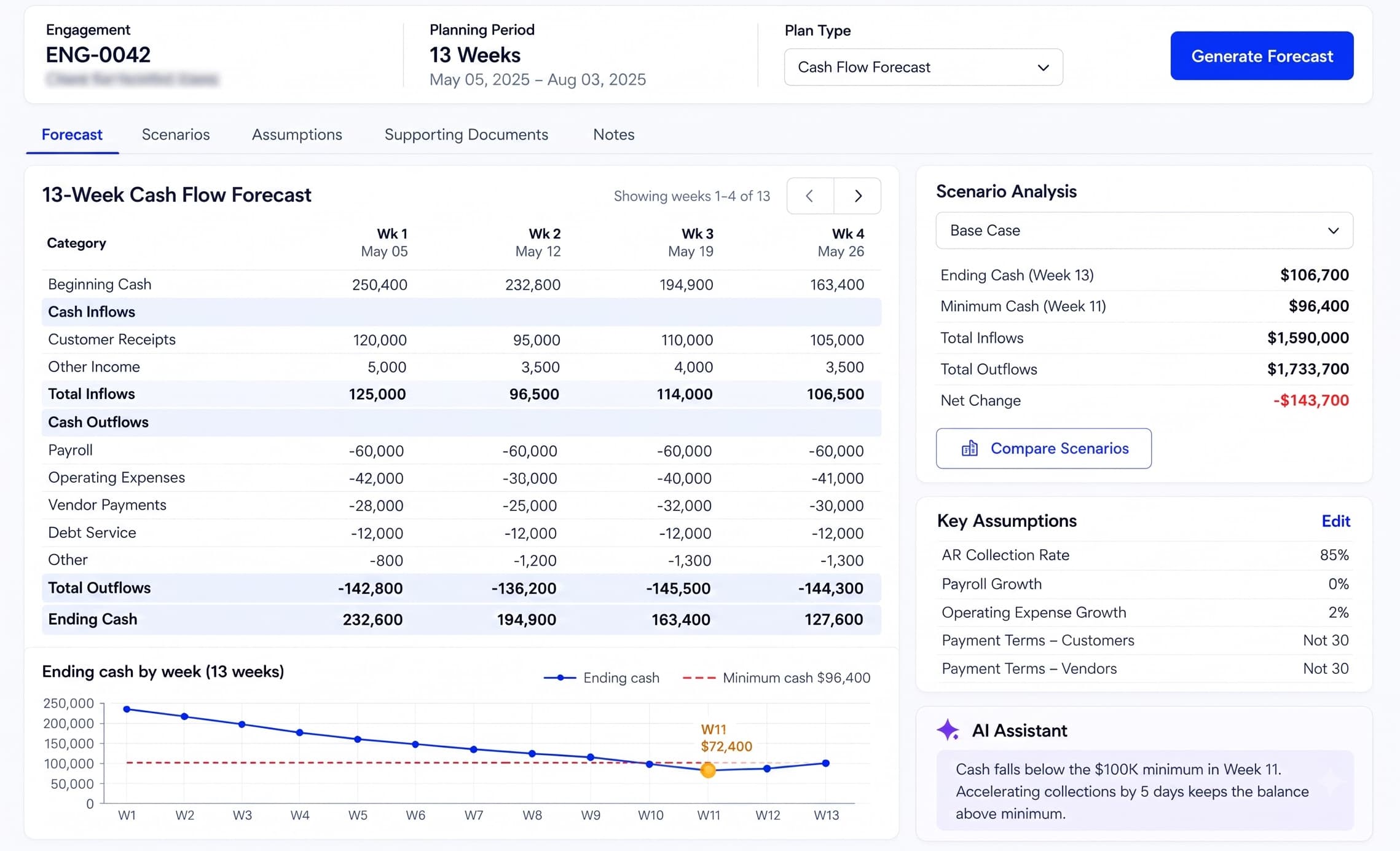
Financial Planning builds cash forecasts, budgets and scenarios from reviewed records. Use defined formulas, document assumptions and assign their owners so the CFO can assess cash needs and explain changes.
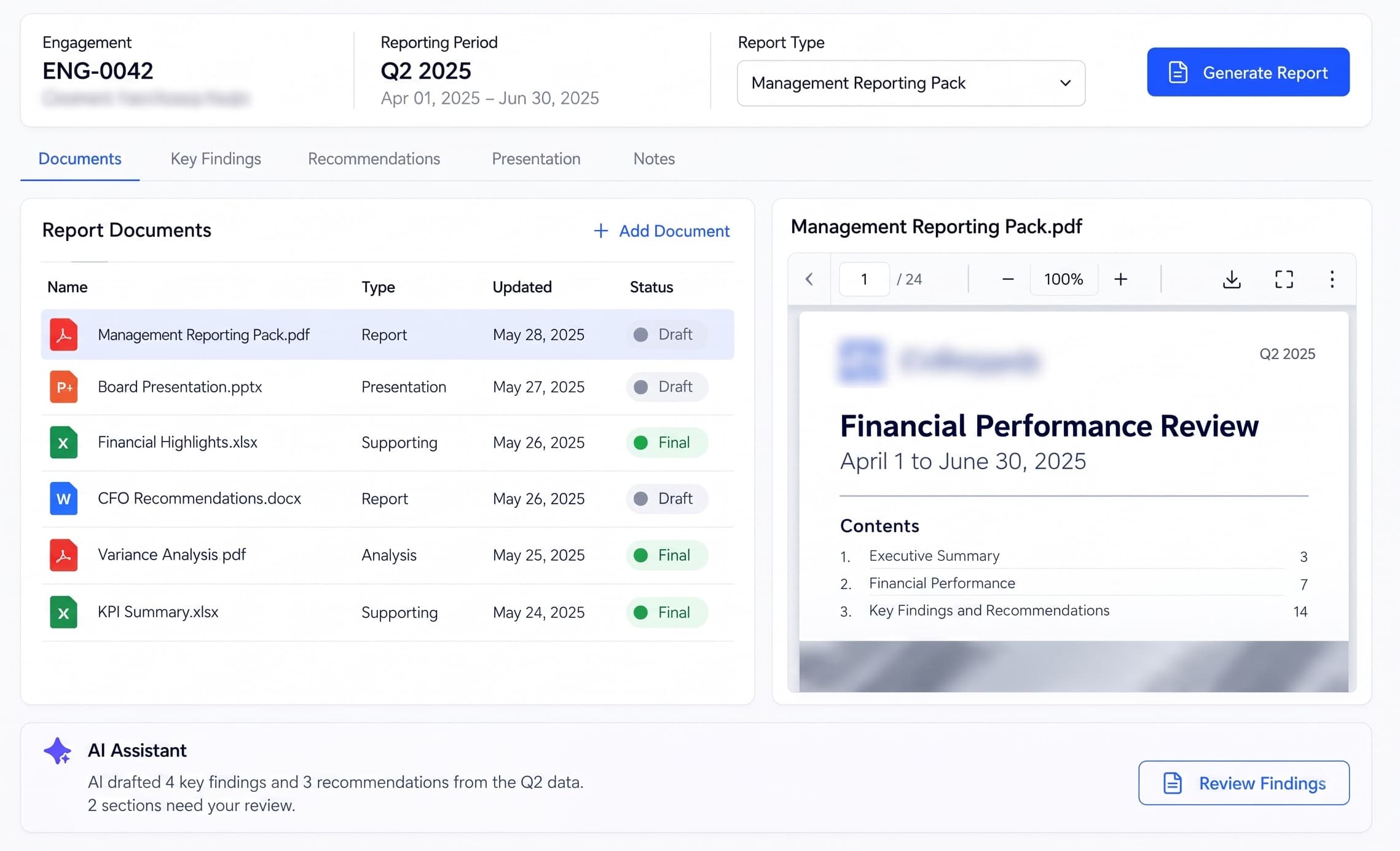
Advisory Delivery brings financial results and forecasts into client reports and recommendations. Prepare management packs, explain variances, link advice to supporting records and send draft deliverables for review.
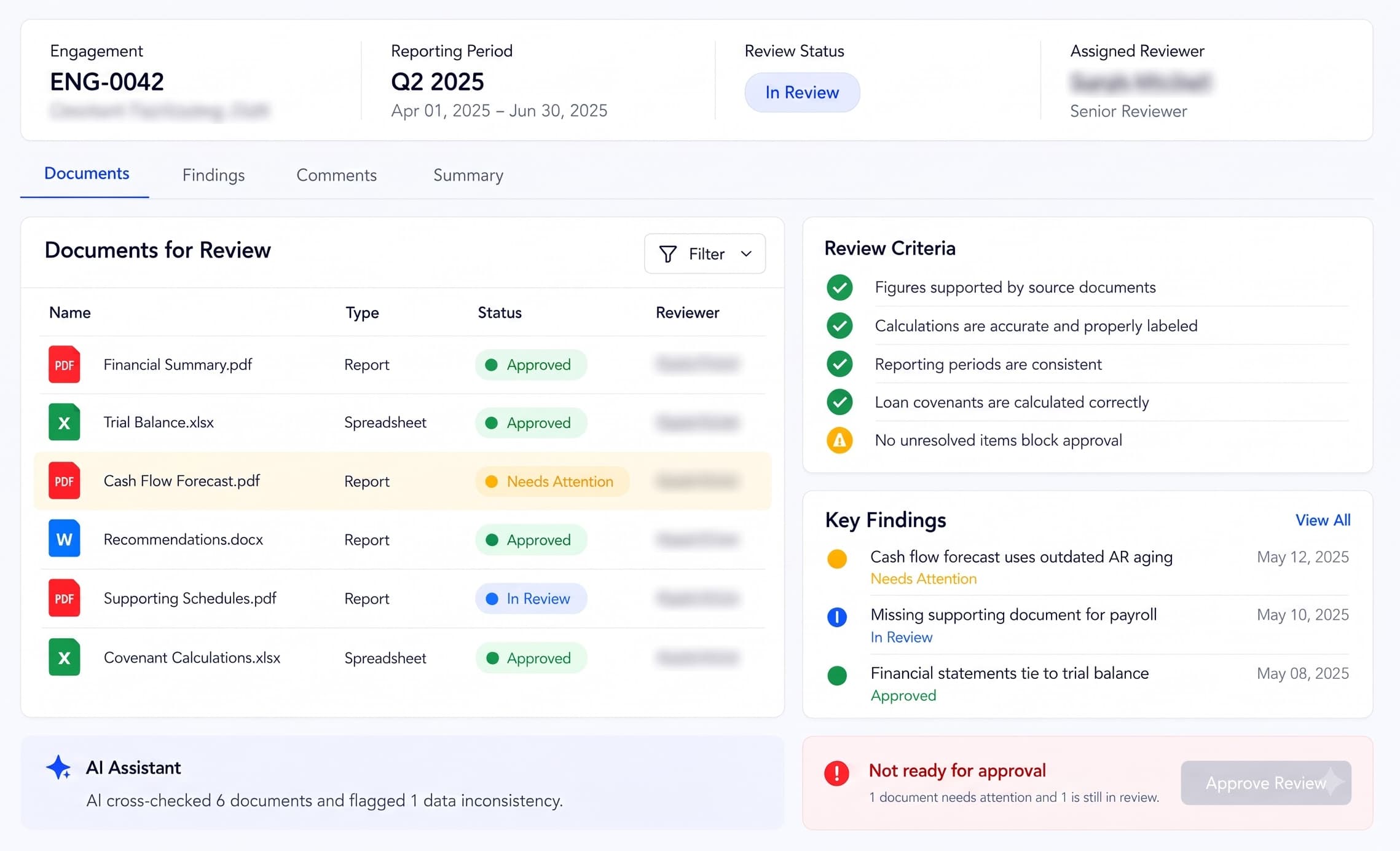
Quality Review checks financial deliverables against supporting records, agreed scope and review requirements. Assign reviewers, resolve findings and record approval of a specific version before authorizing release.
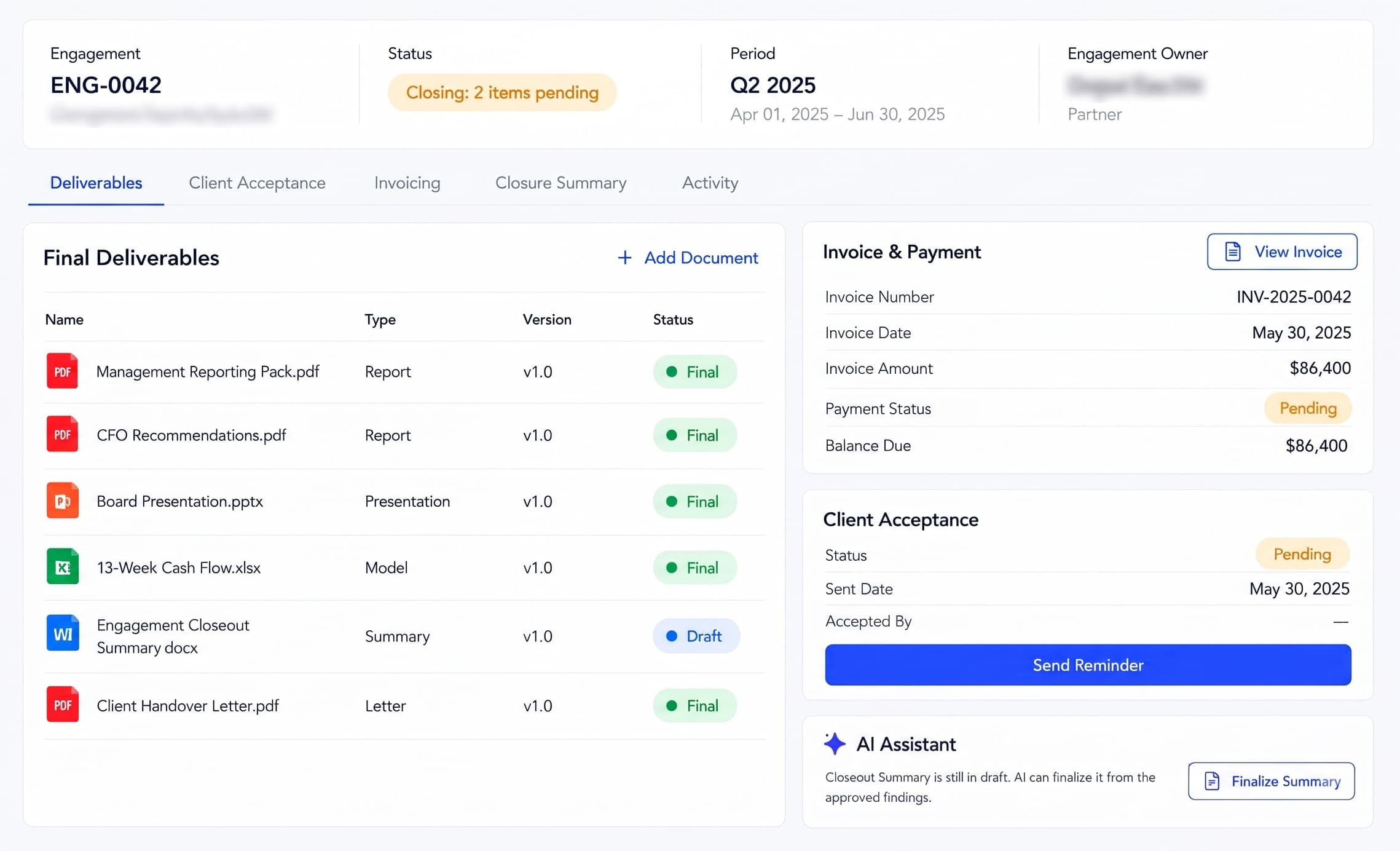
Closeout connects client handover with acceptance, billing and renewal. Record delivered work, assign remaining actions, match approved time and milestones to invoices, and track payment before closing or renewing the engagement.
Client Intake turns an inquiry into an agreed engagement. Record the client’s needs, check conflicts, define deliverables, estimate effort and fees, and obtain an approved scope before assigning the work.
Document Intake collects the statements, ledgers and schedules needed for an engagement. Organize each file by client, entity, period and version, verify extracted information, and request missing records before analysis.
Reconciliation compares ledger balances with bank statements and supporting schedules. Investigate differences, record corrections and unresolved items, and approve a clear financial baseline for planning and reporting.
Financial Planning builds cash forecasts, budgets and scenarios from reviewed records. Use defined formulas, document assumptions and assign their owners so the CFO can assess cash needs and explain changes.
Advisory Delivery brings financial results and forecasts into client reports and recommendations. Prepare management packs, explain variances, link advice to supporting records and send draft deliverables for review.
Quality Review checks financial deliverables against supporting records, agreed scope and review requirements. Assign reviewers, resolve findings and record approval of a specific version before authorizing release.
Closeout connects client handover with acceptance, billing and renewal. Record delivered work, assign remaining actions, match approved time and milestones to invoices, and track payment before closing or renewing the engagement.
Vruqelthyn AI connects the full engagement in three stages, with your team responsible for financial decisions and approvals.
Swipe through steps →
01
Agree the work and prepare the records
Qualify the client, agree the scope and collect the required financial documents. Check the information and reconcile differences to establish a reviewed starting point.
02
Plan, advise and review
Build cash forecasts and budgets from reviewed figures, document assumptions and prepare client recommendations. Resolve professional review findings before approving the final deliverables.
03
Deliver, settle and keep the practice informed
Send the approved work, record client acceptance and track invoices and payment. Close or renew the engagement while Dashboard keeps owners, deadlines and outstanding work visible throughout.
1 / 3
01
Agree the work and prepare the records
Qualify the client, agree the scope and collect the required financial documents. Check the information and reconcile differences to establish a reviewed starting point.
02
Plan, advise and review
Build cash forecasts and budgets from reviewed figures, document assumptions and prepare client recommendations. Resolve professional review findings before approving the final deliverables.
03
Deliver, settle and keep the practice informed
Send the approved work, record client acceptance and track invoices and payment. Close or renew the engagement while Dashboard keeps owners, deadlines and outstanding work visible throughout.
Traditional SaaS vs Vruqelthyn AI
Don't settle for the AI your software chose.
Financial consulting needs different tools for document extraction, source comparison and report drafting. Configure the model for each task while retaining deterministic arithmetic and professional review.
Traditional SaaS
Built-inAI
One model, one pass, and no step you can point somewhere else.
You work within its limits.
Vruqelthyn AI • Routed Extraction
01
Read the financial source
Layout-aware OCR preserves statement tables, account headings, dates and footnotes so extracted financial fields remain traceable to their source.
Document AI
Layout-aware OCR
02
Sort every document
Classify bank statements, trial balances, AR/AP aging, payroll records and credit agreements while flagging uncertain document types for verification.
🤗Hugging Face
Inference providers
03
Keep the engagement in context
Review executed agreements, amendments and supporting schedules together so lender-specific definitions and engagement scope remain visible.
Gemini
Long-context frontier
04
Extract structured financial fields
Map entity, period, account, balance and source version into defined fields. Confidence indicators and unresolved exceptions support reviewer verification.
OpenAI
Structured output
05
Compare financial source versions
Compare revised trial balances and working papers, surface changed figures and identify downstream analyses that need renewed review.
Claude
Frontier reasoning
06
Draft financial commentary
Draft variance explanations from reviewed schedules, preserving source references and distinguishing observed results from proposed causes.
MMistral
Cost-efficient drafting
Note: Provider and model names describe the ecosystem an orchestration layer can route to. They are not a claim of partnership or endorsement, and not a statement that every model listed is enabled in a given workspace — the routing set is configured per deployment.
Connectivity
Your whole stack, connected.
Connect your accounting, CRM, document and collaboration workflows through scoped APIs, exports and document intake. Source records and review-ready outputs stay associated with the right engagement in Vruqelthyn AI. Connector availability is confirmed during implementation.
QuickBooks OnlineXeroSage IntacctMicrosoft ExcelDeltek VantagepointBank statement importsSalesforceMicrosoft 365Microsoft TeamsSharePointGoogle WorkspaceGoogle DriveOkta or Microsoft Entra IDDocuSign
QuickBooks OnlineXeroSage IntacctMicrosoft ExcelDeltek VantagepointBank statement importsSalesforceMicrosoft 365Microsoft TeamsSharePointGoogle WorkspaceGoogle DriveOkta or Microsoft Entra IDDocuSign
Note: Tool names and marks belong to their respective owners. No endorsement or partnership implied. Integration availability depends on your existing systems, licences, API access, security configuration and implementation scope.
CFO Consulting Challenges
Keep evidence, calculations and approvals connected.
Vruqelthyn AI is designed to support three practical priorities: traceable financial evidence, reproducible calculations within a defined scope, and human-owned review before client delivery.
Swipe through workflows →
Financial-source traceability
Financial figures are difficult to verify when supporting documents, source versions, and review notes are spread across multiple files. Keep figures linked to supporting records, financial periods, uploaded versions and review history, with missing evidence and extraction uncertainties visible for verification.
Inconsistent financial calculations
Manual spreadsheet calculations and changing assumptions make financial reconciliations, cash forecasts, and reporting difficult to reproduce consistently. Use a controlled set of reconciliation, cash-flow and supported ratio formulas, with recorded source inputs and assumption owners. Mathematical consistency does not guarantee input quality or forecast outcomes.
Disconnected review and approvals
Financial reports can move between analysts, CFOs, and engagement partners without clear visibility into outstanding findings, approved versions, or release decisions. Assign reviewers, record decisions and versions, return work for correction and restrict release while configured blocking findings remain unresolved.
1 / 3
Financial-source traceability
Financial figures are difficult to verify when supporting documents, source versions, and review notes are spread across multiple files. Keep figures linked to supporting records, financial periods, uploaded versions and review history, with missing evidence and extraction uncertainties visible for verification.
Inconsistent financial calculations
Manual spreadsheet calculations and changing assumptions make financial reconciliations, cash forecasts, and reporting difficult to reproduce consistently. Use a controlled set of reconciliation, cash-flow and supported ratio formulas, with recorded source inputs and assumption owners. Mathematical consistency does not guarantee input quality or forecast outcomes.
Disconnected review and approvals
Financial reports can move between analysts, CFOs, and engagement partners without clear visibility into outstanding findings, approved versions, or release decisions. Assign reviewers, record decisions and versions, return work for correction and restrict release while configured blocking findings remain unresolved.
Note: These are standards the platform is built to support inside your workflows — obligations that fall on you as the licensee. They are not certifications held by us, and support in the product is not a substitute for your own counsel or compliance officer.
Vruqelthyn AI ships
Embedded agents for CFO consulting playbooks.
Financial evidence, reconciliation, planning and advisory work — with source references and review gates in the workflows your firm delivers.
AI assists the work; qualified professionals retain financial judgment and release authority.
ADD-ONS
Add the hardware your workflow needs.
Third-party document capture equipment for financial evidence intake. Each device supplies files through compatible capture software for your configured Document Intake workflow. Confirm export formats and the ingestion setup before selecting equipment.
Swipe through add-ons →
Document Intake → Reconciliation
USB / TWAIN capture → PDF file intake
Sheet-fed document scanner
Digitize paper bank statements, payroll summaries and lender correspondence with compatible capture software. Add the exported PDF to the client’s financial document request for entity, period and extraction review.
Document Intake
USB camera capture → PDF / image file intake
Overhead document camera
Capture bound ledgers, oversized schedules and supporting records that cannot pass through a sheet feeder. Use compatible capture software to export a PDF or image for source-document review.
1 / 2
Document Intake → Reconciliation
USB / TWAIN capture → PDF file intake
Sheet-fed document scanner
Digitize paper bank statements, payroll summaries and lender correspondence with compatible capture software. Add the exported PDF to the client’s financial document request for entity, period and extraction review.
Document Intake
USB camera capture → PDF / image file intake
Overhead document camera
Capture bound ledgers, oversized schedules and supporting records that cannot pass through a sheet feeder. Use compatible capture software to export a PDF or image for source-document review.
Note: Hardware, installation, and integration are not included in the standard subscription. Additional charges apply based on the hardware selected, integration modules required, and implementation scope.
Our prices
One plan for the whole firm.
the whole firm
$200/mo
Vruqelthyn AI runs on a single monthly subscription, covering every engagement your firm runs — from first client inquiry through financial evidence, reconciliation, planning, professional review and closeout.
All eight modules included
Every client and engagement on one shared financial record
Hosting and access requirements agreed during setup
Template pricing is illustrative until confirmed in your proposal. Onboarding is scoped separately.
⚡
Note: AI API usage is charged separately. Clients must recharge their AI credit balance based on their usage.
Onboarding
What your onboarding fee covers
Plan implementation around your engagements, financial source records, approval responsibilities and reporting cycles. These template fees are starting points; final fees, integrations, deployment and timing require an agreed scope.
Swipe through onboarding tiers →
Essential
01
from
$1,000+
one-time · a starting point, scoped to your firm
The foundation:
Map qualification, scoping and signed SOW acceptance
Define partner, CFO, analyst and billing responsibilities
Configure entity, financial period and version conventions
Plan document requests for GL, trial balance, bank statements and AR/AP aging
Establish reconciliation exception handling and baseline approval
Train preparers and reviewers on the first engagement
Plus
Recommended02
from
$2,500+
one-time · a starting point, scoped to your firm
Essential scope, plus:
Map financial source exports and historical working papers
Define 13-week cash schedules, assumptions and owners
Prepare budget-versus-actual and management reporting templates
Design correction loops and version-specific review gates
Enterprise
03
from
$5,000+
one-time · a starting point, scoped to your firm
Plus scope, plus:
Plan multi-office rollout and tenant/client access boundaries
Scope identity, encryption, retention and audit requirements
Assess accounting and secure document-store integrations
Map approved hours, WIP, retainers and invoice settlement
Agree migration validation and go-live acceptance criteria
How it runs
Two deployment approaches for Vruqelthyn AI — scope hosting, security and commercial requirements with your team.
Managed cloud · proposed
Confirm hosting location, data protection requirements, identity controls and service terms before introducing client financial records. This template does not provision a hosted financial workspace.
Private deployment · subject to scope
Evaluate private infrastructure requirements, connector availability, maintenance and commercial terms during solution design. No deployment capability is implied by this landing page.
FAQ
Questions financial consulting leaders ask.
01How much does Vruqelthyn AI cost?
The page shows an illustrative monthly subscription price and starting onboarding fees. Your proposal should confirm the price for your team and engagement volume, included capabilities, implementation scope and any additional AI usage or integration charges before you commit.
02Is Vruqelthyn AI worth the investment for a small CFO consulting firm?
Evaluate it against a few recurring tasks: collecting client documents, investigating reconciliation differences, preparing reports and coordinating reviews. Compare the agreed subscription and setup cost with your measured administrative effort and delivery needs. A small evaluation can help establish fit; savings, ROI and payback are not guaranteed.
03How is our clients' confidential financial information protected?
Before introducing client financial records, review the implemented permissions, authentication, encryption, retention, audit history and hosting arrangements. Confirm responsibilities and data-processing terms in your agreement. Security controls must be built and tested for the deployment; software alone cannot eliminate every risk or establish full regulatory compliance.
04Can we trust AI-generated financial information?
Treat AI output as assistance that needs verification. Review extracted fields against their source documents, keep missing evidence and uncertain extractions visible, and require professional review of draft commentary. Supported calculations should use defined formulas and reviewed inputs. AI does not guarantee document authenticity, forecast accuracy or financial correctness.
05How is Vruqelthyn AI different from spreadsheets and traditional accounting software?
The proposed platform connects the consulting engagement around the financial records: document requests, source versions, reconciliation exceptions, forecast assumptions, review findings and client delivery. It can be evaluated alongside existing accounting systems and spreadsheets. It does not claim to replace every ledger, support arbitrary spreadsheet models or connect to every external system from launch.
06Can Vruqelthyn AI help our consultants manage more client engagements?
Shared document checklists, accountable owners, review queues and engagement status can help teams organize work across clients. Whether this increases capacity depends on record quality, configuration, adoption and the complexity of your engagements. Track workload, overdue requests and review turnaround during an evaluation rather than assuming a specific productivity increase.
07How difficult is it for our finance team to get started?
Start with one engagement, a defined document checklist, agreed financial periods and assigned preparers and reviewers. Map the source exports, supported calculations and approval steps your team needs, then expand after the initial workflow has been checked. Migration, training and integrations are scoped before rollout; no fixed go-live time is promised.
08Can we change or cancel our subscription if our firm's needs change?
Confirm plan changes, subscription duration, cancellation notice, renewal, refunds and data export or deletion arrangements in your service agreement. These terms depend on the agreed subscription; this page does not promise unrestricted changes, automatic refunds or cancellation at any time.