
Utility engineering, from request to handover.

Vyrqelthon AI brings project requests, engineering reviews, estimates, field records and handover documents into one workspace. AI helps organize information and flag gaps so your team can review the work and keep it moving.

Electrical substation gantry lit by sodium lights at night

01 / 04Substation at dusk

The Nestack suite

One family, built for the grid.

Products for other parts of the electric utilities industry will appear here as they go live, on the same platform.

  • This product

    Vyrqelthon AI

    Electric utility & grid. AI-assisted utility engineering, from work request to project closeout.

    Current ProductYou are here
  • Sample sibling

    Energy & utility consulting

    A product for this sub-industry will appear here once it goes live.

    Coming soon
  • Sample sibling

    Solar & storage installation

    A product for this sub-industry will appear here once it goes live.

    Coming soon
  • Sample sibling

    Energy procurement & brokerage

    A product for this sub-industry will appear here once it goes live.

    Coming soon
  • Sample sibling

    EV charging operations

    A product for this sub-industry will appear here once it goes live.

    Coming soon
  • Sample sibling

    Facility energy management

    A product for this sub-industry will appear here once it goes live.

    Coming soon

The platform

See where your projects need attention.

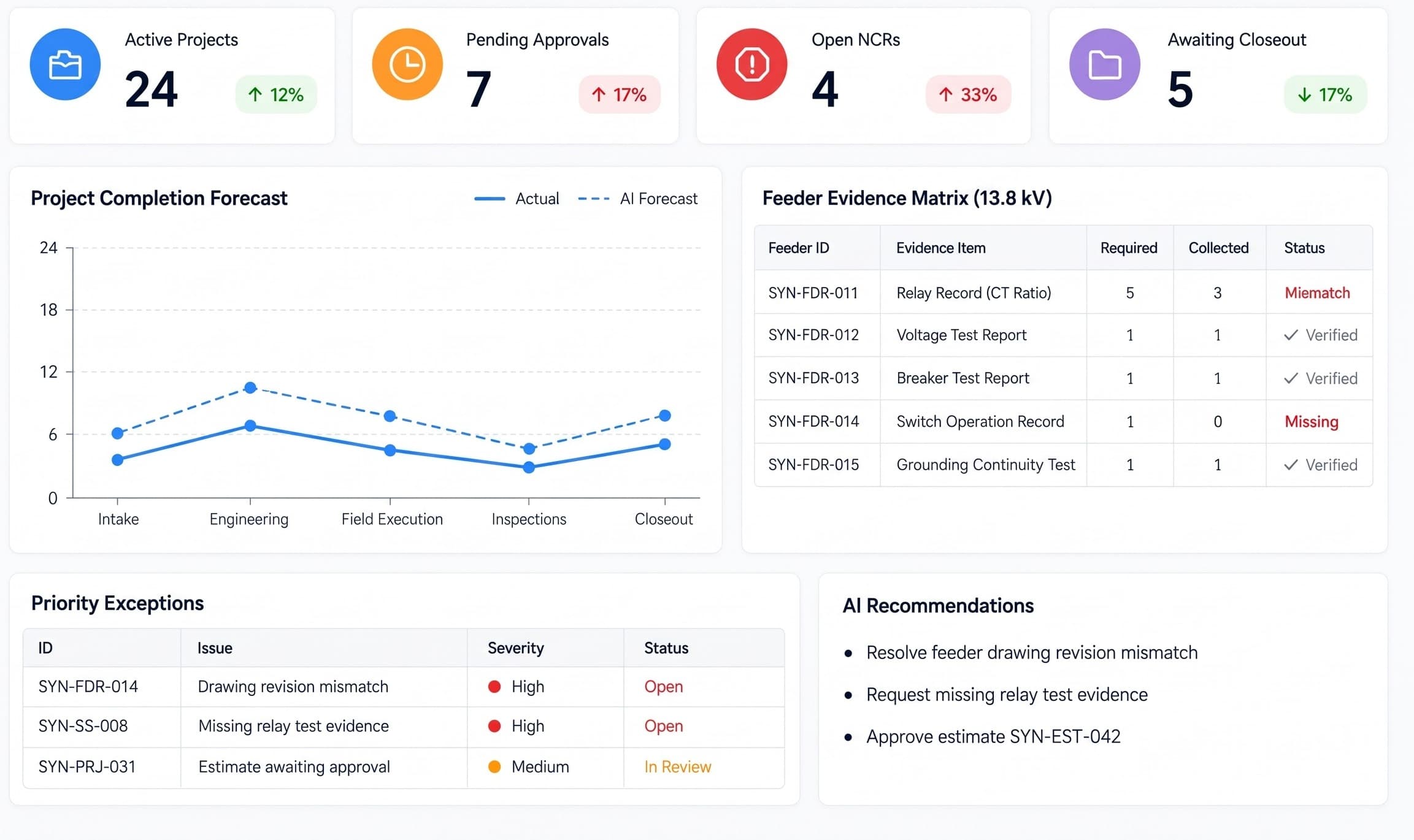
The dashboard brings project progress, pending reviews and outstanding records together. It helps managers prioritize follow-ups and coordinate the next step across their team.

https://app.vyrqelthon.ai/dashboard
Vyrqelthon AI portfolio dashboard: active projects, completion forecast, feeder evidence matrix, priority exceptions and AI recommendations

Tap the plate to open it full screen.

Project recordsKeep requests and documents together
Review workflowsMake ownership and decisions clear
Drawing revisionsKeep approved versions traceable
Inspection evidenceOrganize findings and follow-up

Modules

Manage utility projects from request to handover.

Connect requests, engineering reviews, estimates and field work with inspection evidence, required records and final handover documents.

Swipe to explore · 1 / 7
02/ 08

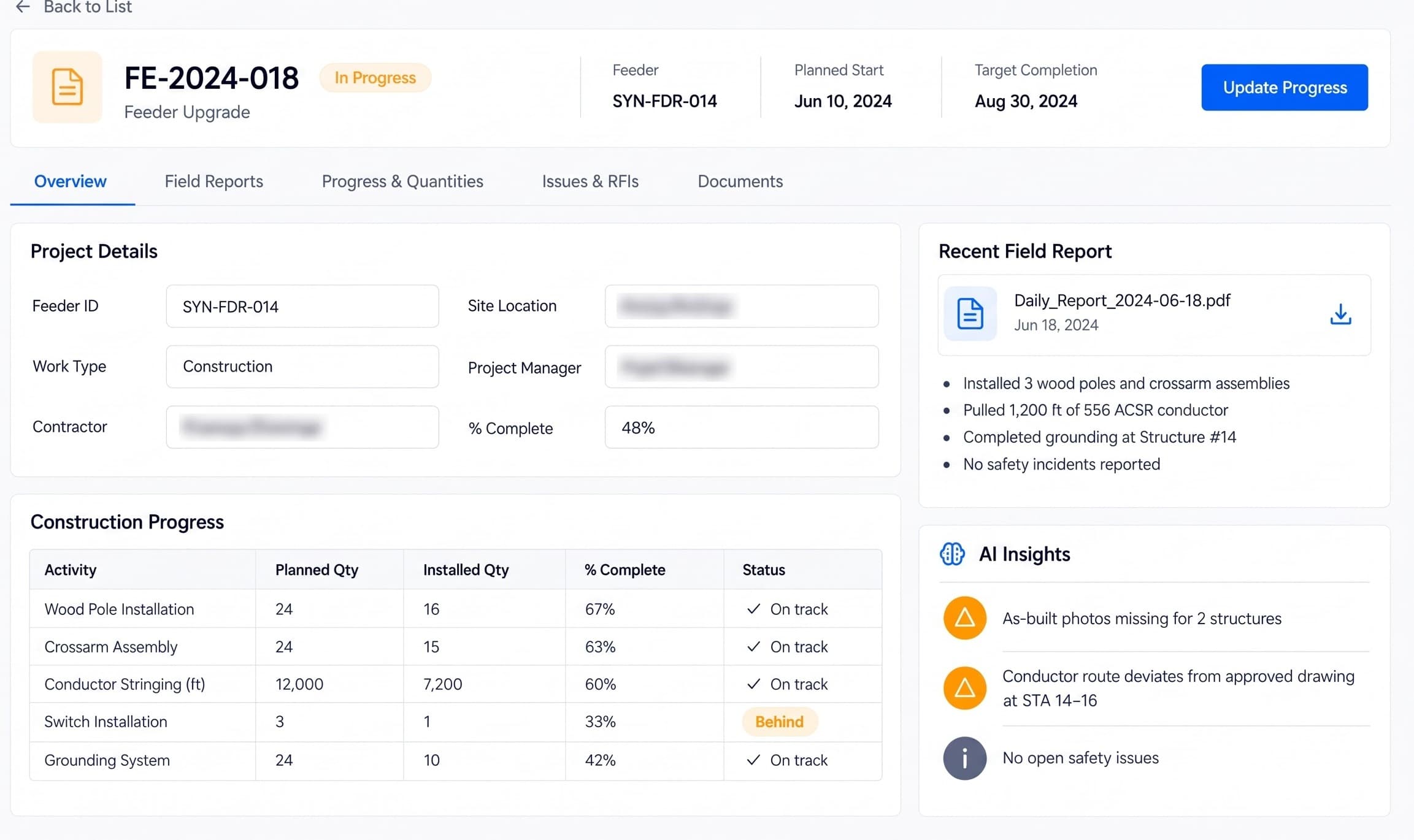
Work Requests

Start each job with a clear scope

  • Keep scope and supporting documents together
  • Assign ownership and track review decisions
https://app.vyrqelthon.ai/work-requests
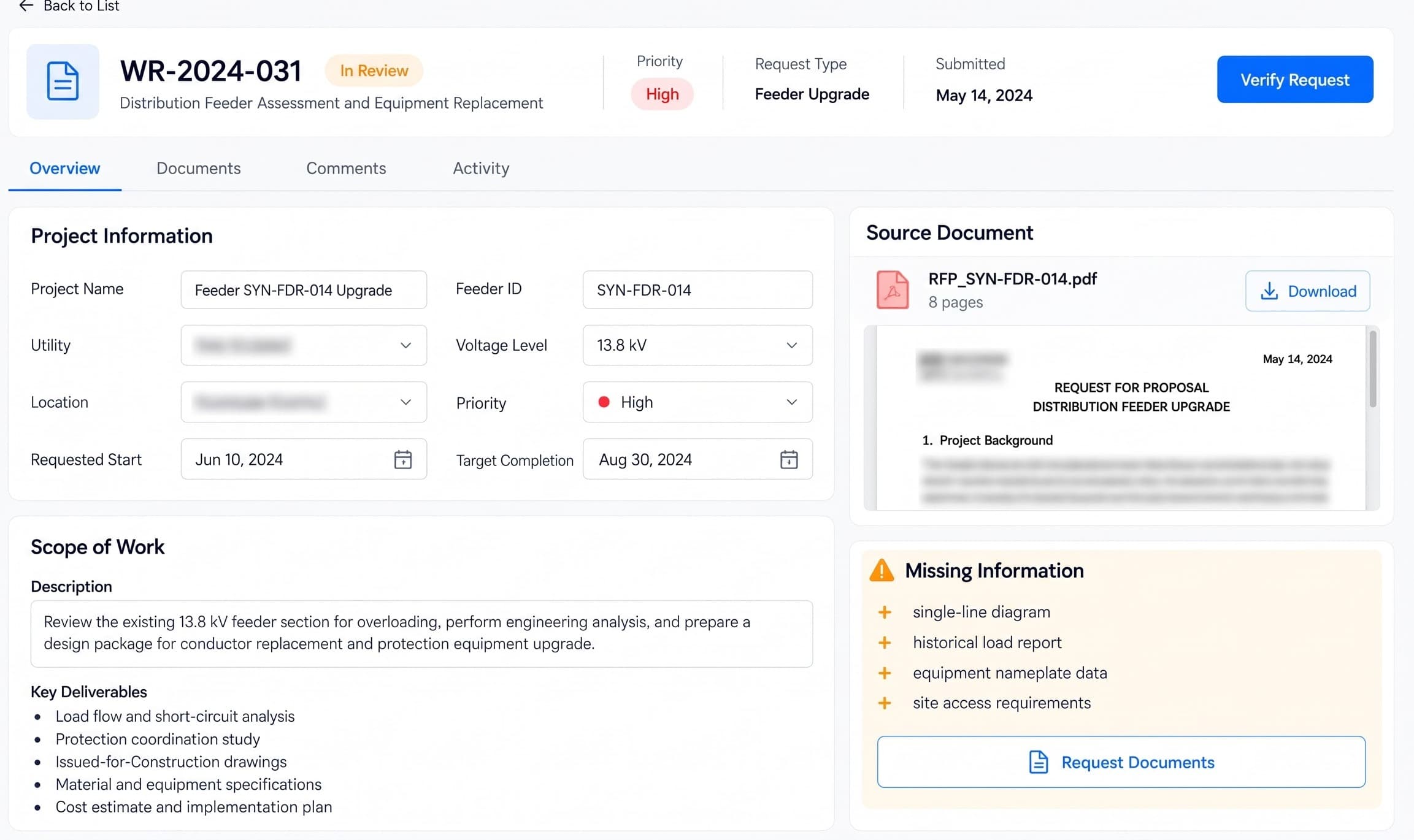
Vyrqelthon AI Work Requests module: Collect requests, project documents and feeder details in one place. Assign a reviewer and identify missing information before engineering work begins.
How it helps

Collect requests, project documents and feeder details in one place. Assign a reviewer and identify missing information before engineering work begins.

03/ 08

Engineering Studies

Keep engineering reviews organized

  • Organize reports and equipment references
  • Track drawing revisions and reviewer comments
https://app.vyrqelthon.ai/engineering-studies
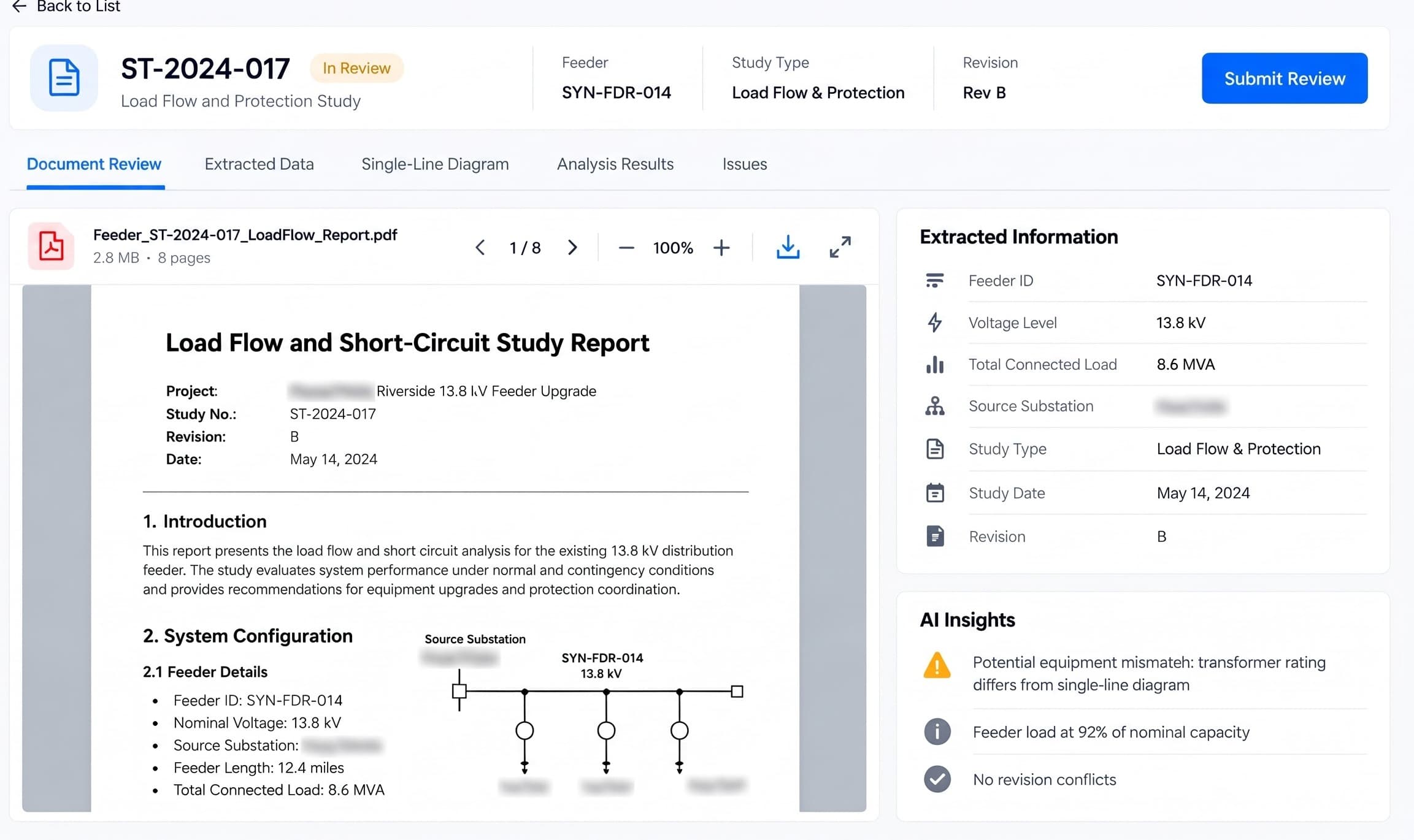
Vyrqelthon AI Engineering Studies module: Bring study reports, equipment references and drawing revisions together. Help engineers review consistent inputs and record their technical decisions.
How it helps

Bring study reports, equipment references and drawing revisions together. Help engineers review consistent inputs and record their technical decisions.

04/ 08

Estimates

Build estimates from the agreed scope

  • Collect quantities, rates and quotations
  • Review cost assumptions before approval
https://app.vyrqelthon.ai/estimates
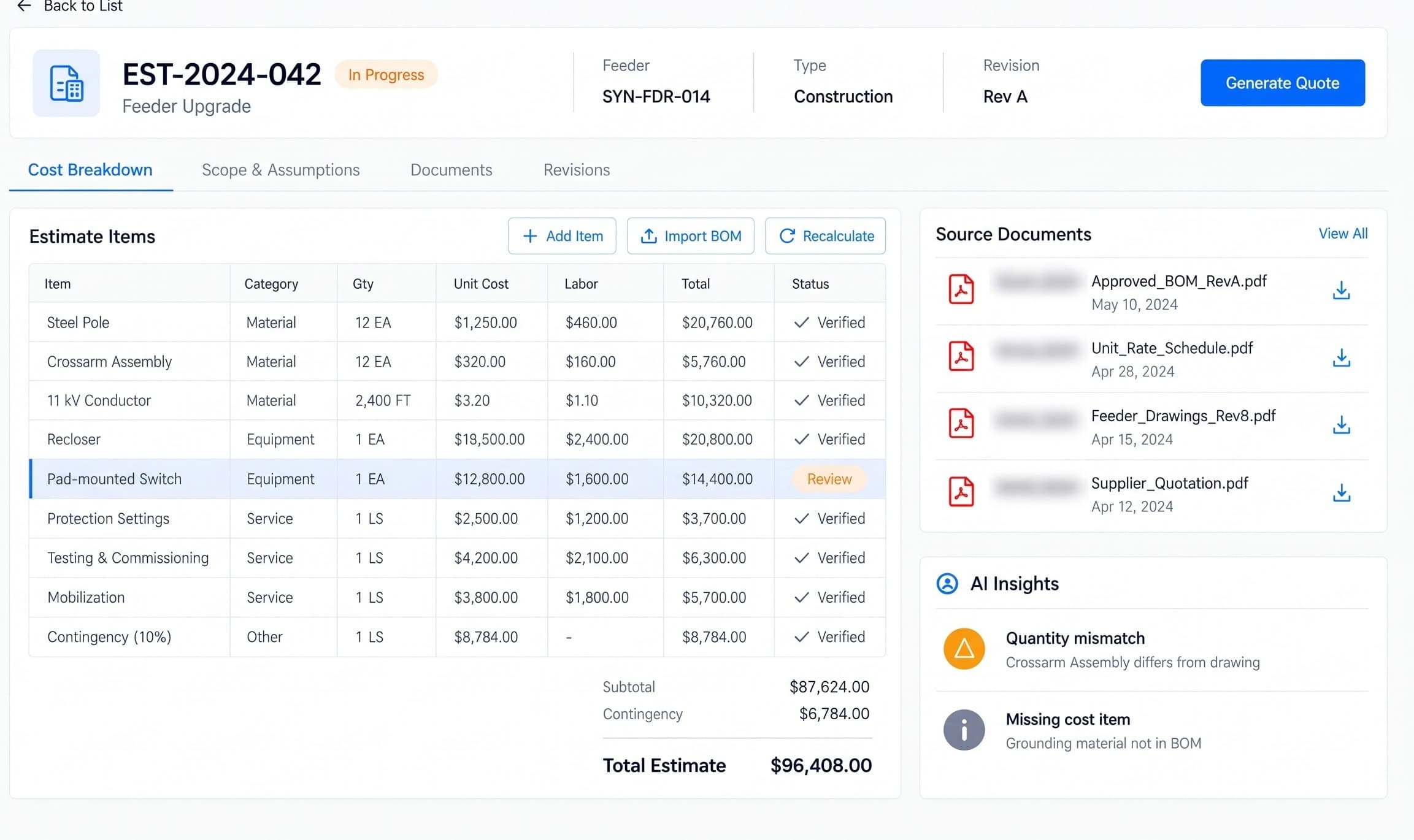
Vyrqelthon AI Estimates module: Organize material quantities, labor costs and supplier quotations against the project scope. Keep assumptions and revisions available for approval.
How it helps

Organize material quantities, labor costs and supplier quotations against the project scope. Keep assumptions and revisions available for approval.

05/ 08

Field Execution

Keep field work connected to the plan

  • Share work packages and approved documents
  • Record site updates, questions and changes
https://app.vyrqelthon.ai/field-execution
Vyrqelthon AI Field Execution module: Give field teams a shared record for work packages, approved drawings, progress updates and questions. Keep changes visible to project reviewers.
How it helps

Give field teams a shared record for work packages, approved drawings, progress updates and questions. Keep changes visible to project reviewers.

06/ 08

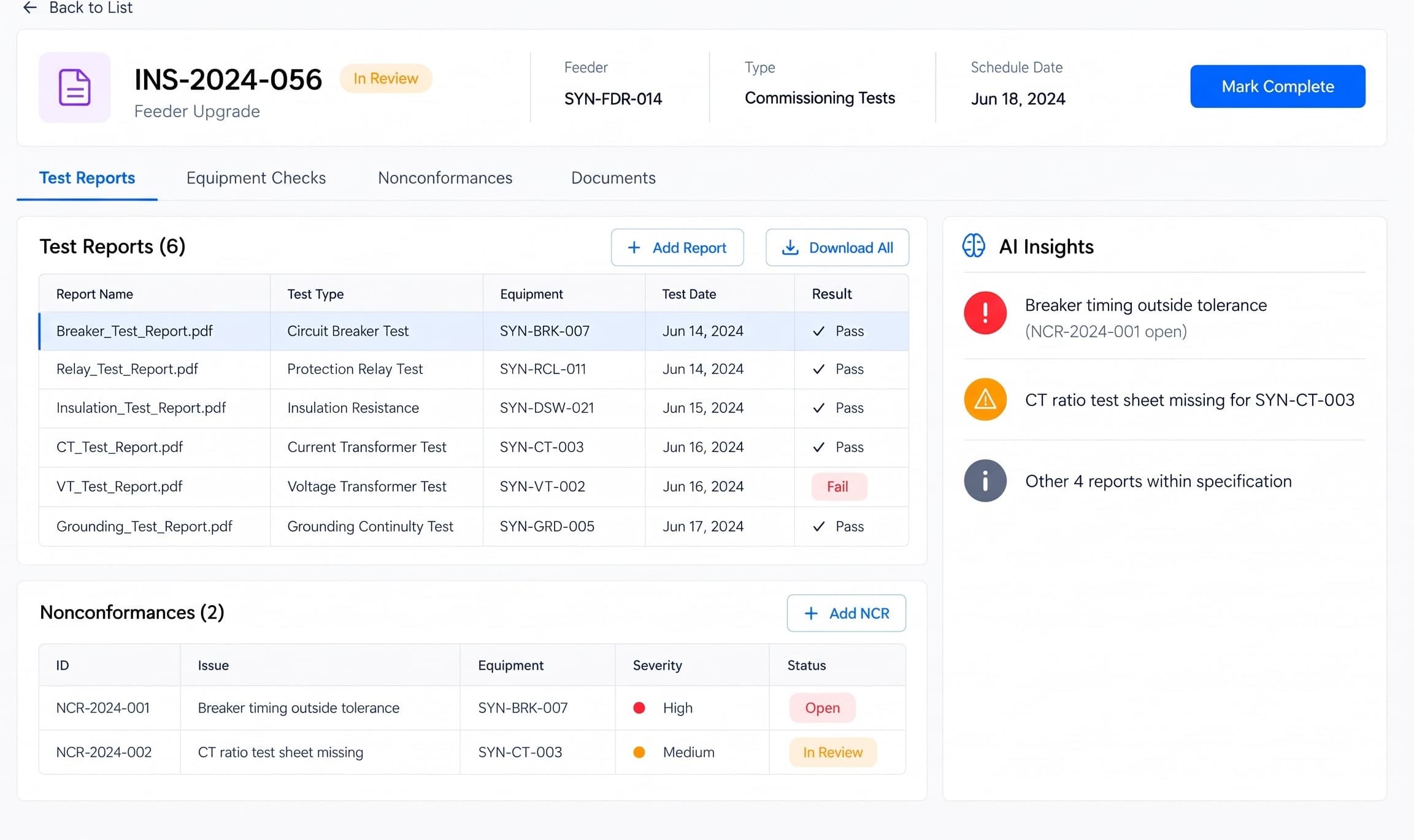
Inspections

Make inspection evidence easier to review

  • Link inspection evidence to the right asset
  • Track findings, reviews and retest requests
https://app.vyrqelthon.ai/inspections
Vyrqelthon AI Inspections module: Organize inspection checklists, photos and test reports by asset or work package. Record findings, reviewer decisions and any follow-up tests.
How it helps

Organize inspection checklists, photos and test reports by asset or work package. Record findings, reviewer decisions and any follow-up tests.

07/ 08

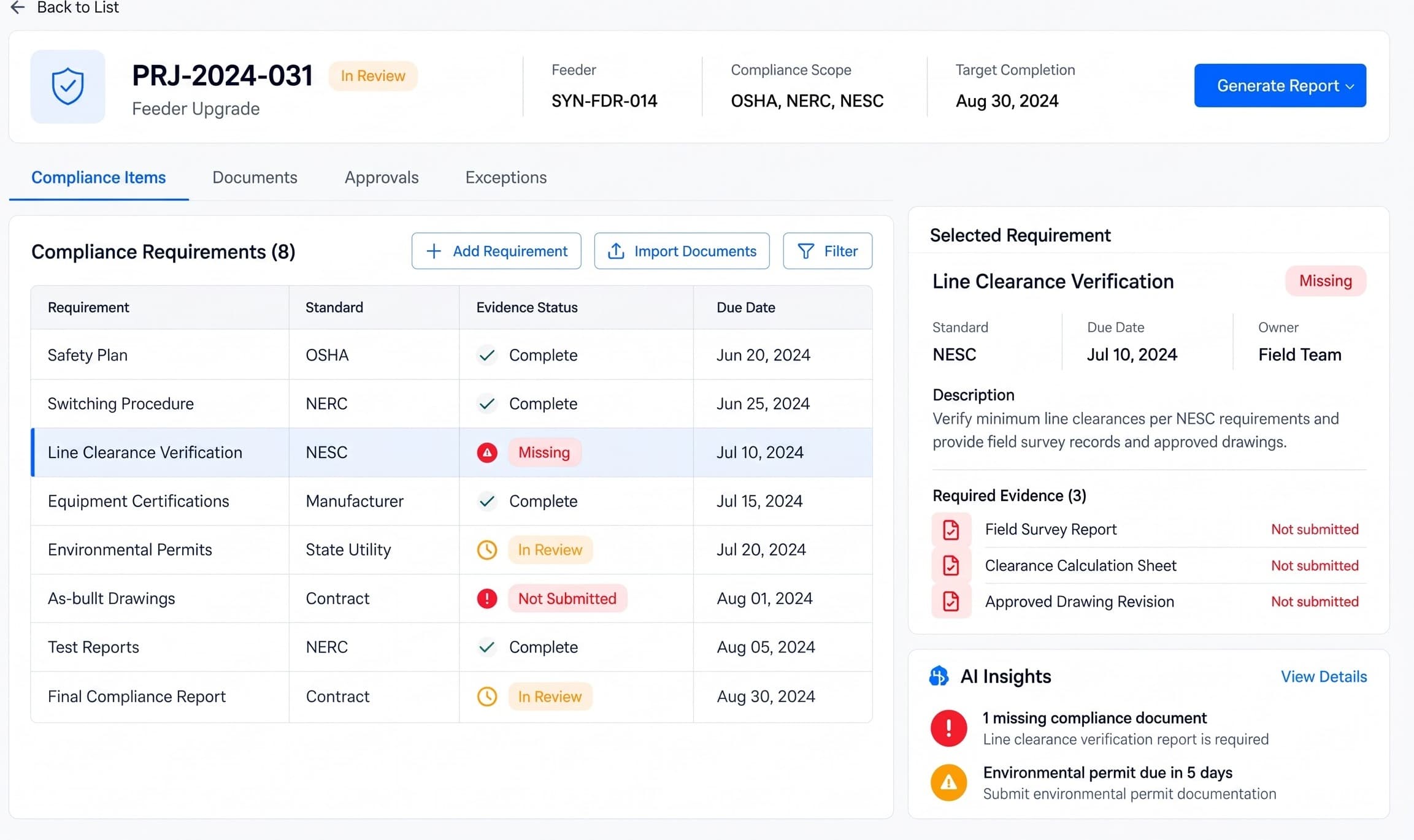
Compliance

Keep required records ready for review

  • Track required records and their owners
  • Record document gaps and review status
https://app.vyrqelthon.ai/compliance
Vyrqelthon AI Compliance module: Organize project requirements, supporting documents and approval status. Help teams find missing records and coordinate reviews with the responsible specialists.
How it helps

Organize project requirements, supporting documents and approval status. Help teams find missing records and coordinate reviews with the responsible specialists.

08/ 08

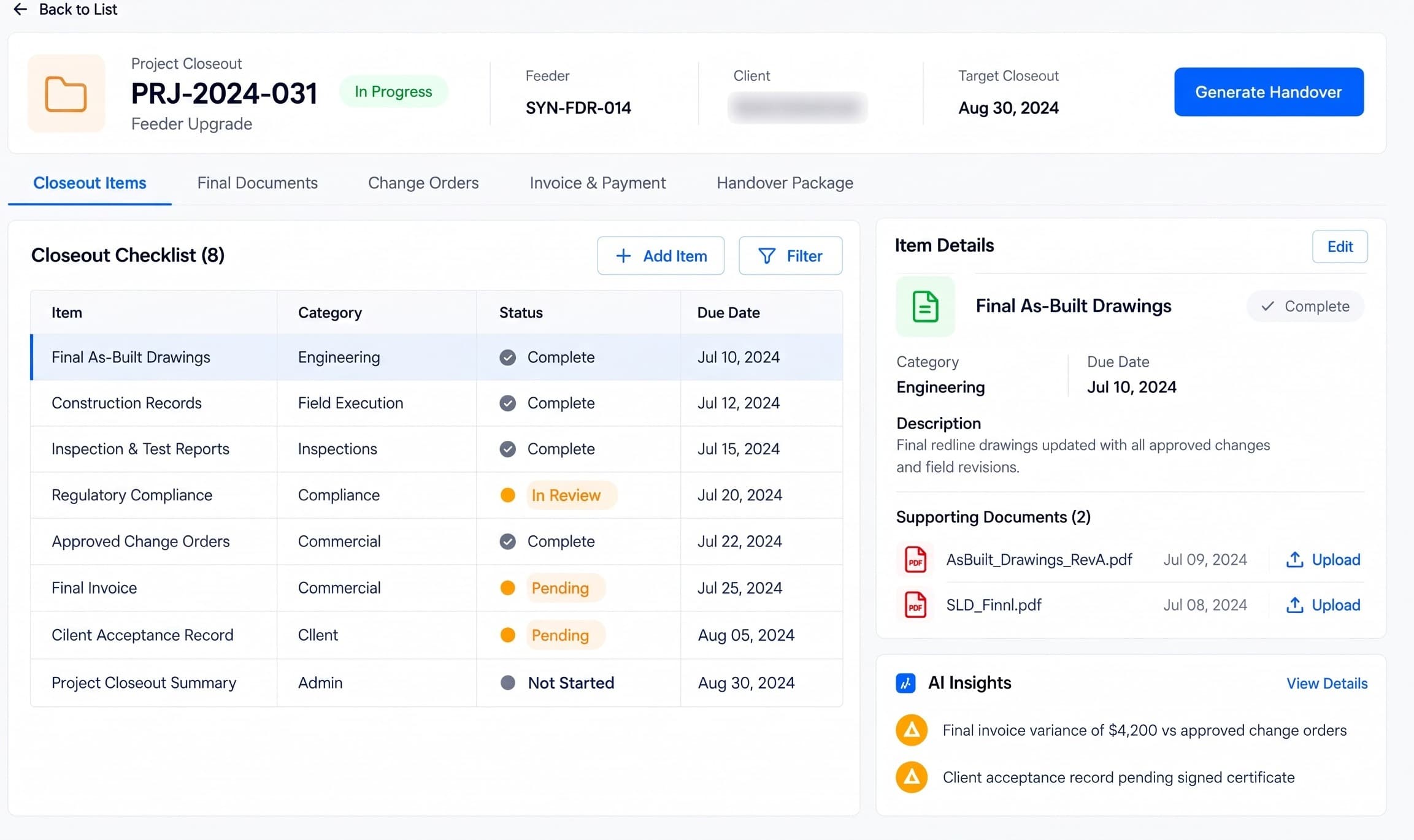
Project Closeout

Bring the handover documents together

  • Gather final drawings and acceptance records
  • Follow up on outstanding handover items
https://app.vyrqelthon.ai/project-closeout
Vyrqelthon AI Project Closeout module: Collect final drawings, inspection records, acceptance documents and commercial records. Track outstanding items before handing the project over to the client.
How it helps

Collect final drawings, inspection records, acceptance documents and commercial records. Track outstanding items before handing the project over to the client.

AI orchestration

Traditional SaaS vs Vyrqelthon AI

Most utility engineering software ships one vendor-chosen model behind a button. Vyrqelthon AI sits between your engineering workflow and the model ecosystem, and sends each step to the model that does it best.

Traditional SaaS

Closed

Intelligence is chosen by the vendor and bolted onto the record system. One model, one path.

01 · System of record

CRM

02 · Vendor-chosen

Built-in AI

03 · Outcome

“You work within its limits.”

Vyrqelthon AI

Adaptive

An orchestration layer reads each step of the job and routes it across frontier and specialist models.

01 · Workflow

RFP triage, protection study, relay test review

02 · AI orchestration layer

Reads the step, picks the route

03 · Frontier & specialist models

Long-context
Vision
Reasoning + code
Extraction

04 · Best model for the task

Chosen per step, not per vendor

05 · Outcome

Best result

Don't settle for the AI your software chose.

Use a platform designed to harness the best intelligence available for the work in front of you.

The model stack

Tiers describe how the platform can route work. They are not partnerships, endorsements or reseller relationships.

01Supported

Default routes for core workflow steps today.

  • OpenAI · GPT
  • Anthropic · Claude
  • Google · Gemini
02Available

Selectable per workspace when a task calls for it.

  • xAI · Grok
  • Mistral AI · Mistral Large
03Specialist

Narrow jobs: bulk extraction, code, open weights.

  • DeepSeek · DeepSeek
  • Alibaba · Qwen
04Roadmap

Under evaluation for future routing.

  • Meta · Llama / Muse

Best model for the task

One project, many models

A single utility engineering job moves through very different kinds of work. Each one is routed on its own merits.

Summarize project requests and extract scope details for reviewer confirmation

Long-context reasoning

Work Requests

Extract equipment references and test values from supplied reports for review

Fast, low-cost extraction

Inspections

Compare document revision references and flag missing study inputs for an engineer

Document comparison and reasoning

Engineering Studies

Note: Model and provider names are illustrative of integration patterns; trademarks belong to their respective owners. Routing is configured per tenant and data boundary. Supported and evaluated ecosystem models include OpenAI, Anthropic / Claude, Google / Gemini, Cohere, Mistral, Meta / Llama, xAI, and DeepSeek.

How it works

A clear path from project request to handover.

Vyrqelthon AI connects the steps your team already follows. Each stage keeps its documents, responsibilities and review decisions with the project.

  1. Step 01: Collect the request

    Capture the project scope, feeder details and supporting documents. Assign an owner and follow up on missing information.

    Work Requests

  2. Step 02: Review the engineering

    Gather study reports and current drawings. Engineers review the inputs, resolve document questions and record their decisions.

    Engineering Studies

  3. Step 03: Prepare the estimate

    Bring quantities, labor costs and quotations together. Review the assumptions and approve the estimate against the agreed scope.

    Estimates

  4. Step 04: Record field work and inspections

    Share work packages and approved drawings. Collect progress updates, inspection evidence and test reports, then track review findings.

    Field Execution · Inspections

  5. Step 05: Review records and hand over

    Check that required documents and approvals are recorded. Resolve outstanding items and gather final drawings and acceptance records for handover.

    Compliance · Project Closeout

High-voltage electrical substation with transformers and switchgear

Industry AI agents · Electric Utility & Grid

Your Electric Utility & Grid AI agents, run like production systems.

Production-oriented agents built around the utility engineering workflow: your work requests, controlled drawings, GIS and engineering teams. Not chatbots. Each agent has a job, connected systems and an outcome you can check.

01 · Industry workflow

Daily RFP triage

Utility RFPs, service requests and feeder work tickets, flowing in from multiple operating companies every day.

02 · AI agents

Extract → reconcile → flag

A scope-extraction agent, a feeder/asset reconciliation agent and a missing-document agent, in sequence.

03 · Connected tools

GIS, work-mgmt and team tools

ArcGIS Utility Network and Smallworld, Maximo and Oracle WAM, Microsoft Teams and Jira.

04 · Execution

Classify, open, post

Classifies the request, opens a work-request record with the right reviewer, and posts the triage summary to the engineering channel.

05 · Outcome

Caught at intake

A missing load report or an unauthorized scope item surfaces at triage instead of at construction, and the engineering package reaches the reviewer complete.

Tools & integrations

Your existing tools become part of the AI workflow

Keep the systems your utility already runs. Vyrqelthon AI connects to them through their public APIs, so GIS feeders, controlled drawings, work orders and inspection evidence move between the platform and the tools your team opens every day.

Note: Tool names and marks belong to their respective owners. No endorsement or partnership implied. Integration availability depends on your existing systems, licences, API access, security configuration and implementation scope.

  • GIS & asset systems

    Feeders, substations and asset nameplate records referenced in work requests, studies and inspections.

    • Esri ArcGIS Utility Network
    • GE Smallworld
    • Bentley OpenUtilities
    • AutoCAD
    • MicroStation
  • Work & asset management

    Work orders, outage coordination and change orders synchronized across the engineering record.

    • IBM Maximo
    • Oracle WAM
    • SAP PM
  • Communication

    Reviewer notifications, field-crew updates, approvals and outage scheduling.

    • Microsoft Teams
    • Slack
  • Productivity & engineering tasks

    Study punch lists and field work as tracked tasks; equipment, revision and NCR tables.

    • Jira
    • Google Sheets
  • Data & analytics

    Portfolio health, SCADA historian snapshots and verification datasets for engineering review.

    • Microsoft Power BI
    • Snowflake
    • Databricks
  • Finance & billing

    Engineering fee invoices, construction progress billing and change-order payments.

    • QuickBooks Online
    • Xero
    • Stripe
  • Automation

    No-code triggers between the platform and long-tail tools.

    • Zapier

Add-ons

Add the hardware your workflow needs.

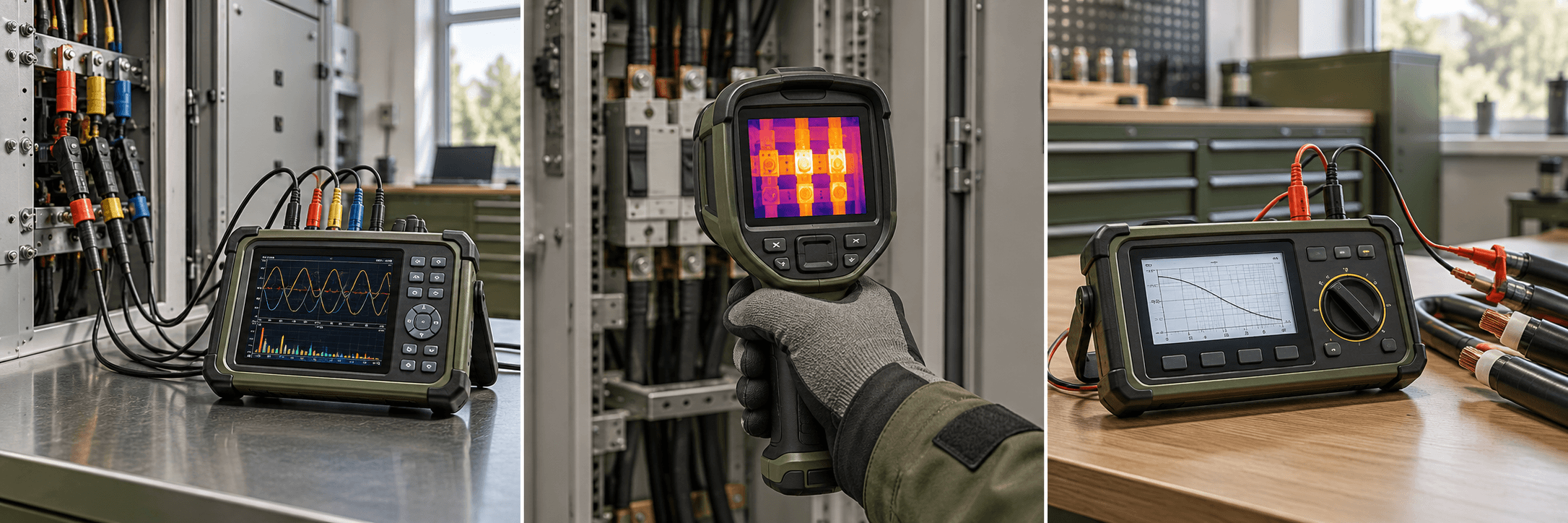
Third-party equipment that supplies useful engineering and inspection evidence. Select models with exportable reports; the agreed implementation maps those files to your study or inspection records. Device software and supported file formats are confirmed during scoping.

Swipe to explore · 1 / 3
  • Portable power-quality analyzer in an electrical engineering inspection or commissioning setting
    Engineering Studies

    Portable power-quality analyzer

    Integration pathway
    Vendor software → CSV or PDF export → study evidence upload
    Operational use
    Review voltage sags, harmonics and load measurements alongside the feeder study.
    Result
    Measured study inputs and a traceable source report for engineering review.
  • Handheld thermal imaging camera in an electrical engineering inspection or commissioning setting
    Inspections

    Handheld thermal imaging camera

    Integration pathway
    Vendor software → JPEG / PDF inspection report → evidence upload
    Operational use
    Document hot spots on busbars, transformer connections and switchgear during a walkdown.
    Result
    Thermal findings linked to the asset inspection and follow-up review.
  • Insulation resistance tester in an electrical engineering inspection or commissioning setting
    Inspections

    Insulation resistance tester

    Integration pathway
    Vendor reporting software → test report export → evidence upload
    Operational use
    Review cable and equipment insulation measurements during commissioning.
    Result
    A retained test report for acceptance review, NCR documentation or retest decisions.

Note: Hardware, installation, and integration are not included in the standard subscription. Additional charges apply based on the hardware selected, integration modules required, and implementation scope.

Compliance

Keep project evidence ready for review.

Vyrqelthon AI helps organize the documents your reviewers need for applicable utility safety and transformer requirements. Keep records, owners and review decisions together; qualified specialists assess the engineering and field work.

Swipe to explore · 1 / 3
  • NESC (IEEE C2)

    National Electrical Safety Code

    Organize clearance documents, grounding records and field inspection evidence alongside approved drawings. Track missing records and coordinate review by your engineers.

    Carried in Field Execution · Inspections · Compliance

  • OSHA 29 CFR 1910.269

    Utility Safety Documentation

    Keep pre-job briefing records, supplied safety forms and inspection evidence organized for authorized review on applicable operation and maintenance work. Required field procedures remain with qualified personnel.

    Carried in Field Execution · Inspections · Compliance

  • IEEE C57

    Transformer Documentation & Test Evidence

    Bring transformer specifications, nameplate information and test reports together. Flag missing documents and inconsistent equipment references for engineering review, within the agreed project scope.

    Carried in Engineering Studies · Inspections

Note: These are standards the platform is built to support inside your workflows — obligations that fall on you as the licensee. They are not certifications held by us, and support in the product is not a substitute for your own counsel or compliance officer.

Pricing

One plan. Every module.

A transmission tower lit at night — the kind of asset utility engineering teams steward

One subscription opens the whole platform for your engineering practice. No per-module add-ons and no tiers to decode: every project runs from work request to a signed, closed-out handover in the same workspace.

Included in every workspace:

  • Dashboard
  • Work Requests
  • Engineering Studies
  • Estimates
  • Field Execution
  • Inspections
  • Compliance
  • Project Closeout

Starting at

$200/mo

Every module, every dashboard, one workspace.

8

Modules included

1

Workspace for intake, studies, field execution and closeout

Note: AI API usage is charged separately. Clients must recharge their AI credit balance based on their usage.

Onboarding

What your onboarding fee covers

A one-time setup that gets your utility engineering team live before the first monthly cycle. We load your active work requests and feeder register, import controlled drawings and study libraries, link your GIS/CAD and work-management systems, and configure your intake, study, estimate and inspection templates. Each fee below is a starting point: we scope the final onboarding once we understand your environment, security needs, integrations, data volume, compliance requirements and deployment model, so the exact figure comes after that conversation, never before.

Swipe to explore · 1 / 3

Essential

from$1,000+one-time onboarding

The foundation:

  • Kickoff call and onboarding plan for your engineering practice and active project portfolio
  • Workspace setup with admin, engineer, reviewer and field roles
  • Import of utility, feeder, substation and asset records from your spreadsheets or GIS export
  • Load up to 24 months of controlled drawing revisions and study references
  • Request intake form and work-request pipeline configured to your service lines
  • Study report folders, equipment reference fields and engineering review templates configured
  • RFP scope-extraction, intake checklist, and reviewer-assignment rules configured
  • Readiness check on dashboards and controlled-revision rules before your first monthly cycle

Plus

Recommended
from$2,500+one-time onboarding

Everything in Essential, plus:

  • GIS feeder data and asset nameplate connections (Esri ArcGIS Utility Network or Smallworld export)
  • Controlled-drawing and SLD intake from AutoCAD / MicroStation / Bentley OpenUtilities libraries
  • Project document checklists and applicable safety record templates configured for reviewer use
  • Two integrations with your CRM, finance or work-management tools (Maximo, Oracle WAM, SAP PM)
  • Live training for engineers, reviewers and field teams, with a recording

Enterprise

from$5,000+one-time onboarding

Everything in Plus, plus:

  • Implementation plan across multiple offices, utility territories or operating companies
  • Live telemetry ingestion from SCADA historians (OSIsoft PI, GE Historian) for review context
  • Project evidence folders, document ownership and approval workflows configured across your portfolio
  • SSO, custom API integrations and data-warehouse export (Snowflake / Databricks)
  • Bulk migration of past studies, as-builts and inspection records, with reconciliation
  • Named onboarding manager with an agreed go-live date

Deployment

Two ways to run the platform

The subscription is the same either way. Only the one-time onboarding scope can differ with your hosting and security requirements.

Cloud (SaaS)

Runs in Nestack's managed cloud. We handle hosting, scaling, updates and backups, so work requests, studies, estimates and inspection records start flowing without any infrastructure to set up.

Private / self-hosted

Discuss deployment in your own cloud / VPC or on-prem where project documents and equipment records must stay within your environment. Hosting, security requirements and implementation scope are confirmed during planning.

FAQ

Questions, answered

Practical answers about using Vyrqelthon AI, getting started and evaluating it for your team.