AI-POWERED 3D PRODUCTION OPERATIONS

ONE CONNECTED PLATFORM FOR THE ENTIRE 3D PRODUCTION LIFECYCLE

Zqelvorith AI connects every stage of 3D modeling, visualization, and rendering in one intelligent platform. From client briefs and CAD/BIM verification to project estimates, asset preparation, 3D production, rendering, quality reviews, and final delivery, every stage stays connected. AI identifies missing requirements, highlights design revisions, forecasts delivery delays, detects rendering problems, and summarizes production risks. With source files, approvals, deliverables, and invoices linked to each project, studios can reduce rework, improve delivery reliability, and maintain control over project costs.

SEVEN OPERATIONAL STAGES · EIGHT CONNECTED MODULES · ONE PROJECT RECORD

The 3D production command center

EVERY PROJECT, EVERY RENDER, EVERY APPROVAL, CONNECTED.

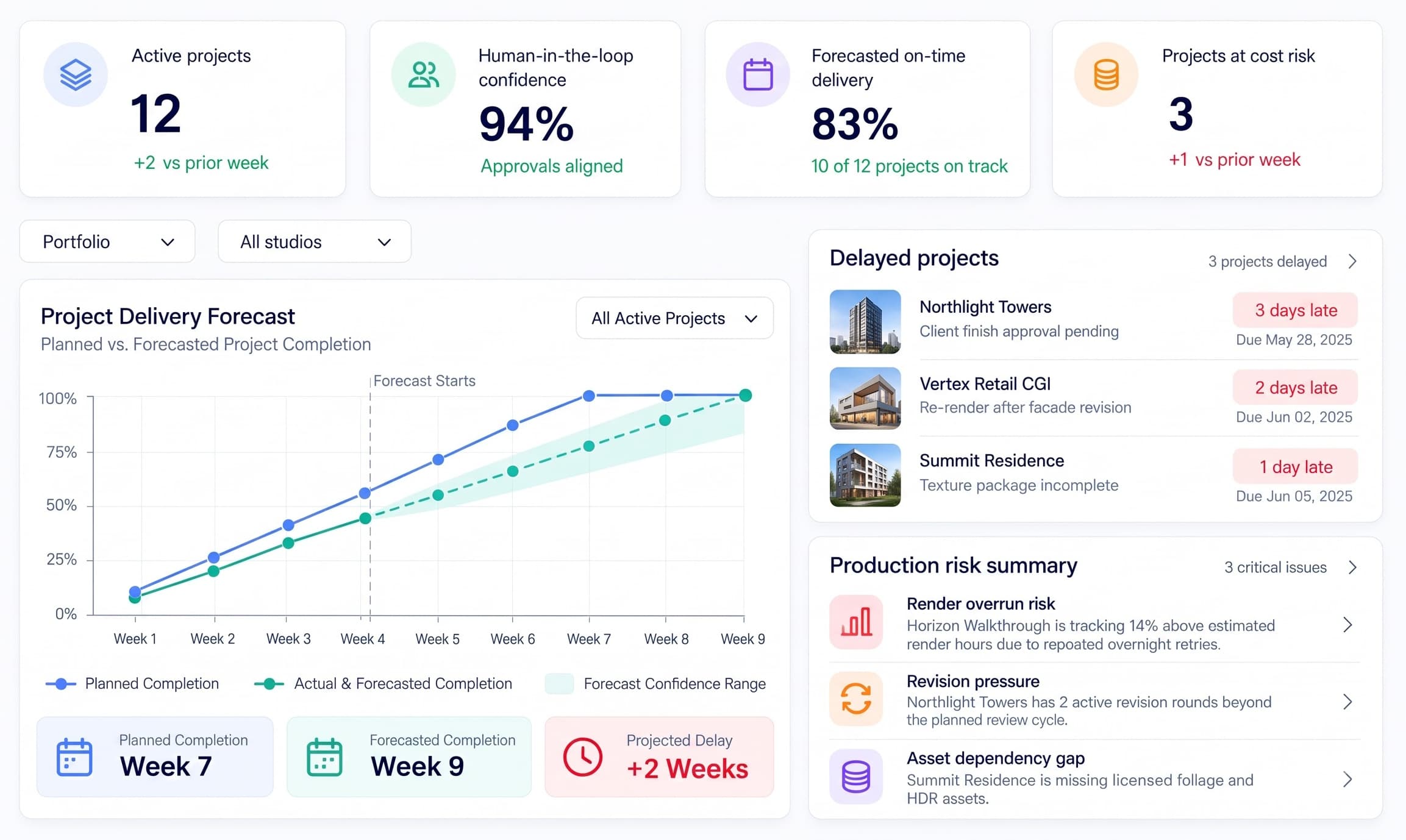
The Zqelvorith AI Dashboard gives 3D studio leaders one connected view of active projects, production progress, rendering workloads, pending approvals, and project costs. It forecasts delivery delays, identifies stalled projects, highlights failed rendering tasks, and detects potential budget overruns. AI summarizes production risks, explains issues such as missing assets, excessive revisions, and rendering delays, and directs each issue to the responsible module for human review and action.

Zqelvorith AI — 3D Production Dashboard
1

Human Review Confidence

94% of approvals are aligned. Pricing decisions, engineering design authority and final client acceptance stay with people; AI only prepares the summaries they review.

1 / 3
Product-wide performance & efficiencyProposed pilot targets
  • 20%

    Less Project Coordination Time

    From fragmented instructions to connected production records.

    Target reduced time spent tracking client briefs, design revisions, artist handoffs, render progress, and approval requests.

  • 95%

    Project Record Completeness

    Keep project information traceable from intake to delivery.

    Target complete records for approved source files, estimates, asset dependencies, scene revisions, rendering progress, and client approvals.

  • 4 hrs

    Weekly Administrative Time Savings

    Less repetitive documentation and manual coordination.

    Target four hours saved per coordinator per week through document extraction, asset retrieval, revision summaries, render-log checks, and delivery reconciliation.

  • 15%

    Less Avoidable Rework

    Prevent repeated corrections caused by incomplete or outdated information.

    Target fewer correction hours arising from wrong drawing revisions, missing texture dependencies, incomplete specifications, and untracked changes.

Note: Proposed pilot targets only, not verified results or industry benchmarks. Actual performance depends on project complexity, existing studio processes, user adoption, and available integrations. Validate improvements against measured pre-implementation baselines.

The Nestack visual production suite

Built for every stage of visual production.

3D visualization studios, photography studios and print production teams each run their work differently, with their own briefs, approvals and deliverables. Zqelvorith AI follows one project record from intake and estimates through assets, production, rendering, review and closeout, and sits beside platforms built around the data flow of photography and printing.

The connected 3D production workflow

FROM VERIFIED BRIEFTO APPROVED RENDERS,DELIVERY & PAYMENT.

Zqelvorith AI connects every stage of the 3D production lifecycle through one project record. Client briefs, CAD/BIM drawings, project estimates, approved assets, production scenes, rendering outputs, quality reviews, and final invoices move through seven connected operational stages. AI helps extract project requirements, identify drawing conflicts, track production risks, analyze render failures, and verify deliverables. Every stage passes approved information to the next, while human reviewers remain responsible for design decisions, commercial approvals, and final client acceptance.

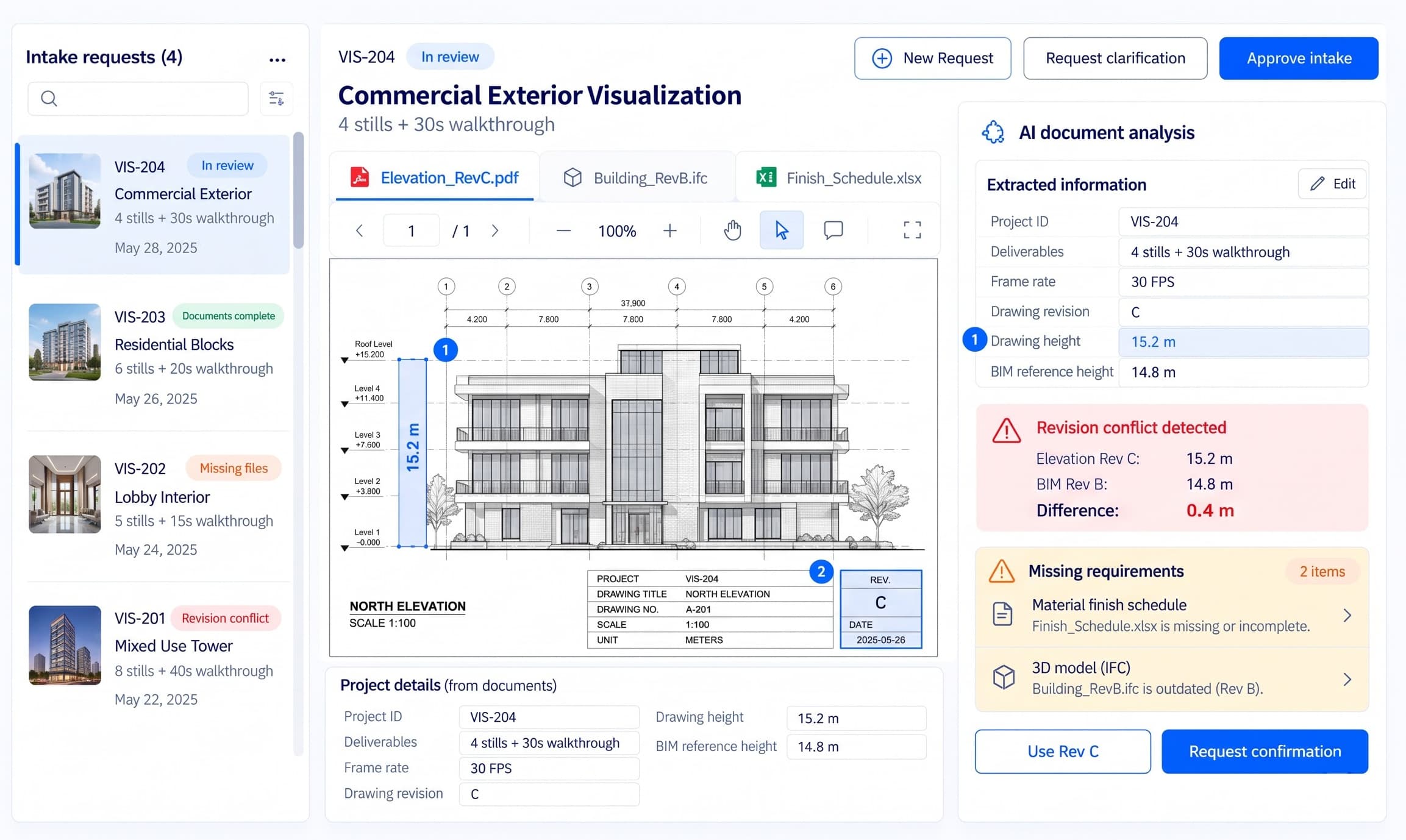
Intake — Zqelvorith AI
Intake

Turn Client Briefs Into a Verified Project Record.

Collect client briefs, CAD/BIM drawings, reference images, and project requirements in one place. AI extracts key details, identifies missing information, and flags conflicting design revisions. Verify the source documents and pass an approved project brief to Estimating.

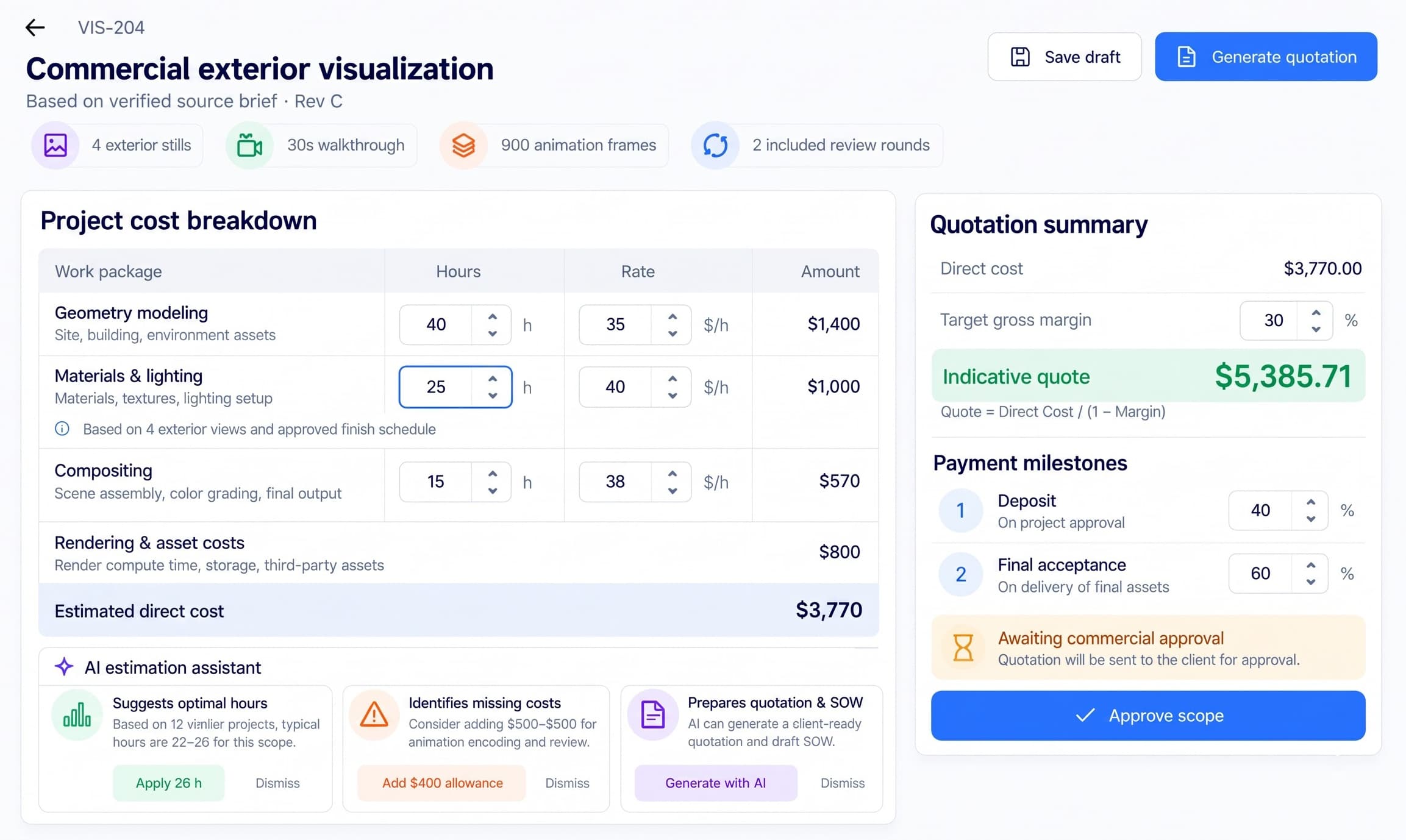
Estimates — Zqelvorith AI
Estimates

Price the Scope Before You Commit to It.

Calculate modeling hours, rendering costs, asset requirements, and revision allowances based on the approved client brief. AI helps identify missing cost items and supports quotation preparation. Output an approved project scope, budget, and asset requirements for production.

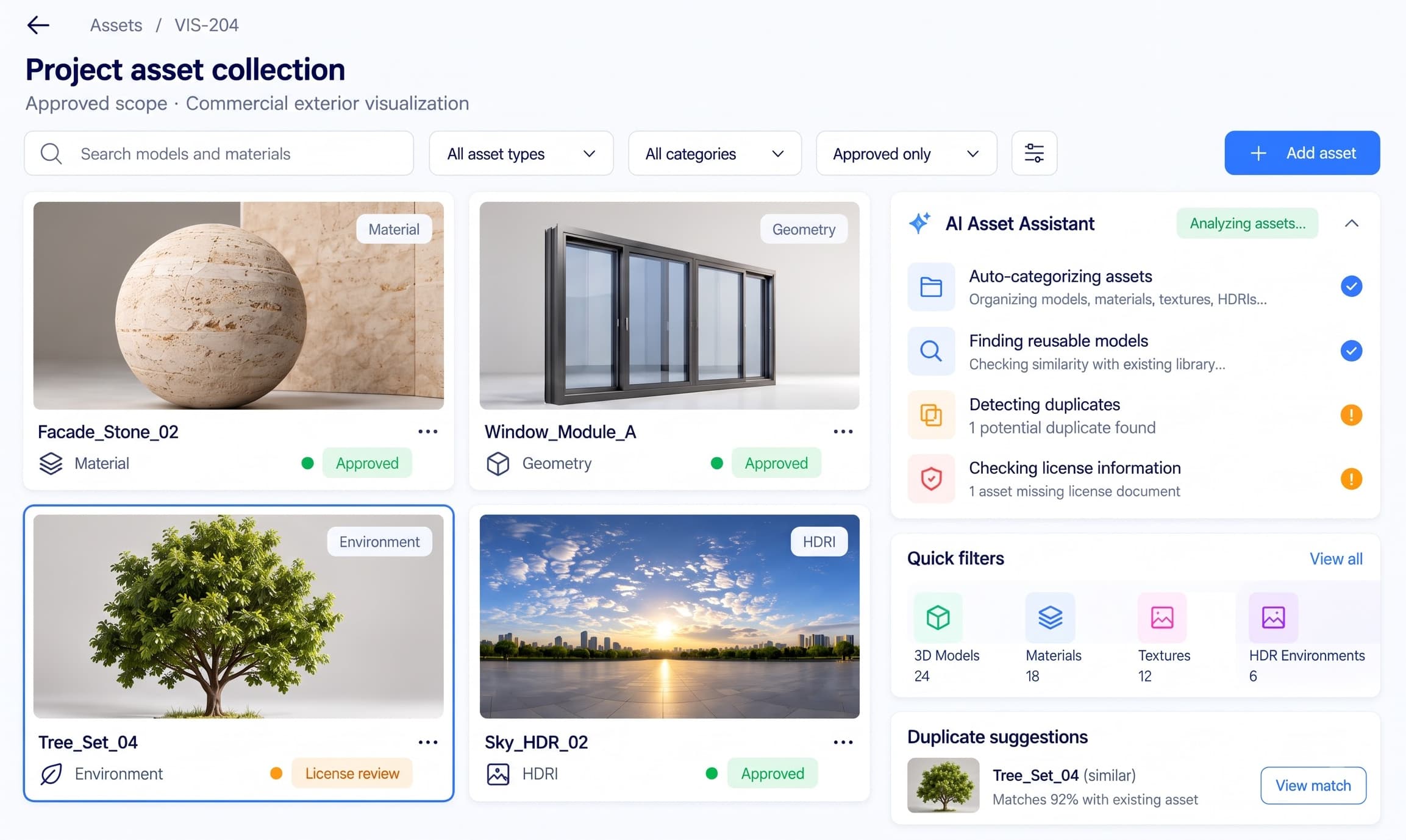
Assets — Zqelvorith AI
Assets

Know Every Model, Texture and License in the Project.

Organize 3D models, textures, HDR environments, and licensing information against the project. AI searches and classifies assets, identifies missing dependencies, and flags incomplete license records. Output an approved asset collection and dependency manifest.

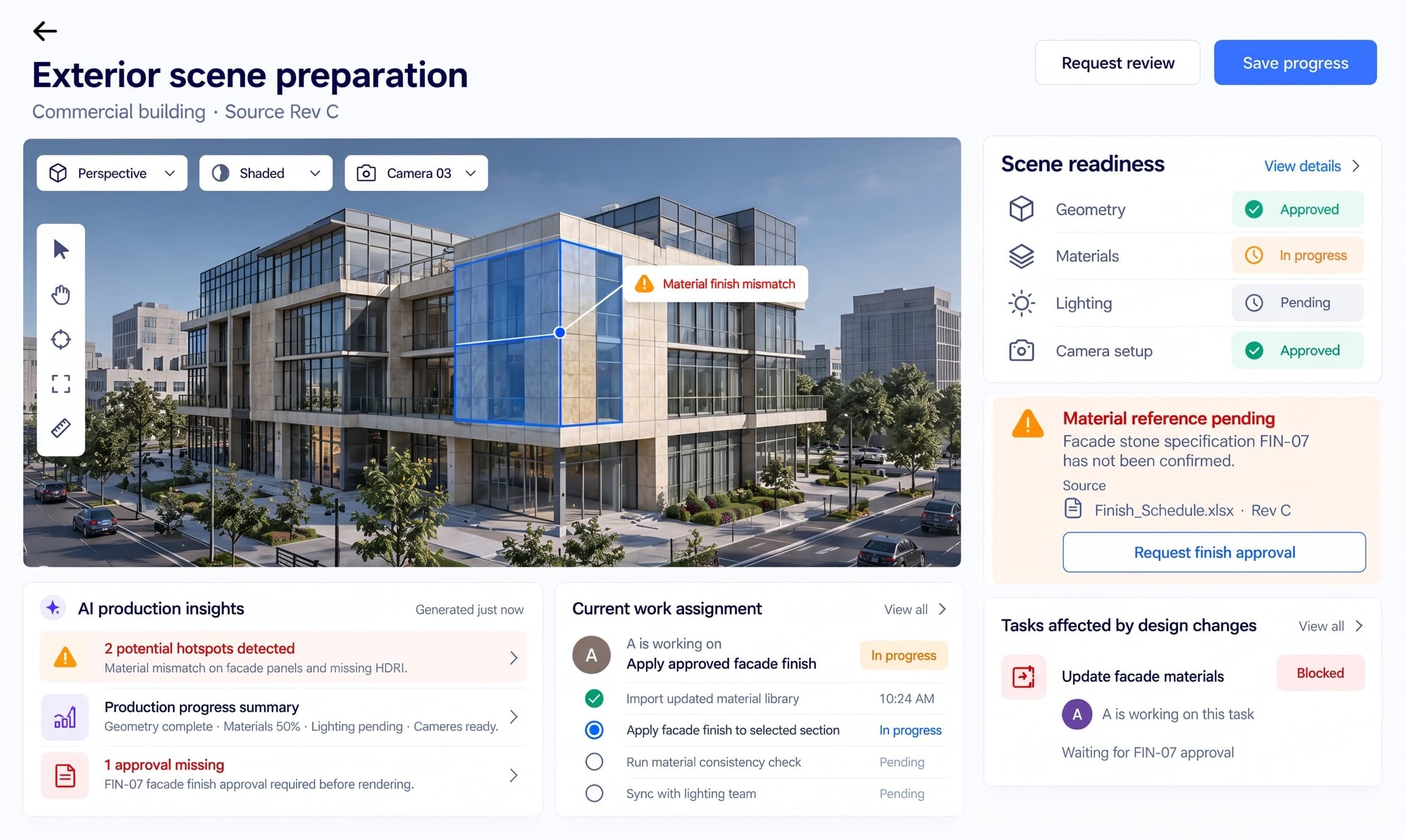
Production — Zqelvorith AI
Production

Coordinate the Scene Until It's Render-Ready.

Track modeling, geometry preparation, materials, lighting, and camera setup against the approved scope. AI highlights design changes, missing approvals, and blocked handoffs between artists. Output a reviewed scene revision, ready for rendering.

Rendering — Zqelvorith AI
Rendering

Keep Every Render Job Moving Towards Completion.

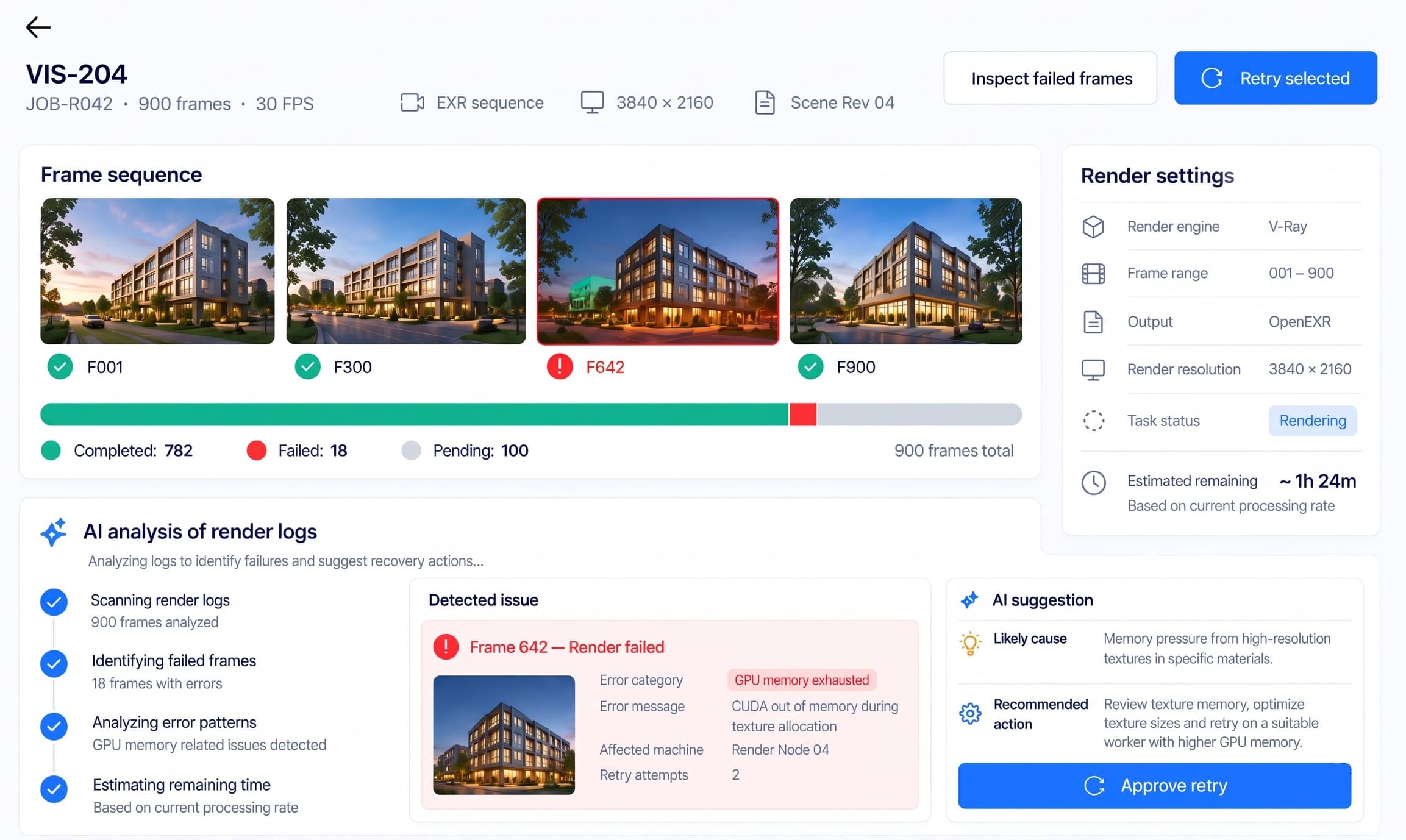
Monitor rendering progress, animation frames, machine workloads, and failed tasks. AI analyzes available render logs, identifies possible failure causes, and estimates remaining rendering time. Pass completed images, frame sequences, and technical records to Review.

Review — Zqelvorith AI
Review

Turn Every Revision Into a Clear Approval.

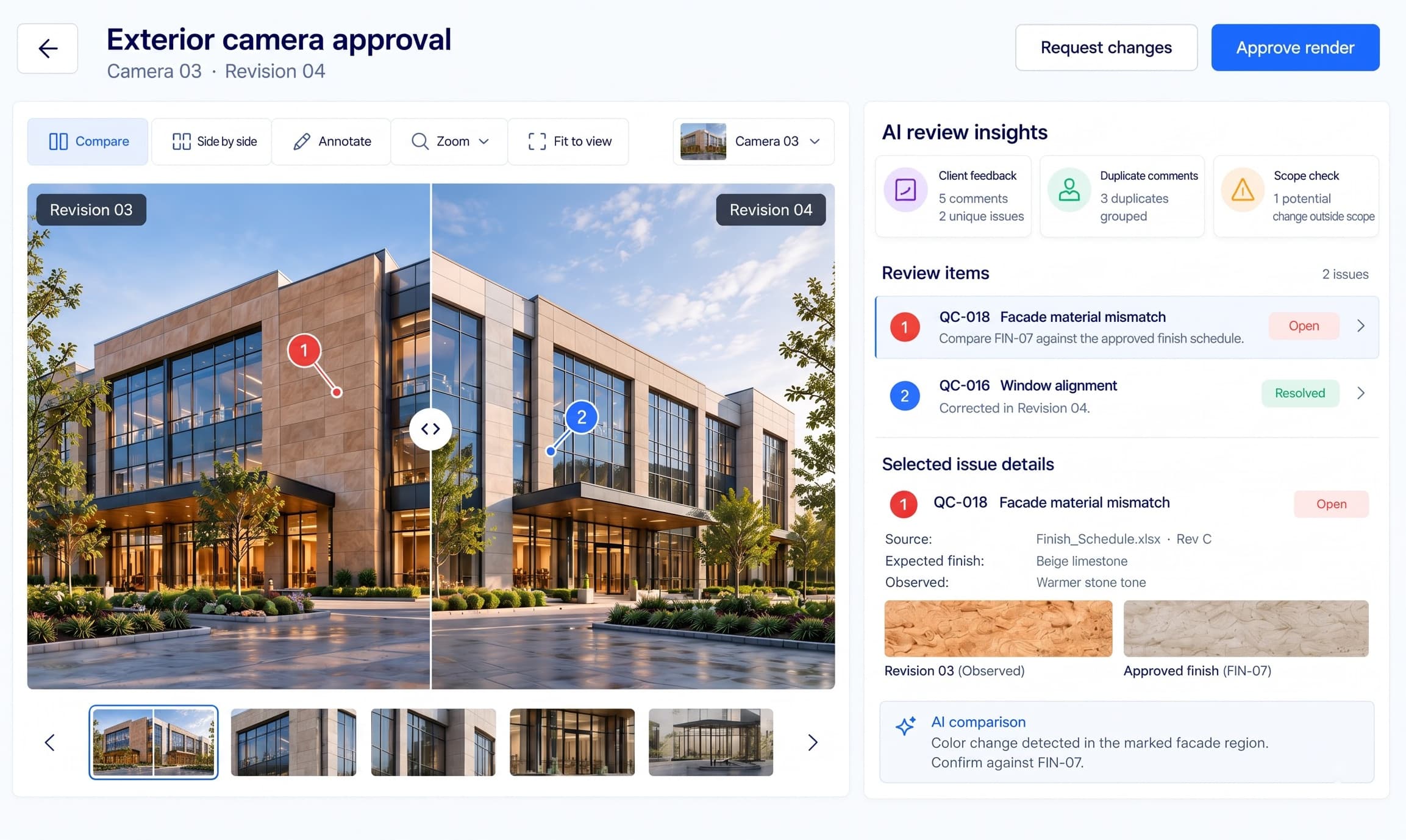
Review rendered images, compare versions, record visual defects, and collect client feedback. AI summarizes comments, identifies repeated issues, and highlights changes that may affect the agreed scope. Pass quality-checked, client-approved deliverables to Closeout.

Closeout — Zqelvorith AI
Closeout

Deliver Every File. Account for Every Payment.

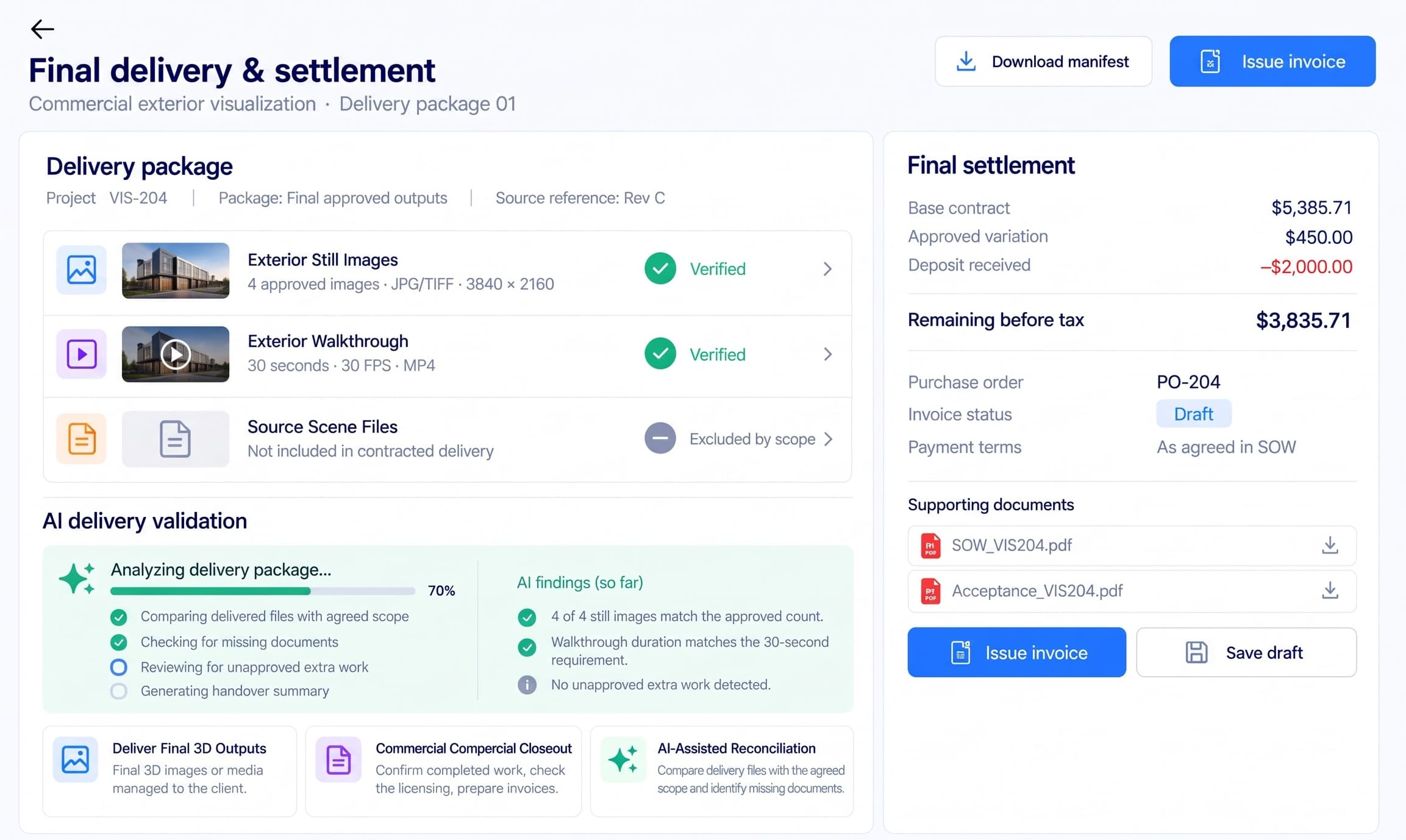
Verify final renders, animation files, asset licenses, and client acceptance against the approved scope. AI flags missing deliverables and unapproved charges before handover. Complete the delivery package, prepare the final invoice, and track project settlement.

how it works

From client brief
to delivered project

Zqelvorith AI connects client requirements, project estimates, 3D assets, production scenes, rendered outputs, approvals, and invoices through one project record. AI helps identify missing information and production risks, while people remain responsible for final decisions.

  1. 01
    intake & estimates

    Verify the Brief and Approve the Scope

    Receive client briefs, CAD/BIM drawings, reference images, and project requirements. AI extracts key details and flags missing information or conflicting revisions. The team verifies the source documents, calculates modeling and rendering costs, and approves the quotation.Output: Verified project brief, approved scope, budget, and asset requirements.

  2. 02
    assets & production

    Prepare Assets and Build the Scene

    Organize approved 3D models, textures, HDR environments, and material references. Artists prepare geometry, apply materials, configure lighting, and set cameras. AI highlights missing dependencies, design changes, and unresolved production requirements.Output: Approved asset package and render-ready 3D scene.

  3. 03
    rendering & review

    Render, Review and Approve

    Track render jobs, animation frames, and output files. AI analyzes available render logs, flags failures, and summarizes revision feedback. Reviewers inspect visual quality, compare image versions, request corrections, and approve final deliverables.Output: Quality-checked, client-approved images and animations.

  4. 04
    closeout

    Deliver, Invoice and Close

    Verify final files against the approved scope, confirm asset licensing and client acceptance, and reconcile approved changes. AI highlights missing deliverables or billing discrepancies before the team issues the final invoice and records payment.Output: Final delivery package, invoice, payment record, and completed project archive.

Traditional 3D Production vs. Connected Operations

Don’t settle for disconnected tools.
Bring the entire 3D production lifecycle into one platform.

3D studios manage client briefs, CAD/BIM files, estimates, models, rendering, reviews, and invoices across different applications. Zqelvorith AI connects these stages through one project record, keeping approved source revisions, production progress, client decisions, and final deliverables traceable.

Traditional Tools
Disconnected
Tools
AutoCAD · Revit
Blender · Maya
3ds Max · V-Ray
Excel · Email

Studios rely on separate modeling applications, rendering engines, spreadsheets, shared folders, and email conversations. Teams manually reconcile source revisions, production tasks, render failures, client feedback, and invoices.

Traditional studio workflows

ZQELVORITH AI — CONNECTED 3D PRODUCTION
  • 01
    Intake

    Verify Client Briefs and Source Files

    AI extracts requirements from client briefs, CAD/BIM references, and technical documents. The team verifies drawing revisions, missing dimensions, and source authority before approving the project brief.

    Output: Verified project brief and approved source register.

    Mistral OCR
  • 02
    Estimates

    Calculate Scope, Costs and Hours

    Build estimates for modeling, materials, rendering, and revisions. AI highlights missing cost items while calculation rules determine project budgets, margins, and quotation totals.

    Output: Approved quotation, project scope, and budget.

    Python
  • 03
    Assets

    Organize Models, Textures and Licenses

    Manage 3D geometry, texture maps, HDR environments, and asset dependencies. AI helps classify reusable assets, search approved libraries, and flag missing license records.

    Output: Approved asset collection and dependency manifest.

    Hugging Face
  • 04
    Production

    Coordinate Modeling and Scene Preparation

    Track geometry, UV mapping, materials, lighting, and camera setup. AI summarizes design changes, identifies blocked handoffs, and highlights missing approvals before rendering.

    Output: Approved render-ready scene.

    Blender Python API
  • 05
    Rendering & Review

    Monitor Rendering and Verify Quality

    Track completed frames, rendering failures, and visual revisions. AI analyzes available render logs, compares supported images, and summarizes review comments. Human reviewers approve final outputs.

    Output: Quality-checked, client-approved renders and animations.

    AWS Deadline Cloud
  • 06
    Closeout

    Deliver Assets and Complete Settlement

    Verify final deliverables, license records, client acceptance, and approved variations. AI identifies missing files or billing discrepancies before invoice preparation and project closure.

    Output: Delivery package, invoice, and settlement record.

    Stripe
One project record · Seven operational stages · Eight connected modules

Note: Zqelvorith AI is designed to coordinate studio operations alongside existing 3D creation and rendering tools. Named technologies are proposed integration options, not confirmed live integrations. AI assists with analysis; people retain approval authority.

Connectivity

Your entire 3D production stack connected.

Zqelvorith AI brings your 3D production tools, creative workflows, and business operations into one connected environment. From CAD/BIM files and asset preparation to modeling, rendering, client reviews, and final invoicing, project information stays linked across every stage. AI helps extract requirements, identify source conflicts, analyze rendering failures, and track deliverables, while teams retain control over creative decisions and approvals.

AutoCAD
Autodesk Revit
Blender
Autodesk Maya
Autodesk 3ds Max
Chaos V-Ray
Google Drive
Dropbox
Adobe Frame.io
Google Calendar
QuickBooks Online
Stripe
AutoCAD
Autodesk Revit
Blender
Autodesk Maya
Autodesk 3ds Max
Chaos V-Ray
Google Drive
Dropbox
Adobe Frame.io
Google Calendar
QuickBooks Online
Stripe
Claude API
Mistral OCR
Hugging Face
Autodesk APS
Blender Python API
AWS Deadline Cloud
OpenCV
OpenImageIO
PostgreSQL
pgvector
Amazon S3
V-Ray App SDK
Claude API
Mistral OCR
Hugging Face
Autodesk APS
Blender Python API
AWS Deadline Cloud
OpenCV
OpenImageIO
PostgreSQL
pgvector
Amazon S3
V-Ray App SDK

Note: Illustrative integration ecosystem for Zqelvorith AI. Actual availability depends on provider APIs, supported access methods, licensing, account permissions, and integration development. Displayed tools represent potential integrations and do not imply existing partnerships or currently active connections.

Zqelvorith AI — 3D Production Operations

Connected 3D production, from brief to delivery.

Zqelvorith AI follows one project identifier. A verified brief becomes an approved scope; the scope drives asset preparation and the production scene; the approved scene is rendered, and render outputs go through review. Approved outputs feed Closeout, so the final invoice traces back to what was approved. AI assists at each step and people approve.

  • Intake and Estimates: briefs and drawings become a verified brief, then an approved scope, budget and quotation
  • Assets and Production: models, textures and licenses organized, then a render-ready scene built and approved
  • Rendering and Review: render jobs tracked, revisions compared, and client approval recorded
  • Closeout: deliverables, licensing, invoices and payments reconciled into a delivery package

Built for end-to-end 3D production operations

Sister platform — Nestack AgentsProduction playbooks

Your studio operations AI agents, run like production systems.

The AI agents behind scheduling, render capacity, stage handoffs and delivery forecasts need monitoring too. Nestack Agents, a separate Nestack service, adds telemetry, evaluations, guardrails, human review, and a crew on call when an agent starts drifting — before scheduling, capacity or reporting errors reach your clients.

138
Failure modes
49
SEV-1 failure modes
2240+
Baseline eval cases
24/7
Agent monitoring
Explore Operations AI Agents

Operations agents are catalogued on Nestack Agents.

Standards we support

Built for Accountable
3D Production Operations

Zqelvorith AI helps studios keep source revisions traceable, asset licenses recorded and client personal data controlled. Formats, project-information standards, licenses and statutes are different things, and each is shown for what it is. Every stage supports human approvals, controlled access and the retention of records that disputes and audits rely on.

  • ISO 10303

    STEP — ISO 10303 (product data representation and exchange)

    The neutral file format studios commonly receive CAD product models in. STEP files can be received as source documents in Intake; the platform keeps each revision traceable and flags revision discrepancies from supported file data for human review. It does not certify the design.

  • ISO 16739-1

    Industry Foundation Classes (IFC) — ISO 16739-1

    An open data schema for exchanging BIM model data, for studios visualizing architectural projects. IFC files can be received as source documents in Intake; the platform reads supported file data and does not certify the design or the file's conformance.

  • ISO/IEC 12113

    glTF 2.0 — runtime 3D asset delivery format (ISO/IEC 12113)

    A standard format for transmitting 3D scenes and models. Assets in this format are tracked in the Assets manifest alongside their textures and dependencies, so missing files surface before production starts.

  • CC LICENSES

    Creative Commons license suite (CC BY, CC BY-SA, CC0 and others)

    Licenses that set the attribution, share-alike and commercial-use terms of reusable assets. Zqelvorith AI records the license against each asset, flags incomplete license records, and checks them again at Closeout; people confirm the terms of use.

  • GDPR

    EU GDPR (Regulation 2016/679) and UK GDPR

    Client contacts, approver identities and user accounts are personal data, and higher-tier infringements can reach €20 million or 4% of worldwide turnover. Zqelvorith AI supports role-based access, controlled retention and traceable approval records across every stage.

Note: These are rules and standards the platform is built to support inside your workflows — obligations that fall on you as the licensee. They are not certifications held by us, and support in the product is not a substitute for your own counsel or compliance officer.

Add-ons

The kit your production floor needs.

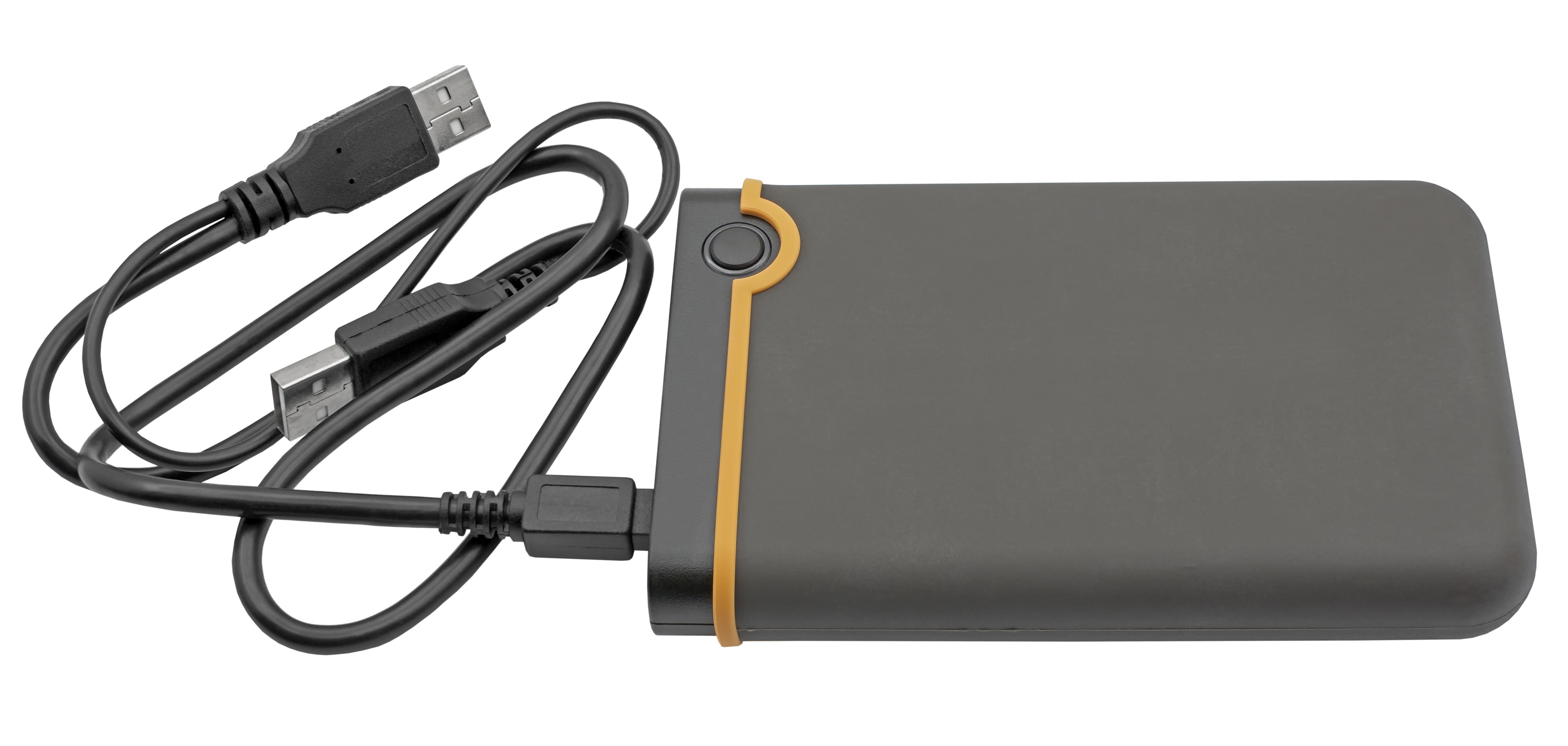
A companion hardware option that pairs with Zqelvorith AI. It carries large project files between workstations and render machines, so source files, approved assets, scenes and final deliverables can be registered against the project record rather than left as another file on someone’s desktop.

Portable SSD

Portable SSD

Keep Your Project Files Within Reach.

Carry CAD/BIM source files, approved assets, scene files, and render outputs between workstations and render machines. Files moved on the drive can be registered against the project in Intake, Assets, Rendering, and Closeout, so handoffs stay traceable through to final delivery.

Note: Hardware, installation, and integration are not included in the standard subscription. Additional charges apply based on the hardware selected, integration modules required, and implementation scope.

our prices

One platform. Every stage from client brief to final delivery.

The 3D Production Operations Plan

$200/mo

Zqelvorith AI connects Intake, Estimates, Assets, Production, Rendering, Review & Closeout in one project record, with a Dashboard that monitors all seven stages. Each stage passes approved information to the next — verified brief, approved quotation, approved assets, render-ready scene, rendered outputs, client approval and final invoice — with one monthly subscription.

Note: AI API usage is charged separately. Clients must recharge their AI credits balance based on their usage.
  • Dashboard plus seven connected stages included
  • One project record from intake to closeout
  • AI-assisted analysis at each stage, with human approval
Book a Demo

Onboarding is a separate one-time fee, set out below.

Onboarding

What your onboarding fee covers

A one-time setup that connects your studio to Zqelvorith AI before your next project begins. We configure your workspace, user roles and permissions, and the approval checkpoints for scope, pricing, design sign-off, client acceptance and invoicing. We then set up each stage of the data flow: Intake brief fields and source-file registers, Estimates rate templates, Assets libraries and license records, Production scene handoffs, Rendering job tracking, Review approval rounds, and Closeout delivery and invoice records, with the Dashboard monitoring all seven stages. AI workflow settings are matched to your operating process. The final setup is scoped according to your team size, integration needs, active project volume, security requirements, and deployment model.

Essential

$1,000+one-time
  • Kickoff call and rollout plan scoped to your active projects
  • Workspace provisioning with your studio branding and admin accounts
  • Import of your client records, project files and active briefs
  • Core modules switched on: Intake, Estimates and Assets
  • Estimate and rate templates seeded with your modeling and rendering rates and margin rules
  • Approval stages and reviewer groups set for your primary clients
  • Roles and seat permissions set for your first project team
  • Live-readiness check before your first project cycle

Plus

Most teams
$2,500+one-time

Everything in Essential, plus:

  • Guided migration of historical estimates, approvals and project revision history, with validation
  • Production, Rendering and Review configured to your delivery pipeline
  • Render settings and delivery-format templates matched to your typical deliverables
  • Asset library structured to your taxonomy, with licenses and usage terms loaded
  • Live training for project managers, modelers, render operators, reviewers and finance, with a recording
  • Dedicated onboarding specialist for the rollout

Enterprise

$5,000+one-time

Everything in Plus, plus:

  • Tailored implementation across multiple studios, offices or client business units
  • Scoped integrations, SSO and API wiring into your existing finance and storage stack
  • Bulk migration of your project archive with de-duplication and reconciliation
  • Custom approval routing tuned to client sign-off authority and review rules
  • Closeout workflows aligned to client PO, procurement and tax-invoice requirements
  • Named onboarding manager with a defined go-live date and SLA
Where it runs

Cloud (SaaS)

Runs in Zqelvorith AI’s managed cloud — the fastest way to start. We host, patch and scale the platform for you, so your production, review and finance teams are verifying briefs and closing projects from day one with nothing to stand up.

Private / self-hosted

The same platform deployed inside your own infrastructure — your cloud, VPC or on-prem — for studios with sensitive client IP. Briefs, source files, unreleased renders, license records and billing data never leave your environment, and the recurring subscription stays the same.

Note: The subscription is identical on either model; only the onboarding scope differs by your security and deployment requirements.

FAQs

Before you
subscribe.

01How does Zqelvorith AI handle conflicting CAD/BIM revisions before 3D modeling begins?

Zqelvorith AI helps studios organize client briefs, DWG drawings, IFC/BIM references, and design specifications under one project record. AI-assisted extraction can flag conflicting drawing numbers, dimensions, and revision references. The responsible design authority confirms which source is approved before the information moves into estimating and production.

02How are modeling hours, rendering costs, and revision allowances calculated before quotation approval?

The Estimates module separates geometry preparation, materials, lighting, animation, compositing, render processing, and included revisions into individual cost components. Studios can calculate labor using role-based hourly rates, include estimated rendering expenses, and review target margins. AI helps identify missing cost items, while authorized personnel approve the final quotation.

03Can the platform track missing textures, external asset dependencies, and third-party licensing?

The Assets module maintains project-specific records for 3D models, PBR textures, HDR environments, asset versions, and license documentation. Supported metadata and dependency checks can identify missing file references or incomplete license records. Artists review these exceptions before approving the asset package for production.

04How does Zqelvorith AI control scene readiness when client design changes affect materials, geometry, or cameras?

The Production module connects approved source revisions with modeling, UV preparation, material assignments, lighting, and camera setup. Changes can be recorded against affected work packages, allowing teams to identify incomplete tasks and approval requirements. A scene is marked render-ready only after the required production checks and human approvals are completed.

05How are render-farm failures, incomplete frame sequences, and delivery delays identified?

The Rendering module uses available rendering task records and logs to track completed, failed, and pending frames. AI can help classify failures involving memory limits, missing textures, unsupported plugins, or worker interruptions. Estimated completion times can be calculated from observed rendering throughput and available processing capacity.

06How does the review process maintain traceability between render revisions, QC defects, and client approvals?

The Review module links each proof to its project, camera or shot identifier, and revision. Reviewers can record material mismatches, geometric defects, rendering artifacts, and client comments against specific images. AI assists with feedback summaries and supported image comparisons, while authorized reviewers make the final acceptance decisions.

07How are additional camera views, design revisions, and out-of-scope requests reconciled with the original project budget?

Zqelvorith AI connects approved project scope with recorded production changes and revision requests. Additional camera views, material changes, or redesigned geometry can be evaluated for their impact on labor, rendering costs, and delivery milestones. Chargeable variations require commercial approval before being included in final settlement calculations.

08How does Zqelvorith AI verify final deliverables, source-file rights, and licensing before project closeout?

The Closeout module compares delivered images, animation files, and any contracted editable scene files against the approved Statement of Work. Teams verify client acceptance, asset license records, authorized variations, and invoice details. AI helps highlight missing documentation or discrepancies, while the responsible personnel authorize handover, invoicing, and project closure.